
Ubuntu Indicator to display net usage and speed on Unity taskbar. https://pypi.python.org/pypi/netstat-cl
Requirements:
Ubuntu OS
Python 2.6 or higher
Change log
Package fixes
Implicit network interface selection
Install
$ pip install netstat-cl
To Run
$ netstat-cl
// To run in without interupt (background) $ netstat-cl &
To stop
$ killall netstat-cl
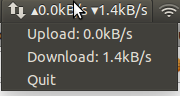
Result

Menu:
To-Do
Add features like total net usage, and alert on certain limit.
May the Force be with you.
1 maintainer

Metadata
1 maintainer
Release files for netstat-cl 0.1.3
For a detailed explanation of source distributions (sdists) and built distributions (wheels), please see the package formats documentation.
Built distribution (wheel)
| File | Interpreter | ABI | Platform | Reset |
|---|---|---|---|---|
| netstat_cl-0.1.3-py2.py3-none-any.whl | Python 3, Python 2 | none | any | Details |
Release files / netstat_cl-0.1.3-py2.py3-none-any.whl
| Download URL | netstat_cl-0.1.3-py2.py3-none-any.whl |
|---|---|
| Size | 4.8 kB |
| Tags | Python 2 Python 3 |
|
SHA-256 checksum How to use checksums |
75610424ff30812f1fa91667560ee25d1146e1da2803a3c235e02ca0ce662257
|
|
BLAKE2b-256 checksum How to use checksums |
a6730721cd4f9ac85eb83f5d5c33d9260665b77c25704a17212513d230445ba1
|
| Upload date | |
|
Uploaded using Trusted Publishing? What is trusted publishing? |
No |














