






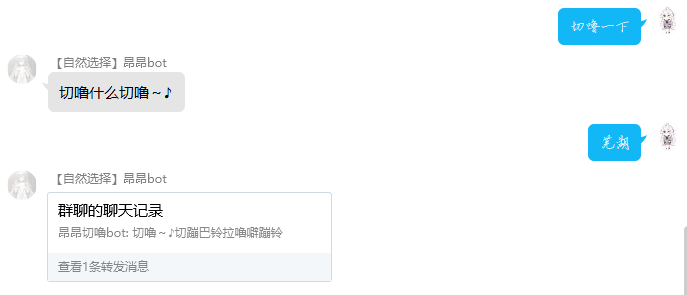
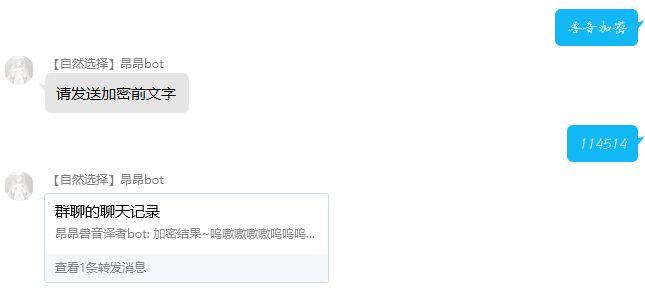
✔ 使用例
💿 安装
1. nb-cli安装(推荐)
bot根目录下打开命令行,执行nb命令安装插件,插件配置会自动添加至配置文件
nb plugin install nonebot_plugin_animalVoice
2. pip安装
pip install nonebot_plugin_animalVoice --upgrade
打开 nonebot2 项目的 bot.py 文件, 在其中写入
nonebot.load_plugin('nonebot_plugin_animalVoice')
或在bot路径pyproject.toml的[tool.nonebot]的plugins中添加nonebot_plugin_animalVoice即可
pyproject.toml配置例如:
[tool.nonebot]
plugin_dirs = ["src/plugins"]
plugins = ["nonebot_plugin_animalVoice","xxxxx"]
🎉 使用
指令表
| 指令 | 需要@ | 范围 | 说明 |
|---|---|---|---|
| [兽音加密]/[convert] | 否 | 群聊/私聊 | 发送需要加密的文字 |
| [兽音解密]/[deconvert] | 否 | 群聊/私聊 | 发送需要解密的文字 |
| [切噜一下]/[cherulize] | 否 | 群聊/私聊 | 发送需要解密的文字 |
| [切噜~]/[decherulize] | 否 | 群聊/私聊 | 发送需要解密的文字 |
| [译者帮助] | 否 | 群聊/私聊 | 发送帮助 |
注意 默认情况下, 您应该在指令前加上命令前缀, 通常是 /
🛠 配置项
| 配置项 | 类型 | 说明 |
|---|---|---|
| customize_cmd_animalconvert | str | 自定义触发兽音加密命令 |
| customize_cmd_animaldeconvert | str | 自定义触发兽音解密命令 |
| customize_cmd_cherulizing | str | 自定义触发切噜一下命令 |
| customize_cmd_decherulizing | str | 自定义触发切噜~命令 |
🧡特别感谢
HoshinoBot: https://github.com/Ice-Cirno/HoshinoBot 提供了切噜切噜的算法
1 maintainer

Metadata
1 maintainer
Release files for nonebot-plugin-animalvoice 0.2.2
For a detailed explanation of source distributions (sdists) and built distributions (wheels), please see the package formats documentation.
Source distribution (sdist)
| File | Size | Uploaded | Provenance | |
|---|---|---|---|---|
| nonebot_plugin_animalvoice-0.2.2.tar.gz | 18.9 kB | Without provenance | Details |
Built distribution (wheel)
| File | Interpreter | ABI | Platform | Reset |
|---|---|---|---|---|
| nonebot_plugin_animalvoice-0.2.2-py3-none-any.whl | Python 3 | none | any | Details |
Total release size: 39.6 kB
Release files / nonebot_plugin_animalvoice-0.2.2.tar.gz
| Download URL | nonebot_plugin_animalvoice-0.2.2.tar.gz |
|---|---|
| Size | 18.9 kB |
| Tags | Source |
|
SHA-256 checksum How to use checksums |
c31f6094b7b5e33496d9c18b43fb5554ea24629a2ae9feb121f8248157e3fbe0
|
|
BLAKE2b-256 checksum How to use checksums |
2b6d34bc5d802596673b04e78a2b743fe089b5ec678f8122d25c8245c475f3b9
|
| Upload date | |
|
Uploaded using Trusted Publishing? What is trusted publishing? |
No |
| Uploaded via |
poetry/1.2.2 CPython/3.10.0 Windows/10
|
Release files / nonebot_plugin_animalvoice-0.2.2-py3-none-any.whl
| Download URL | nonebot_plugin_animalvoice-0.2.2-py3-none-any.whl |
|---|---|
| Size | 20.7 kB |
| Tags | Python 3 |
|
SHA-256 checksum How to use checksums |
b6d65afb22ce02a64f58c5e1aa3b5f9518929f4e9551fb4abda7d645be5c3ee0
|
|
BLAKE2b-256 checksum How to use checksums |
c79ccf0cf35262843c51c4b7c66e0bad74bec52277461f06e7e8c04d33cc93aa
|
| Upload date | |
|
Uploaded using Trusted Publishing? What is trusted publishing? |
No |
| Uploaded via |
poetry/1.2.2 CPython/3.10.0 Windows/10
|
Security for nonebot-plugin-animalvoice 0.2.2
Provenance
Provenance describes where a file came from. On PyPI, provenance is shared via attestations, which provide a verifiable record of the build or publishing details. View details, limitations and caveats.
No provenance found
None of the files in this release were uploaded with provenance metadata.
A note on package security
PyPI is a repository for distributing packages, not a service for auditing them. While third-party security researchers and our staff do their best to detect and remove malicious packages, PyPI cannot guarantee the quality, security or suitability of any given package.














