
Plasma: LED Sequencing
Plasma is an LED/Light sequencing suite written to harmonise a variety of LED strand/board types and interfaces into a standard API for write-once-run-anywhere lighting code.
Plasma also includes plasmad, a system daemon for sequencing light strips using PNG images to provide animation frames.


Compatible Products
Plasma was originally written to provide an easy way to sequence lights and swap out patterns for the Pimoroni Plasma kit.
- https://shop.pimoroni.com/products/picade-plasma-kit-illuminated-arcade-buttons
- https://shop.pimoroni.com/products/player-x-usb-games-controller-pcb
- https://shop.pimoroni.com/products/blinkt
- https://shop.pimoroni.com/products/unicorn-hat
- https://shop.pimoroni.com/products/unicorn-phat
Installing
Full install (recommended):
We've created an easy installation script that will install all pre-requisites and get your Plasma Arcade Button Lights up and running with minimal efforts. To run it, fire up Terminal which you'll find in Menu -> Accessories -> Terminal on your Raspberry Pi desktop, as illustrated below:
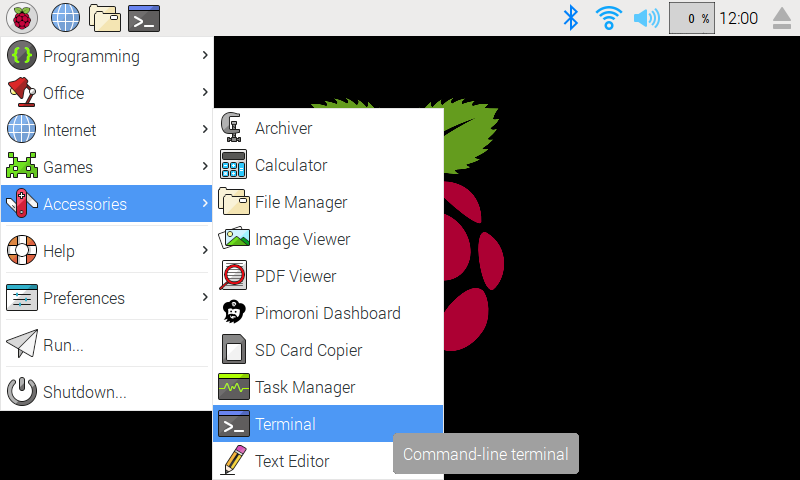
In the new terminal window type the command exactly as it appears below (check for typos) and follow the on-screen instructions:
curl https://get.pimoroni.com/plasma | bash
If you choose to download examples you'll find them in /home/pi/Pimoroni/plasma/.
Manual install:
python3 -m pip install plasmalights
Using Plasma Daemon
To install the Plasma daemon you should clone this repository, navigate to the "daemon" directory and run the installer:
git clone https://github.com/pimoroni/plasma-python
cd plasma/daemon
sudo ./install
Note: If you're using Picade Player X you should edit daemon/etc/systemd/system/plasma.service and change the output device option from -o GPIO:15:14 to -o SERIAL:/dev/ttyACM0. If you're using Unicorn HAT or pHAT you should use -o WS281X:WS2812:18:0.
If you're using GPIO on a Picade HAT you can adjust the pins accordingly using -o GPIO:<data>:<clock> where data and clock are valid BCM pins. If you're using the old Plasma/Hack header you may need to swap from -o GPIO:15:14 to -o GPIO:14:15 depending on how your connections are wired.
The Plasma daemon installer installs two programs onto your Raspberry Pi. plasma itself and a tool called plasmactl you can use to install and switch lighting effects. Plasma runs as a service on your system.
plasmactl commands:
plasmactl 255 0 0- Set Plasma lights to R, G, B colour. Red in this case.plasmactl <pattern>- Set Plasma lights to pattern imageplasmactl fps <fps>- Change plasma effect framerate (default is 30, lower FPS = less CPU)plasmactl --list- List all available patternssudo plasmactl --install <pattern>- Install a new pattern, where<pattern>is the filename of a 24bit PNG image file
Development:
If you want to contribute, or like living on the edge of your seat by having the latest code, you should clone this repository and run:
./install.sh --unstable
Documentation & Support
- Guides and tutorials - https://learn.pimoroni.com/
- Get help - http://forums.pimoroni.com/c/support
Changelog
3.0.1
- Repackage to pyproject/hatchling
- Drop Python 3.7 and 3.8, add 3.12 and 3.13
- Fix GitHub URL to plasma-python
- plasmafx: replace pkg_resources with importlib.metadata
- Version now comes from the git tag;
plasma.__version__reads package metadata
2.0.2
- Pass brightness values through plasma Matrix to underlying LED drivers
2.0.1
- New
auto()can accept a config file path directly (for plasma daemon) - New
MatrixandCorenow accept list and dict type sequences inset_sequence - New
Matrixconfig supports an "enabled" option for easy config switching - Bugfix
Matrixcatches KeyError when trying todelnon-required options
2.0.0
- Port to Python >=3.7, drop Python 2.7 support
- Significant refactoring and restructuring
- Config file support for configuring LED types/relationships
- WS382X support
- Chip-Select support for APA102
- PlasmaMatrix to combine multiple output devices
1.0.0
- API refactor, use plasma.legacy for old API
- USB support for Picade Player X
0.0.1
- Initial Release
1 maintainer

Metadata
1 maintainer
Release files for plasmalights 3.0.1
For a detailed explanation of source distributions (sdists) and built distributions (wheels), please see the package formats documentation.
Source distribution (sdist)
| File | Size | Uploaded | |
|---|---|---|---|
| plasmalights-3.0.1.tar.gz | 135.4 kB | Details |
Built distribution (wheel)
| File | Interpreter | ABI | Platform | Reset |
|---|---|---|---|---|
| plasmalights-3.0.1-py3-none-any.whl | Python 3 | none | any | Details |
Total release size: 200.8 kB
Release files / plasmalights-3.0.1.tar.gz
| Download URL | plasmalights-3.0.1.tar.gz |
|---|---|
| Size | 135.4 kB |
| Tags | Source |
|
SHA-256 checksum How to use checksums |
e6a7147419441e2df15ef877bbafedabac615e9f0df37ff38c984d573612372f
|
|
BLAKE2b-256 checksum How to use checksums |
6e3868d7b6e8dd99a588f5a39c707e046e6cb674a2e9488fbde599e7cc0f9b52
|
| Upload date | |
|
Uploaded using Trusted Publishing? What is trusted publishing? |
Yes |
| Uploaded via |
uv/0.9.2
|
Release files / plasmalights-3.0.1-py3-none-any.whl
| Download URL | plasmalights-3.0.1-py3-none-any.whl |
|---|---|
| Size | 65.4 kB |
| Tags | Python 3 |
|
SHA-256 checksum How to use checksums |
de61b753449ec1e2d3e30263d78eccd20e239fcacbd3f0eca294370b1bffdb6c
|
|
BLAKE2b-256 checksum How to use checksums |
72aabcc7c7a512af37a64ef534fb5d41c220cc06201cbf8ff26a1eb8ebdfa6f9
|
| Upload date | |
|
Uploaded using Trusted Publishing? What is trusted publishing? |
Yes |
| Uploaded via |
uv/0.9.2
|














