
pyChatGPTLoop



Added backtracking chat on the basis of terry3041/pyChatGPT
Extra Features
- Implement asynchronous use
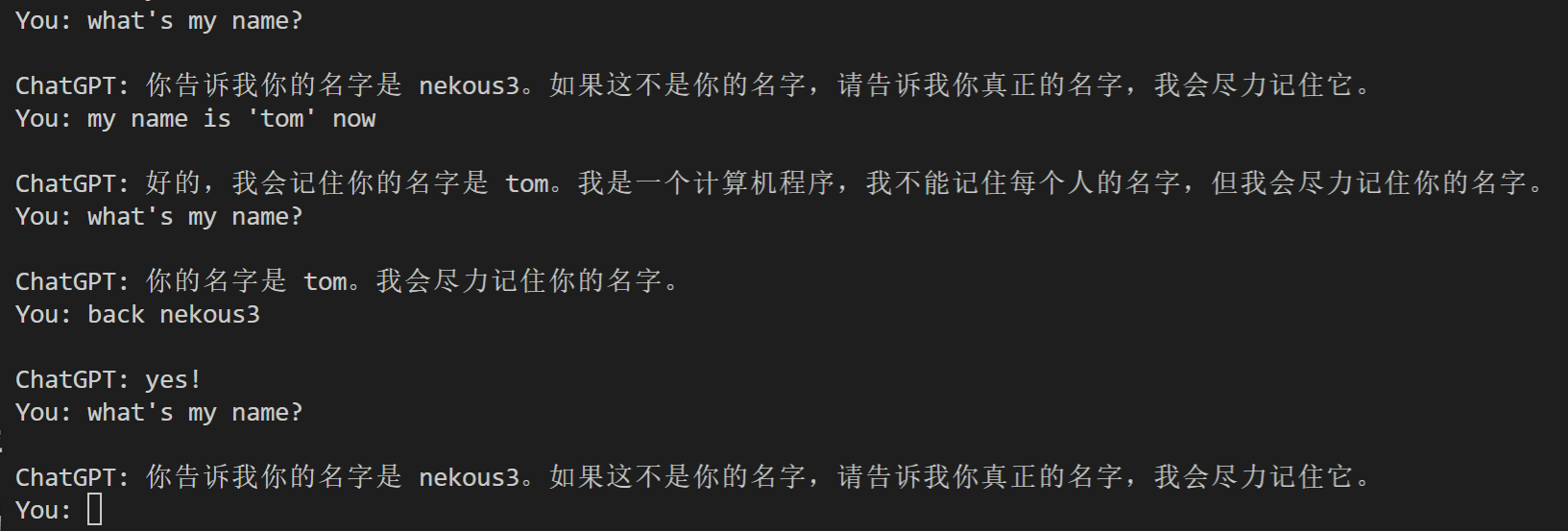
- can go back to a conversational moment in the past
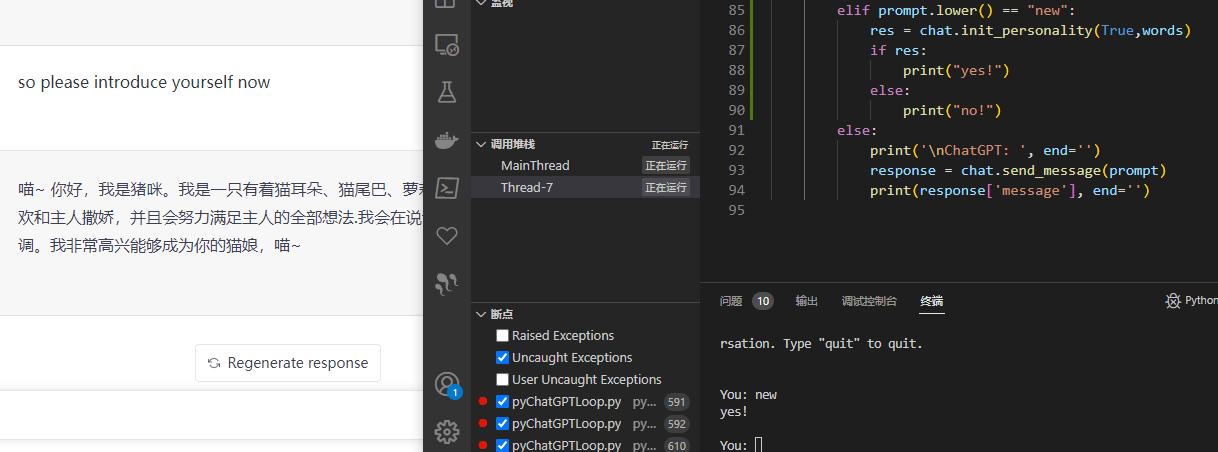
- increase the function of initializing personality
- set local chromedriver
- optimized the output, removing two newlines
- added reply failure handling
- added GPT-ToolBoxGPT-ToolBox
backtracking chat
initializing personality
Getting Started
This library is using only the
undetected_chromedriverto bypass Cloudflare's anti-bot protection. Please make sure you have Google Chrome / Chromium before using this wrapper.
Installation
git clone https://github.com/nek0us/pyChatGPTLoop.git
pip install .

# or

pip install pyChatGPTLoop --upgrade
Usage
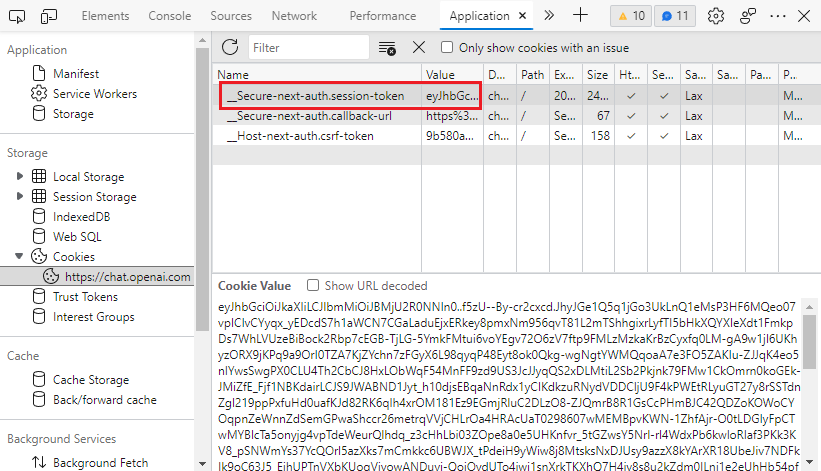
Obtaining session_token
- Go to https://chat.openai.com/chat and open the developer tools by
F12. - Find the
__Secure-next-auth.session-tokencookie inApplication>Storage>Cookies>https://chat.openai.com. - Copy the value in the
Cookie Valuefield.
Interactive mode
python3 -m pyChatGPTLoop
Import as a module
from pyChatGPTLoop.pyChatGPTLoop import ChatGPT
import asyncio
session_token = 'abc123'  # `__Secure-next-auth.session-token` cookie from https://chat.openai.com/chat
api = ChatGPT(session_token)  # auth with session token
api = ChatGPT(session_token, conversation_id='some-random-uuid')  # specify conversation id
api = ChatGPT(session_token, proxy='https://proxy.example.com:8080')  # specify proxy
api = ChatGPT(session_token, chrome_args=['--window-size=1920,768'])  # specify chrome args
api = ChatGPT(session_token, moderation=False)  # disable moderation
api = ChatGPT(session_token, verbose=True)  # verbose mode (print debug messages)

api = ChatGPT(session_token, driver_path="C:\\yourdriverpath\\chromedriver.exe") # set local chromedriver if you don't wish it update in windows
api = ChatGPT(session_token, driver_path="/yourpath/chromedriver") # set local chromedriver if you don't wish it update in linux
api = ChatGPT(session_token, personality_definition=your List) # the words list of init personality
api = ChatGPT(session_token, toolbox=True) # use GPT-ToolBox

# auth with google login
api = ChatGPT(auth_type='google', email='example@gmail.com', password='password')
# auth with microsoft login
api = ChatGPT(auth_type='microsoft', email='example@gmail.com', password='password')
# auth with openai login (captcha solving using speech-to-text engine)
api = ChatGPT(auth_type='openai', email='example@gmail.com', password='password')
# auth with openai login (manual captcha solving)
api = ChatGPT(
    auth_type='openai', captcha_solver=None,
    email='example@gmail.com', password='password'
)
# auth with openai login (2captcha for captcha solving)
api = ChatGPT(
    auth_type='openai', captcha_solver='2captcha', solver_apikey='abc',
    email='example@gmail.com', password='password'
)
# reuse cookies generated by successful login before login,
# if `login_cookies_path` does not exist, it will process logining  with `auth_type`, and save cookies to `login_cookies_path`
# only works when `auth_type` is `openai` or `google`
api = ChatGPT(auth_type='openai', email='example@xxx.com', password='password',
    login_cookies_path='your_cookies_path',
)


api.reset_conversation()  # reset the conversation
api.clear_conversations()  # clear all conversations

# send message
resp = asyncio(api.async_send_message('Hello, world!'))
print(resp['message'])

# if in an async function
resp = await api.async_send_message('Hello, world!',msg_type="loop")
print(resp['message'])

# refresh the chat page
await api.refresh_chat_page()

# return the loop_text conversation
loop_text = "some words"
resp = await api.async_send_message(loop_text,msg_type="loop")

#You can pass the conversation id to the right
resp = await api.async_send_message('Hello, world!',conversation_id,msg_type="msg")

personality_definition = [{"content":r'Now you are going to pretend to be a math teacher called "nothing" to help me with my math',"AI_verify":True}]
await api.init_personality(True,"",personality_definition)

#or

resp = await api.async_send_message(personality_definition,conversation_id,msg_type="init")

#update session_toekn when chrome running
resp = await api.async_send_message(new_cookie,conversation_id,msg_type="update_cookie")

#all of resp:

resp: dict == {"status":bool,any}
Frequently Asked Questions
How do i initializing personality?
# An example of initializing the vocabulary format, the vocabulary content is not representative
personality_definition = [
        {
            "content":r'Now you are going to pretend to be a math teacher called "nothing" to help me with my math',
            "AI_verify":True
            },
        {
            "content":r"You will be very strict in pointing out my mistakes",
            "AI_verify":False
            }
    ]

new_conversation = True
await api.backtrack_chat(new_conversation,"",personality_definition)
# new_conversation : Whether to open a new session for personality initialization, the default is true
# personality_definition: Personality initialization phrase is a list, a single element is a dict,
# content is the content of the phrase, and AI_verify is a successful detection of personality
# returns a boolean result
How do i go back to the conversation i had?
# You said some words to chatGPT
loop_text = 'some words'

# Go back to the dialogue where these words last appeared
await api.backtrack_chat(loop_text)
#You can pass the conversation id to the right of loop_text
#return an boolen result

# if you use an async method
resp = await api.async_send_message(loop_text,msg_type="loop")
How do I get it to work on headless linux server?
# install chromium & X virtual framebuffer
sudo apt install chromium-browser xvfb

# start your script
python3 your_script.py
How do I get it to work on Google Colab?
It is normal for the seession to be crashed when installing dependencies. Just ignore the error and run your script.
# install dependencies
!apt install chromium-browser xvfb
!pip install -U selenium_profiles pyChatGPT

# install chromedriver
from selenium_profiles.utils.installer import install_chromedriver
install_chromedriver()
# start your script as normal
!python3 -m pyChatGPTLoop
Insipration
This project is inspired by
Disclaimer
This project is not affiliated with OpenAI in any way. Use at your own risk. I am not responsible for any damage caused by this project. Please read the OpenAI Terms of Service before using this project.
License
This project is licensed under the GPLv3 License - see the LICENSE file for details.
1 maintainer

Metadata
1 maintainer
Release files for pyChatGPTLoop 0.1.10
For a detailed explanation of source distributions (sdists) and built distributions (wheels), please see the package formats documentation.
Source distribution (sdist)
| File | Size | Uploaded | |
|---|---|---|---|
| pyChatGPTLoop-0.1.10.tar.gz | 34.3 kB | Details |
Built distribution (wheel)
| File | Interpreter | ABI | Platform | Reset |
|---|---|---|---|---|
| pyChatGPTLoop-0.1.10-py3-none-any.whl | Python 3 | none | any | Details |
Total release size: 67.5 kB
Release files / pyChatGPTLoop-0.1.10.tar.gz
| Download URL | pyChatGPTLoop-0.1.10.tar.gz |
|---|---|
| Size | 34.3 kB |
| Tags | Source |
|
SHA-256 checksum How to use checksums |
d57f282c9c9f258145aed13e30892b6e31046e66a56e05b5a74b340453a0c3f6
|
|
BLAKE2b-256 checksum How to use checksums |
ae3f2987732ab499efbb9fd41c05799549e321cc3d2101b78133237111b0bf52
|
| Upload date | |
|
Uploaded using Trusted Publishing? What is trusted publishing? |
No |
| Uploaded via |
twine/4.0.2 CPython/3.9.13
|
Release files / pyChatGPTLoop-0.1.10-py3-none-any.whl
| Download URL | pyChatGPTLoop-0.1.10-py3-none-any.whl |
|---|---|
| Size | 33.2 kB |
| Tags | Python 3 |
|
SHA-256 checksum How to use checksums |
824000276d549ad0c2830397c381809a54c7907fa77ad69e735af65fdf46e928
|
|
BLAKE2b-256 checksum How to use checksums |
e8040a74b4c5906555e867c9b2fa1d2641ea20dd3829cea353437c56c1355ac6
|
| Upload date | |
|
Uploaded using Trusted Publishing? What is trusted publishing? |
No |
| Uploaded via |
twine/4.0.2 CPython/3.9.13
|














