
What’s This?
Pycgettb is convert guided form excel files to text data. No special programming is required.
First, prepare the same xlsx format of the data and the template, to define the text data using the jinja2-based template.
This command/library is currently alpha version
Recommended to use it in virtual environment.
Dependencies
Install
Using pip
# Example, Using Python3 venv module.
$ python3 -m venv env
$ source env/bin/activate
(env)$ pip install pycgettb
Using by Github
$ git clone https://github.com/hrsano645/pycgettb.git
$ cd pycgettb

# Example, Using Python3 venv module.
$ python3 -m venv env
$ source env/bin/activate

(env)$ pip install -r requirements.txt
Command Usage
(env)$ pycgettbcli --help
Usage: pycgettbcli [OPTIONS] SRC_TEMPLATE SRC_DATA EXPORT_TEMPLATE

Options:
  --export_filename TEXT  Set export filename
  --help                  Show this message and exit.
–export_filename: If not specified, create a file named exported_data.txt.
How To Use
When using pycgettb, prepare three files. The sample file is ./tests/testfiles/.
Source Data: An xlsx file containing the data.
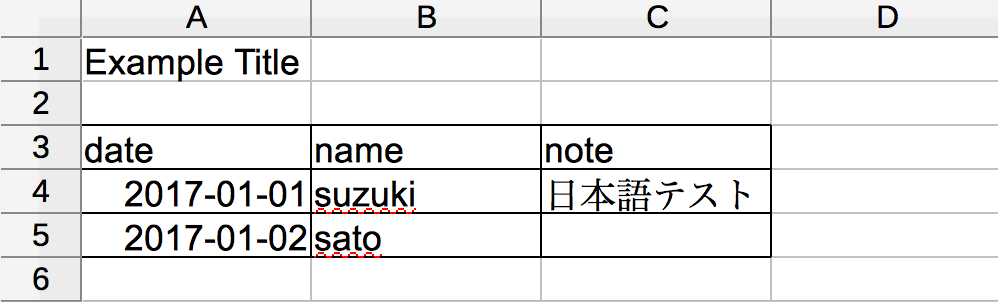
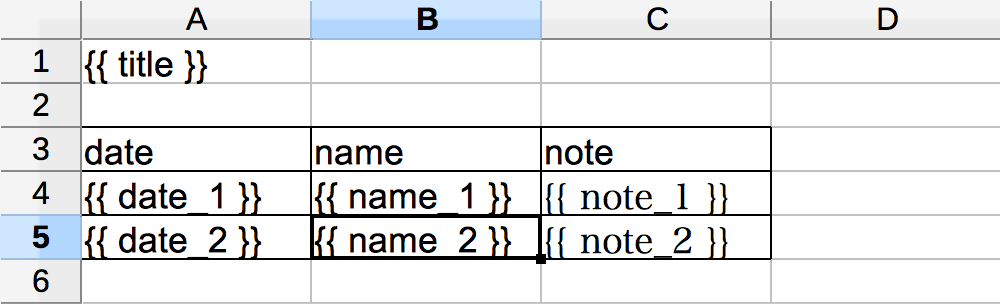
Source Template: An xlsx file with embedded template variables. Make the same worksheet and cell layout of the source data file.
Export Template: The jinja2 template file (html, json, csv, etc…)
※:The jinja2 template currently supports variables only.
<!DOCTYPE html>
<html lang="ja">
<head>
    <meta charset="UTF-8">
    <title>{{ title }}</title>
</head>
<body>

<h1>{{ title }}</h1>

<table>
    <tr>
        <td>date</td>
        <td>name</td>
        <td>note</td>
    </tr>
    <tr>
        <td>{{ date_1 }}</td>
        <td>{{ name_1 }}</td>
        <td>{{ note_1 }}</td>
    </tr>
    <tr>
        <td>{{ date_2 }}</td>
        <td>{{ name_2 }}</td>
        <td>{{ note_2 }}</td>
    </tr>
</table>
</body>
</html>
Template files(source template, export template) must be the same template variable name. Based on that convert to text data using jinja2.
(env)$ pycgettbcli ./tests/testfiles/template.xlsx ./tests/testfiles/data.xlsx ./tests/testfiles/export_template.html
Converted result. Default file name is exported_data.txt
<!DOCTYPE html>
<html lang="ja">
<head>
    <meta charset="UTF-8">
    <title>Example Title</title>
</head>
<body>

<h1>Example Title</h1>

<table>
    <tr>
        <td>date</td>
        <td>name</td>
        <td>note</td>
    </tr>
    <tr>
        <td>2017-01-01 00:00:00</td>
        <td>suzuki</td>
        <td>日本語テスト</td>
    </tr>
    <tr>
        <td>2017-01-02 00:00:00</td>
        <td>sato</td>
        <td>None</td>
    </tr>
</table>
</body>
</html>
Using as a Library
pycgettb can also be used as a library.
from pycgettb import Source
from pycgettb import TextRender

# set file path
src_template = "[source template file path]"
src_data = "[source data file path]"
export_template = "[export template file path]"

# define export filename
export_filename = "exported_file.txt"

source = Source(src_template, src_data)
source_data_map = source.parse()

textrender = TextRender(export_template, source_data_map)

# write rendreing textdata
with open(export_filename, "w") as export_file:
    export_file.write(textrender.render())
Future Work
Building a command binary for Windows, macOS, Linux.
Add list type to source template variable
GUI Frontend
API Document
License
MIT License
1 maintainer

Metadata
1 maintainer
Release files for pycgettb 0.1.2
For a detailed explanation of source distributions (sdists) and built distributions (wheels), please see the package formats documentation.
Source distribution (sdist)
| File | Size | Uploaded | Provenance | |
|---|---|---|---|---|
| pycgettb-0.1.2.tar.gz | 85.5 kB | Without provenance | Details |
Built distribution (wheel)
| File | Interpreter | ABI | Platform | Reset |
|---|---|---|---|---|
| pycgettb-0.1.2-py2.py3-none-any.whl | Python 2, Python 3 | none | any | Details |
Total release size: 95.0 kB
Release files / pycgettb-0.1.2.tar.gz
| Download URL | pycgettb-0.1.2.tar.gz |
|---|---|
| Size | 85.5 kB |
| Tags | Source |
|
SHA-256 checksum How to use checksums |
1c9ed848c1e9650e97aacb752efe2819f7a82f015d081dac6abfa0408ed8c41a
|
|
BLAKE2b-256 checksum How to use checksums |
d8954e40a2af57a83aff7a6517114e59137f1bb1770f51d97abb3307a905fdf6
|
| Upload date | |
|
Uploaded using Trusted Publishing? What is trusted publishing? |
No |
Release files / pycgettb-0.1.2-py2.py3-none-any.whl
| Download URL | pycgettb-0.1.2-py2.py3-none-any.whl |
|---|---|
| Size | 9.5 kB |
| Tags | Python 2 Python 3 |
|
SHA-256 checksum How to use checksums |
48e7dc1006372fb632a4ade68e273619d2b3f22c082e02312d023b8097b332f5
|
|
BLAKE2b-256 checksum How to use checksums |
5aaff8784e9ba4508f18fae6c0dae72b442ad7f05793ca2990a47c859d57940c
|
| Upload date | |
|
Uploaded using Trusted Publishing? What is trusted publishing? |
No |
Security for pycgettb 0.1.2
Provenance
Provenance describes where a file came from. On PyPI, provenance is shared via attestations, which provide a verifiable record of the build or publishing details. View details, limitations and caveats.
No provenance found
None of the files in this release were uploaded with provenance metadata.
A note on package security
PyPI is a repository for distributing packages, not a service for auditing them. While third-party security researchers and our staff do their best to detect and remove malicious packages, PyPI cannot guarantee the quality, security or suitability of any given package.
To learn more about protecting yourself from malicious actors, visit our package security documentation.













