
QuickUp!


Documentation | GitHub | PyPI
A simple, lightweight, and beautiful console-based client for ClickUp that lets you view, filter, and manage tasks directly from your command line. View tasks grouped by status, assignee, or priority, update task statuses, and auto-detect your current sprint. It features interactive mode for easy navigation and caching for fast performance.
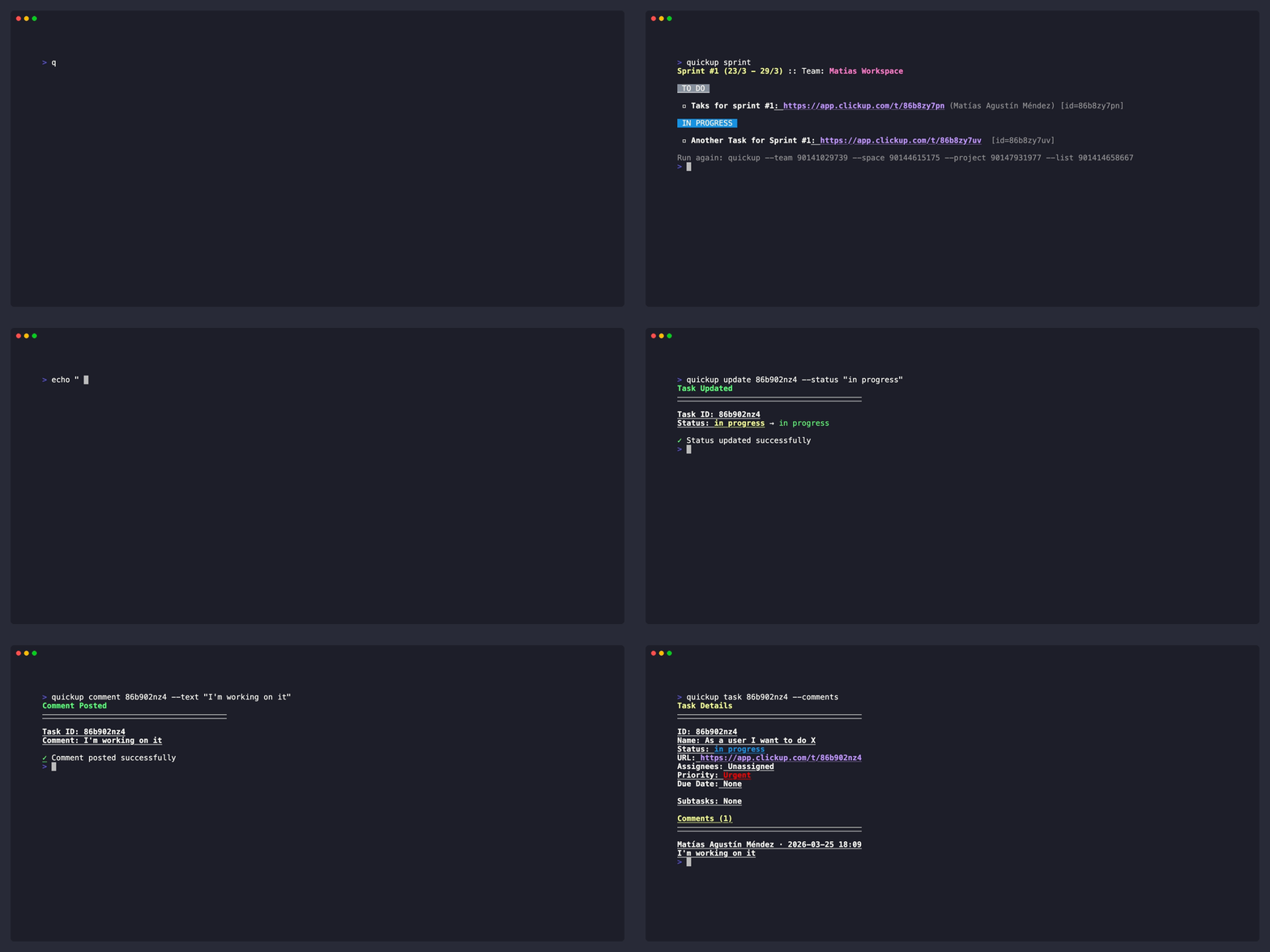
Features
- Task Listing: View all tasks from a ClickUp list with color-coded status groups
- Filtering: Filter tasks by assignee, priority, or due date
- Grouping: Group tasks by status, assignee, or priority
- Task Details: View detailed information about a specific task
- Task Updates: Update task status with confirmation display
- Task Comments: Post comments on tasks from the CLI or via piped input
- Sprint Detection: Auto-detect current sprint/iteration lists
- Interactive Mode: Navigate through Team → Space → Project → List hierarchy with prompts
- Caching: Disk-based caching for improved performance (24h for teams/lists, 5min for tasks)
Installation
pip install quickup
Quick Start
Authenticate with ClickUp (recommended):
quickup login
This opens your browser for OAuth authentication and saves your credentials to ~/.quickup/auth.json.
Alternatively, set your ClickUp API token directly (useful for CI/automation):
export CLICKUP_TOKEN=your_token_here
Or create a .env file in your project directory:
CLICKUP_TOKEN=your_token_here
List tasks from a specific list:
quickup --team <team_id> --list <list_id>
Commands
quickup login - Authenticate
Authenticate with ClickUp via OAuth. Opens your default browser and waits for the callback (up to 120 seconds).
quickup login
Credentials are saved to ~/.quickup/auth.json (permissions: 0o600).
quickup logout - Remove Stored Credentials
Remove the stored OAuth token.
quickup logout
This only removes the OAuth token — it does not affect tokens set via CLICKUP_TOKEN or .env.
quickup (default) - List Tasks
List all tasks from a ClickUp list, grouped by status.
# Basic usage
quickup --team <team_id> --list <list_id>

# With filters
quickup --team <team_id> --list <list_id> --assignee john --priority high

# Group by assignee
quickup --team <team_id> --list <list_id> --group-by assignee

# Interactive mode
quickup -i

# Bypass cache
quickup --team <team_id> --list <list_id> --no-cache
Options:
--team: Team ID--space: Space ID--project: Project ID--list: List ID--assignee: Filter by assignee username (case-insensitive)--priority: Filter by priority (low, normal, high, urgent)--due-before: Filter tasks due before date (YYYY-MM-DD)--group-by: Group by status (default), assignee, or priority--closed: Include closed/done tasks--no-cache: Bypass cache and fetch from API-i, --interactive: Enable interactive mode
quickup sprint - Current Sprint Tasks
Auto-detects the current sprint list by searching for lists containing "sprint" or "iteration" in the name.
# List tasks from current sprint
quickup sprint --team <team_id>

# With filters
quickup sprint --team <team_id> --assignee jane --group-by priority
Options:
--team: Team ID--space: Space ID--project: Project ID--assignee: Filter by assignee username--priority: Filter by priority--due-before: Filter tasks due before date--group-by: Group by status, assignee, or priority--closed: Include closed/done tasks--no-cache: Bypass cache-i, --interactive: Enable interactive mode
quickup task <task_id> - Task Details
Show detailed information about a specific task.
# Show task details
quickup task <task_id>

# With team specification
quickup task <task_id> --team <team_id>

# Include task comments
quickup task <task_id> --comments
Options:
task_id: ClickUp task ID--team: Team ID (required if multiple teams exist)--comments: Fetch and display task comments-i, --interactive: Enable interactive mode
quickup update <task_id> - Update Task Status
Update the status of a specific task.
# Update task status
quickup update <task_id> --status "In Progress"

# With team specification
quickup update <task_id> --status "Done" --team <team_id>
Options:
task_id: ClickUp task ID--status: New status name (e.g., "To Do", "In Progress", "Done")--team: Team ID (required if multiple teams exist)-i, --interactive: Enable interactive mode
quickup comment <task_id> - Post a Comment
Post a comment on a specific task.
# Post a comment
quickup comment <task_id> --text "This is my comment"

# Notify all task watchers
quickup comment <task_id> --text "Attention everyone" --notify-all

# Pipe comment from stdin
echo "Piped comment" | quickup comment <task_id>
Options:
task_id: ClickUp task ID--text: Comment text to post (reads from stdin if omitted)--notify-all: Notify all task watchers
Interactive Mode
When multiple teams, spaces, projects, or lists exist, use -i flag to enable interactive selection:
quickup -i
This will prompt you to select:
- Team (if multiple teams exist)
- Space (if multiple spaces exist)
- Project (if multiple projects exist)
- List (if multiple lists exist)
Output Format
Tasks are displayed with:
- Bold task name
- Blue underlined URL
- Priority badge (color-coded)
- Assignee names in parentheses
Status groups are displayed with color-coded headers matching the ClickUp status colors.
At the bottom of the output, a suggestion is shown in gray text with the command to repeat the same query:
Run again: quickup --assignee john --priority high --group-by priority
This makes it easy to re-run the same filtered/grouped view without typing the full command again.
Caching
QuickUp! uses disk-based caching to reduce API calls:
- Teams: 24 hours TTL
- Lists: 24 hours TTL
- Tasks: 5 minutes TTL
Cache location: ~/.quickup/cache/
Use --no-cache to bypass cache and fetch fresh data from the API.
Exit Codes
| Code | Meaning |
|---|---|
| 1 | Token error or general ClickUp error |
| 2 | Team not found or ambiguous team |
| 3 | List not found |
| 4 | Network error |
| 5 | API error |
| 99 | Unexpected error |
Requirements
- Python 3.11+
- ClickUp API token
Dependencies
- cyclopts - CLI framework
- pyclickup - ClickUp API wrapper
- colorist - Terminal colors
- inquirer - Interactive prompts
- sqlite3 - Caching layer (Python standard library)
- python-dotenv - Environment loading
Development
Running Tests
Run the test suite:
hatch run test:test
Run tests with coverage:
hatch run test:cov
Coverage reports are generated in:
coverage.json- JSON format- Terminal - Human-readable report
Run tests on a specific Python version:
hatch run +py=3.11 test:test
Documentation
Build the documentation:
hatch run docs:build
Serve the documentation locally:
hatch run docs:serve
Then open http://localhost:8000 in your browser.
Debug Environment
For debugging with enhanced tooling:
hatch run debug:python
This environment includes ipdb and line_profiler.
License
MIT
1 maintainer

Metadata
1 maintainer
Release files for QuickUp 0.5.0
For a detailed explanation of source distributions (sdists) and built distributions (wheels), please see the package formats documentation.
Source distribution (sdist)
| File | Size | Uploaded | Provenance | Actions |
|---|---|---|---|---|
| quickup-0.5.0.tar.gz | 477.2 kB | Without provenance | Details for quickup-0.5.0.tar.gz |
Built distribution (wheel)
| File | Interpreter | ABI | Platform | Actions Reset |
|---|---|---|---|---|
| quickup-0.5.0-py3-none-any.whl | Python 3 | none | any | Details for quickup-0.5.0-py3-none-any.whl |
Total release size: 511.6 kB
Release files / quickup-0.5.0.tar.gz
| Download URL | quickup-0.5.0.tar.gz |
|---|---|
| Size | 477.2 kB |
| Tags | Source |
|
SHA-256 checksum How to use checksums |
a4062d32c7d3e4989b000a4ad4036d6e1c1168d718780548fa1a33f3f1162cba
|
|
BLAKE2b-256 checksum How to use checksums |
5bfcf4503edd7ee55ac2d89ceea9007033d2bbbc8a413964ac8018da13579a78
|
| Upload date | |
|
Uploaded using Trusted Publishing? What is trusted publishing? |
No |
| Uploaded via |
twine/7.0.0 CPython/3.13.14
|
Release files / quickup-0.5.0-py3-none-any.whl
| Download URL | quickup-0.5.0-py3-none-any.whl |
|---|---|
| Size | 34.4 kB |
| Tags | Python 3 |
|
SHA-256 checksum How to use checksums |
2a61a7d66d4fd6b7f9defa55e2ca6e5578a4a3d5d8b2397a5faeb5ae3d656a82
|
|
BLAKE2b-256 checksum How to use checksums |
76f4d9f98b3f666254d2ffb7b8aa77cab12f354f34f31a95c36669c35ca43214
|
| Upload date | |
|
Uploaded using Trusted Publishing? What is trusted publishing? |
No |
| Uploaded via |
twine/7.0.0 CPython/3.13.14
|
Security for QuickUp 0.5.0
Provenance
Provenance describes where a file came from. On PyPI, provenance is shared via attestations, which provide a verifiable record of the build or publishing details. View details, limitations and caveats.
No provenance found
None of the files in this release were uploaded with provenance metadata.
A note on package security
PyPI is a repository for distributing packages, not a service for auditing them. While third-party security researchers and our staff do their best to detect and remove malicious packages, PyPI cannot guarantee the quality, security or suitability of any given package.
To learn more about protecting yourself from malicious actors, visit our package security documentation.














