
replbox



A synchronous Python client package for loading, reading, and dumping REPL projects from repl.it
There currently isn't any functionality for writing to REPLs, nor running REPLs in this version, those features will come at a later date. This library is still in alpha and much more is still to come. Version 0.1.0 won't hit until the ability to run a REPL is added. Currently working on learning crosis first lol
Usage
You first have to instantiate a Client class from replbox. Like so:
import replbox

client = replbox.Client()
Load/Create a REPL:
Then you can either load a REPL from a user/team path, or create an anonymous REPL with the client.
repl = client.create(language="python3", title="New Repl")

otherRepl = client.load_from_path("@replbox/dummy-repl")
client.create() can take a number of keyword arguments but only requires the language kwarg, which defaults to python3. You get a list of valid languages by running print(replbox.fetch_langs())
client.load_from_path() takes a single argument: a user/team REPL path. This path is usually follow the format @<username>/<replname>. The username is case-insensitive, but the REPL name has to be a compatible slug, so for example, "This is a New Repl" becomes This-is-a-New-Repl.
Once you've done that, you now have a REPL!
Get REPL Info:
You can ouput the REPL object in a pretty way like this:
print(json.dumps(repl.json, indent=2))
which will get you a similar output to this:
{
  "id": "dd6f9fcd-c515-4d7f-ae93-0e3b317c85d8",
  "user_id": 4532700,
  "title": "dummy-repl",
  "description": "",
  "is_project": false,
  "is_private": false,
  "time_created": "2020-10-26T20:59:41.312Z",
  "time_updated": "2020-10-26T21:59:42.407Z",
  ...
}
NOTE: All attributes in repl.json can be accessed individually, like repl.id or repl.time_created
Read a REPL file:
You can read the contents of a file within a REPL with:
file = repl.read('mock/__init__.py')

print(file)
OR
mainFile = repl.read_main()

print(mainFile)
The main file of a REPL is usually named main.<language-extension>. If a main file can't be found then it will default to the first file in the list repl.fileNames.
Download the REPL:
Using a bit of os magic, you can download all the contents of a repl to a folder of your choosing, take a look at this code:
path = os.getcwd() + "/" + repl.slug + "/"

for file in repl.fileNames:
	repl.ensure_path(path + file)
	print(f"Created directory: {path + file}")

	with open(path + file, 'w+') as fp:
		repl.dump(file, fp)
		print(f"Contents successfully dumped.")

	print()
This code does a few things:
- Creates a folder with the REPL name in the same directory as your code.
repl.ensure_path()Splices the file path and file name, then creates the directory if it doesn't exist already.repl.dump()Writes the contents of the REPL file to the local copy.
Login
You can login with your repl.it SID. Find this value in your cookies after logging into repl.it under connect.sid and keep this supder-duper ultra secret! It'll look a little something like this:
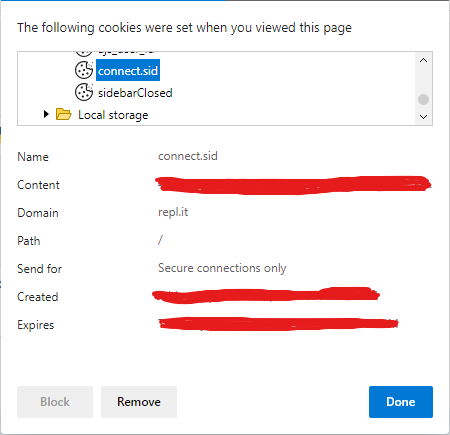
Then login like so:
import os
import replbox

SID = os.getenv("SID")

client = replbox.Client()
user = client.login(SID)
client.login() will return a UserClient() which is essentially the same as a base client but will make requests to the API on your behalf. So loading a REPL from a path under your username should make repl.is_owner equal to True.
1 maintainer

Metadata
1 maintainer
Release files for replbox 0.0.2
For a detailed explanation of source distributions (sdists) and built distributions (wheels), please see the package formats documentation.
Source distribution (sdist)
| File | Size | Uploaded | |
|---|---|---|---|
| replbox-0.0.2.tar.gz | 2.9 kB | Details |
Built distribution (wheel)
| File | Interpreter | ABI | Platform | Reset |
|---|---|---|---|---|
| replbox-0.0.2-py3-none-any.whl | Python 3 | none | any | Details |
Total release size: 6.0 kB
Release files / replbox-0.0.2.tar.gz
| Download URL | replbox-0.0.2.tar.gz |
|---|---|
| Size | 2.9 kB |
| Tags | Source |
|
SHA-256 checksum How to use checksums |
c3eeafcca51636ccf1402783387e9250faeac9eb332dbf67bfe357141a11d40b
|
|
BLAKE2b-256 checksum How to use checksums |
d3396170dfc0e5bc89633a0aca35d1aaf2ad9c863056d1076915e41e1530c271
|
| Upload date | |
|
Uploaded using Trusted Publishing? What is trusted publishing? |
No |
| Uploaded via |
twine/3.2.0 pkginfo/1.5.0.1 requests/2.24.0 setuptools/47.1.0 requests-toolbelt/0.8.0 tqdm/4.48.2 CPython/3.8.5
|
Release files / replbox-0.0.2-py3-none-any.whl
| Download URL | replbox-0.0.2-py3-none-any.whl |
|---|---|
| Size | 3.1 kB |
| Tags | Python 3 |
|
SHA-256 checksum How to use checksums |
975b33bcd11d7c3a3028dae0272a06511398171fb5e351a042f5aeb5515a4d1a
|
|
BLAKE2b-256 checksum How to use checksums |
0c37eaefabea0b60bb87614f9d277ce9851f5a77f56947d6f98219484b4e6451
|
| Upload date | |
|
Uploaded using Trusted Publishing? What is trusted publishing? |
No |
| Uploaded via |
twine/3.2.0 pkginfo/1.5.0.1 requests/2.24.0 setuptools/47.1.0 requests-toolbelt/0.8.0 tqdm/4.48.2 CPython/3.8.5
|














