
robotframework-aprslib




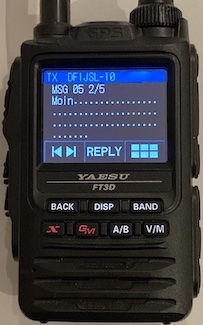
robotframework-aprslib is a Robot Framework keyword collection for the aprslib Python library. It allows licensed ham radio operators to establish a connection to the APRS-IS servers and send/receive/decode APRS requests.
Installation
The easiest way is to install this package is from pypi:
pip install robotframework-aprslib
Robot Framework Library Examples
In order to run these scripts, you need to add your call sign to the script's configuration section:
# This is your APRS-IS call sign. Replace this place holder with your personal call sign
${callsign}   YOURCALLSIGN
Replace the current placeholder with your call sign and you are good to go. The Robot Framework 5 examples use the new WHILE loop for an 'eternal' loop; all other code samples use finite FOR loops and will terminate after processing 10 records in a row.
- Echo incoming APRS messages
- Send and receive a single APRS message
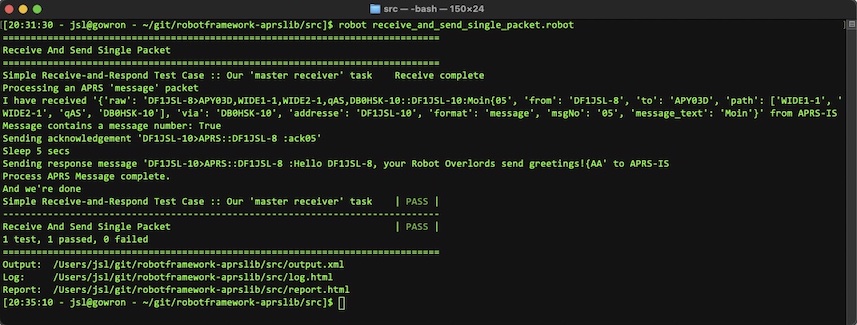
- Receive a message, acknowledge it if necessary and then respond to it
- ROBOT FRAMEWORK 5: Echo incoming APRS messages
- ROBOT FRAMEWORK 5: Receive a message, acknowledge it if necessary and then respond to it
Library usage and supported keywords
Default settings for a new APRS-IS connection via robotframework-aprslib
When you initialize an APRS connection without explicitly setting parameters such as server, port, user/pass and filter, the following default values are automatically applied:
- server =
euro.aprs2.net - port =
14580 - callsign =
N0CALL - passcode =
-1 - aprs-is filter = not set
- aprsis_msgno =
0(this is equal toAAif you rather want to use the more recent replyack scheme)
This default set of values will allow you to establish a read-only connection to APRS-IS, assuming that the respective APRS-IS server that you intend to connect with permits such a connection.
Change the server / port / etc
You can either specify all parameters during the initial setup of the library or alternatively via separate keywords
Option 1 - set as position parameters
*** Settings ***

Library  AprsLibrary  server_value  port_value  user_value  passcode_value  filter_value  message_value

*** Test Cases ***
My first test case
Option 2 - set as named parameters
*** Settings ***

Library  AprsLibrary  aprsis_server=server_value  aprsis_port=port_value  aprsis_callsign=user_value  aprsis_passcode=passcode_value  aprsis_filter=filter_value aprsis_msgno = msgno_value

*** Test Cases ***
My first test case
Option 3 - Use Robot Keywords
| Keyword | Description |
|---|---|
Set APRS-IS Server and Get APRS-IS Server |
Sets/Gets the APRS-IS server |
Set APRS-IS Port and Get APRS-IS Port |
Sets/Gets the APRS-IS port |
Set APRS-IS Callsign and Get APRS-IS Callsign |
Sets/Gets the APRS-IS callsign (user name) |
Set APRS-IS Passcode and Get APRS-IS Passcode |
Sets/Gets the APRS-IS passcode |
Set APRS-IS Filter and Get APRS-IS Filter |
Sets/Gets the APRS-IS server filter. Note: This keyword performs a (basic) sanity check on the content and will cause an error in case an invalid filter qualifier has been submitted |
Get Current APRS-IS Configuration |
Returns a dictionary containing all previously listed parameters and the APRS-IS connection status to the user (basically a collection of all previously mentioned keywords). An AIS object whose value is different to None indicates an active connection. |
Other Robot Keywords supported by this library
| Keyword | Description | Parameter |
|---|---|---|
Calculate APRS-IS Passcode |
Calculates the APRS-IS passcode (based on the given call sign) and returns it to the user | aprsis_callsign |
Parse APRS Packet |
Parses the given APRS packet. In case the packet is either invalid or its format is unknown, an exception will be triggered | aprs_packet |
Connect to APRS-IS |
Establishes a socket connection to the APRS-IS network | |
Disconnect from APRS-IS |
Disconnects from the APRS-IS network | |
Send APRS Packet |
Sends a raw APRS packet to APRS-IS in case an open connection to the APRS-IS network has been established | packet (string) |
Receive APRS Packet |
Receives an APRS packet to APRS-IS in case an open connection to the APRS-IS network has been established. The default setting uses the parameter values immortal = True and raw= False, meaning that aprslib will try to re-establish the connection in case it is lost and will also auto-decode APRS packets when received |
immortal and raw (both boolean params) |
Get <field name> Value from APRS Packet |
various wrappers; e.g. Get Message Text Value From APRS Packet will return the decoded message string if it is present in the message |
aprs_packet. If you specify a field that does not exit in the packet, this keyword will cause an error. Both raw and decoded messages are supported. |
Get Value From APRS Packet |
called by the aforementioned Get <field name> Value fron APRS Packet functions |
aprs_packet and field_name. If you specify a field that does not exit in the packet, this keyword will cause an error. Both raw and decoded messages are supported. |
Check If APRS Packet Contains <field name> |
Similar to Get <field name> Value From APRS Packet but returns True/False in case the field does / does not exit |
aprs_packet. Both raw and decoded messages are supported. |
Check If APRS Packet Contains |
called by the aforementioned Check If APRS Packet Contains <field name> functions |
aprs_packet and field_name |
Get APRS MsgNo, Set APRS MsgNo, Increment APRS MsgNo and Get APRS MsgNo as Alphanumeric |
Gets and sets the MsgNo that you can use for building up your own messages (aka library-maintained counter value). The alphanumeric keyword provides the message number in a format which supports the more recent replyack scheme. An increment to the value of 675 (ZZ) will automatically reset the value to 0 (AA). Both Get APRS MsgNo methods do NOT automatically increment the message number. |
Set APRS MsgNo allows you to set a numeric value between 0 and 675 (equals AA to ZZ). All other keywords have no parameters. |
Known issues
-
When you need to define strings which contain multiple spaces, escaping these strings won't work as Robot will try to interpret these as list values. You need to construct them as Robot-conform strings with
${SPACE}. Example:ABCD${SPACE}${SPACE}${SPACE}${SPACE}EFGHresults inABCD____EFGH(four blanks between the variable's value). -
Apart from minor helper methods for the connection setup and field check/retrieval, this Robot Framework library does not offer any additional keywords for exchanging data in a proper way. (Almost) every feature that the original aprslib offers is supported by this Robot library - nothing more and nothing less.
-
The
Receive APRS Packetkeyword has no timeout which means that it will only return from its code if it has found a message that is to be returned to Robot. If you depend on timeout, you may need to amend your APRS-IS filter settings and handle the filter process in your code. -
The keyword
Send APRS Packetwill not check whether the APRS-IS connection has been establised read-only (N0CALLcall sign) or read-write.
The fine print
- APRS is a registered trademark of APRS Software and Bob Bruninga, WB4APR. Thank you, Bob!
- This is a hobby project. It has no commercial background whatsoever.
- Exchanging data with APRS(-IS) requires you to be a licensed ham radio operator. If you don't know what APRS is, then this library is not for you. Alternatively, you may want to explore the option of getting your own amateur radio license (it's a great hobby).
1 maintainer

Metadata
1 maintainer
Release files for robotframework-aprslib 0.9.1
For a detailed explanation of source distributions (sdists) and built distributions (wheels), please see the package formats documentation.
Source distribution (sdist)
| File | Size | Uploaded | Provenance | |
|---|---|---|---|---|
| robotframework-aprslib-0.9.1.tar.gz | 22.4 kB | Without provenance | Details |
Built distribution (wheel)
| File | Interpreter | ABI | Platform | Reset |
|---|---|---|---|---|
| robotframework_aprslib-0.9.1-py3-none-any.whl | Python 3 | none | any | Details |
Total release size: 45.2 kB
Release files / robotframework-aprslib-0.9.1.tar.gz
| Download URL | robotframework-aprslib-0.9.1.tar.gz |
|---|---|
| Size | 22.4 kB |
| Tags | Source |
|
SHA-256 checksum How to use checksums |
439ec9f7b4143426b538d72de9f50801f8d5dd9ec6a016fd9f07f024cf192964
|
|
BLAKE2b-256 checksum How to use checksums |
0e59148b306e9560c43d4b29efcbb9e78308dcafa89c0a44746c1eab3eb3d07c
|
| Upload date | |
|
Uploaded using Trusted Publishing? What is trusted publishing? |
No |
| Uploaded via |
twine/4.0.1 CPython/3.9.14
|
Release files / robotframework_aprslib-0.9.1-py3-none-any.whl
| Download URL | robotframework_aprslib-0.9.1-py3-none-any.whl |
|---|---|
| Size | 22.8 kB |
| Tags | Python 3 |
|
SHA-256 checksum How to use checksums |
18246b3c38f418c5fa2c387b960e71a4198bf274456cc160f7fbb302e0f0e1a4
|
|
BLAKE2b-256 checksum How to use checksums |
bf41539a8640893b4a2213c5cb4d7a6790d52916b58186d873ae0a73236166b2
|
| Upload date | |
|
Uploaded using Trusted Publishing? What is trusted publishing? |
No |
| Uploaded via |
twine/4.0.1 CPython/3.9.14
|
Security for robotframework-aprslib 0.9.1
Provenance
Provenance describes where a file came from. On PyPI, provenance is shared via attestations, which provide a verifiable record of the build or publishing details. View details, limitations and caveats.
No provenance found
None of the files in this release were uploaded with provenance metadata.
A note on package security
PyPI is a repository for distributing packages, not a service for auditing them. While third-party security researchers and our staff do their best to detect and remove malicious packages, PyPI cannot guarantee the quality, security or suitability of any given package.
To learn more about protecting yourself from malicious actors, visit our package security documentation.














