
salmon


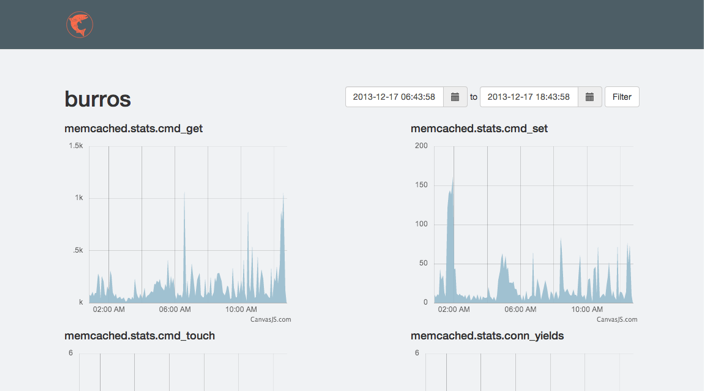
A simple monitoring system built on top of Django.
The intent is to serve both as an alerting system like monit and a monitoring system like munin (using Graphite’s whisper database).
The original release of Salmon was coupled to Salt and designed to monitor servers (Sal t Mon itor). As of v0.2.0, the system has been decoupled from Salt and ingests data via a simple HTTP interface.

Installation
To bootstrap the project:
virtualenv salmon
source salmon/bin/activate
pip install salmon
salmon init
salmon upgrade
salmon collectstatic
Fire up the web server with:
salmon start
Sending Metrics to Salmon
Metrics are sent in as JSON over HTTP. The format for a single metric:
{
    "source": "test.example.com",
    "name": "load",
    "value": 0.1
}
Multiple metrics can be sent as an array:
[
    {"source": "test.example.com", "name": "load", "value": 0.1},
    {"source": "multi.example.com", "name": "cpu", "value": 55.5}
]
The API endpoint is /api/v1/metric/. If your Salmon server lives at http://salmon.example.com, you can POST to http://salmon.example.com/api/v1/metric/. Pass in your API key as found in ~/.salmon/conf.py for authentication. Using Curl, it would look something like this:
curl -i --user "<API_KEY>:" \
     -H "Content-Type: application/json" \
     -X POST \
     -d '{"source": "test.example.com", "name": "load", "value": 0.1}' \
     http://salmon.example.com/api/v1/metric/
Using Salt
Setup the salt-stats states on your master or just grab the salmon returner
Add the path to your Salmon install and API key (found in ~/.salmon/conf.py) to your Salt Pillar. (salmon pillar example)
Add a schedule pillar. (schedule pillar example)
Run salt '*' saltutil.sync_all
Note: To use Salt’s ps module, psutil must be installed on the minions. Ubuntu provides a python-psutil package or it can be installed via pip install psutil.
1 maintainer

Metadata
1 maintainer
Release files for salmon 0.2.0
For a detailed explanation of source distributions (sdists) and built distributions (wheels), please see the package formats documentation.
Source distribution (sdist)
| File | Size | Uploaded | Provenance | |
|---|---|---|---|---|
| salmon-0.2.0.tar.gz | 248.9 kB | Without provenance | Details |
Built distribution (wheel)
| File | Interpreter | ABI | Platform | Reset |
|---|---|---|---|---|
| salmon-0.2.0-py2.py3-none-any.whl | Python 2, Python 3 | none | any | Details |
Total release size: 527.0 kB
Release files / salmon-0.2.0.tar.gz
| Download URL | salmon-0.2.0.tar.gz |
|---|---|
| Size | 248.9 kB |
| Tags | Source |
|
SHA-256 checksum How to use checksums |
464556a9d8037233410db70b61967ad63fe1f6134bafbb4c66c32847a08f26bb
|
|
BLAKE2b-256 checksum How to use checksums |
c085bba15929e886bdaa9eb8fa2b9af3583182c283c0807722cb9faf26898e43
|
| Upload date | |
|
Uploaded using Trusted Publishing? What is trusted publishing? |
No |
Release files / salmon-0.2.0-py2.py3-none-any.whl
| Download URL | salmon-0.2.0-py2.py3-none-any.whl |
|---|---|
| Size | 278.1 kB |
| Tags | Python 2 Python 3 |
|
SHA-256 checksum How to use checksums |
a05441d1bbadcb8c8fe7a187938ade63f8b734e01407d01e3148540d89daf361
|
|
BLAKE2b-256 checksum How to use checksums |
bcda33ded11ce3f48c2dc8286866b2dd4f8d1fcb218d3fe7570adacddfd1156d
|
| Upload date | |
|
Uploaded using Trusted Publishing? What is trusted publishing? |
No |
Security for salmon 0.2.0
Provenance
Provenance describes where a file came from. On PyPI, provenance is shared via attestations, which provide a verifiable record of the build or publishing details. View details, limitations and caveats.
No provenance found
None of the files in this release were uploaded with provenance metadata.
A note on package security
PyPI is a repository for distributing packages, not a service for auditing them. While third-party security researchers and our staff do their best to detect and remove malicious packages, PyPI cannot guarantee the quality, security or suitability of any given package.
To learn more about protecting yourself from malicious actors, visit our package security documentation.














