
sequgen
Purpose
Programmatically generate synthetic sequence data such as time series, strings, DNA, etc. Sequence data generation is fully controlled by the user. sequgen does not build models from real-world sequence data.
Badges
| fair-software.nl recommendations | |
|---|---|
| (1/5) code repository |  |
| (2/5) license |  |
| (3/5) community registry |  |
| (4/5) citation |  |
| (5/5) checklist |  |
| overall |  |
| Other best practices | |
| Documentation |  |
| Supported Python versions |  |
| Code quality |  |
| Code coverage of unit tests |  |
| GitHub Actions | |
| Citation metadata consistency |  |
| Unit tests |  |
Install
pip3 install sequgen
Usage example
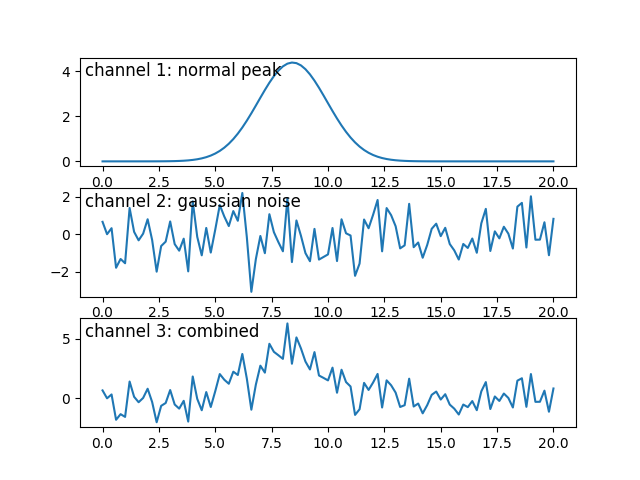
This usage example involves generating time series data. We generate a time series with three channels: 1. a normal distribution, 2. Gaussian noise, and 3. the combination (sum) of the first two channels. The normal distribution is positioned between 8 and 12 on an abstract time axis of 100 intervals starting at 0 and ending at 20. The standard deviation of the distribution is a value between 1 and 2 and its peak has a height between 4 and 5. For the Gaussian noise we use the default values (standard deviation 1 and average value 0). The third channel is defined as the sum of the other two channels. After creating the three channels, graphs with their values are plotted:
from matplotlib import pyplot as plt
import numpy
from sequgen.deterministic.normal_peak import normal_peak
from sequgen.stochastic.gaussian import gaussian
from sequgen.parameter_space import ParameterSpace
from sequgen.dimension import Dimension

time_axis = numpy.linspace(start=0, stop=20, num=101)
parameter_space_0 = ParameterSpace([
    Dimension("location", 8, 12),
    Dimension("stddev", 1, 2),
    Dimension("height", 4, 5),
])

channel_1 = normal_peak(time_axis, **parameter_space_0.sample())
channel_2 = gaussian(time_axis)
channel_3 = channel_1 + channel_2
channels = { "channel 1: normal peak": channel_1,
             "channel 2: gaussian noise": channel_2,
             "channel 3: combined": channel_3 }

i = 0
for title, channel in channels.items():
    plt.subplot(len(channels), 1, i+1)
    plt.plot(time_axis, channel)
    plt.title(title, y=0.75, x=0.01, loc="left")
    i += 1
plt.show()
And these are the results:
You can find more usage examples in the notebooks repository on GitHub: https://github.com/sequgen/notebooks.
Contributing
For developer documentation, go to the developer's README.
If you want to contribute to the development of sequgen, have a look
at the contribution guidelines.
Credits
This package was created with Cookiecutter and the NLeSC/python-template.
1 maintainer

Metadata
1 maintainer
Release files for sequgen 0.2.0
For a detailed explanation of source distributions (sdists) and built distributions (wheels), please see the package formats documentation.
Source distribution (sdist)
| File | Size | Uploaded | |
|---|---|---|---|
| sequgen-0.2.0.tar.gz | 14.3 kB | Details |
Built distribution (wheel)
| File | Interpreter | ABI | Platform | Reset |
|---|---|---|---|---|
| sequgen-0.2.0-py3-none-any.whl | Python 3 | none | any | Details |
Total release size: 29.1 kB
Release files / sequgen-0.2.0.tar.gz
| Download URL | sequgen-0.2.0.tar.gz |
|---|---|
| Size | 14.3 kB |
| Tags | Source |
|
SHA-256 checksum How to use checksums |
214f976d5b8330e5fc200a1c5f12933b8fecce68f2b32c2718412d9c72747379
|
|
BLAKE2b-256 checksum How to use checksums |
8a25bbcdfe1e8790c0899df9984412047392ea0eb538ce0f604f236ed4e4436d
|
| Upload date | |
|
Uploaded using Trusted Publishing? What is trusted publishing? |
No |
| Uploaded via |
twine/3.4.1 importlib_metadata/3.10.0 pkginfo/1.7.0 requests/2.25.1 requests-toolbelt/0.9.1 tqdm/4.60.0 CPython/3.8.5
|
Release files / sequgen-0.2.0-py3-none-any.whl
| Download URL | sequgen-0.2.0-py3-none-any.whl |
|---|---|
| Size | 14.9 kB |
| Tags | Python 3 |
|
SHA-256 checksum How to use checksums |
94e9f6041ad2a5e4a9e358930fabd69149f33a0d8740b1450645140eeca483c0
|
|
BLAKE2b-256 checksum How to use checksums |
695c7b6c125c2938910c2a08f18bfbcf64c6afd2805722d1898495070ade5ddb
|
| Upload date | |
|
Uploaded using Trusted Publishing? What is trusted publishing? |
No |
| Uploaded via |
twine/3.4.1 importlib_metadata/3.10.0 pkginfo/1.7.0 requests/2.25.1 requests-toolbelt/0.9.1 tqdm/4.60.0 CPython/3.8.5
|














