
speedtest_http
Visualize data generated by speedtest-cli in a web app powered by Plotly


Screenshot
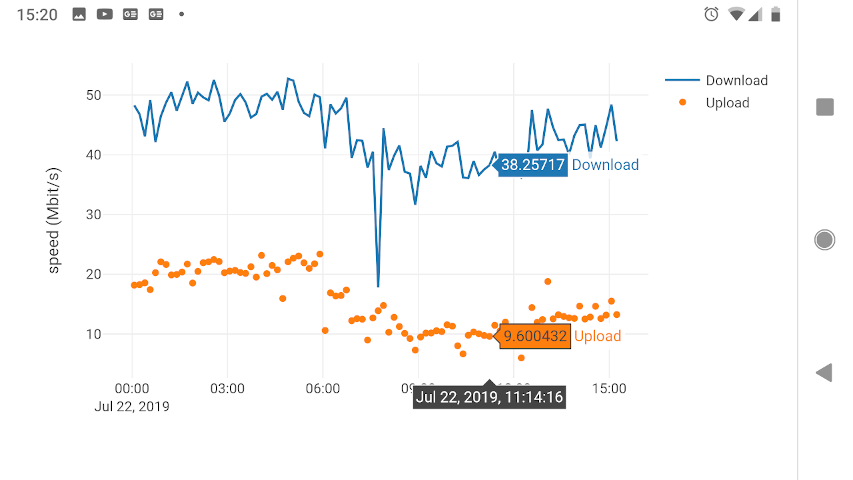
Description
Web app for visualizing internet uplink speeds. Environments supported so far:
Docker container
GNU/Linux hosts with Python >= 3.6 installed
(Other POSIX systems and Windows need testing.)
Recent changes
Added line plot with selectable window size
Added 3D graph for download speed densities
Install and run
dockerhub
Get up and running instantly, with a speedtest.csv file in your home dir and logs written to stdout.
# Please adapt details (container timezone, sitename) to your needs.

docker run -ti -p 80:5000 -v ~:/root -e FLASK_DEBUG=1 -e "TZ=EST" \
   -e "INFILE=/root/speedtest.csv" -e "SITENAME=my provider" \
   shuntingyard/speedtest_http
pip / easy_install
pip install speedtest_http
or
easy_install speedtest_http
Github
pip install git+https://github.com/shuntingyard/speedtest_http.git
or
git clone https://github.com/shuntingyard/speedtest_http.git
cd speedtest_http
python setup.py install
run in shell environments
# Please adapt env variables, host, port according to your needs.

INFILE=~/data/speedtest.csv \
LOGDIR=/tmp \
SITENAME="my provider" \
FLASK_APP=speedtest_http \
FLASK_DEBUG=0 \
python -m flask run -h 0.0.0.0 -p 8080
Changelog
Version 0.0.6
Line plot with selectable window size
Version 0.0.5
3D graph for download speed densities
Version 0.0.4
Using new speedtest_reader API
Version 0.0.3
All graphs migrated from Dash to Plotly
1 maintainer

Metadata
1 maintainer
Release files for speedtest-http 0.0.6
For a detailed explanation of source distributions (sdists) and built distributions (wheels), please see the package formats documentation.
Source distribution (sdist)
| File | Size | Uploaded | Provenance | Actions |
|---|---|---|---|---|
| speedtest_http-0.0.6.tar.gz | 148.7 kB | Without provenance | Details for speedtest_http-0.0.6.tar.gz |
Release files / speedtest_http-0.0.6.tar.gz
| Download URL | speedtest_http-0.0.6.tar.gz |
|---|---|
| Size | 148.7 kB |
| Tags | Source |
|
SHA-256 checksum How to use checksums |
837f2ca3f580758413ad7fa18c67864592ddc8f499a3272247f80d520351bddd
|
|
BLAKE2b-256 checksum How to use checksums |
e4b312ffc259606f89233a7a9b3b68d3f30c57e716677bef50e54aaa0bcc5c85
|
| Upload date | |
|
Uploaded using Trusted Publishing? What is trusted publishing? |
No |
| Uploaded via |
twine/1.13.0 pkginfo/1.5.0.1 requests/2.22.0 setuptools/40.8.0 requests-toolbelt/0.9.1 tqdm/4.32.2 CPython/3.7.3
|
Security for speedtest-http 0.0.6
Provenance
Provenance describes where a file came from. On PyPI, provenance is shared via attestations, which provide a verifiable record of the build or publishing details. View details, limitations and caveats.
No provenance found
None of the files in this release were uploaded with provenance metadata.
A note on package security
PyPI is a repository for distributing packages, not a service for auditing them. While third-party security researchers and our staff do their best to detect and remove malicious packages, PyPI cannot guarantee the quality, security or suitability of any given package.
To learn more about protecting yourself from malicious actors, visit our package security documentation.














