

osexample extension for Sphinx
This is a modified fork of Serge Domkowski’s examplecode extension for Sphinx.
About
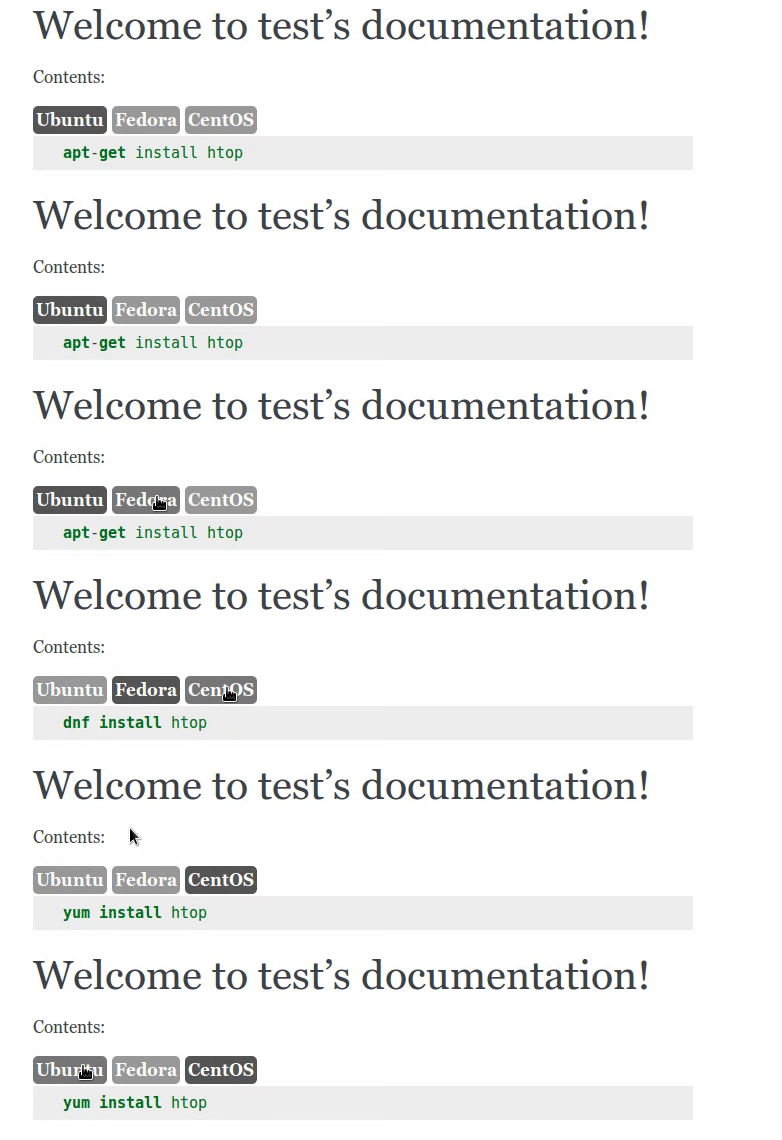
This is a simple extension that, when rendered as HTML, will fold multiple code blocks containing different operating systems administration examples into a single block which can be toggled from one to another using buttons.
It’s intended to be used for displaying package manager examples. (e.g., apt install or dnf install).
This extension adds the example-code directive which adds a class to a container wrapping the code blocks that should be folded. The class allows the included Javascript and CSS to render the folded block and buttons.
Currently supported are: Debian, Ubuntu, Fedora, CentOS, OSX
Quick Example
Source would look something like this:
.. example-code::
    .. code-block:: Debian

        sudo apt install htop

    .. code-block:: Fedora

        sudo dnf install htop
This will create an output like this:
Installation
$ pip install sphinxcontrib-osexampleEnabling the extension in Sphinx
Just add sphinxcontrib.examplecode to the list of extensions in the conf.py file. For example:
extensions = ['sphinxcontrib.osexample']Documentation
Full documentation for end users can be found in the “docs” folder.
It is also available online on Read The Docs
Contribute
Support
If you are having issues, please let us know.
License
The project is licensed under BSD.


Release files for sphinxcontrib-osexample 0.1.1
For a detailed explanation of source distributions (sdists) and built distributions (wheels), please see the package formats documentation.
Source distribution (sdist)
| File | Size | Uploaded | Provenance | |
|---|---|---|---|---|
| sphinxcontrib-osexample-0.1.1.tar.gz | 4.8 kB | Without provenance | Details |
Release files / sphinxcontrib-osexample-0.1.1.tar.gz
| Download URL | sphinxcontrib-osexample-0.1.1.tar.gz |
|---|---|
| Size | 4.8 kB |
| Tags | Source |
|
SHA-256 checksum How to use checksums |
ab05432cb818def8566662cf4d4815d9f18bdf2bd1da386fb3b079fb59857cb9
|
|
BLAKE2b-256 checksum How to use checksums |
4d062625bad796cf45065002b4144e7cef292e6d2ff45a5045b8b826798b2841
|
| Upload date | |
|
Uploaded using Trusted Publishing? What is trusted publishing? |
No |
Security for sphinxcontrib-osexample 0.1.1
Provenance
Provenance describes where a file came from. On PyPI, provenance is shared via attestations, which provide a verifiable record of the build or publishing details. View details, limitations and caveats.
No provenance found
None of the files in this release were uploaded with provenance metadata.
A note on package security
PyPI is a repository for distributing packages, not a service for auditing them. While third-party security researchers and our staff do their best to detect and remove malicious packages, PyPI cannot guarantee the quality, security or suitability of any given package.
To learn more about protecting yourself from malicious actors, visit our package security documentation.














