
This project has been archived by its maintainers, and is no longer receiving any updates.
Sportyfin
For Educational Purposes Only
Description
Stream sports events straight from your Jellyfin server. Sportyfin allows users to scrape for live streamed events and watch straight from Jellyfin. Sportyfin also generates meta-data that is used in Jellyfin to provide a great viewing experience.
Currently, Sportyfin supports NBA, NHL, NFL and Premier League livestreams, but we plan to support other leagues in the future.
Installation
Pip
To install Sportyfin with pip, follow the steps bellow:
pip install sportyfin --no-binary=sportyfin
Docker
To install Sportyfin with Docker, follow the steps bellow:
git clone https://github.com/axelmierczuk/sportyfin.git
cd sportyfin
docker build --tag sportyfin .
docker run -v <Path Where You Want Output>:/sportyfin/output sportyfin

# For example: docker run -v ~/Desktop:/sportyfin/output sportyfin
# You can edit the paramaters that sportyfin runs with from the Dockerfile
OR you may pull the container with the following:
docker pull sportyfin/sportyfin:latest
docker run -v <Path Where You Want Output>:/sportyfin/output sportyfin/sportyfin:latest

# You CANNOT edit the paramaters that sportyfin runs with when pulling the image
Usage
We highly recommend running Sportyfin in combination with tmux, or something similar.
Example usage:
python3 -m sportyfin <arguments>
Start the sportyfin server as follows:
# -nba specifies finding streams for the NBA
# -s allows sportyfin to use Selenium to scrape
# -v enables verbose mode
# -o enables selecting output location

python3 -m sportyfin -nba -s -v -o ~/Desktop
# -vv specifies silent mode (no output will be produced)
# -a specifies all leagues supported by sportyfin

python3 -m sportyfin -a -vv
See the full list of arguments here.
Once you have run the program, make sure to link to the .m3u's in the Jellyfin dashboard:
Dashboard > Live TV > Tuner Devices (+) > Tuner Type (M3U Tuner) > File or URL (enter path)
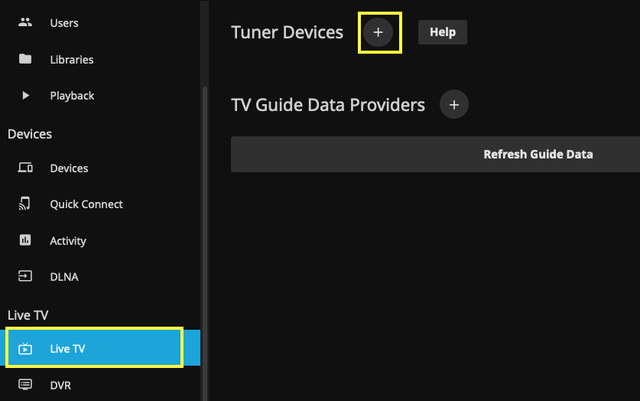
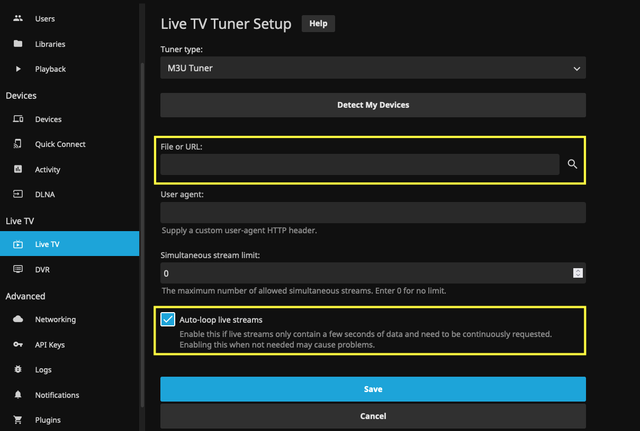
Additionally, make sure to change the "Refresh Guide" setting under:
Dashboard > Scheduled Tasks > Live TV > Refresh Guide > Task Triggers
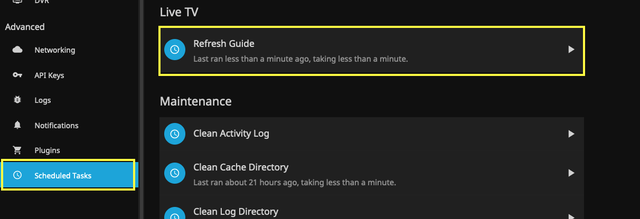
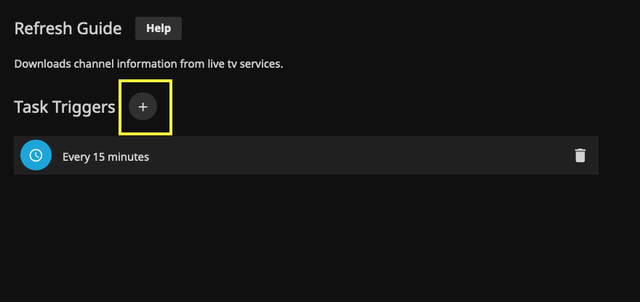
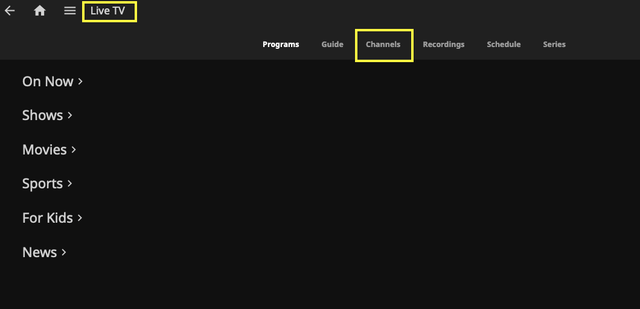
Once the path has been defined and the settings have been updated, you can check out your streams under:
Home > Live TV > Channels (at the top)
Documentation
Find all the documentation here.
Future Improvement
Add server functionality, aka, ability to access streams (m3u files) from HTTP server.
1 maintainer

Metadata
1 maintainer
Release files for sportyfin 1.0.7
For a detailed explanation of source distributions (sdists) and built distributions (wheels), please see the package formats documentation.
Source distribution (sdist)
| File | Size | Uploaded | Provenance | Actions |
|---|---|---|---|---|
| sportyfin-1.0.7.tar.gz | 14.6 kB | Without provenance | Details for sportyfin-1.0.7.tar.gz |
Release files / sportyfin-1.0.7.tar.gz
| Download URL | sportyfin-1.0.7.tar.gz |
|---|---|
| Size | 14.6 kB |
| Tags | Source |
|
SHA-256 checksum How to use checksums |
0b6fb45f3139cca6a3ee16ac9ace137073cc8458f54dd1a1e8a115cfea20488d
|
|
BLAKE2b-256 checksum How to use checksums |
ef281676349c1b0eb5ad187020dde191730907aedf1af91a562cde29d2ac5cf0
|
| Upload date | |
|
Uploaded using Trusted Publishing? What is trusted publishing? |
No |
| Uploaded via |
twine/3.7.1 importlib_metadata/4.10.0 pkginfo/1.8.2 requests/2.27.1 requests-toolbelt/0.9.1 tqdm/4.62.3 CPython/3.9.7
|
Security for sportyfin 1.0.7
Provenance
Provenance describes where a file came from. On PyPI, provenance is shared via attestations, which provide a verifiable record of the build or publishing details. View details, limitations and caveats.
No provenance found
None of the files in this release were uploaded with provenance metadata.
A note on package security
PyPI is a repository for distributing packages, not a service for auditing them. While third-party security researchers and our staff do their best to detect and remove malicious packages, PyPI cannot guarantee the quality, security or suitability of any given package.
To learn more about protecting yourself from malicious actors, visit our package security documentation.














