
SyncToGit



Table of contents
Introduction
This is a lightweight backup solution for your Evernote® stuff. It syncs your notes with their resources to the git repository in HTML format.
Say, you have the following in your Evernote:
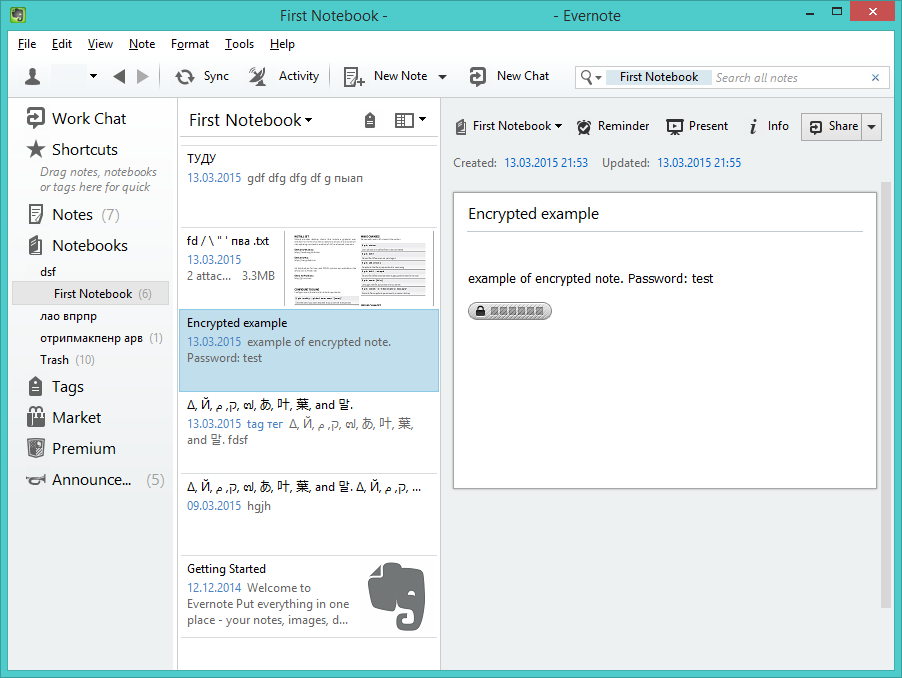
This is a tree of resulting git repository:
├── index.html
├── Notes
│   ├── dsf
│   │   └── First Notebook
│   │       ├── Encrypted example.d9c1deac-2d62-405d-a5fc-26599e4e6a51.html
│   │       ├── fd _002f _005c _0022 _0027 пва .txt.ab05137e-5788-47ed-831f-6af475b94ad5.html
│   │       ├── Getting Started.6f5d93dd-4db9-4b0d-a343-c0d4eb5ed35b.html
│   │       ├── Δ_002c Й_002c ק_002c م_002c _0e57_002c あ_002c 叶_002c 葉_002c and 말..211590e3-98bc-46bc-bfa9-d52da889514b.html
│   │       ├── Δ_002c Й_002c ק_002c م_002c _0e57_002c あ_002c 叶_002c 葉_002c and 말..7b7a3ab8-f458-4163-98b4-e6ad5c8d20c1.html
│   │       └── ТУДУ.6cab5a3c-abcc-4457-80e6-211388093bec.html
│   └── отрипмакпенр арв
│       └── ваат.da8d3c90-8f0b-440f-9b46-3c748f1bef65.html
└── Resources
    ├── 6f5d93dd-4db9-4b0d-a343-c0d4eb5ed35b
    │   ├── 0e2d61050811670832d80ed457203343.png
    │   ├── 4914ced8925f9adcc1c58ab87813c81f.png
    │   ├── 53df38a9b4999d2f9ababedaae41d3b0.png
    │   ├── 836fc57702fc08596a5b6d74e54b33cc.png
    │   ├── 908ca278561900d6620da9a8b06ecbaf.png
    │   ├── 950bf3517b1e7f23bc40066853a23f7e.png
    │   ├── bb54c12582d7d1793fb860ae27fe9daa.png
    │   ├── c7dbb1ce10ff3dfe7c0a485d904d0d23.png
    │   └── e9a7b8ccbfaeca2feebc51ccb1faa2b6.png
    ├── ab05137e-5788-47ed-831f-6af475b94ad5
    │   ├── c1506a96c01707c542581221e63e7bb8.mpeg
    │   └── f1f8a2cf00c9b9765f30ca904281290e.pdf
    └── da8d3c90-8f0b-440f-9b46-3c748f1bef65
        └── d2a99d1e273b2fc81b32c4d0fa3216ad.png
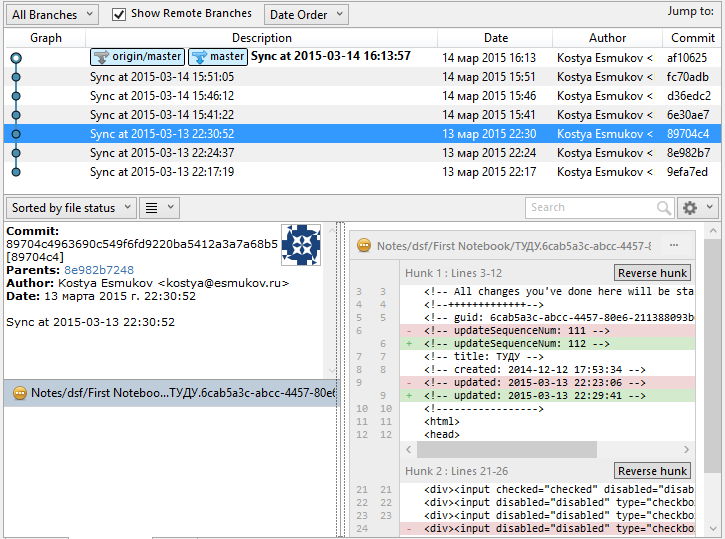
Git log:
How To Install:
Installation
- Windows:
python 2.7: https://www.python.org/downloads/
Ensure that your PATH variable includes C:\Python27\Scripts and C:\Python27
Open cmd (Win+R, cmd, Enter)
> pip install synctogit
- Debian/Ubuntu:
# apt-get install git python python-pip
# pip install synctogit
Create a new file config.ini somewhere (for example: ~/.synctogit/config.ini):
[git]
repo_dir = /home/user/EvernoteBackup
push = false
repo_dir - absolute path to the directory where you would like to keep your target git repository with synced notes. This folder must exist (and should be empty). Git repository will be initialized automatically.
push - should program push changes to remotes? You should add them manually, just as usual git remote.
You are all set. Run the program:
> synctogit ~/.synctogit/config.ini
Git repository will be initialized and you will be guided through authorization steps. After it initial sync will be performed. Authorization token will be saved in the config.ini, so keep this file secure! Following syncs will use that token until it is expired or revoked. You can run the sync this way:
> synctogit ~/.synctogit/config.ini -b
Notice the -b key - this means never prompt anything - so-called batch mode. You may also want to use the -q key - which will keep the program quiet until a problem arises.
Now you can add remotes to your git repository if you want. Just cd to it and add remotes as usual. Make sure to set push = true in the config.ini file.
Create a scheduler task, so syncs are performed automatically.
Linux:
$ crontab -e
Add new line: */10 * * * * synctogit ~/.synctogit/config.ini -bq
All errors occurred during syncs will be mailed to your account by cron. Please refer to its manual.
Windows:
Create new task: > Schtasks /Create /TN synctogit /SC DAILY /TR "C:\Python27\Lib\site-packages\synctogit\NoShell.vbs cmd /C """synctogit %USERPROFILE%\.synctogit\config.ini -bq ^>^> %USERPROFILE%\.synctogit\errors.log 2^>^&1"""" /RI 10
you may want to adjust it. Navigate to Control Panel -> Task Sheduler -> synctogit
All errors occurred during syncs will be saved in the %USERPROFILE%\.synctogit\errors.log file. Make sure to check it sometimes.
Known problems and limitations:
IE has problems with opening notes containing non-latin (unicode) chars. Google Chrome and Mozilla Firefox hasn’t.
Some Evernote clients (ex. ios) make note’s html look ugly. This makes diff hard to read. Not a big deal.
Workchat and shared notes are not synced.
License
MIT
CHANGELOG
2.0.1 (2016-08-05)
Fix Evernote seeing first 250 notes only
2.0.0 (2016-08-04)
Simplified installation process, published to the PyPI
Turned evernote sdk to a plain PyPI dependency instead of downloading it from the GitHub.
Added the --quiet option instead of sync.sh and sync.bat
Updated Readme to reflect these changes
0.0.0 (unreleased)
Initial working version
1 maintainer

Metadata
1 maintainer
Release files for synctogit 2.0.1
For a detailed explanation of source distributions (sdists) and built distributions (wheels), please see the package formats documentation.
Source distribution (sdist)
| File | Size | Uploaded | Provenance | |
|---|---|---|---|---|
| synctogit-2.0.1.tar.gz | 35.2 kB | Without provenance | Details |
Release files / synctogit-2.0.1.tar.gz
| Download URL | synctogit-2.0.1.tar.gz |
|---|---|
| Size | 35.2 kB |
| Tags | Source |
|
SHA-256 checksum How to use checksums |
1d1c88ca7cc2c641ce0a9f969b1f049621f70e2a6ca067ed663b838408e7308a
|
|
BLAKE2b-256 checksum How to use checksums |
70e72c7d4fe15ea4027294c96d77af7b45041f109a143a4e69f03e39b89d8490
|
| Upload date | |
|
Uploaded using Trusted Publishing? What is trusted publishing? |
No |
Security for synctogit 2.0.1
Provenance
Provenance describes where a file came from. On PyPI, provenance is shared via attestations, which provide a verifiable record of the build or publishing details. View details, limitations and caveats.
No provenance found
None of the files in this release were uploaded with provenance metadata.
A note on package security
PyPI is a repository for distributing packages, not a service for auditing them. While third-party security researchers and our staff do their best to detect and remove malicious packages, PyPI cannot guarantee the quality, security or suitability of any given package.
To learn more about protecting yourself from malicious actors, visit our package security documentation.














