
tableschema-sql-py




Generate and load SQL tables based on Table Schema descriptors.
Features
- implements
tableschema.Storageinterface - provides additional features like indexes and updating
Contents
Getting Started
Installation
The package use semantic versioning. It means that major versions could include breaking changes. It's highly recommended to specify package version range in your setup/requirements file e.g. package>=1.0,<2.0.
pip install tableschema-sql
Documentation
from datapackage import Package
from tableschema import Table
from sqlalchemy import create_engine

# Create sqlalchemy engine
engine = create_engine('sqlite://')

# Save package to SQL
package = Package('datapackage.json')
package.save(storage='sql', engine=engine)

# Load package from SQL
package = Package(storage='sql', engine=engine)
package.resources
API Reference
Storage
Storage(self, engine, dbschema=None, prefix='', reflect_only=None, autoincrement=None)
SQL storage
Package implements Tabular Storage interface (see full documentation on the link):
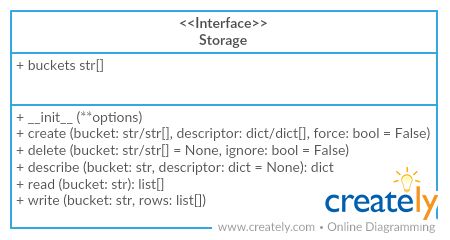
Only additional API is documented
Arguments
- engine (object):
sqlalchemyengine - dbschema (str): name of database schema
- prefix (str): prefix for all buckets
- reflect_only (callable): a boolean predicate to filter the list of table names when reflecting
- autoincrement (str/dict):
add autoincrement column at the beginning.
- if a string it's an autoincrement column name
- if a dict it's an autoincrements mapping with column
names indexed by bucket names, for example,
{'bucket1': 'id', 'bucket2': 'other_id}
storage.create
storage.create(self, bucket, descriptor, force=False, indexes_fields=None)
Create bucket
Arguments
- indexes_fields (str[]): list of tuples containing field names, or list of such lists
storage.write
storage.write(self, bucket, rows, keyed=False, as_generator=False, update_keys=None, buffer_size=1000, use_bloom_filter=True)
Write to bucket
Arguments
- keyed (bool): accept keyed rows
- as_generator (bool): returns generator to provide writing control to the client
- update_keys (str[]): update instead of inserting if key values match existent rows
- buffer_size (int=1000): maximum number of rows to try and write to the db in one batch
- use_bloom_filter (bool=True): should we use a bloom filter to optimize DB update performance (in exchange for some setup time)
Contributing
The project follows the Open Knowledge International coding standards.
Recommended way to get started is to create and activate a project virtual environment. To install package and development dependencies into active environment:
$ make install
To run tests with linting and coverage:
$ make test
Changelog
Here described only breaking and the most important changes. The full changelog and documentation for all released versions could be found in nicely formatted commit history.
v1.3
- Implemented constraints loading to a database
v1.2
- Add option to configure buffer size, bloom filter use (#77)
v1.1
- Added support for the
autoincrementparameter to be a mapping - Fixed autoincrement support for SQLite and MySQL
v1.0
- Initial driver implementation.


Release files for tableschema-sql 2.0.1
For a detailed explanation of source distributions (sdists) and built distributions (wheels), please see the package formats documentation.
Source distribution (sdist)
| File | Size | Uploaded | Provenance | Actions |
|---|---|---|---|---|
| tableschema-sql-2.0.1.tar.gz | 13.6 kB | Without provenance | Details for tableschema-sql-2.0.1.tar.gz |
Built distribution (wheel)
| File | Interpreter | ABI | Platform | Actions Reset |
|---|---|---|---|---|
| tableschema_sql-2.0.1-py2.py3-none-any.whl | Python 2, Python 3 | none | any | Details for tableschema_sql-2.0.1-py2.py3-none-any.whl |
Total release size: 26.0 kB
Release files / tableschema-sql-2.0.1.tar.gz
| Download URL | tableschema-sql-2.0.1.tar.gz |
|---|---|
| Size | 13.6 kB |
| Tags | Source |
|
SHA-256 checksum How to use checksums |
791140479b8f1acd75f381a96aa52b6d15edde1153531efb3451140fa1d88e4a
|
|
BLAKE2b-256 checksum How to use checksums |
f24593c77807b1f5acd375de6ee031c0be7be537e90bfdf625ddd9e0ed355e97
|
| Upload date | |
|
Uploaded using Trusted Publishing? What is trusted publishing? |
No |
| Uploaded via |
twine/4.0.2 CPython/3.9.17
|
Release files / tableschema_sql-2.0.1-py2.py3-none-any.whl
| Download URL | tableschema_sql-2.0.1-py2.py3-none-any.whl |
|---|---|
| Size | 12.4 kB |
| Tags | Python 2 Python 3 |
|
SHA-256 checksum How to use checksums |
cf2da48bef2e7ad7d912cdcc0992c32d74a66cc900bf32809cfc89b647acd5d3
|
|
BLAKE2b-256 checksum How to use checksums |
f2205a8bf56cc40f102e2ff3ddeced440e81b83abfa4b49a9308305ec52e8764
|
| Upload date | |
|
Uploaded using Trusted Publishing? What is trusted publishing? |
No |
| Uploaded via |
twine/4.0.2 CPython/3.9.17
|
Security for tableschema-sql 2.0.1
Provenance
Provenance describes where a file came from. On PyPI, provenance is shared via attestations, which provide a verifiable record of the build or publishing details. View details, limitations and caveats.
No provenance found
None of the files in this release were uploaded with provenance metadata.
A note on package security
PyPI is a repository for distributing packages, not a service for auditing them. While third-party security researchers and our staff do their best to detect and remove malicious packages, PyPI cannot guarantee the quality, security or suitability of any given package.
To learn more about protecting yourself from malicious actors, visit our package security documentation.














