
text2art





text2art is Python implementation of the original Figlet project. It looks like this (although you can select your font and color):
      .-') _     ('-.  ) (`-.      .-') _               ('-.     _  .-')   .-') _
     (  OO) )  _(  OO)  ( OO ).   (  OO) )             ( OO ).-.( \( -O ) (  OO) )
     /     '._(,------.(_/.  \_)-./     '._  .-----.   / . --. / ,------. /     '._
     |'--...__)|  .---' \  `.'  / |'--...__)/ ,-.   \  | \-.  \  |   /`. '|'--...__)
     '--.  .--'|  |      \     /\ '--.  .--''-'  |  |.-'-'  |  | |  /  | |'--.  .--'
        |  |  (|  '--.    \   \ |    |  |      .'  /  \| |_.'  | |  |_.' |   |  |
        |  |   |  .--'   .'    \_)   |  |    .'  /__   |  .-.  | |  .  '.'   |  |
        |  |   |  `---. /  .'.  \    |  |   |       |  |  | |  | |  |\  \    |  |
        `--'   `------''--'   '--'   `--'   `-------'  `--' `--' `--' '--'   `--'
                                                                --------- by HangfengYang
Getting Started
help
>>> text2art h
            Usage:
                text2art lf  # Random display of 25 fonts
                text2art rd text [--on_color] [--attr] [--width] [--justify]
                text2art gt text [--font] [--color] [--on_color] [--attr] [--width] [--justify]

            available text colors:
                red, green, yellow, blue, magenta, cyan, white.
            available text highlights:
                on_red, on_green, on_yellow, on_blue, on_magenta,
                on_cyan,on_white.
            available attributes:
                bold, dark, underline, blink, reverse, concealed.
            width: Setting the size of the terminal output font,type is int.
            justify: Setting the location of the terminal output font.
            available parameter: left, enter, right.
Generates random fonts and random colors.
>>> text2art rd yang

                                                       /
                      Y88b  /   /~~~8e  888-~88e e88~88e
                       Y888/        88b 888  888 888 888
                        Y8/    e88~-888 888  888 "88_88"
                         Y    C888  888 888  888  /
                        /      "88_-888 888  888 Cb
                      _/                          Y8""8D
Random display of 25 fonts
>>> text2art lf
Generate ascii art text via given font
>>> text2art gt yang --font ghost

                               ('-.         .-') _
                              ( OO ).-.    ( OO ) )
                   ,--.   ,--./ . --. /,--./ ,--,'  ,----.
                    \  `.'  / | \-.  \ |   \ |  |\ '  .-./-')
                  .-')     /.-'-'  |  ||    \|  | )|  |_( O- )
                 (OO  \   /  \| |_.'  ||  .     |/ |  | .--, \
                  |   /  /\_  |  .-.  ||  |\    | (|  | '. (_/
                  `-./  /.__) |  | |  ||  | \   |  |  '--'  |
                    `--'      `--' `--'`--'  `--'   `------'
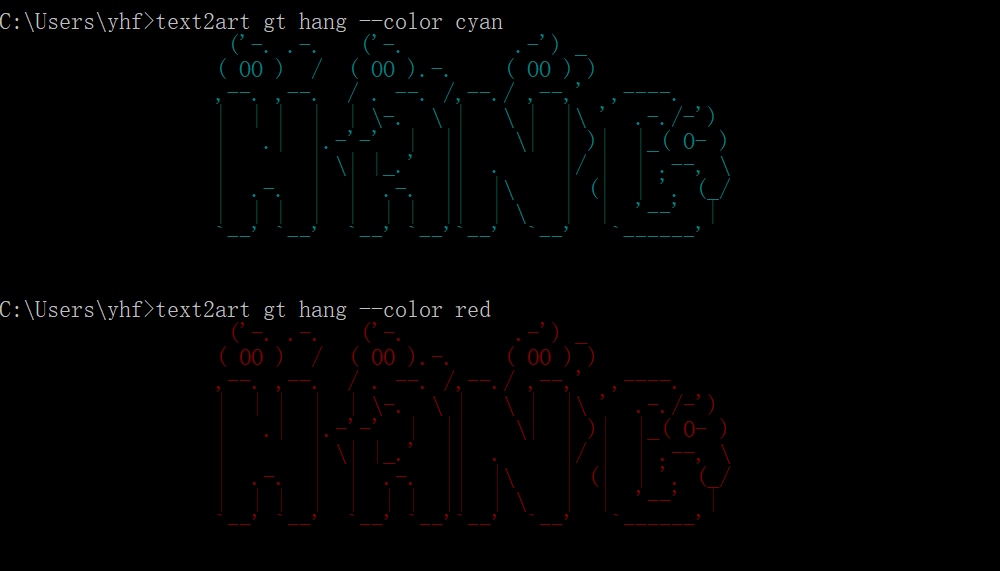
Generate ascii art text via given color
>>> text2art gt hang --color cyan
>>> text2art gt hang --color red
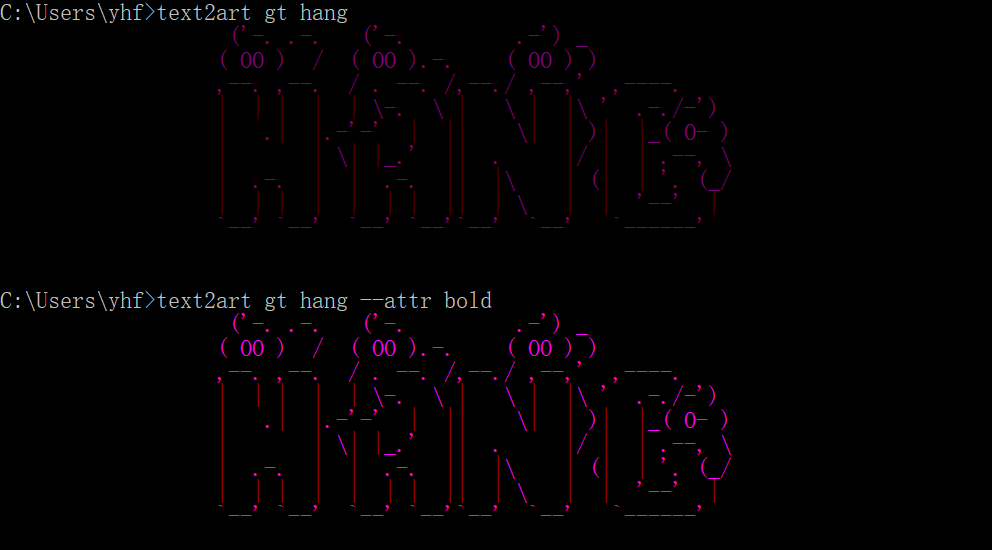
Adjust the properties of the font
>>> text2art gt hang
>>> text2art gt hang --attr bold
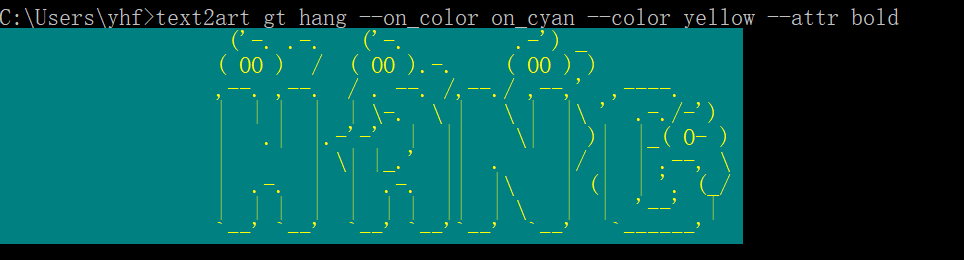
Adjust the background color
>>> text2art gt hang --on_color on_cyan --color yellow --attr bold
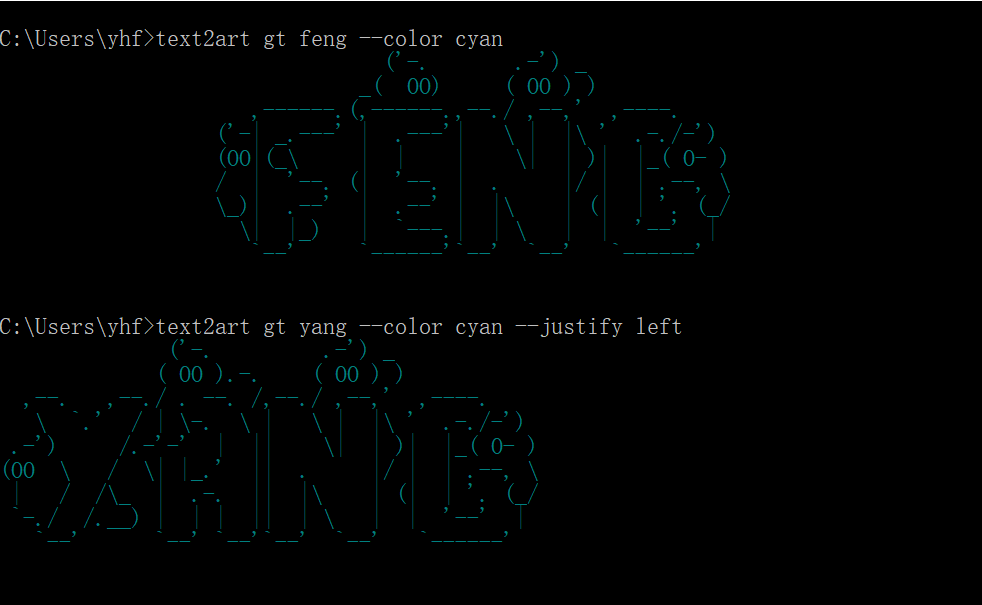
Adjust the location of the output font
>>> text2art gt feng --color cyan # default center
>>> text2art gt feng --color cyan --justify left
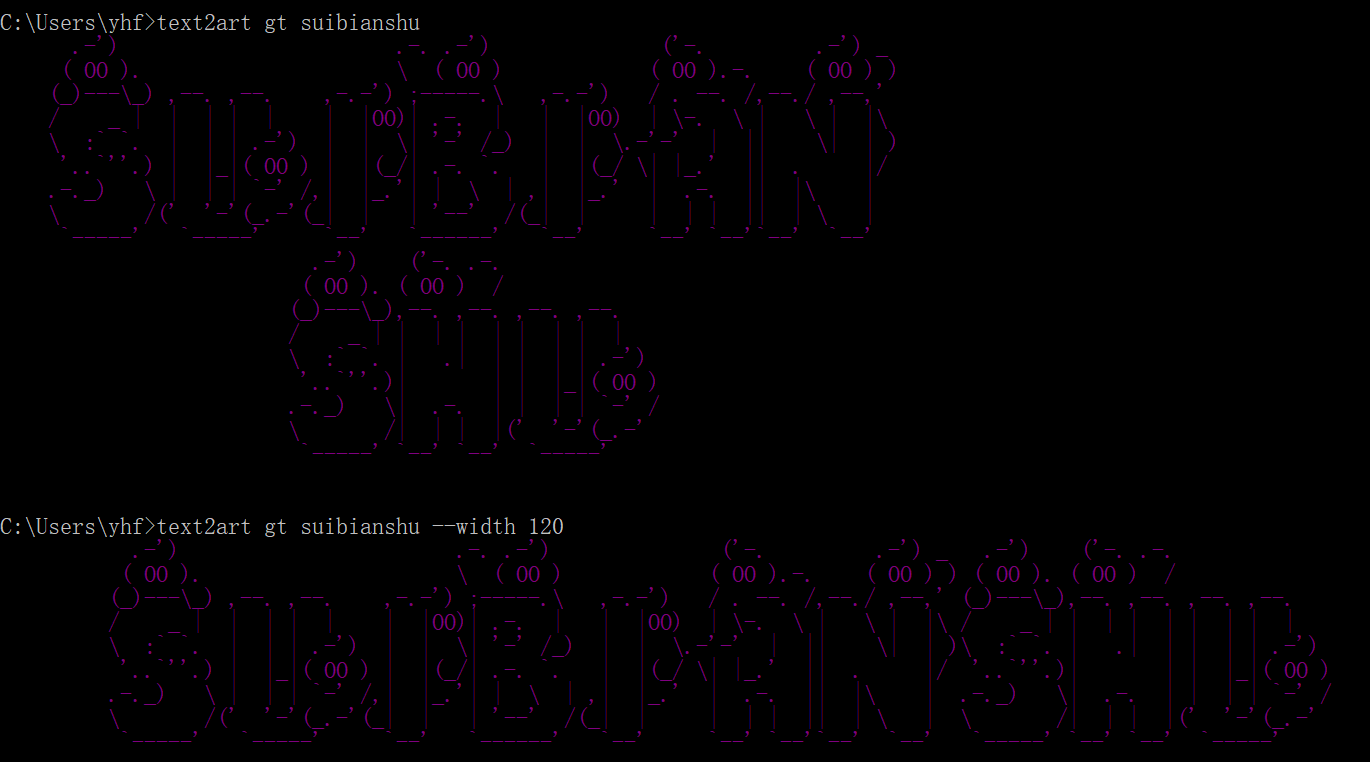
Adjust the width of the terminal background
>>> text2art gt suibianshu # default width is 80
>>> text2art gt suibianshu --width 120
Installation
text2art is hosted on PYPI and can be installed as such:
>>> pip install text2art
Alternatively, you can also get the latest source code from GitHub and install it manually:
>>> git clone git@github.com:yhangf/text2art.git
>>> cd text2art
>>> python setup.py install
For update:
>>> pip install text2art --upgrade
Questions
-
The color display in DOS uses the init method in the colorama package. How can it be implemented without calling additional packages?
-
How fire packages are friendly output help documents?
Last
very welcome to star and pull requests, and I hope you can submit a nice font or color scheme to Issue.
License
MIT (here)
1 maintainer

Metadata
1 maintainer
Release files for text2art 0.2.0
For a detailed explanation of source distributions (sdists) and built distributions (wheels), please see the package formats documentation.
Source distribution (sdist)
| File | Size | Uploaded | Provenance | |
|---|---|---|---|---|
| text2art-0.2.0.tar.gz | 5.9 kB | Without provenance | Details |
Release files / text2art-0.2.0.tar.gz
| Download URL | text2art-0.2.0.tar.gz |
|---|---|
| Size | 5.9 kB |
| Tags | Source |
|
SHA-256 checksum How to use checksums |
437cbe8d979b01995348f4da1792e3b277f1766bfaa232027423cf0e83896380
|
|
BLAKE2b-256 checksum How to use checksums |
bfa10700d641823976ab3544e85c05e21c2fa955c1d34bb4eef83fd6059b4949
|
| Upload date | |
|
Uploaded using Trusted Publishing? What is trusted publishing? |
No |
| Uploaded via |
twine/1.11.0 pkginfo/1.4.2 requests/2.18.4 setuptools/39.0.1 requests-toolbelt/0.8.0 tqdm/4.23.1 CPython/3.6.4
|
Security for text2art 0.2.0
Provenance
Provenance describes where a file came from. On PyPI, provenance is shared via attestations, which provide a verifiable record of the build or publishing details. View details, limitations and caveats.
No provenance found
None of the files in this release were uploaded with provenance metadata.
A note on package security
PyPI is a repository for distributing packages, not a service for auditing them. While third-party security researchers and our staff do their best to detect and remove malicious packages, PyPI cannot guarantee the quality, security or suitability of any given package.
To learn more about protecting yourself from malicious actors, visit our package security documentation.














