




tsfeatures
Calculates various features from time series data. Python implementation of the R package tsfeatures.
Installation
You can install the released version of tsfeatures from the Python package index with:
pip install tsfeatures
Usage
The tsfeatures main function calculates by default the features used by Montero-Manso, Talagala, Hyndman and Athanasopoulos in their implementation of the FFORMA model.
from tsfeatures import tsfeatures
This function receives a panel pandas df with columns unique_id, ds, y and optionally the frequency of the data.
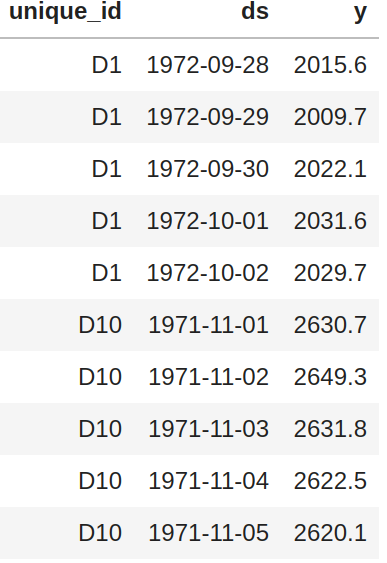
tsfeatures(panel, freq=7)
By default (freq=None) the function will try to infer the frequency of each time series (using infer_freq from pandas on the ds column) and assign a seasonal period according to the built-in dictionary FREQS:
FREQS = {'H': 24, 'D': 1,
         'M': 12, 'Q': 4,
         'W':1, 'Y': 1}
You can use your own dictionary using the dict_freqs argument:
tsfeatures(panel, dict_freqs={'D': 7, 'W': 52})
List of available features
| Features | ||
|---|---|---|
| acf_features | heterogeneity | series_length |
| arch_stat | holt_parameters | sparsity |
| count_entropy | hurst | stability |
| crossing_points | hw_parameters | stl_features |
| entropy | intervals | unitroot_kpss |
| flat_spots | lumpiness | unitroot_pp |
| frequency | nonlinearity | |
| guerrero | pacf_features |
See the docs for a description of the features. To use a particular feature included in the package you need to import it:
from tsfeatures import acf_features

tsfeatures(panel, freq=7, features=[acf_features])
You can also define your own function and use it together with the included features:
def number_zeros(x, freq):

    number = (x == 0).sum()
    return {'number_zeros': number}

tsfeatures(panel, freq=7, features=[acf_features, number_zeros])
tsfeatures can handle functions that receives a numpy array x and a frequency freq (this parameter is needed even if you don't use it) and returns a dictionary with the feature name as a key and its value.
R implementation
You can use this package to call tsfeatures from R inside python (you need to have installed R, the packages forecast and tsfeatures; also the python package rpy2):
from tsfeatures.tsfeatures_r import tsfeatures_r

tsfeatures_r(panel, freq=7, features=["acf_features"])
Observe that this function receives a list of strings instead of a list of functions.
Comparison with the R implementation (sum of absolute differences)
Non-seasonal data (100 Daily M4 time series)
| feature | diff | feature | diff | feature | diff | feature | diff |
|---|---|---|---|---|---|---|---|
| e_acf10 | 0 | e_acf1 | 0 | diff2_acf1 | 0 | alpha | 3.2 |
| seasonal_period | 0 | spike | 0 | diff1_acf10 | 0 | arch_acf | 3.3 |
| nperiods | 0 | curvature | 0 | x_acf1 | 0 | beta | 4.04 |
| linearity | 0 | crossing_points | 0 | nonlinearity | 0 | garch_r2 | 4.74 |
| hw_gamma | 0 | lumpiness | 0 | diff2x_pacf5 | 0 | hurst | 5.45 |
| hw_beta | 0 | diff1x_pacf5 | 0 | unitroot_kpss | 0 | garch_acf | 5.53 |
| hw_alpha | 0 | diff1_acf10 | 0 | x_pacf5 | 0 | entropy | 11.65 |
| trend | 0 | arch_lm | 0 | x_acf10 | 0 | ||
| flat_spots | 0 | diff1_acf1 | 0 | unitroot_pp | 0 | ||
| series_length | 0 | stability | 0 | arch_r2 | 1.37 |
To replicate this results use:
python -m tsfeatures.compare_with_r --results_directory /some/path
                                    --dataset_name Daily --num_obs 100
Sesonal data (100 Hourly M4 time series)
| feature | diff | feature | diff | feature | diff | feature | diff |
|---|---|---|---|---|---|---|---|
| series_length | 0 | seas_acf1 | 0 | trend | 2.28 | hurst | 26.02 |
| flat_spots | 0 | x_acf1 | 0 | arch_r2 | 2.29 | hw_beta | 32.39 |
| nperiods | 0 | unitroot_kpss | 0 | alpha | 2.52 | trough | 35 |
| crossing_points | 0 | nonlinearity | 0 | beta | 3.67 | peak | 69 |
| seasonal_period | 0 | diff1_acf10 | 0 | linearity | 3.97 | ||
| lumpiness | 0 | x_acf10 | 0 | curvature | 4.8 | ||
| stability | 0 | seas_pacf | 0 | e_acf10 | 7.05 | ||
| arch_lm | 0 | unitroot_pp | 0 | garch_r2 | 7.32 | ||
| diff2_acf1 | 0 | spike | 0 | hw_gamma | 7.32 | ||
| diff2_acf10 | 0 | seasonal_strength | 0.79 | hw_alpha | 7.47 | ||
| diff1_acf1 | 0 | e_acf1 | 1.67 | garch_acf | 7.53 | ||
| diff2x_pacf5 | 0 | arch_acf | 2.18 | entropy | 9.45 |
To replicate this results use:
python -m tsfeatures.compare_with_r --results_directory /some/path \
                                    --dataset_name Hourly --num_obs 100
Authors
- Federico Garza - FedericoGarza
- Kin Gutierrez - kdgutier
- Cristian Challu - cristianchallu
- Jose Moralez - jose-moralez
- Ricardo Olivares - rolivaresar
- Max Mergenthaler - mergenthaler
3 maintainers


Metadata
3 maintainers
Release files for tsfeatures 0.4.5
For a detailed explanation of source distributions (sdists) and built distributions (wheels), please see the package formats documentation.
Source distribution (sdist)
| File | Size | Uploaded | Provenance | |
|---|---|---|---|---|
| tsfeatures-0.4.5.tar.gz | 25.3 kB | Without provenance | Details |
Built distribution (wheel)
| File | Interpreter | ABI | Platform | Reset |
|---|---|---|---|---|
| tsfeatures-0.4.5-py3-none-any.whl | Python 3 | none | any | Details |
Total release size: 53.9 kB
Release files / tsfeatures-0.4.5.tar.gz
| Download URL | tsfeatures-0.4.5.tar.gz |
|---|---|
| Size | 25.3 kB |
| Tags | Source |
|
SHA-256 checksum How to use checksums |
28e529b7441c2d95fa28a90768980ca12f4795dff729387139e1923bd2dcc0ff
|
|
BLAKE2b-256 checksum How to use checksums |
b29c780e67e91b6c64ff1456cdc93c6b416df180b5b279882575b72c11bc09ff
|
| Upload date | |
|
Uploaded using Trusted Publishing? What is trusted publishing? |
No |
| Uploaded via |
twine/4.0.2 CPython/3.9.17
|
Release files / tsfeatures-0.4.5-py3-none-any.whl
| Download URL | tsfeatures-0.4.5-py3-none-any.whl |
|---|---|
| Size | 28.6 kB |
| Tags | Python 3 |
|
SHA-256 checksum How to use checksums |
b4b6bb805d15533fed2343986f6188fd97b29bf91e416d4a6ebb4d4394ff8bcc
|
|
BLAKE2b-256 checksum How to use checksums |
7961ba5bcaae1212907bb22508cc87fd59011037374fb0d825fb0a67ea0fe62c
|
| Upload date | |
|
Uploaded using Trusted Publishing? What is trusted publishing? |
No |
| Uploaded via |
twine/4.0.2 CPython/3.9.17
|
Security for tsfeatures 0.4.5
Provenance
Provenance describes where a file came from. On PyPI, provenance is shared via attestations, which provide a verifiable record of the build or publishing details. View details, limitations and caveats.
No provenance found
None of the files in this release were uploaded with provenance metadata.
A note on package security
PyPI is a repository for distributing packages, not a service for auditing them. While third-party security researchers and our staff do their best to detect and remove malicious packages, PyPI cannot guarantee the quality, security or suitability of any given package.
To learn more about protecting yourself from malicious actors, visit our package security documentation.














