
Wagtail resume





Wagtail-resume is a reusable Wagtail page model designed to make the creation of your resume easy and quick.
Feaures:
- Easy management of your resume in Wagtail
- Search engine optimized using HTML meta tags - make it easier to find your resume in Google
- Flexible section creation of projects, blog posts, etc
- Easy customizations of font, icons and background color
- Easily reference other content on your Wagtail page as blog posts
- HTML based, no more sending of PDFs, just a url for sharing
- In-site Weasyprint button for a PDF version
- Responsive for mobile and tablet
Preview
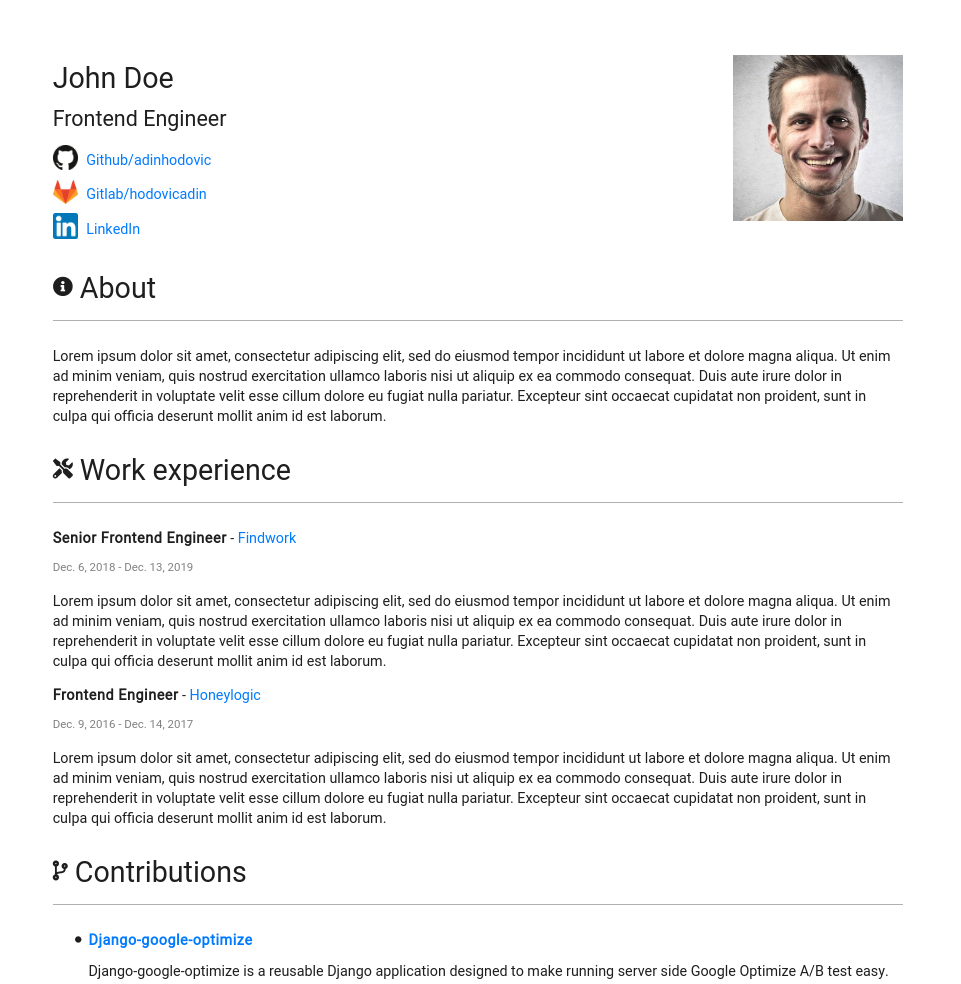
The full resume example is live and accesible here.
Dependencies
- Wagtail-metadata
- It uses wagtail-metadata for all meta & SEO fields.
- Wagtail-markdown
- Weasyprint
- Uses Weasyprint to generate a PDF from the HTML page.
Installation
Install wagtail-resume with pip:
pip install wagtail-resume
Add the application and dependencies to installed Django applications:
INSTALLED_APPS = [
    ...
    "wagtailmetadata",
    "wagtailmarkdown",
    "wagtail_resume",
    ...
]
Add the urls for generating a pdf using Weasyprint:
path("resume/", include("wagtail_resume.urls")),
Run the migrations.
Getting started
Import and extend the BaseResumePage:
# home/models.py
from wagtail_resume.models import BaseResumePage


class ResumePage(BaseResumePage):
    pass
After adding the model you'll need to make a migration
python manage.py makemigrations
... and then apply it
python manage.py migrate
Head over to the Wagtail admin and create your resume!
Weasyprint generates PDFs using the absolute URL of a resume which consists of the hostname, port and path. Therefore don't forget to configure your site's host and path in the Wagtail admin interface which is located in settings -> sites. E.g when running the server locally the host should be localhost and the port should be 8000 (or whichever port you develop locally with).
Default Fields
Default resume fields:
- Role
- Profile picture
- Social links
- About
- Work Experience
- Contributions (Opensource/projects)
- Writing (internal Wagtail pages or external URLs)
- Education (Degrees/Courses/Certificates)
Customization
Wagtail-resume currently supports 4 customizations:
- Heading for a section
- Icon for a section (Fontawesome)
- Font style
- Background color
- PDF generation button visibility (public, authenticated, disabled)
The background-color should be specified in hex (e.g #FFFFFF) or css supported colors and the font should be available on Google fonts. The fonts supported are only the ones from Google Fonts so make sure to check what fonts are available.
2 maintainers


Metadata
2 maintainers
Release files for wagtail-resume 2.12.0
For a detailed explanation of source distributions (sdists) and built distributions (wheels), please see the package formats documentation.
Source distribution (sdist)
| File | Size | Uploaded | Provenance | |
|---|---|---|---|---|
| wagtail_resume-2.12.0.tar.gz | 19.8 kB | With provenance | Details |
Built distribution (wheel)
| File | Interpreter | ABI | Platform | Reset |
|---|---|---|---|---|
| wagtail_resume-2.12.0-py3-none-any.whl | Python 3 | none | any | Details |
Total release size: 55.5 kB
Release files / wagtail_resume-2.12.0.tar.gz
| Download URL | wagtail_resume-2.12.0.tar.gz |
|---|---|
| Size | 19.8 kB |
| Tags | Source |
|
SHA-256 checksum How to use checksums |
a406085793d51cabec5b68ccffe893ac13961d64e497b95bc4f4b33cbbaa9144
|
|
BLAKE2b-256 checksum How to use checksums |
a6a6c434db14e6bbdf785c4762d6ac75c6504341c537b4b5e347fc2fd4ec4cd3
|
| Upload date | |
|
Uploaded using Trusted Publishing? What is trusted publishing? |
Yes |
| Uploaded via |
twine/6.1.0 CPython/3.13.7
|
Provenance
Provenance describes where a file came from. On PyPI, provenance is shared via attestations, which provide a verifiable record of the build or publishing details. View details, limitations and caveats.


PyPI Publish Attestation
PyPI verified that this artifact, at this checksum, originated from the publisher listed below.
Signed by GitHub Actions, verified by PyPI on Jan 20, 2026.
Transparency logRelease files / wagtail_resume-2.12.0-py3-none-any.whl
| Download URL | wagtail_resume-2.12.0-py3-none-any.whl |
|---|---|
| Size | 35.7 kB |
| Tags | Python 3 |
|
SHA-256 checksum How to use checksums |
c7023e1d2a8e792830603043df8e150070a15d92bf9c6faf6dfa081c6c0675fe
|
|
BLAKE2b-256 checksum How to use checksums |
8ac0b73e2f9d5d47c08b382c21d53fbeea3fd236797bb4a7f306ec5b3b97aace
|
| Upload date | |
|
Uploaded using Trusted Publishing? What is trusted publishing? |
Yes |
| Uploaded via |
twine/6.1.0 CPython/3.13.7
|
Provenance
Provenance describes where a file came from. On PyPI, provenance is shared via attestations, which provide a verifiable record of the build or publishing details. View details, limitations and caveats.
PyPI Publish Attestation
PyPI verified that this artifact, at this checksum, originated from the publisher listed below.
Signed by GitHub Actions, verified by PyPI on Jan 20, 2026.
Transparency logSecurity for wagtail-resume 2.12.0
Provenance
Provenance describes where a file came from. On PyPI, provenance is shared via attestations, which provide a verifiable record of the build or publishing details. View details, limitations and caveats.
Full provenance
All 2 files in this release have been uploaded with provenance metadata.
Attestation for wagtail_resume-2.12.0.tar.gz
PyPI Publish Attestation
PyPI verified that this artifact, at this checksum, originated from the publisher listed below.
Signed by GitHub Actions, verified by PyPI on Jan 20, 2026.
Transparency logA note on package security
PyPI is a repository for distributing packages, not a service for auditing them. While third-party security researchers and our staff do their best to detect and remove malicious packages, PyPI cannot guarantee the quality, security or suitability of any given package.














