
Webex Teams Archiver
Simple utility to archive Webex Teams rooms


Webex Teams Archiver extracts the messages and files out of a Webex Teams room and saves them in text, HTML, and JSON formats.
Example
from webexteamsarchiver import WebexTeamsArchiver

personal_token = "mytoken"
archiver = WebexTeamsArchiver(personal_token)

# room id from https://developer.webex.com/docs/api/v1/rooms/list-rooms
room_id = "Y2lzY29zcGFyazovL3VzL1JPT00vd2ViZXh0ZWFtc2FyY2hpdmVy"
archiver.archive_room(room_id)
Produces the following files:
$ ls
Title_Timestamp.tgz
Title_Timestamp

$ ls Title_Timestamp/
Title_Timestamp.html
Title_Timestamp.json
Title_Timestamp.txt
attachments/
avatars/
space_details.json
Below is an example of a simple room that got archived.
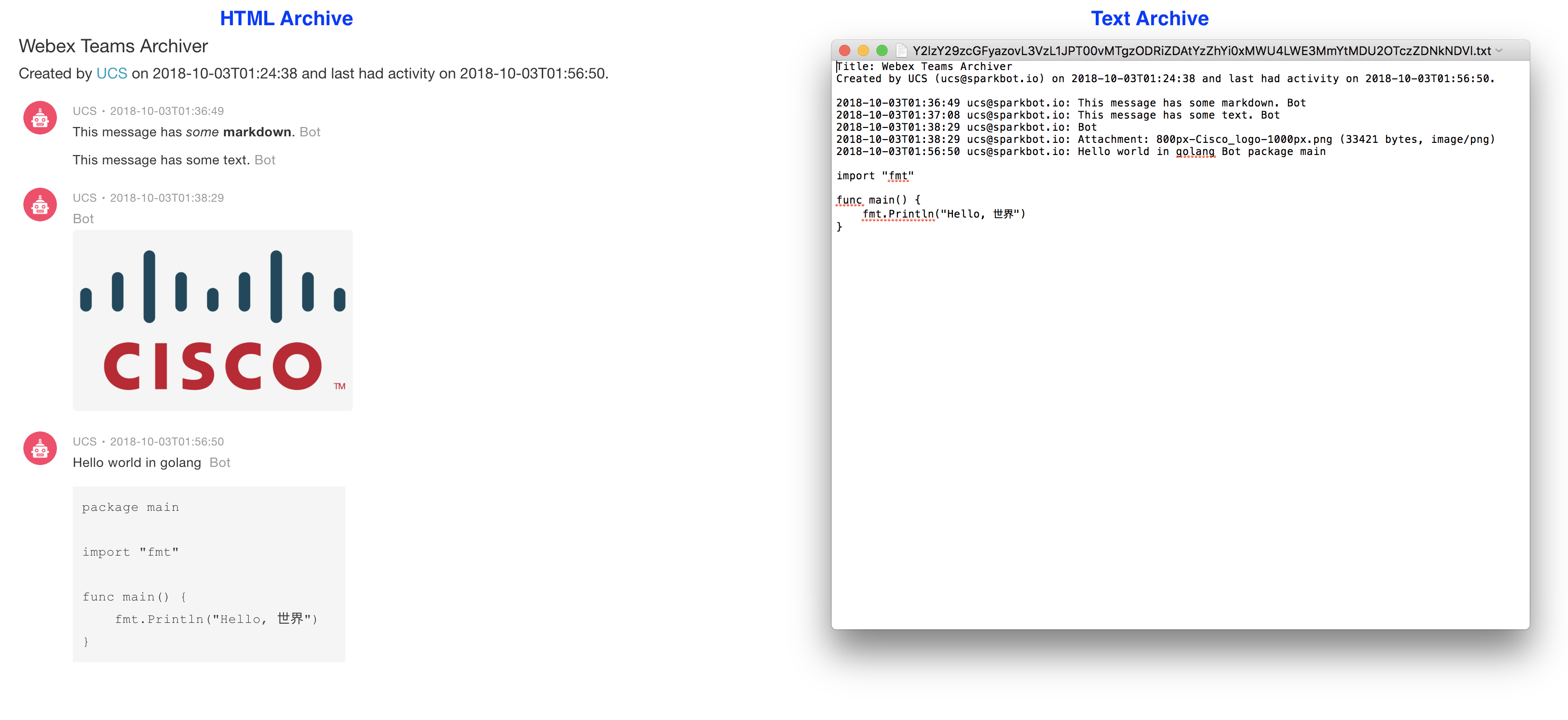
Note 1: The HTML version of the archive requires Internet connectivity because of the CSS, which is not packaged with the archive because of licensing conflicts.
Note 2: Please note that use of the Webex Teams Archiver may violate the retention policy, if any, applicable to your use of Webex Teams.
Installation
Installing and upgrading is easy:
Install via PIP
$ pip install webexteamsarchiverUpgrading to the latest Version
$ pip install webexteamsarchiver --upgradeOptions
The archive_room method exposes the following options:
Argument |
Default Value |
Description |
|---|---|---|
text_format |
True |
Create a text version of the archive |
html_format |
True |
Create an HTML version of the archive |
json_format |
True |
Create a JSON version of the archive |
In addition, the options kwargs supports the following additional options today:
Argument |
Default Value |
Description |
|---|---|---|
compress_folder |
True |
Compress archive folder |
delete_folder |
False |
Delete the archive folder when done |
reverse_order |
True |
Order messages by most recent on the bottom |
download_attachments |
True |
Download attachments sent to the room |
download_avatars |
True |
Download avatar images |
download_workers |
15 |
Number of download workers for downloading files |
timestamp_format |
%Y-%m-%dT%H:%M:%S |
Timestamp strftime format |
file_format |
gztar |
Archive file format |
Questions, Support & Discussion
webexteamsarchiver is a community developed and community supported project. Feedback, thoughts, questions, issues can be submitted using the issues page.
Contribution
webexteamsarchiver is a community developed project. Code contributions are welcome via PRs!
Copyright (c) 2018-2021 Cisco and/or its affiliates.
1 maintainer

Metadata
1 maintainer
Release files for webexteamsarchiver 0.11.3
For a detailed explanation of source distributions (sdists) and built distributions (wheels), please see the package formats documentation.
Source distribution (sdist)
| File | Size | Uploaded | Provenance | Actions |
|---|---|---|---|---|
| webexteamsarchiver-0.11.3.tar.gz | 1.5 MB | Without provenance | Details for webexteamsarchiver-0.11.3.tar.gz |
Built distribution (wheel)
| File | Interpreter | ABI | Platform | Actions Reset |
|---|---|---|---|---|
| webexteamsarchiver-0.11.3-py3-none-any.whl | Python 3 | none | any | Details for webexteamsarchiver-0.11.3-py3-none-any.whl |
Total release size: 3.1 MB
Release files / webexteamsarchiver-0.11.3.tar.gz
| Download URL | webexteamsarchiver-0.11.3.tar.gz |
|---|---|
| Size | 1.5 MB |
| Tags | Source |
|
SHA-256 checksum How to use checksums |
6b38741e3f26355083b1c094138cda06247bcdb898033f33f7721d1521d3b496
|
|
BLAKE2b-256 checksum How to use checksums |
2747e882d697a129fbb01c9278f70551983d5796ad8770b0e4436b88d440b654
|
| Upload date | |
|
Uploaded using Trusted Publishing? What is trusted publishing? |
No |
| Uploaded via |
twine/3.8.0 pkginfo/1.8.2 readme-renderer/33.0 requests/2.27.1 requests-toolbelt/0.9.1 urllib3/1.26.8 tqdm/4.63.0 importlib-metadata/4.11.2 keyring/23.5.0 rfc3986/2.0.0 colorama/0.4.4 CPython/3.9.10
|
Release files / webexteamsarchiver-0.11.3-py3-none-any.whl
| Download URL | webexteamsarchiver-0.11.3-py3-none-any.whl |
|---|---|
| Size | 1.5 MB |
| Tags | Python 3 |
|
SHA-256 checksum How to use checksums |
75a08b01c61437b4177a7a609f5835b3667d941d467033fb4984c77186389e78
|
|
BLAKE2b-256 checksum How to use checksums |
997f3a93be43a71ec6281bbe9af1fee50eae530a0f3e171cf7dbb94e6a1a5637
|
| Upload date | |
|
Uploaded using Trusted Publishing? What is trusted publishing? |
No |
| Uploaded via |
twine/3.8.0 pkginfo/1.8.2 readme-renderer/33.0 requests/2.27.1 requests-toolbelt/0.9.1 urllib3/1.26.8 tqdm/4.63.0 importlib-metadata/4.11.2 keyring/23.5.0 rfc3986/2.0.0 colorama/0.4.4 CPython/3.9.10
|
Security for webexteamsarchiver 0.11.3
Provenance
Provenance describes where a file came from. On PyPI, provenance is shared via attestations, which provide a verifiable record of the build or publishing details. View details, limitations and caveats.
No provenance found
None of the files in this release were uploaded with provenance metadata.
A note on package security
PyPI is a repository for distributing packages, not a service for auditing them. While third-party security researchers and our staff do their best to detect and remove malicious packages, PyPI cannot guarantee the quality, security or suitability of any given package.
To learn more about protecting yourself from malicious actors, visit our package security documentation.














