


To install:
$ pip install zmapioBasic usage of zmapio
import matplotlib.pyplot as plt
import numpy as np
from zmapio import ZMAPGrid%matplotlib inlineReading a ZMAP file:
z_file = ZMAPGrid('./examples/NSLCU.dat')Accessing the comments header:
for c in z_file.comments:
    print(c)
Landmark Zmap grid file name: .DATANSLCU.dat Created/converted by Oasis Montaj, Geosoft Inc.
Plotting the grid data:
z_file.plot()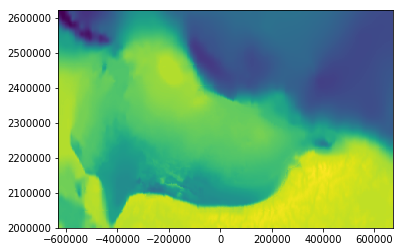
Counts for rows and columns:
z_file.no_cols, z_file.no_rows(435, 208)
Shape for z-values:
z_file.z_values.shape(208, 435)
Exporting to CSV file:
z_file.to_csv('./output/output.csv')head ./output/output.csv-630000.0,2621000.0,-16481.9570313 -630000.0,2618000.0,-16283.9033203 -630000.0,2615000.0,-16081.5751953 -630000.0,2612000.0,-15856.7861328 -630000.0,2609000.0,-15583.7167969 -630000.0,2606000.0,-15255.734375 -630000.0,2603000.0,-14869.3769531 -630000.0,2600000.0,-14426.1513672 -630000.0,2597000.0,-13915.8769531 -630000.0,2594000.0,-13340.4677734
Exporting to WKT file:
z_file.to_wkt('./output/output.wkt', precision=2)Exporting to GeoJSON file:
z_file.to_geojson('./output/output.json')Exporting to Pandas Dataframe:
df = z_file.to_dataframe()df.Z.describe()count 90480.000000 mean -5244.434235 std 4692.845490 min -16691.371094 25% -10250.590088 50% -4003.433105 75% -1320.896881 max 2084.417969 Name: Z, dtype: float64
Write a new ZMAP file as 3 nodes per line format:
z_file.write('./output/test.zmap', nodes_per_line=3)head ./output/test.zmap! Landmark Zmap grid file name: .DATANSLCU.dat
! Created/converted by Oasis Montaj, Geosoft Inc.
@.DATANSLCU.dat, GRID, 3
20, 1e+30, , 7, 1
208, 435, -630000.0, 672000.0, 2000000.0, 2621000.0
0.0, 0.0, 0.0
@
-16481.9570313 -16283.9033203 -16081.5751953
-15856.7861328 -15583.7167969 -15255.7343750
-14869.3769531 -14426.1513672 -13915.8769531
Creating a ZMAP object from string:
z_text = """
!
! File created by DMBTools2.GridFileFormats.ZmapPlusFile
!
@GRID FILE, GRID, 4
20, -9999.0000000, , 7, 1
6, 4, 0, 200, 0, 300
0.0, 0.0, 0.0
@
       -9999.0000000       -9999.0000000           3.0000000          32.0000000
          88.0000000          13.0000000
       -9999.0000000          20.0000000           8.0000000          42.0000000
          75.0000000           5.0000000
           5.0000000         100.0000000          35.0000000          50.0000000
          27.0000000           1.0000000
           2.0000000          36.0000000          10.0000000           6.0000000
           9.0000000       -9999.0000000
"""
z_t = ZMAPGrid(z_text)
z_t.plot()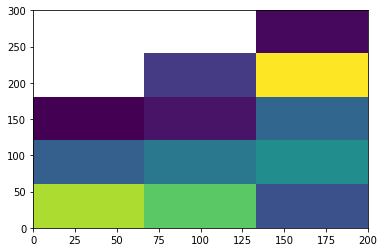
Adding colorbar and colormap using matplotlib:
z_obj = ZMAPGrid('./examples/NStopo.dat')
fig=plt.figure(figsize=(12, 6))
z_obj.plot(cmap='jet')
plt.colorbar()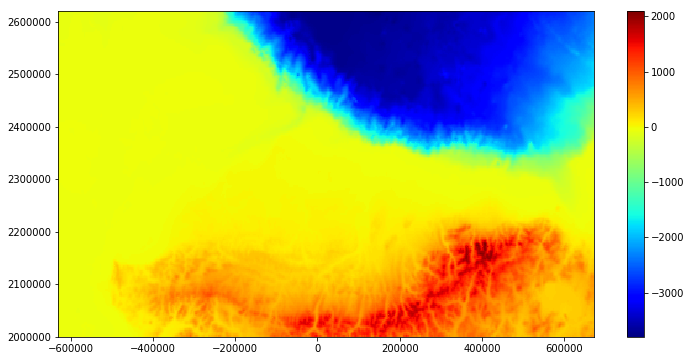
Creating a new ZMAP object from 2D-Numpy array with shape (no_cols, no_rows):
z_val = z_obj.z_values
print('Z-values shape: ', z_val.shape)
new_zgrid = ZMAPGrid(z_values=z_val, min_x=-630000.0000, max_x=672000.0000,
                     min_y=2000000.0000,  max_y=2621000.0000)
Z-values shape: (435, 208)
new_zgrid.plot(cmap='gist_earth')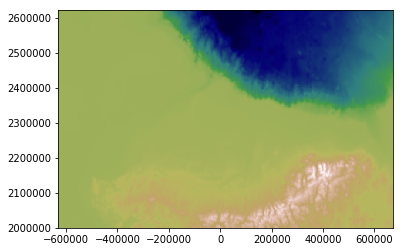
Customize writing a ZMAP file:
new_zgrid.comments = ['this is', 'a test']
new_zgrid.nodes_per_line = 4
new_zgrid.field_width = 15
new_zgrid.decimal_places = 3
new_zgrid.name = 'test'
new_zgrid.write('./output/new_z.dat')
head ./output/new_z.dat!this is
!a test
@test, GRID, 4
15, 1e+30, , 3, 1
208, 435, -630000.0, 672000.0, 2000000.0, 2621000.0
0.0, 0.0, 0.0
@
-67.214 -67.570 -67.147 -69.081
-73.181 -74.308 -72.766 -72.034
-70.514 -68.555 -66.195 -62.776
References
https://lists.osgeo.org/pipermail/gdal-dev/2011-June/029173.html
Saltus, R.W. and Bird, K.J., 2003. Digital depth horizon compilations of the Alaskan North Slope and adjacent arctic regions. U.S. Geological Survey data release: https://doi.org/10.3133/ofr03230
1 maintainer

Metadata
1 maintainer
Release files for zmapio 0.8.1
For a detailed explanation of source distributions (sdists) and built distributions (wheels), please see the package formats documentation.
Source distribution (sdist)
| File | Size | Uploaded | Provenance | Actions |
|---|---|---|---|---|
| zmapio-0.8.1.tar.gz | 9.5 kB | Without provenance | Details for zmapio-0.8.1.tar.gz |
Built distribution (wheel)
| File | Interpreter | ABI | Platform | Actions Reset |
|---|---|---|---|---|
| zmapio-0.8.1-py3-none-any.whl | Python 3 | none | any | Details for zmapio-0.8.1-py3-none-any.whl |
Total release size: 17.2 kB
Release files / zmapio-0.8.1.tar.gz
| Download URL | zmapio-0.8.1.tar.gz |
|---|---|
| Size | 9.5 kB |
| Tags | Source |
|
SHA-256 checksum How to use checksums |
5e760761757830343b7d4bf53beb17478e23ae3f42c92dd6f745fe43756b1bca
|
|
BLAKE2b-256 checksum How to use checksums |
122bd6d63141a96210f0d6c88379f4ffa64dfa505b20629e17f8d8893781d9b5
|
| Upload date | |
|
Uploaded using Trusted Publishing? What is trusted publishing? |
No |
| Uploaded via |
twine/3.8.0 pkginfo/1.8.2 readme-renderer/34.0 requests/2.27.1 requests-toolbelt/0.9.1 urllib3/1.26.8 tqdm/4.63.1 importlib-metadata/4.11.3 keyring/23.5.0 rfc3986/2.0.0 colorama/0.4.4 CPython/3.9.13
|
Release files / zmapio-0.8.1-py3-none-any.whl
| Download URL | zmapio-0.8.1-py3-none-any.whl |
|---|---|
| Size | 7.7 kB |
| Tags | Python 3 |
|
SHA-256 checksum How to use checksums |
b539a50749be06891753f52389ccd605eff5de470ffa0bc877cb6148f87d51c5
|
|
BLAKE2b-256 checksum How to use checksums |
6b38d606ecc55068b5fd85a28643f7291a860db5de7a77ec7927f5577b24e18c
|
| Upload date | |
|
Uploaded using Trusted Publishing? What is trusted publishing? |
No |
| Uploaded via |
twine/3.8.0 pkginfo/1.8.2 readme-renderer/34.0 requests/2.27.1 requests-toolbelt/0.9.1 urllib3/1.26.8 tqdm/4.63.1 importlib-metadata/4.11.3 keyring/23.5.0 rfc3986/2.0.0 colorama/0.4.4 CPython/3.9.13
|
Security for zmapio 0.8.1
Provenance
Provenance describes where a file came from. On PyPI, provenance is shared via attestations, which provide a verifiable record of the build or publishing details. View details, limitations and caveats.
No provenance found
None of the files in this release were uploaded with provenance metadata.
A note on package security
PyPI is a repository for distributing packages, not a service for auditing them. While third-party security researchers and our staff do their best to detect and remove malicious packages, PyPI cannot guarantee the quality, security or suitability of any given package.
To learn more about protecting yourself from malicious actors, visit our package security documentation.














