
Bombard





Bombard is a tool for stress test and benchmarking your HTTP server. Especially it’s good to simulate a heavy load and initial burst of simultaneous HTTP requests with complex logic.
It is designed to be extremely simple yet powerful tool to load test functional behavior.
Thanks to optional Python inlines you can fast and easy describe complex logic for the tests.
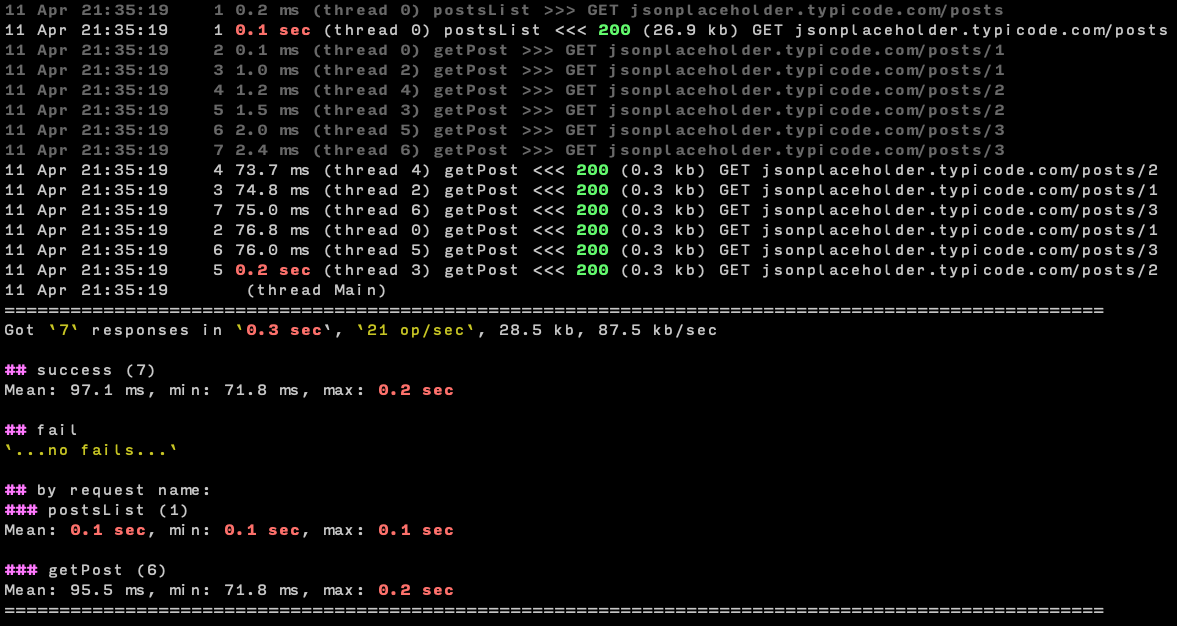
Test report shows you how many requests per second your server is capable of serving and with what latency.
Installation
pip install bombard --upgradeAfter that use bombard (bombard.exe in Windows) executable:
bombard --helpRequests description
Requests can be just URL or contain JSON described like this
supply:  # you can redefine variables from command line (--supply host=http://localhost/)
  host: https://jsonplaceholder.typicode.com/

getToken:
    url: "{host}auth"  # use custom {host} variable to stay DRY
    method: POST
    body:  # below is JSON object for request body
        email: name@example.com
        password: admin
    extract:  # get token for next requests
        token:
In first request you can get security token as in example above.
And use it in next requests:
postsList:
   url: "{host}posts"
   headers:
       Authorization: "Bearer {token}"  # we get {token} in 1st request
   script: |
       for post in resp[:3]:  # for 1st three posts from response
           # schedule getPost request (from ammo section)
           # and provide it with id we got from the response
           reload(ammo.getPost, id=post['id'])
Included examples. To list examples
bombard --examplesCommand line
From command line you can change number of threads, loop count, supply vars, customize report and so on.
Also you can bootstrap your own bombard.yaml file from any example you like:
bombard --init --example simple
Report
Example of report for the command:
bombard --example simple --repeat 2 --threshold 100
Documentation
Translation managed with Transifex
2 maintainers


Metadata
2 maintainers
Release files for bombard 1.20
For a detailed explanation of source distributions (sdists) and built distributions (wheels), please see the package formats documentation.
Source distribution (sdist)
| File | Size | Uploaded | Provenance | |
|---|---|---|---|---|
| bombard-1.20.tar.gz | 22.4 kB | Without provenance | Details |
Built distribution (wheel)
| File | Interpreter | ABI | Platform | Reset |
|---|---|---|---|---|
| bombard-1.20-py3-none-any.whl | Python 3 | none | any | Details |
Total release size: 52.5 kB
Release files / bombard-1.20.tar.gz
| Download URL | bombard-1.20.tar.gz |
|---|---|
| Size | 22.4 kB |
| Tags | Source |
|
SHA-256 checksum How to use checksums |
9c0fc5a05608c9b6f93c75b0414107d91e9f41f23c46673a51fdba9d315d4f53
|
|
BLAKE2b-256 checksum How to use checksums |
f154217b3694d2a06c5e462b3205649ad5539cacfb12d643469efc5d59cf7bf4
|
| Upload date | |
|
Uploaded using Trusted Publishing? What is trusted publishing? |
No |
| Uploaded via |
twine/3.1.1 pkginfo/1.5.0.1 requests/2.23.0 setuptools/41.2.0 requests-toolbelt/0.9.1 tqdm/4.43.0 CPython/3.8.2
|
Release files / bombard-1.20-py3-none-any.whl
| Download URL | bombard-1.20-py3-none-any.whl |
|---|---|
| Size | 30.1 kB |
| Tags | Python 3 |
|
SHA-256 checksum How to use checksums |
20adb1011bb31391d3055f0be70b76b45445f554f8dc5374ce34c9e3c3b085cd
|
|
BLAKE2b-256 checksum How to use checksums |
2df021ab61e1d3b2004b28068e6d70b569546d6219ac0167095c2c7ce5da067a
|
| Upload date | |
|
Uploaded using Trusted Publishing? What is trusted publishing? |
No |
| Uploaded via |
twine/3.1.1 pkginfo/1.5.0.1 requests/2.23.0 setuptools/41.2.0 requests-toolbelt/0.9.1 tqdm/4.43.0 CPython/3.8.2
|
Security for bombard 1.20
Provenance
Provenance describes where a file came from. On PyPI, provenance is shared via attestations, which provide a verifiable record of the build or publishing details. View details, limitations and caveats.
No provenance found
None of the files in this release were uploaded with provenance metadata.
A note on package security
PyPI is a repository for distributing packages, not a service for auditing them. While third-party security researchers and our staff do their best to detect and remove malicious packages, PyPI cannot guarantee the quality, security or suitability of any given package.
To learn more about protecting yourself from malicious actors, visit our package security documentation.













