
YouTube Music To Spotify



An open-source app for effortlessly transferring playlists from YouTube Music to Spotify.
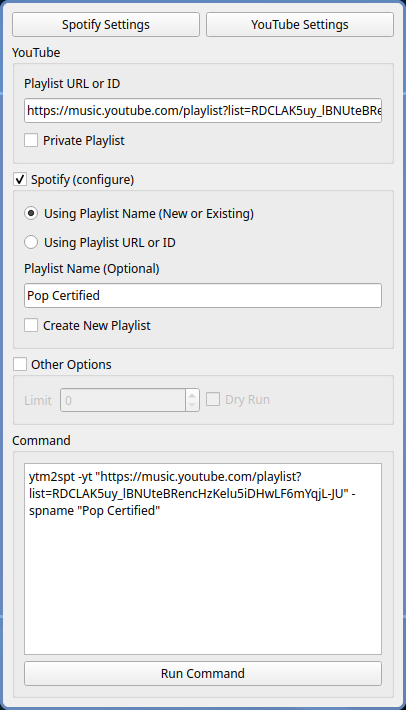
Features
- No limit on size of playlist
- Support public playlists
- Support private playlists
- Auto create or update playlist if it already exists
- Use fuzzy search to find the best match
- Copy playlist thumbnail from youtube to spotify
- Copy playlist description from youtube to spotify
- Limit number of songs to be imported in the playlist
- Dry run mode to test without adding to spotify
Setup
Spotify Developer Account
Why?
By setting up a Developer account and creating your own credentials (like keys), you are ensuring that the app connects to your account in a safe way without sharing your login details with anyone. It gives you full control over what the app can access and helps keep your Spotify account secure.
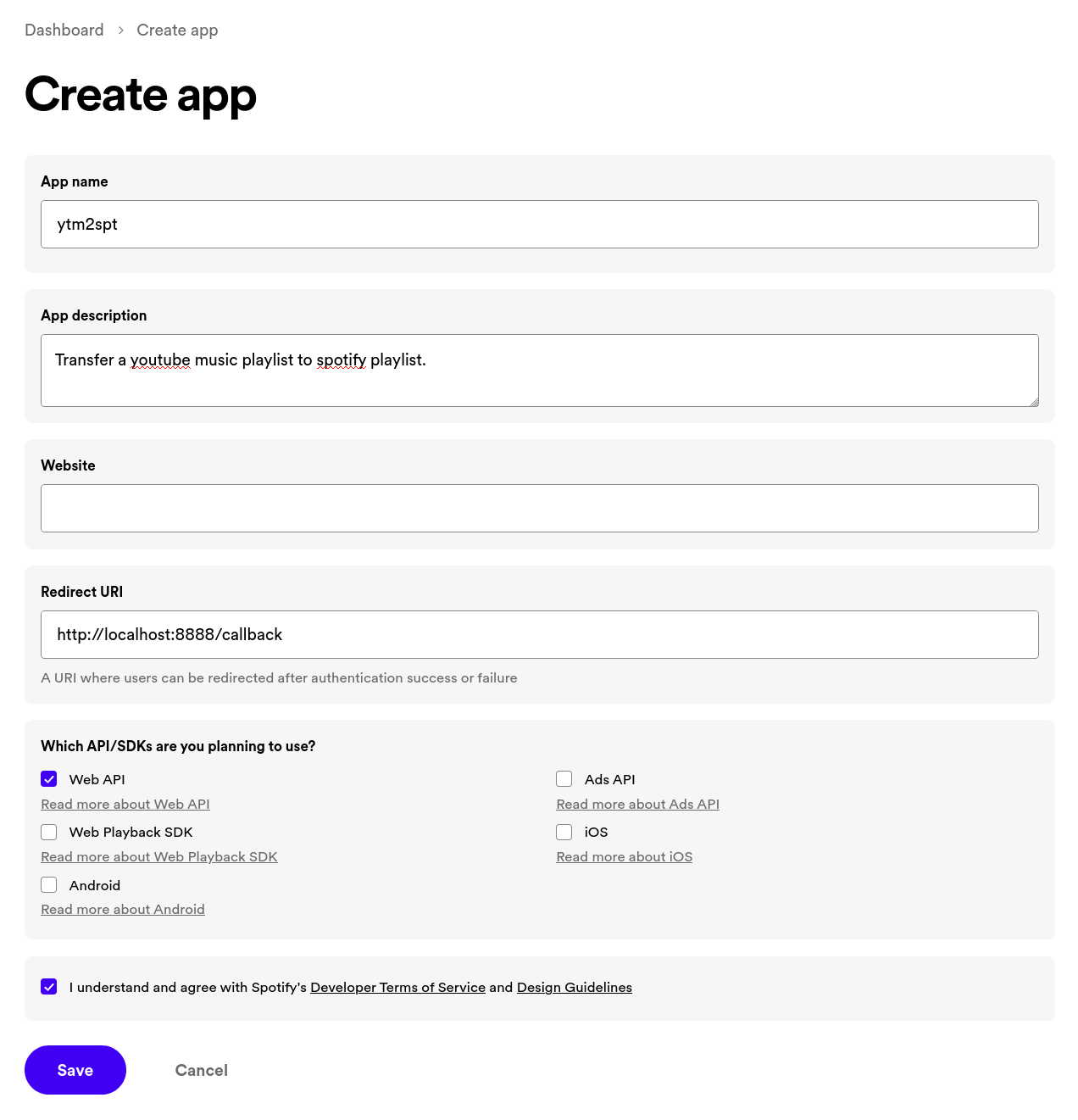
- Create a new app: https://developer.spotify.com/dashboard
- Set "Redirect URI" to
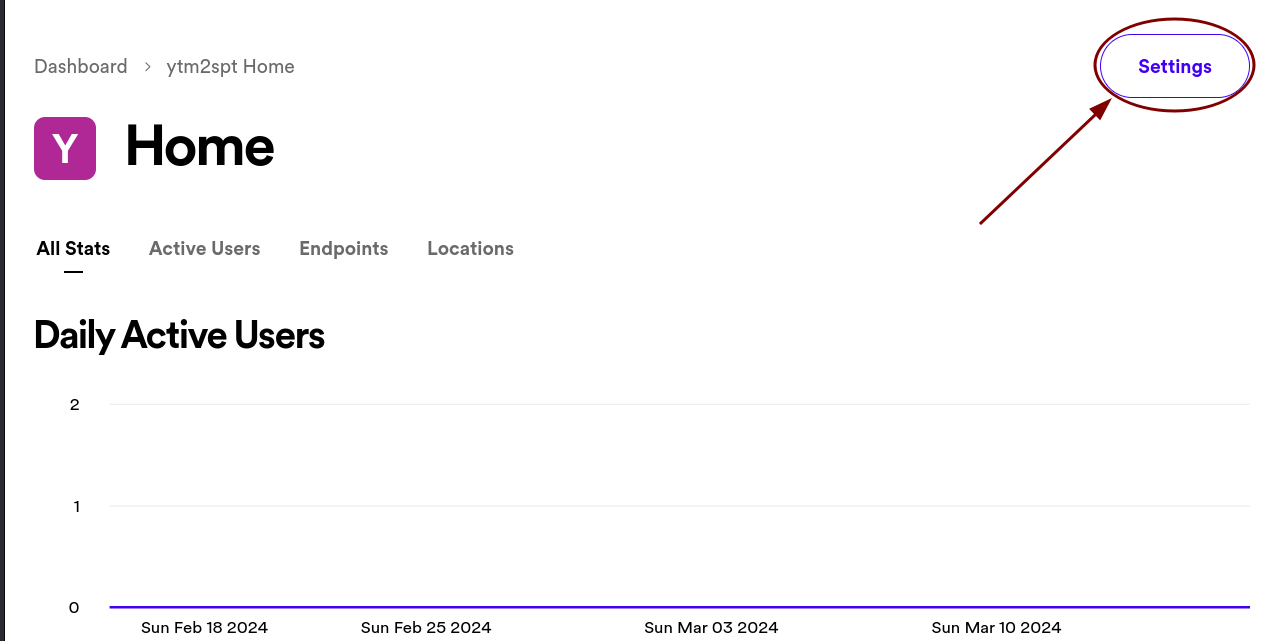
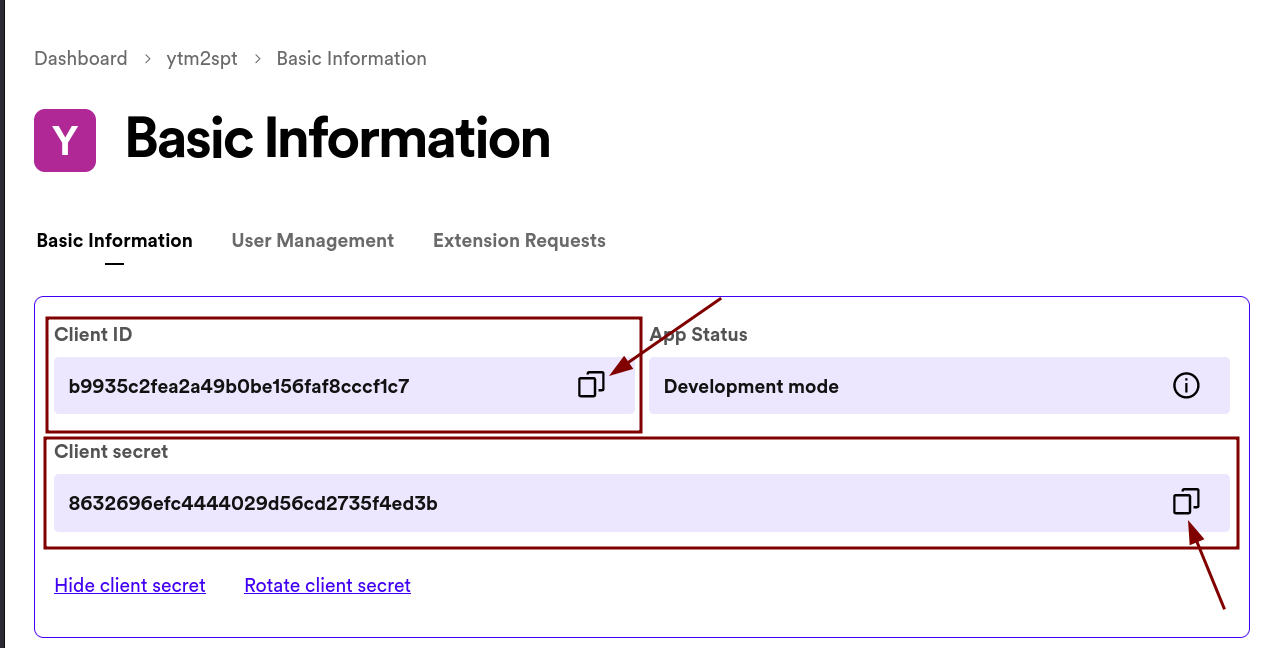
http://127.0.0.1:8888/callback - Copy the "Client ID" and "Client Secret" to use later
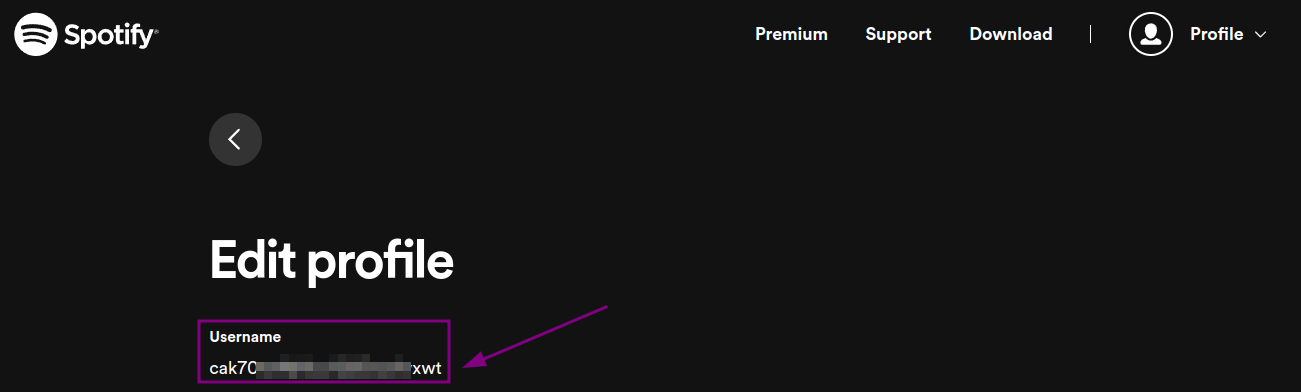
- Copy the "User ID" from your Spotify account: https://www.spotify.com/in-en/account/profile/
Installation
Download the latest version from the releases page.
[!NOTE]
Windows: Windows Defender may interrupt the app from running. Click on more info and allow the program to run.Linux: You need to run the app from terminal, if you want the to know the progress of the transfer.
Using pip or pipx:


If you have Python installed, you can install the app using pipx (recommended) or pip.
pipx install ytm2spt
or
pip install ytm2spt
After installation, you can run the app using the command ytm2spt.
[!CAUTION]
While syncing into an existing spotify playlist, first all the songs from Stopify playlist will be deleted and then the all the songs from YouTube Music playlist will be copied.
Spotify Settings
When you run the executable, you will be prompted to enter your Spotify credentials.

Youtube Settings
If you click on "Private Playlist", you will be prompted to enter get your Youtube OAuth credentials if not already set.

[!TIP]
If you find this project useful or interesting, please consider giving it a 🌟star! It helps others discover it too!
GUI
Python3 is required to run the app. You can download it from python.org for Windows.
Install Dependencies
pip install .
Run the App
python ytm2spt.py
CLI
Setting Environment Variables Linux and Mac
- Rename the file
.env.sampleto.env - Edit the file by adding your credentials
- Run the following command to set your environment variable:
source .env
Setting Environment Variables (Windows)
- Edit
env.batfile by adding your credentials in these linesset SPOTIFY_USER_ID=<your_user_id> set SPOTIFY_CLIENT_ID=<your_client_id> set SPOTIFY_CLIENT_SECRET=<your_client_secret>
- Run the batch file to set your environment variable:
env.bat
[!NOTE]
If the environment variables are not set, you may need to restart your terminal or IDE.
Install Dependencies
pip install -r requirements.txt
Youtube OAuth (Only for private playlists)
Run the following command to login to your Youtube account and save the credentials to ytmusicapi-oauth.json
ytmusicapi-oauth
Usage
$ source .env
$ ytm2spt -h
usage: ytm2spt [-h] -yt YOUTUBE_URL_OR_ID
               [-sp SPOTIFY_URL_OR_ID | -spname SPOTIFY_PLAYLIST_NAME]
               [-ytauth YOUTUBE_OAUTH_JSON]
               [-n | -d] [-l LIMIT]

options:
  -h, --help            show this help message and exit
  -yt YOUTUBE_URL_OR_ID, --youtube-url-or-id YOUTUBE_URL_OR_ID
                        Youtube Playlist URL or ID
  -sp SPOTIFY_URL_OR_ID, --spotify-url-or-id SPOTIFY_URL_OR_ID
                        Spotify Playlist URL or ID
  -spname SPOTIFY_PLAYLIST_NAME, --spotify-playlist-name SPOTIFY_PLAYLIST_NAME
                        Spotify Playlist Name (Default: Youtube Playlist Name)
  -ytauth YOUTUBE_OAUTH_JSON, --youtube-oauth-json YOUTUBE_OAUTH_JSON
                        Youtube OAuth JSON filepath (run 'ytmusicapi-oauth')
  -n, --create-new      Force create a new playlist
  -d, --dryrun          Do not add to Spotify
  -l LIMIT, --limit LIMIT
                        Limit the number of songs to fetch
$ ytmusicapi-oauth -h
usage: ytmusicapi-oauth [-h] [-b] [file]

positional arguments:
  file                file path to store the json (Default: ytmusic-oauth.json)

options:
  -h, --help          show this help message and exit
  -b, --open-browser  open browser for OAuth login (Default: True)
Examples
Sample Playlist: Pop Certified (YouTube Music to Spotify)
# Pass any link containing a youtube playlist ID
# Sets same name as youtube playlist
$ python ytm2spt.py -yt "https://music.youtube.com/playlist?list=RDCLAK5uy_lBNUteBRencHzKelu5iDHwLF6mYqjL-JU"

# Pass just the youtube playlist ID
# Set a custom name for the playlist
$ python ytm2spt.py -yt "CLAK5uy_lBNUteBRencHzKelu5iDHwLF6mYqjL-JU" -spname "Pop Certified"

# Pass link of a private youtube playlist
# Provide the path to the oauth.json file
$ python ytm2spt.py -yt "https://music.youtube.com/playlist?list=PLz96m0PSfi9p8ABcEcUlSMVmz7sN-IEFu" -ytauth "oauth.json"

# Pass an existing spotify playlist URL or ID
# Limit the number of songs to fetch
# Dry run mode
$ python ytm2spt.py -yt "CLAK5uy_lBNUteBRencHzKelu5iDHwLF6mYqjL-JU" -sp "https://open.spotify.com/playlist/6DyIxXHMwuEMbsfPTIr9C8" -l 10 -d

# Pass even the URL of video playing from playlist
# Force create a new playlist
$ python ytm2spt.py -yt "https://www.youtube.com/watch?v=RlPNh_PBZb4&list=RDCLAK5uy_lBNUteBRencHzKelu5iDHwLF6mYqjL-JU" -n
Build an Executable
Note: This is only required if you want to build the executable yourself. This is not necessary if you just need to run the app directly using Python.
Requirements:
- C Compiler (gcc, clang)
patchelf(Linux only)python3-develor similar package in your OS
pip install -r requirements-dev.txt
nuitka ytm2spt.py
[!NOTE]
Forked from @edgarh22's Youtube-to-Spotify-Archiver.
1 maintainer

Metadata
1 maintainer
Release files for ytm2spt 1.1.2
For a detailed explanation of source distributions (sdists) and built distributions (wheels), please see the package formats documentation.
Source distribution (sdist)
| File | Size | Uploaded | |
|---|---|---|---|
| ytm2spt-1.1.2.tar.gz | 322.3 kB | Details |
Built distribution (wheel)
| File | Interpreter | ABI | Platform | Reset |
|---|---|---|---|---|
| ytm2spt-1.1.2-py3-none-any.whl | Python 3 | none | any | Details |
Total release size: 348.9 kB
Release files / ytm2spt-1.1.2.tar.gz
| Download URL | ytm2spt-1.1.2.tar.gz |
|---|---|
| Size | 322.3 kB |
| Tags | Source |
|
SHA-256 checksum How to use checksums |
ce5aa20a954b22c7898ab078a711b5138062f0412d38715b1d0bb7d5e01cdfef
|
|
BLAKE2b-256 checksum How to use checksums |
f11d875fa00720d7d2357f64c7debd1a7e3f6257692a1e205ca0209ef519f717
|
| Upload date | |
|
Uploaded using Trusted Publishing? What is trusted publishing? |
Yes |
| Uploaded via |
twine/6.1.0 CPython/3.12.9
|
Provenance
Provenance describes where a file came from. On PyPI, provenance is shared via attestations, which provide a verifiable record of the build or publishing details. View details, limitations and caveats.


PyPI Publish Attestation
PyPI verified that this artifact, at this checksum, originated from the publisher listed below.
Signed by GitHub Actions, verified by PyPI on May 8, 2025.
Transparency logRelease files / ytm2spt-1.1.2-py3-none-any.whl
| Download URL | ytm2spt-1.1.2-py3-none-any.whl |
|---|---|
| Size | 26.6 kB |
| Tags | Python 3 |
|
SHA-256 checksum How to use checksums |
cfd647677e54bb70da378fcaba8056bddf146a703fd4c35217b4422c1b17f72d
|
|
BLAKE2b-256 checksum How to use checksums |
71474d4ee05cca24ef98b4add49e176d0510b0efd50352dd0deaae726405177f
|
| Upload date | |
|
Uploaded using Trusted Publishing? What is trusted publishing? |
Yes |
| Uploaded via |
twine/6.1.0 CPython/3.12.9
|
Provenance
Provenance describes where a file came from. On PyPI, provenance is shared via attestations, which provide a verifiable record of the build or publishing details. View details, limitations and caveats.
PyPI Publish Attestation
PyPI verified that this artifact, at this checksum, originated from the publisher listed below.
Signed by GitHub Actions, verified by PyPI on May 8, 2025.
Transparency log













