
A Python tool for interactive 2D combination selection and analysis.

Project description
2DComboSelector
🛠️ Installation
Welcome! This guide will help you install, update, and launch 2dcomboselector. No prior experience with Python or command line tools is required.
Option 1: Easiest – Use the All-in-One Installer (Recommended for New Users)
We provide a Windows installer that bundles Python and all dependencies.
Download and run this file:
- Double-click the downloaded
.exefile. - Follow the on-screen instructions.
After installation, you’ll find a shortcut to launch the tool on your Desktop or in the Start Menu.
Option 2: Manual Installation via Python and pip
You need Python 3.8 or newer.
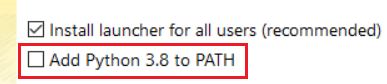
If you don’t have Python, download it here.Note: Make sure to select the option "Add python 3.X.X to PATH during python installation
Step 1: Make sure Python and pip are available
- On Windows, open the Start menu, type cmd and run Command Prompt.
- Type
python --versionandpip --version - If you see errors, Python may not be installed or not in your PATH.
See this guide for help.
Step 2: Install 2dcomboselector
In your Command Prompt or PowerShell, run:
pip install 2dcomboselector
This will automatically install all required libraries.
If you see errors, try:
python -m pip install 2dcomboselector
🔄 Update
To update to the newest version:
-
If you installed with the installer:
Download and run the latest installer from the Releases page. -
If you already have it installed with pip and want to upgrade to the latest version:
pip install --upgrade 2dcomboselector
Or, if pip isn’t in your PATH:
python -m pip install --upgrade 2dcomboselector
🚀 How to Launch
If you used the installer:
- Double-click the 2dcomboselector icon on your Desktop or Start Menu.
If you installed with pip:
- Open Command Prompt (or Terminal on Mac/Linux).
- Run:
combo-selector
If that doesn’t work, try:python -m combo-selector
ℹ️ Troubleshooting & Help
- If you see “command not found” or “not recognized as an internal or external command,”
make sure Python and pip are installed and added to your system PATH. - For additional help, see the FAQ or open an issue.
Thank you for using 2dcomboselector!
Feel free to suggest improvements or ask questions on our GitHub Discussions.
Release history Release notifications | RSS feed


Download files
Download the file for your platform. If you're not sure which to choose, learn more about installing packages.
Source Distribution
Built Distribution
Filter files by name, interpreter, ABI, and platform.
If you're not sure about the file name format, learn more about wheel file names.
Copy a direct link to the current filters
File details
Details for the file 2dcomboselector-0.2.1b0.tar.gz.
File metadata
- Download URL: 2dcomboselector-0.2.1b0.tar.gz
- Upload date:
- Size: 2.0 MB
- Tags: Source
- Uploaded using Trusted Publishing? No
- Uploaded via: twine/6.1.0 CPython/3.13.5
File hashes
| Algorithm | Hash digest | |
|---|---|---|
| SHA256 |
c6597cddfdc0e7c057685d50c9fd3eeb5f08f6d5937a2f2dd9181b2b8660ec3e
|
|
| MD5 |
ea7ebf517126b91877e0a8bf125479c5
|
|
| BLAKE2b-256 |
99f8816abc2597200ca342c712d2ef3faa0a6848e0f882c11a0ce49b16f0dca0
|
File details
Details for the file 2dcomboselector-0.2.1b0-py3-none-any.whl.
File metadata
- Download URL: 2dcomboselector-0.2.1b0-py3-none-any.whl
- Upload date:
- Size: 2.0 MB
- Tags: Python 3
- Uploaded using Trusted Publishing? No
- Uploaded via: twine/6.1.0 CPython/3.13.5
File hashes
| Algorithm | Hash digest | |
|---|---|---|
| SHA256 |
8e0ba507c2e7c7628a05fa10f7c007a06e9e776138430ecd0843231a80f02081
|
|
| MD5 |
7a7c154d15af9ce9b783f304b068be8e
|
|
| BLAKE2b-256 |
d81329c41fa0c44ec19f1cf12a602ac274a23d2834b38766b4b6f001865412f0
|






