
Freeway for network pentesting

Project description
Freeway for Network Pentesting
Read the article about Freeway, now on Medium
[!NOTE] User will not be prompted to accept EULA anymore!
Therefore, by downloading the software, user automatically agrees to follow every guideline specified in EULA section below.
1. Overview
Freeway is a Python scapy-based tool for WiFi penetration that aim to help ethical hackers and pentesters develop their skills and knowledge in auditing and securing home or enterprise networks.
2. Features
- IEEE 802.11 Packet Monitoring
- Deauthentication Attack
- Beacon Flood
- Packet Fuzzer
- Network Audit
- Channel Hopper
- Evil Twin
- Packet Crafter
Description of the features can be found in Section 6
3. Preparation
It is necessary to have:
- A network adapter supporting monitor mode and frame injection.
- An operating system running a Linux distribution.
- Python 3+ installed.
Optionally, install Scapy and Rich packages for Python if not installing via pip (see Section 4)
4. Setup
Option A: Install via PyPi (RECOMMENDED)
$ sudo pip install 3way
Option B: Install or run manually
First, clone the repository:
git clone https://github.com/FLOCK4H/Freeway
Navigate to the cloned repository:
cd Freeway
Option 1: Install dependencies, folders, and Freeway. (RECOMMENDED)
This will allow to launch the tool from anywhere
sudo pip install .
Option 2: Run without installation using Python.
Must be called from the /Freeway directory
sudo pip install scapy rich
sudo python Freeway
5. Usage
This tool comes with its own command line interface (CLI) and can be run without specifying any additional arguments.
Click to expand the CLI usage
sudo Freeway
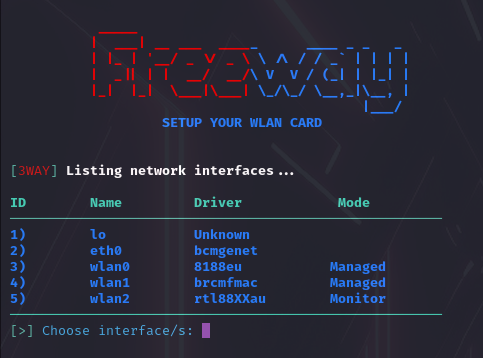
Follow the prompt to select the network adapter (see Section 3):
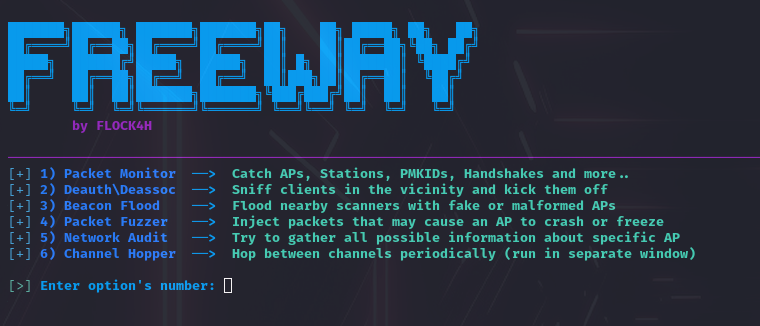
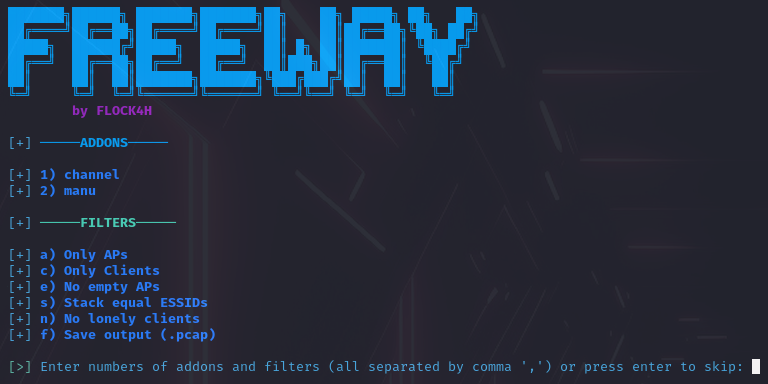
Select the feature and parameter(s):
And with the additional arguments, to skip the CLI partially or completely.
Click to expand the arguments usage
sudo Freeway -i wlan2 -a monitor -p 1,2,a
'-p' is not required with '-a', e.g., this will prompt for parameters to specify in the CLI:
sudo Freeway -i wlan2 -a deauth
All arguments, actions, and parameters:
  Arguments:
  -h, --help     Show the help message.

  -i, --inf      Specify the WLAN interface (e.g., wlan0, wlan1).

  -a, --action   Action number or alias (e.g., 1 or monitor).

  -p, --params   Parameter identifiers (e.g., 1,2,a or 3rtv, depends on action).

Actions:
1 or monitor,
2 or deauth,
3 or beacon_spam,
4 or fuzzer,
5 or audit,
6 or hopper,
7 or eviltwin
8 or packet_crafter
Parameters must be provided in the same format as in the CLI, specific for every action.
To list all parameters for a given action, just provide -a argument without -p.
6. Details
- Packet Monitor - Sniffs the WiFi packets in the air, analyze them and return the result onto the python's curses display. Catches SSIDs, MACs, Clients, Uptime, Channel, Signal (dBm), Encryption and resolves manufacturer. Catches PMKIDs in hashcat crackable format, and 4-way Handshakes, as well as other EAPOL packets. Logs the captured session to the /caps folder or every captured packet if Save output was selected.
- Deauthentication Attack (Deauthing) - Disconnects a device from the network by sending a packet containing AP1 address, device address (or broadcast for Mass Deauthing) and the deauthentication frame with a reason of kicking the client(s). In case where a device address is a broadcast address, the AP will in most cases disconnect all clients at once. Freeway creates separate thread for every AP or client found in order to make deauthing maximally efficient.
- Beacon Flood Attack - Floods the nearby WiFi scanners with fake or malformed APs. It can cause the devices looking for WiFi to behave abnormally (e.g. crash, freeze, drain the battery or run slower) and disrupt the nearby network traffic. User is able to specify his own ssid list, use the default one and generate correct (but random) or malformed beacon packets.
- Packet Fuzzer - Fuzzing is a technique of network vulnerability assesment by sending a wide array of malformed or semi-random data to network interfaces and observing the responses. Freeway covers: Replay captured packets (RX&TX2), Spam CTS/RTS or Probe requests and Flood an AP with Authentication or Association Frames. Devices that will capture fuzzed packets will behave differently depending on vulnerability level of receiver (!USE WITH CAUTION!).
- Network Audit - Gathers all possible information about specific network and returns them onto the curses view. Tracks all clients signal and last activity, as well as resolve the manufacturer.
- Channel Hopper - Changes the current channel of the network adapter. Helpful in making specific attacks more successful.
- Evil Twin - Hosts a legitimate Access Point with Captive Portal, this 'legitimate' AP asks user for login/ bank credentials, or to download malware. First, there's a normal AP created, most times with an ESSID and MAC of existing network. Then, we host our captive portal (e.g., login website), so a normal web server, that reroutes users to our
index.htmltrying to associate with the network we spoof. - Packet Crafter - Allows to construct proper .11 frames, modify them with custom values, and send in the air using multiple interfaces on a custom number of threads. Useful for quick packet delivery, educational activities, or threaded/ multi-node penetration. All encapsulated in a user-friendly interface with prompt-after-prompt typing.
1Access Points
2Transceive and receive at the same time
7. Uninstall
In case where Freeway doesn't meet the expectations and was installed via pip, the removal process is as easy:
sudo pip uninstall 3way
EULA
1) Users must strictly adhere to local legal guidelines
2) Users must not disrupt, introduce chaos, cause damage to others, or to other devices in any circumstances
3) Redistribution of this software must comply with MIT license standards
4) The author disclaims all liability for any damage caused by the use of this software
5) In the event of an investigation, the author will not provide assistance to any parties
Remember, the purpose of Freeway is to identify vulnerabilities, not to exploit them!
TODO
✅ Evil Twin attack
✅ Version & update checker
✅ PyPi Release
✅ Packet Crafter
Changelog
19.05
- Fixed rare RuntimeError in deauth.py caused by iterating on dynamicly changing size dictionary
- Further improvements of beacon packet formatting in beacon_spam.py
27.05
- Added
updater.py- Added
evil_twin.py- Added
/templatesfolder- Added Evil Twin to actions list
- Updated README.md
- PyPi Release
3.06
- Added
git_downloader.py- Updated
beacon_spam- Updated
evil_twin
27.06
- Removed
EULAfrom script- Added
EULAtoREADME.md- Added
pkt_crafter.py- Modified
Freewayscript
Known Issues
- Android filters out fake beacon frames (works for Android 5, doesn't on Android 11+, versions below Android 11 and above Android 5 were not tested.)
- EvilTwin needs a second adapter connected to the internet (not really an issue), to be able to reroute traffic
Legal Note
[!IMPORTANT] Any malicious use of such features should be considered a crime,
always assert permission to perform the penetration testing.
License
The distribution of Freeway is regulated by the standard MIT license, users can feel free to use, share and contribute to the repository or report bugs.


Download files
Download the file for your platform. If you're not sure which to choose, learn more about installing packages.
Source Distribution
Built Distribution
Filter files by name, interpreter, ABI, and platform.
If you're not sure about the file name format, learn more about wheel file names.
Copy a direct link to the current filters
File details
Details for the file 3way-1.4.0.tar.gz.
File metadata
- Download URL: 3way-1.4.0.tar.gz
- Upload date:
- Size: 93.0 kB
- Tags: Source
- Uploaded using Trusted Publishing? No
- Uploaded via: twine/5.1.0 CPython/3.11.9
File hashes
| Algorithm | Hash digest | |
|---|---|---|
| SHA256 |
ebe0310c28ed78a15443f777cceff8cce1677c119c547e2e97635cef22b38582
|
|
| MD5 |
13bb6116c14a6a29aa9d72dd5c77a770
|
|
| BLAKE2b-256 |
b8ee79faa31afb80cc14611d0e8a2f00e60a490cc44e44f96e0dfd4ce47d57e1
|
File details
Details for the file 3way-1.4.0-py3-none-any.whl.
File metadata
- Download URL: 3way-1.4.0-py3-none-any.whl
- Upload date:
- Size: 48.5 kB
- Tags: Python 3
- Uploaded using Trusted Publishing? No
- Uploaded via: twine/5.1.0 CPython/3.11.9
File hashes
| Algorithm | Hash digest | |
|---|---|---|
| SHA256 |
3cae192707a486fb04ad5856899ce05e616500ed2d7af06fef846c7c771329d4
|
|
| MD5 |
cf76fd6dd4d50bb430bf4cf46bbc0423
|
|
| BLAKE2b-256 |
9284fc58de4435837ce8bd7db98de0244b06f7fcc0149d9978d703cad67c2492
|






