
Reproducible, structure-guided sketch-to-image exploration for designers
Verified details
These details have been verified by PyPIProject links
GitHub Statistics
Maintainers

Project description
AIsketcher


Turn one sketch into a traceable family of design directions.
AIsketcher is a model-agnostic Python SDK for structure-guided visual exploration. It prepares a sketch, explores several seeded candidates, records the direction you pick, creates controlled variations, and exports a replayable manifest. It is designed for product designers, graphic designers, and sketchers who need more than a one-off image.

Pocket Kingdom hero concept · marketing artwork, not an SDK execution claim · select to inspect the real local source, scout, variations, and replay evidence
Documentation · 한국어 빠른 시작 · PyPI · Migration from 0.0.x
Why AIsketcher
- Prepare with evidence: normalize orientation and size, generate a control image, and inspect actionable structure diagnostics before spending GPU time.
- Explore deliberately: create 1, 4, or 8 candidates with an explicit seed plan instead of repeatedly changing an undocumented seed.
- Pick and vary: preserve the selected parent and make subtle, balanced, or bold variations while recording how the active backend applied each constraint.
- Replay the handoff: export inputs, controls, recipes, seeds, lineage, hashes, and runtime information as a portable study.
- Bring your backend: use the Diffusers adapter or implement the small backend protocol for another local or hosted image model.
Install
AIsketcher 0.3.0 is published on
PyPI. The product name is
AIsketcher, but the install identifier, Python import, and CLI are all
lowercase aisketcher:
pip install aisketcher
Pin the public release when you need a reproducible install:
python -m pip install "aisketcher==0.3.0"
The lightweight SDK does not install Torch, Diffusers, model weights, or the
Gradio runtime. Studio code and its Guided Sample are packaged; the demo
extra adds the runtime needed to launch the UI.
For development from this repository:
python -m pip install -e ".[dev]"
Install optional local generation or the Studio separately:
python -m pip install "aisketcher[demo]==0.3.0"
python -m pip install "aisketcher[local,demo]==0.3.0"
The complete model-free first run is one line:
python -m pip install "aisketcher[demo]==0.3.0" && aisketcher init && aisketcher studio
Model downloads happen only after you explicitly choose a local preset. Guided
Sample mode does not require a model or network connection: this repository
includes a reviewed four-direction fixture with matching hashes and a real
aisketcher.manifest/v1 manifest.
For a new live study, Auto selects the T4-validated
flux2-klein-edit@1 preset. FLUX.2 Klein is the recommended default for
sketch-to-design and photo-led edits; the SDXL Canny presets remain available
only for legacy manifest replay or intentional edge-conditioned work. Preparing
a model shows the pinned revisions, transfer size, cache destination, licenses,
and the pinned Korean→English helper before any download. The helper is
MIT-licensed facebook/m2m100_418M, pinned to revision
55c2e61bbf05dfb8d7abccdc3fae6fc8512fd636, and adds about 1.9 GB when it is
not cached. The same confirmation prepares both the selected model and that
helper when either is missing. It also verifies every cached image-model
runtime file — weights, configuration, schedulers, indexes, and tokenizers —
against its reviewed size and SHA-256 once per Studio process before the
backend can load it. A new process may initially label existing files
“Not yet verified”; on the validated T4, checking the 16.2 GB FLUX cache can
take up to about one minute without downloading it.
Guided Sample works on CPU. The supported interactive FLUX.2 path requires CUDA; Apple Silicon MPS remains experimental for the legacy SDXL backend only. Live CPU generation is disabled. Use Stop instead of refreshing while a download or generation is active. Studio reconnects the same browser session to work that is still running, and exposes a recovery layer when the temporary server itself has ended.
For Korean briefs, Studio preserves the exact source text, protects recognized visual-design terms with a deterministic glossary, and then prepares separate model-facing English with the pinned helper. The original, prepared English, helper ID, and immutable revision are recorded as prompt provenance; this normalization improves terminology consistency but is not a promise that every Korean phrase will translate perfectly.
PyPI renders this README from the metadata embedded in each immutable release
artifact. Publishing the tagged v0.3.0 GitHub Release builds and publishes
that artifact automatically; editing main, this README, or an existing
GitHub Release does not rewrite an already-published PyPI page.
Studio
The packaged Gradio Studio is the fastest way to understand the workflow. This is the actual English Simple view with the bundled v0.3 Guided Sample open:
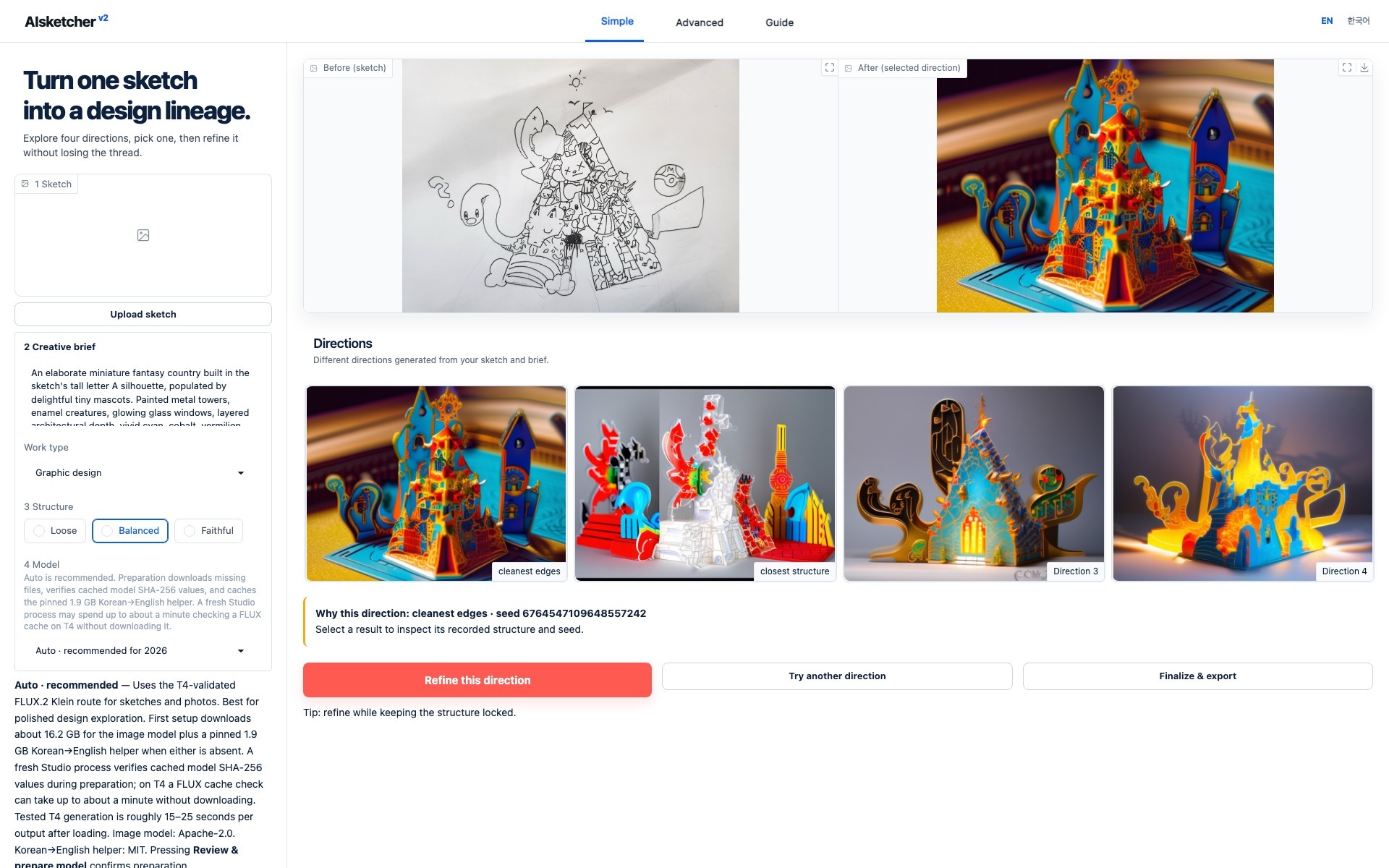
Actual local Studio · HPO-selected historical seed 6764547109648557242 · pinned legacy sdxl-canny-lite@1 provenance · select the image to open it full size
The bundled, privacy-reviewed HPO hero fixture supplies the visible prompt,
profile, structure controls, and fixed selected seed
6764547109648557242. Twelve new candidates were reviewed in four bounded
rounds before this direction was selected. It opens without model weights,
network access, or an image upload. Pocket Kingdom remains a separate
documentation-only canonical lineage example.
- Simple asks for a sketch, a one-sentence brief, a work type, a Loose/Balanced/Faithful structure choice, and an explained model choice. Auto is the recommended FLUX.2 default.
- Advanced exposes model, Canny, generation, seed, variation, export, and replay controls without discarding the Simple session.
Launch it after installing the demo extra:
aisketcher init  # First run only; omit when settings already exist.
aisketcher studio
Start with Guided Sample when no model is installed. It is read-only: selecting Refine this direction opens a model-preparation layer instead of an error, while Keep exploring the sample closes the layer without changing the fixture. See the Studio guide and configuration reference for Advanced controls, local-only defaults, versioned YAML, and project overrides.
Python workflow
from aisketcher import FakeBackend, Intent, PresetManager, SeedPlan, Studio

preset = "flux2-klein-edit@1"
models = PresetManager()
plan = models.plan_install(preset)
print(plan.license_notice, plan.estimated_bytes, plan.download_bytes, plan.items)

# Run this only after reviewing the repositories, revisions, size, and licenses.
if not plan.installed:
    models.install(preset, confirm=True)

studio = Studio.from_preset(preset, device="auto", preset_manager=models)
prepared = studio.prepare("sketch.jpg")

study = studio.explore(
    prepared,
    intent=Intent(
        prompt="A playful paper-cut fantasy kingdom",
        profile="graphic_design",
        structure="balanced",
    ),
    outputs=4,
    seed_plan=SeedPlan.scout(4),
)

choice = study.pick(1)  # Stable zero-based index: the second candidate.
variants = studio.vary(
    choice,
    outputs=4,
    strength="subtle",
    locks=("structure",),
)

variants.export("pocket-kingdom-run")
report = studio.replay(
    "pocket-kingdom-run/manifest.json",
    mode="strict",
)
FLUX.2 Klein has no native numeric denoise-strength argument. AIsketcher maps
subtle, balanced, and bold to versioned, deterministic edit instructions
and records that approximation in candidate metadata; structure locks are
included explicitly. Legacy SDXL backends continue to use their native
image-to-image strength path.
For a network- and model-free workflow test, use
Studio(FakeBackend(), preset="sdxl-canny-lite@1"). Its images are deterministic
fixtures for code and CI, not model-generated creative results.
The exported manifest contains the resolved recipe and actual seeds. Built-in exports re-encode images without EXIF, omit source filenames, and allowlist backend metadata. Do not put secrets or private paths in prompts, profiles, or custom backend identifiers. See the complete SDK workflow and privacy model.
Canonical example
Pocket Kingdom is the canonical source → control → scout four → pick → vary four → final → export example. Its anonymized source, exact prepared input,
Canny control, four real local SDXL directions, four structure-locked
variations, human selections, seeds, lineage, technical scores, and hashes are
checked in with replayable manifests. The manual presents the final result
alongside every alternative instead of substituting private reference art.
Artwork is not licensed under MIT. Read the artwork notice before using any image from this repository.
Compatibility
Version 0.3.0 completes the announced removal of the uppercase
AIsketcher.img2img facade and aisketcher.modelPipe. Use the lowercase
aisketcher package and the prepare → explore → pick → vary → export → replay
workflow. Cloud translation and credential arguments remain removed; Korean
prompt preparation now uses the explicit, pinned local helper described above.
Development
python -m pip install -e ".[dev,docs]"
python -m pytest tests/core tests/docs
python -m pytest tests/app tests/test_config.py tests/test_cli.py
mkdocs build --strict
python -m build
python -m twine check dist/*
Network and GPU tests are opt-in. Normal CI uses a deterministic fake backend and never downloads model weights.
License
Source code and documentation text are licensed under the MIT License. Images, drawings, generated derivatives, and other artwork are excluded; see the artwork notice.
Project details
Verified details
These details have been verified by PyPIProject links
GitHub Statistics
Maintainers


Download files
Download the file for your platform. If you're not sure which to choose, learn more about installing packages.
Source Distribution
Built Distribution
Filter files by name, interpreter, ABI, and platform.
If you're not sure about the file name format, learn more about wheel file names.
Copy a direct link to the current filters
File details
Details for the file aisketcher-0.3.0.tar.gz.
File metadata
- Download URL: aisketcher-0.3.0.tar.gz
- Upload date:
- Size: 3.6 MB
- Tags: Source
- Uploaded using Trusted Publishing? Yes
- Uploaded via: twine/6.1.0 CPython/3.13.14
File hashes
| Algorithm | Hash digest | |
|---|---|---|
| SHA256 |
26ea7dfc867c8b452adf7962d6b3aff5659888707ca4aa4c5c913cddf24d9e21
|
|
| MD5 |
4d73293b37b83359129411ca2b6090cd
|
|
| BLAKE2b-256 |
211ee9b60e9f10166ed105326a1a0fd5bb89aca4e0391c026f10ee3c2a088532
|
Provenance
The following attestation bundles were made for aisketcher-0.3.0.tar.gz:
Publisher:
publish-pypi.yml on hyeonsangjeon/AIsketcher
-
Statement:
-
Statement type:
https://in-toto.io/Statement/v1 -
Predicate type:
https://docs.pypi.org/attestations/publish/v1 -
Subject name:
aisketcher-0.3.0.tar.gz -
Subject digest:
26ea7dfc867c8b452adf7962d6b3aff5659888707ca4aa4c5c913cddf24d9e21 - Sigstore transparency entry: 2232463832
- Sigstore integration time:
-
Permalink:
hyeonsangjeon/AIsketcher@5af7ed8aaedc0ad523687af0715f65f16d309773 -
Branch / Tag:
refs/tags/v0.3.0 - Owner: https://github.com/hyeonsangjeon
-
Access:
public
-
Token Issuer:
https://token.actions.githubusercontent.com -
Runner Environment:
github-hosted -
Publication workflow:
publish-pypi.yml@5af7ed8aaedc0ad523687af0715f65f16d309773 -
Trigger Event:
release
-
Statement type:
File details
Details for the file aisketcher-0.3.0-py3-none-any.whl.
File metadata
- Download URL: aisketcher-0.3.0-py3-none-any.whl
- Upload date:
- Size: 3.6 MB
- Tags: Python 3
- Uploaded using Trusted Publishing? Yes
- Uploaded via: twine/6.1.0 CPython/3.13.14
File hashes
| Algorithm | Hash digest | |
|---|---|---|
| SHA256 |
cb0c678f093593e1637e6482f8708105b8f0507759276d0f4e9cf1946586c4d8
|
|
| MD5 |
ce356b32e1d7341ee9ff3364e87c8c34
|
|
| BLAKE2b-256 |
e48956fbb590b62ee6eec28754cd2cc959f93caac7150638b1f594303fcb5d98
|
Provenance
The following attestation bundles were made for aisketcher-0.3.0-py3-none-any.whl:
Publisher:
publish-pypi.yml on hyeonsangjeon/AIsketcher
-
Statement:
-
Statement type:
https://in-toto.io/Statement/v1 -
Predicate type:
https://docs.pypi.org/attestations/publish/v1 -
Subject name:
aisketcher-0.3.0-py3-none-any.whl -
Subject digest:
cb0c678f093593e1637e6482f8708105b8f0507759276d0f4e9cf1946586c4d8 - Sigstore transparency entry: 2232464868
- Sigstore integration time:
-
Permalink:
hyeonsangjeon/AIsketcher@5af7ed8aaedc0ad523687af0715f65f16d309773 -
Branch / Tag:
refs/tags/v0.3.0 - Owner: https://github.com/hyeonsangjeon
-
Access:
public
-
Token Issuer:
https://token.actions.githubusercontent.com -
Runner Environment:
github-hosted -
Publication workflow:
publish-pypi.yml@5af7ed8aaedc0ad523687af0715f65f16d309773 -
Trigger Event:
release
-
Statement type:






