
APIFlask


APIFlask is a lightweight Python web API framework based on Flask. It's easy to use, highly customizable, ORM/ODM-agnostic, and 100% compatible with the Flask ecosystem.
APIFlask supports both marshmallow schemas and Pydantic models through a pluggable schema adapter system, giving you the flexibility to choose the validation approach that best fits your project.
With APIFlask, you will have:
- More sugars for view function (
@app.input(),@app.output(),@app.get(),@app.post()and more) - Automatic request validation and deserialization
- Automatic response formatting and serialization
- Automatic OpenAPI Specification (OAS, formerly Swagger Specification) document generation
- Automatic interactive API documentation
- API authentication support (with Flask-HTTPAuth)
- Automatic JSON response for HTTP errors
Requirements
- Python 3.9+
- Flask 2.1+
Installation
For Linux and macOS:
$ pip3 install apiflask
For Windows:
> pip install apiflask
Links
- Website: https://apiflask.com
- Documentation: https://apiflask.com/docs
- 中文文档: https://zh.apiflask.com/docs
- PyPI Releases: https://pypi.python.org/pypi/APIFlask
- Change Log: https://apiflask.com/changelog
- Source Code: https://github.com/apiflask/apiflask
- Issue Tracker: https://github.com/apiflask/apiflask/issues
- Discussion: https://github.com/apiflask/apiflask/discussions
- 中文论坛: https://codekitchen.community
- Twitter: https://twitter.com/apiflask
- Open Collective: https://opencollective.com/apiflask
Donate
If you find APIFlask useful, please consider donating today. Your donation keeps APIFlask maintained and evolving.
Thank you to all our backers and sponsors!
Backers

Sponsors

Example
from apiflask import APIFlask, Schema, abort
from apiflask.fields import Integer, String
from apiflask.validators import Length, OneOf

app = APIFlask(__name__)

pets = [
    {'id': 0, 'name': 'Kitty', 'category': 'cat'},
    {'id': 1, 'name': 'Coco', 'category': 'dog'}
]


class PetIn(Schema):
    name = String(required=True, validate=Length(0, 10))
    category = String(required=True, validate=OneOf(['dog', 'cat']))


class PetOut(Schema):
    id = Integer()
    name = String()
    category = String()


@app.get('/')
def say_hello():
    # returning a dict or list equals to use jsonify()
    return {'message': 'Hello!'}


@app.get('/pets/<int:pet_id>')
@app.output(PetOut)
def get_pet(pet_id):
    if pet_id > len(pets) - 1:
        abort(404)
    # you can also return an ORM/ODM model class instance directly
    # APIFlask will serialize the object into JSON format
    return pets[pet_id]


@app.patch('/pets/<int:pet_id>')
@app.input(PetIn(partial=True))  # -> json_data
@app.output(PetOut)
def update_pet(pet_id, json_data):
    # the validated and parsed input data will
    # be injected into the view function as a dict
    if pet_id > len(pets) - 1:
        abort(404)
    for attr, value in json_data.items():
        pets[pet_id][attr] = value
    return pets[pet_id]
You can use Pydantic models for type-hint based validation
from enum import Enum

from apiflask import APIFlask, abort
from pydantic import BaseModel, Field

app = APIFlask(__name__)


class PetCategory(str, Enum):
    DOG = 'dog'
    CAT = 'cat'


class PetOut(BaseModel):
    id: int
    name: str
    category: PetCategory


class PetIn(BaseModel):
    name: str = Field(min_length=1, max_length=50)
    category: PetCategory


pets = [
    {'id': 0, 'name': 'Kitty', 'category': 'cat'},
    {'id': 1, 'name': 'Coco', 'category': 'dog'}
]


@app.get('/')
def say_hello():
    return {'message': 'Hello, Pydantic!'}


@app.get('/pets')
@app.output(list[PetOut])
def get_pets():
    return pets


@app.get('/pets/<int:pet_id>')
@app.output(PetOut)
def get_pet(pet_id: int):
    if pet_id > len(pets) or pet_id < 1:
        abort(404)
    return pets[pet_id - 1]


@app.post('/pets')
@app.input(PetIn, location='json')
@app.output(PetOut, status_code=201)
def create_pet(json_data: PetIn):
    # the validated and parsed input data will
    # be injected into the view function as a Pydantic model instance
    new_id = len(pets) + 1
    new_pet = PetOut(id=new_id, name=json_data.name, category=json_data.category)
    pets.append(new_pet)
    return new_pet
Or use async def
$ pip install -U "apiflask[async]"
import asyncio

from apiflask import APIFlask

app = APIFlask(__name__)


@app.get('/')
async def say_hello():
    await asyncio.sleep(1)
    return {'message': 'Hello!'}
See Using async and await for the details of the async support in Flask 2.0.
Save this as app.py, then run it with:
$ flask run --debug
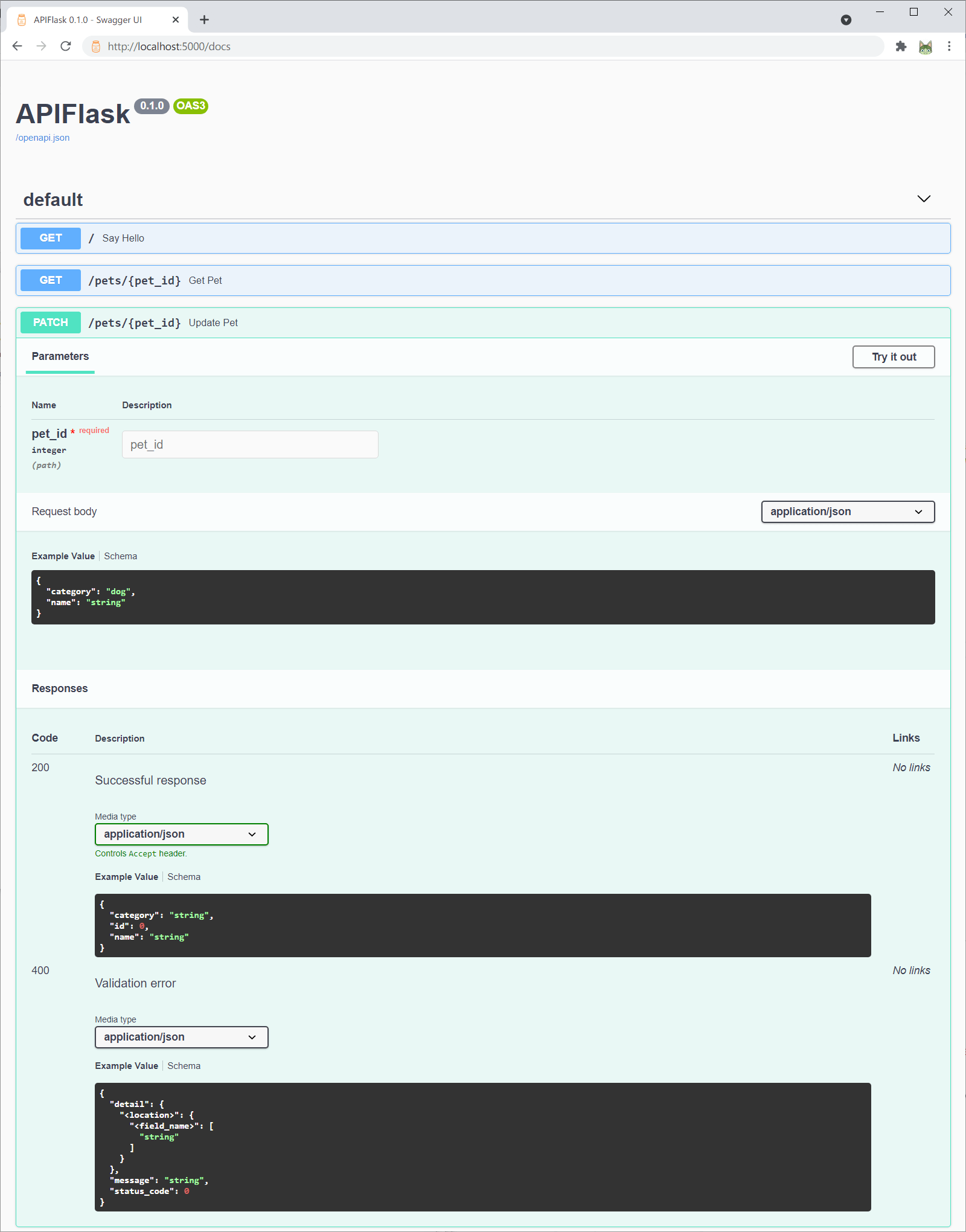
Now visit the interactive API documentation (Swagger UI) at http://localhost:5000/docs:
Or you can change the API documentation UI when creating the APIFlask instance with the docs_ui parameter:
app = APIFlask(__name__, docs_ui='redoc')
Now http://localhost:5000/docs will render the API documentation with Redoc.
Supported docs_ui values (UI libraries) include:
swagger-ui(default value): Swagger UIredoc: Redocelements: Elementsrapidoc: RapiDocrapipdf: RapiPDF
The auto-generated OpenAPI spec file is available at http://localhost:5000/openapi.json. You can also get the spec with the flask spec command:
$ flask spec
For some complete examples, see /examples.
Relationship with Flask
APIFlask is a thin wrapper on top of Flask. You only need to remember the following differences (see Migrating from Flask for more details):
- When creating an application instance, use
APIFlaskinstead ofFlask. - When creating a blueprint instance, use
APIBlueprintinstead ofBlueprint. - The
abort()function from APIFlask (apiflask.abort) returns JSON error response.
For a minimal Flask application:
from flask import Flask, request
from markupsafe import escape

app = Flask(__name__)

@app.route('/')
def hello():
    name = request.args.get('name', 'Human')
    return f'Hello, {escape(name)}'
Now change to APIFlask:
from apiflask import APIFlask  # step one
from flask import request
from markupsafe import escape

app = APIFlask(__name__)  # step two

@app.route('/')
def hello():
    name = request.args.get('name', 'Human')
    return f'Hello, {escape(name)}'
In a word, to make Web API development in Flask more easily, APIFlask provides APIFlask and APIBlueprint to extend Flask's Flask and Blueprint objects and it also ships with some helpful utilities. Other than that, you are actually using Flask.
Credits
APIFlask starts as a fork of APIFairy and is inspired by flask-smorest and FastAPI (see Comparison and Motivations for the comparison between these projects).


Release files for APIFlask 3.1.2
For a detailed explanation of source distributions (sdists) and built distributions (wheels), please see the package formats documentation.
Source distribution (sdist)
| File | Size | Uploaded | Provenance | |
|---|---|---|---|---|
| apiflask-3.1.2.tar.gz | 117.7 kB | With provenance | Details |
Built distribution (wheel)
| File | Interpreter | ABI | Platform | Reset |
|---|---|---|---|---|
| apiflask-3.1.2-py3-none-any.whl | Python 3 | none | any | Details |
Total release size: 177.2 kB
Release files / apiflask-3.1.2.tar.gz
| Download URL | apiflask-3.1.2.tar.gz |
|---|---|
| Size | 117.7 kB |
| Tags | Source |
|
SHA-256 checksum How to use checksums |
9e19b554631a518a637c8a77887be37f37d46aeeee3d4a863bc4f6f0128bde23
|
|
BLAKE2b-256 checksum How to use checksums |
76ab7619cec867fccd142db7d175e69bb48749079124fe14d8961fde2a9559ae
|
| Upload date | |
|
Uploaded using Trusted Publishing? What is trusted publishing? |
Yes |
| Uploaded via |
twine/7.0.0 CPython/3.13.14
|
Provenance
Provenance describes where a file came from. On PyPI, provenance is shared via attestations, which provide a verifiable record of the build or publishing details. View details, limitations and caveats.


PyPI Publish Attestation
PyPI verified that this artifact, at this checksum, originated from the publisher listed below.
Signed by GitHub Actions, verified by PyPI on Sep 12, 2026.
Transparency logRelease files / apiflask-3.1.2-py3-none-any.whl
| Download URL | apiflask-3.1.2-py3-none-any.whl |
|---|---|
| Size | 59.5 kB |
| Tags | Python 3 |
|
SHA-256 checksum How to use checksums |
cab72013153602f475236c0dfbe13815fc94ee5fcd78c8b8d5ecdfddba17df4c
|
|
BLAKE2b-256 checksum How to use checksums |
95a84df71070ca5db0681c1f0a3ee8af91fbeeaf6929247978dcee8e5be1cd62
|
| Upload date | |
|
Uploaded using Trusted Publishing? What is trusted publishing? |
Yes |
| Uploaded via |
twine/7.0.0 CPython/3.13.14
|
Provenance
Provenance describes where a file came from. On PyPI, provenance is shared via attestations, which provide a verifiable record of the build or publishing details. View details, limitations and caveats.
PyPI Publish Attestation
PyPI verified that this artifact, at this checksum, originated from the publisher listed below.
Signed by GitHub Actions, verified by PyPI on Sep 12, 2026.
Transparency logSecurity for APIFlask 3.1.2
Provenance
Provenance describes where a file came from. On PyPI, provenance is shared via attestations, which provide a verifiable record of the build or publishing details. View details, limitations and caveats.
Full provenance
All 2 files in this release have been uploaded with provenance metadata.
Attestation for apiflask-3.1.2.tar.gz
PyPI Publish Attestation
PyPI verified that this artifact, at this checksum, originated from the publisher listed below.
Signed by GitHub Actions, verified by PyPI on Sep 12, 2026.
Transparency logA note on package security
PyPI is a repository for distributing packages, not a service for auditing them. While third-party security researchers and our staff do their best to detect and remove malicious packages, PyPI cannot guarantee the quality, security or suitability of any given package.














