
APIFlask


APIFlask is a lightweight Python web API framework based on Flask. It's easy to use, highly customizable, ORM/ODM-agnostic, and 100% compatible with the Flask ecosystem.
APIFlask supports both marshmallow schemas and Pydantic models through a pluggable schema adapter system, giving you the flexibility to choose the validation approach that best fits your project.
With APIFlask, you will have:
- More sugars for view function (
@app.input(),@app.output(),@app.get(),@app.post()and more) - Automatic request validation and deserialization
- Automatic response formatting and serialization
- Automatic OpenAPI Specification (OAS, formerly Swagger Specification) document generation
- Automatic interactive API documentation
- API authentication support (with Flask-HTTPAuth)
- Automatic JSON response for HTTP errors
Requirements
- Python 3.9+
- Flask 2.1+
Installation
For Linux and macOS:
$ pip3 install apiflask
For Windows:
> pip install apiflask
Links
- Website: https://apiflask.com
- Documentation: https://apiflask.com/docs
- 中文文档: https://zh.apiflask.com/docs
- PyPI Releases: https://pypi.python.org/pypi/APIFlask
- Change Log: https://apiflask.com/changelog
- Source Code: https://github.com/apiflask/apiflask
- Issue Tracker: https://github.com/apiflask/apiflask/issues
- Discussion: https://github.com/apiflask/apiflask/discussions
- 中文论坛: https://codekitchen.community
- Twitter: https://twitter.com/apiflask
- Open Collective: https://opencollective.com/apiflask
Donate
If you find APIFlask useful, please consider donating today. Your donation keeps APIFlask maintained and evolving.
Thank you to all our backers and sponsors!
Backers

Sponsors

Example
from apiflask import APIFlask, Schema, abort
from apiflask.fields import Integer, String
from apiflask.validators import Length, OneOf

app = APIFlask(__name__)

pets = [
    {'id': 0, 'name': 'Kitty', 'category': 'cat'},
    {'id': 1, 'name': 'Coco', 'category': 'dog'}
]


class PetIn(Schema):
    name = String(required=True, validate=Length(0, 10))
    category = String(required=True, validate=OneOf(['dog', 'cat']))


class PetOut(Schema):
    id = Integer()
    name = String()
    category = String()


@app.get('/')
def say_hello():
    # returning a dict or list equals to use jsonify()
    return {'message': 'Hello!'}


@app.get('/pets/<int:pet_id>')
@app.output(PetOut)
def get_pet(pet_id):
    if pet_id > len(pets) - 1:
        abort(404)
    # you can also return an ORM/ODM model class instance directly
    # APIFlask will serialize the object into JSON format
    return pets[pet_id]


@app.patch('/pets/<int:pet_id>')
@app.input(PetIn(partial=True))  # -> json_data
@app.output(PetOut)
def update_pet(pet_id, json_data):
    # the validated and parsed input data will
    # be injected into the view function as a dict
    if pet_id > len(pets) - 1:
        abort(404)
    for attr, value in json_data.items():
        pets[pet_id][attr] = value
    return pets[pet_id]
You can use Pydantic models for type-hint based validation
from enum import Enum

from apiflask import APIFlask, abort
from pydantic import BaseModel, Field

app = APIFlask(__name__)


class PetCategory(str, Enum):
    DOG = 'dog'
    CAT = 'cat'


class PetOut(BaseModel):
    id: int
    name: str
    category: PetCategory


class PetIn(BaseModel):
    name: str = Field(min_length=1, max_length=50)
    category: PetCategory


pets = [
    {'id': 0, 'name': 'Kitty', 'category': 'cat'},
    {'id': 1, 'name': 'Coco', 'category': 'dog'}
]


@app.get('/')
def say_hello():
    return {'message': 'Hello, Pydantic!'}


@app.get('/pets')
@app.output(list[PetOut])
def get_pets():
    return pets


@app.get('/pets/<int:pet_id>')
@app.output(PetOut)
def get_pet(pet_id: int):
    if pet_id > len(pets) or pet_id < 1:
        abort(404)
    return pets[pet_id - 1]


@app.post('/pets')
@app.input(PetIn, location='json')
@app.output(PetOut, status_code=201)
def create_pet(json_data: PetIn):
    # the validated and parsed input data will
    # be injected into the view function as a Pydantic model instance
    new_id = len(pets) + 1
    new_pet = PetOut(id=new_id, name=json_data.name, category=json_data.category)
    pets.append(new_pet)
    return new_pet
Or use async def
$ pip install -U "apiflask[async]"
import asyncio

from apiflask import APIFlask

app = APIFlask(__name__)


@app.get('/')
async def say_hello():
    await asyncio.sleep(1)
    return {'message': 'Hello!'}
See Using async and await for the details of the async support in Flask 2.0.
Save this as app.py, then run it with:
$ flask run --debug
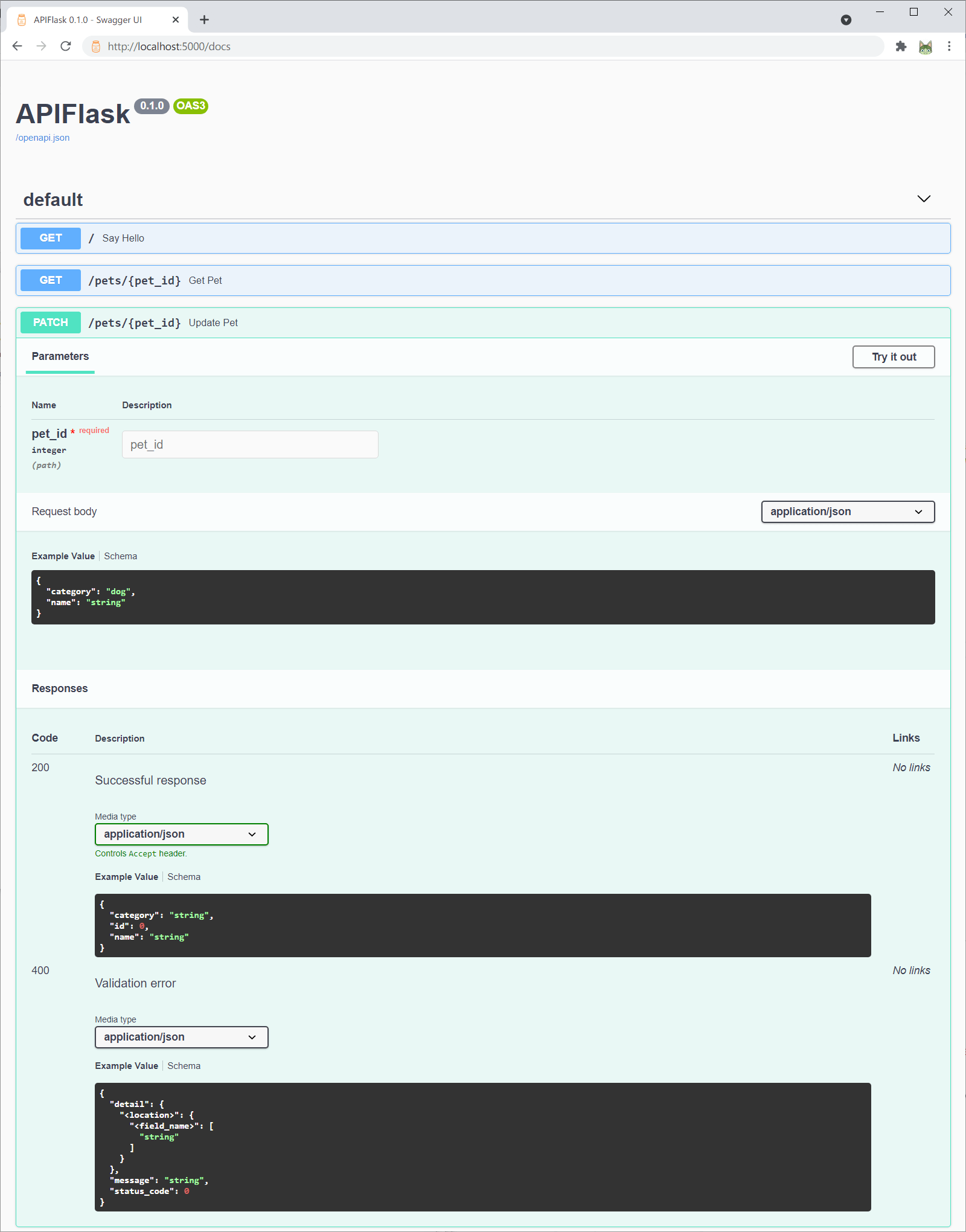
Now visit the interactive API documentation (Swagger UI) at http://localhost:5000/docs:
Or you can change the API documentation UI when creating the APIFlask instance with the docs_ui parameter:
app = APIFlask(__name__, docs_ui='redoc')
Now http://localhost:5000/docs will render the API documentation with Redoc.
Supported docs_ui values (UI libraries) include:
swagger-ui(default value): Swagger UIredoc: Redocelements: Elementsrapidoc: RapiDocrapipdf: RapiPDF
The auto-generated OpenAPI spec file is available at http://localhost:5000/openapi.json. You can also get the spec with the flask spec command:
$ flask spec
For some complete examples, see /examples.
Relationship with Flask
APIFlask is a thin wrapper on top of Flask. You only need to remember the following differences (see Migrating from Flask for more details):
- When creating an application instance, use
APIFlaskinstead ofFlask. - When creating a blueprint instance, use
APIBlueprintinstead ofBlueprint. - The
abort()function from APIFlask (apiflask.abort) returns JSON error response.
For a minimal Flask application:
from flask import Flask, request
from markupsafe import escape

app = Flask(__name__)

@app.route('/')
def hello():
    name = request.args.get('name', 'Human')
    return f'Hello, {escape(name)}'
Now change to APIFlask:
from apiflask import APIFlask  # step one
from flask import request
from markupsafe import escape

app = APIFlask(__name__)  # step two

@app.route('/')
def hello():
    name = request.args.get('name', 'Human')
    return f'Hello, {escape(name)}'
In a word, to make Web API development in Flask more easily, APIFlask provides APIFlask and APIBlueprint to extend Flask's Flask and Blueprint objects and it also ships with some helpful utilities. Other than that, you are actually using Flask.
Credits
APIFlask starts as a fork of APIFairy and is inspired by flask-smorest and FastAPI (see Comparison and Motivations for the comparison between these projects).


Download files
Download the file for your platform. If you're not sure which to choose, learn more about installing packages.
Source Distribution
Built Distribution
Filter files by name, interpreter, ABI, and platform.
If you're not sure about the file name format, learn more about wheel file names.
Copy a direct link to the current filters
File details
Details for the file apiflask-3.1.2.tar.gz.
File metadata
- Download URL: apiflask-3.1.2.tar.gz
- Upload date:
- Size: 117.7 kB
- Tags: Source
- Uploaded using Trusted Publishing? Yes
- Uploaded via:
twine/7.0.0 CPython/3.13.14
File hashes
| Algorithm | Hash digest | |
|---|---|---|
| SHA256 |
9e19b554631a518a637c8a77887be37f37d46aeeee3d4a863bc4f6f0128bde23
|
|
| MD5 |
37ab7af7e4fdc8910affd0b426bf09af
|
|
| BLAKE2b-256 |
76ab7619cec867fccd142db7d175e69bb48749079124fe14d8961fde2a9559ae
|
Provenance
The following attestation bundles were made for apiflask-3.1.2.tar.gz:
Publisher:
release.yml on apiflask/apiflask
-
Statement:
-
Statement type:
https://in-toto.io/Statement/v1 -
Predicate type:
https://docs.pypi.org/attestations/publish/v1 -
Subject name:
apiflask-3.1.2.tar.gz -
Subject digest:
9e19b554631a518a637c8a77887be37f37d46aeeee3d4a863bc4f6f0128bde23 - Sigstore transparency entry: 2808576355
- Sigstore integration time:
-
Permalink:
apiflask/apiflask@e67e816b7ffd2450bf5d579909cfa48bcbbc14be -
Branch / Tag:
refs/tags/3.1.2 - Owner: https://github.com/apiflask
-
Access:
public
-
Token Issuer:
https://token.actions.githubusercontent.com -
Runner Environment:
github-hosted -
Publication workflow:
release.yml@e67e816b7ffd2450bf5d579909cfa48bcbbc14be -
Trigger Event:
push
-
Statement type:
File details
Details for the file apiflask-3.1.2-py3-none-any.whl.
File metadata
- Download URL: apiflask-3.1.2-py3-none-any.whl
- Upload date:
- Size: 59.5 kB
- Tags: Python 3
- Uploaded using Trusted Publishing? Yes
- Uploaded via:
twine/7.0.0 CPython/3.13.14
File hashes
| Algorithm | Hash digest | |
|---|---|---|
| SHA256 |
cab72013153602f475236c0dfbe13815fc94ee5fcd78c8b8d5ecdfddba17df4c
|
|
| MD5 |
cbec98b384b7129d74d8703e251a8a62
|
|
| BLAKE2b-256 |
95a84df71070ca5db0681c1f0a3ee8af91fbeeaf6929247978dcee8e5be1cd62
|
Provenance
The following attestation bundles were made for apiflask-3.1.2-py3-none-any.whl:
Publisher:
release.yml on apiflask/apiflask
-
Statement:
-
Statement type:
https://in-toto.io/Statement/v1 -
Predicate type:
https://docs.pypi.org/attestations/publish/v1 -
Subject name:
apiflask-3.1.2-py3-none-any.whl -
Subject digest:
cab72013153602f475236c0dfbe13815fc94ee5fcd78c8b8d5ecdfddba17df4c - Sigstore transparency entry: 2808576455
- Sigstore integration time:
-
Permalink:
apiflask/apiflask@e67e816b7ffd2450bf5d579909cfa48bcbbc14be -
Branch / Tag:
refs/tags/3.1.2 - Owner: https://github.com/apiflask
-
Access:
public
-
Token Issuer:
https://token.actions.githubusercontent.com -
Runner Environment:
github-hosted -
Publication workflow:
release.yml@e67e816b7ffd2450bf5d579909cfa48bcbbc14be -
Trigger Event:
push
-
Statement type:














