
A cross platform UI auto framework

Project description


AXUI is short for “Auto eXecute UI”, is an UI automation framework, target to minimize the gap between tools and testers. AXUI provides testers a powerful, unified, easy to use interface for common met platforms, like windows desktop, web, Android, IOS…
AXUI features
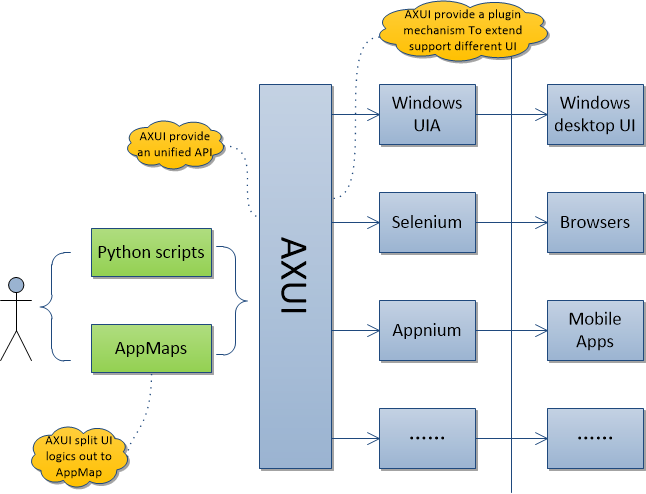
AXUI provide a plug-in mechanism for automation guy to extend support for different UI
AXUI provide built-in drivers for:
windows native UIAutomation Client API for windows desktop UI
selenium project for web UI
appium project for Android and IOS UI
AXUI provide an unified, easy to use python interface for use in test scripts
AXUI separate UI logic from test scripts, make test scripts more readable and easier to maintain
AXUI provide mechanism to handle auto met UI automation issues, like UI response time
An overview of AXUI structure
code demonstrations
This code is in example/selenium, it’s a simple example to demonstrate how AXUI separate UI logic from test script.
Though this example give us a impression that AXUI add extra complexities but doesn’t improve code readability. Image that an app contains a lot of UI Elements, and the search identifiers split into multiple test scripts, then AXUI can gather all UI identifiers into one appmap, and make your scripts clean to read and maintain.
Original:
import selenium.webdriver as webdriver

browser = webdriver.Chrome(executable_path = r"C:\Users\cxuanx\Downloads\chromedriver.exe")
browser.get(r"http://www.bing.com")

searchEdit = browser.find_element_by_id("sb_form_q")
goButton = browser.find_element_by_id("sb_form_go")

searchEdit.send_keys("AXUI")
goButton.click()
AXUI AppMap:
<AXUI:app_map xmlns:AXUI="AXUI" xmlns:xsi="http://www.w3.org/2001/XMLSchema-instance" xsi:schemaLocation="AXUI AXUI_app_map.xsd">
    <AXUI:funcs>
        <AXUI:func name="go_to_bing" description="">
            <AXUI:step type="GUI" cmd='browser.BrowserPattern.get "http://www.bing.com"'/>
        </AXUI:func>
    </AXUI:funcs>

    <AXUI:UI_elements>
        <AXUI:Root_element name="browser" >
            <AXUI:UI_element name="searchEdit" identifier="id='sb_form_q'" start_func="go_to_bing"/>
            <AXUI:UI_element name="goButton" identifier="id='sb_form_go'" start_func="go_to_bing"/>
        </AXUI:Root_element>
    </AXUI:UI_elements>
</AXUI:app_map>
AXUI Code:
import AXUI

config_file = "selenium.cfg"
app_map = "www.bing.com.xml"

AXUI.Config(config_file)
appmap = AXUI.AppMap(app_map)

appmap.browser.start(browser_name="CHROME", executable_path = r"C:\Users\cxuanx\Downloads\chromedriver.exe")

appmap.browser.searchEdit.Keyboard.input("AXUI")
appmap.browser.goButton.Mouse.left_click()
More details, please check AXUI documents
To have quick experience about AXUI, please check AXUI samples


Download files
Download the file for your platform. If you're not sure which to choose, learn more about installing packages.
Source Distribution
File details
Details for the file AXUI-0.2.1.zip.
File metadata
- Download URL: AXUI-0.2.1.zip
- Upload date:
- Size: 59.1 kB
- Tags: Source
- Uploaded using Trusted Publishing? No
File hashes
| Algorithm | Hash digest | |
|---|---|---|
| SHA256 |
061d4d377a544b0f902e06bc2455fec83acb7009c4897679049677b741017393
|
|
| MD5 |
66fb472ab7fe760c20cb740eea259b13
|
|
| BLAKE2b-256 |
f88dd03d91be6a4db3cdbfea84f4657983f319bc6e8ee61cee577ecaeefa4f6b
|






