
Integrated Pipeline with Specialized Non-LLM AI Agent Framework for ARM64 and Windows architecture

Project description
[=] IntegratedPipeline-Specialized-AI-Agent-library
[~] Introduction:
- IntegratedPipeline is a standalone Specialized AI Agent Library for Non-LLL memory - Augmented Agentic Framework orchestrator, Specifically designed to provide Agentic capability for any Autonomous Agentic Framework locally and Coordinatively that runs efficiently from consumer based machine to High-end embedded systems, where the AI Can directly and continously learn, with minimal and efficient compute, built-in augmented memory, Secure Peer-To-Peer (Multi-Agent) Coordination with security layers as an option, And Explainability capability based on proof from in it's internal metrics, reducing Black-Box condition necessary for reliability.
- AbstractIntegratedModule Contains specialized MLP using Its Own specialized geometric Weight shaping (AWE), Specialized efficient Transformer and LSTM (Long-short term memory) architecture for Scarce Data with Alpha-based computation, specifically designed for low-amount samples environment, or Messy environments.
Library Short Description:
- Development Stage on PyPi: 0.8.3 Official Release.
- Author and Maintainer: Micro-Novelty and EpsitronNet-bot.
- library Source-Code is Open-sourced with MIT License.
- Purpose: Specifically Designed for providing Non-LLM AI Agent Framework for edge Devices, Optimized for ARM64 architecture.
- Library installation:
pip install AbstractIntegratedModule
python -m install AbstractIntegratedModule
Github Link (for Visiting and cloning)
-
https://github.com/Micro-Novelty/IntegratedPipeline-Specialized-Non-LLM-AI-Agent-Framework
-
The library also includes precompiled binaries for:
-
aarch64 manylinux (accepts version 2.17+) architecture, accepts python version 3.10, 3.11 only.
-
aarch64 musllinux (accepts version 1.2+) architecture, accepts python version 3.10, 3.11 only.
-
Windows 64 bit architecture (only python 3.13 only)
-
Library installation if you dont have aarch64 setup, you can download the correct wheel for your setup in this repository or by using pip:
- ✨ use pip for downloading the correct wheels for your setup:
-
pip install abstractintegratedmodule --extra-index-url https://Micro-Novelty.github.io/abstract-modules/whl/ --break-system-packages
# ensures proper installation by bypassing pip strict external download setup.
- Note: Using the above installation --extra-index method Provides you with:
- x86_64 and aarch64 with manylinux (v. 2.17+) and musllinux (v. 1.2+) architecture only (No regular singular x86_64 arch wheel, tarball will be used for regular x86_64 and windows).
- macOS with aarch64 and x86_64 architecture. (v. 10.9+)
- All of this Wheels provided in the Repository Only Provides Wheels for python with version 3.10 3.11 and 3.12.
- This setup will automatically download the correct wheel Based on your python/pip version and OS / hardware architecture setup.
-
- ✨ use pip for downloading the correct wheels for your setup:
-
For specific module in Rust for handling and loading Weights and Parsing JSON values with reduced memory lookup overhead.
-
Consider using this Optimization library by using:
-
pip install abstract-weights-core
- Note: This Optimization would allow AbstractIntegratedModule faster JSON parsing and much more flexible database handling handled in Rust.
-
-
Proven Capabilities:
- The library has been thoroughly tested in Multiple Environments from Windows to ARM64 Environment. The library is now Robust for Wider use and Deployment.
- Proven Works on ARM64 Environment, Training and Prediction works efficient on Docker ARM64 environment with QEMU, good parallelizing behavior is guaranteed.
- P2P Works efficiently in ARM64 Docker + QEMU, No conflicting socket and all prediction works efficiently.
- AWE setup Proven Efficient on Hard-uncontrolled dataset such as Activity Recognition from the given Database.
- LSTM is Optimized efficiently for scarce data with AWE method.
- Robust Advanced prediction capabilities proven effective on ARM64 Using MLP + LSTM Architectures.
- Transformer Optimized using Cython, to reduce Memory overhead and Reduce CPU Usage, With Reduced Training Time.
- Changelog:
- v0.8.3:
- [=] New features:
- Added more robust inhomogenous shape handling for handling input_ids in Transformer and AccurateAnswerCache architecture.
- Fixed P2P Vulnerabilities:
- Empty allowed_ips in PRODUCTION/HARDENED mode now DENIES external IPs instead of allowing all
- Startup validation warns about dangerous config combinations
- Loopback (127.0.0.1) always permitted for local agent comms
- DEVELOPMENT/STAGING retains allow-all behavior with explicit warning since local P2P testing requires it
- pickle.loads() replaced by json.loads with utf-8 encoding order.
- generate self signed cert fixes and added client.crt for fallback when users dont provide any SSL cert and key for both server and client.
- v0.8.3:
[+] MANN Intro
[=] Memory augmented Neural network (MANN) is a neural network architecture coupled with an external, dynamic memory module, allowing it to store, retrieve, and update information similarly to a computer's RAM. Unlike traditional networks that store knowledge only in weight parameters, MANNs excel at fast learning, long-term dependency handling, and episodic recall, In IntegratedPipeline, Its memory is stored in a custom database inside your local machine, then later used for memory retrieval, transfered to the AI Dictionary where it can finnaly recall its memory when input condition matched with memory.
[+] Abstract Weight Encoder (AWE) Intro
[=] AWE is a specialized custom weight shaping or encoding method Specifically designed for MLP Architecture, using eigenvalue and spectral methods as base equations to calculate covariance inside a given input data, and shape the correct Weight from the given eigenvalue, AWE Works by processing input and then captures the necessary eigenvalue to shape a properly initialized Weight that aligns with input data complexity, With this approach, MLP training will be much more consistent and robust against noise.
[+] LSTM And Transformer Intro:
A. LSTMs (Long Short-Term Memory) and Transformers are foundational deep learning architectures built to process sequential data (like text or time series). While both handle the flow of time and context, they do so using completely different mechanisms.
- LSTM (Long Short-Term Memory):
- LSTMs are an advanced class of Recurrent Neural Networks (RNNs) introduced to solve the problem of traditional RNNs forgetting earlier data.
- How it works: LSTMs process data sequentially—one word or time-step at a time. They regulate information using "gates" (forget, input, and output) that determine what information from the sequence to keep or discard.
- Use Cases: Ideal for tasks with strictly continuous chronological data like time-series forecasting (e.g., stock market or weather prediction) or speech recognition.
- Limitations: Because they process data in a strict chain, it is difficult to parallelize training, making them slow and prone to forgetting long contexts.
B. Transformer: Transformers are the modern standard for AI, introduced in 2017 with the famous "Attention Is All You Need" paper.
- How it works: Instead of reading sequences linearly, Transformers read the entire sequence all at once. They utilize a self-attention mechanism, which calculates how much "attention" or weight every part of the sequence should give to every other part, understanding the global context instantly.
- Use Cases: The backbone of Large Language Models (LLMs) like ChatGPT or BERT, making them perfect for machine translation, text generation, and summarization.
- Limitations: Transformers require massive amounts of training data and computing power to work effectively.
[~] For a much In-Depth Explanation You can visit This repository to learn more about AWE and its performance results:
[+] Why IntegratedPipeline?
[~] IntegratedPipeline is a great choice for a sophisticated Non-LLM AI Program for The Main Orchestrator of a Distributed MANN-Type AI Agent Working in Edge-device/Consumer-Based machine Where LLM is'nt a great fit for Messy, Noisy environments. while still run efficiently on High-end Embedded systems in single-instance or as a distributed network during multi Agent cooperation.
[=] IntegratedPipeline offers:
-
Local-Based AI Orchestrator:
- IntegratedPipeline Creates its own SQLite Database inside Your Computer once the library is executed, This database is used directly to store the AI Memory, Attention weights, predicted Output, and identified peer, all without leaving the machine, The Database will be created Automatically once you run the library, database name saved as activity_log.db.
-
Continously Learning behavior for an Agent:
- different from LLM that is static and cannot improve beyond its given training condition, AI Agent using IntegratedPipeline has a dynamic, flexible continously learning behavior with conditional training algorithms included in the library that has both supervised and unsupervised learning present, The learned input and predicted Output will be stored in the database, allowing it to recall its memory during processing and find matching known prediction given if input matched with the stored input inside the database. this Continous learning behavior is efficient because its not relying on weights for memory, allowing flexible and predictable behavior inside a given environment.
-
Robust Specialized MLP, Transformer and LSTM Architecture with ensemble weighting architecture:
- IntegratedPipeline has 2 Different type's of AI Architecture stacked together, and one architecture to weight their confidence and probability fairly to get the final prediction, Specialized MLP for Noise robustness And Specialized Transformer that used Alpha-based Computing algorithm for contextual reasoning, LSTM architecture to provides proof-of-credibility over a certain output, acting as a support mechanism rather than Main orchestrator like MLP and Transformer. The reason why those Models complement and used together:
- Specialized MLP Provides synchronous robust classification Against noise with its specialized Weight Encoder (AWE) to handle noise using eigenvalue based computing that is lightweight and efficient. This Method can't be replicated Inside Transformer FFN (Feed-forward-network) because of Transformer dynamic brute force computing where AWE-Based generated weight's get diluted over time by Transformer dynamic projection embedding, making AWE Generated weight causes inefficient inside Transformer dynamic FFN/QKV projection.
- Specialized Transformer provides robust synchronous advanced contextual relationships, efficient data processing using Alpha based computing, The Transformer is tuned towards to be as flexible as possible to provide dynamic projection or fixed FFN projection training with minimal head's and dimension's to reduce computational power.
- LSTM doesn't act as a Main orchestrator, instead it Provides coherent Short-term memory for the Ensemble architecture, acting as a support mechanism to provides proof-of-credibility of a given answer from past previous context input, this allows flexible and achievable Aggreement between Transformer and MLP over a short period of time.
- Ensemble weighting provides the model a much more robust classification best from both worlds perspective, weighting both MLP and Transformer confidence and probability, combined with Attention quality from the transformer to get the final prediction of an input if transformer is allowed and permitted to be in use.
-
flexible and secure Peer-to-Peer Coordination (Multi-Agent):
- IntegratedPipeline offers Peer to Peer communication capabilities asynchronously, Where IntegratedPipeline directly checks for other Peer presence directly to the local database present in the local computer or system (Synchronous prediction from peer previous data in the database), or externally, by using asynchronous request for initiating prediction, P2P is secured Using:
- secure socket using user provided SSL CERT. on both client and server,
- API key for requesting,
- Alpha rate limiting,
- HMAC secret key for authentication,
- and IP validation.
[~] Each agent has double roles during P2P:
- Server provider: the peer Agent can start a server to listen for peer client's
- Connecting Agent: the peer Agent which happens to connect to other peer that has or have opened and provided a server listener to act as a receiver.
-
Cross-Session memory availability:
- IntegratedPipeline offers share-able Memory capability, included capability below:
- Exportable memory: this allows a flexible memory saving for later use, such as cross transfer memory between model, the memory is saved as .json file after exporting.
- Importable Memory: allowing to import memory from the exported .json file directly for the model to use.
- syncing with other model: socket-based communication to export memory to other external machine.
- [=] Note: socket Syncing is unsecure witout additional security layer wrapped, For a safer syncing, directly transfer the .json file memory to the target machine via other ways such as manual send.
- list sessions: listing available sessions using model's memory name.
- IntegratedPipeline offers share-able Memory capability, included capability below:
[=] With its Specialized Multi-Layer-Perceptron (using AWE Encoder) and Optimized Transformer module with optimized Embedding, IntegratedPipeline can directly tolerate low samples-amount of Data, including noisy ambiguous data, using Weighted Confidence assembling from both specialized MLP and Transformer for better reliability during training and prediction over Messy, noisy environments, such as:
[1.] User data's : User data is often messy and ambiguous, Specialized MLP with AWE will do the job for shaping the necessary Weight to complement for the Ambiguous noisy pattern, AWE MLP is highly robust to noise, proven in synthetic Environment such as scikit-learn Make-Classification scarce and Noisy Input robustness during generalization test. making it a great fit for messy, Scarce data.
[2.] Small Dataset's : We often don't have enough Dataset to train a Transformer Model, Thats Why IntegratedPipeline Offers a Highly optimized Transformer that supports scarce dataset processing, Using Alpha-Based computing as a Warm-up for training, it provides a direct Boost for the transformer to be efficient during training in scarce-data Environment.
[3.] Non-Representative data (Undersampled) : IntegratedPipeline Support's ambiguous data that come's from file with format such as CSV Format to extract title's and label's necessary to create automatic Dataset for Later use in Training, making it optimized for specific task's and easier dataset creation with lower overfitting rate for reliability.
[=] Architectural-Overview
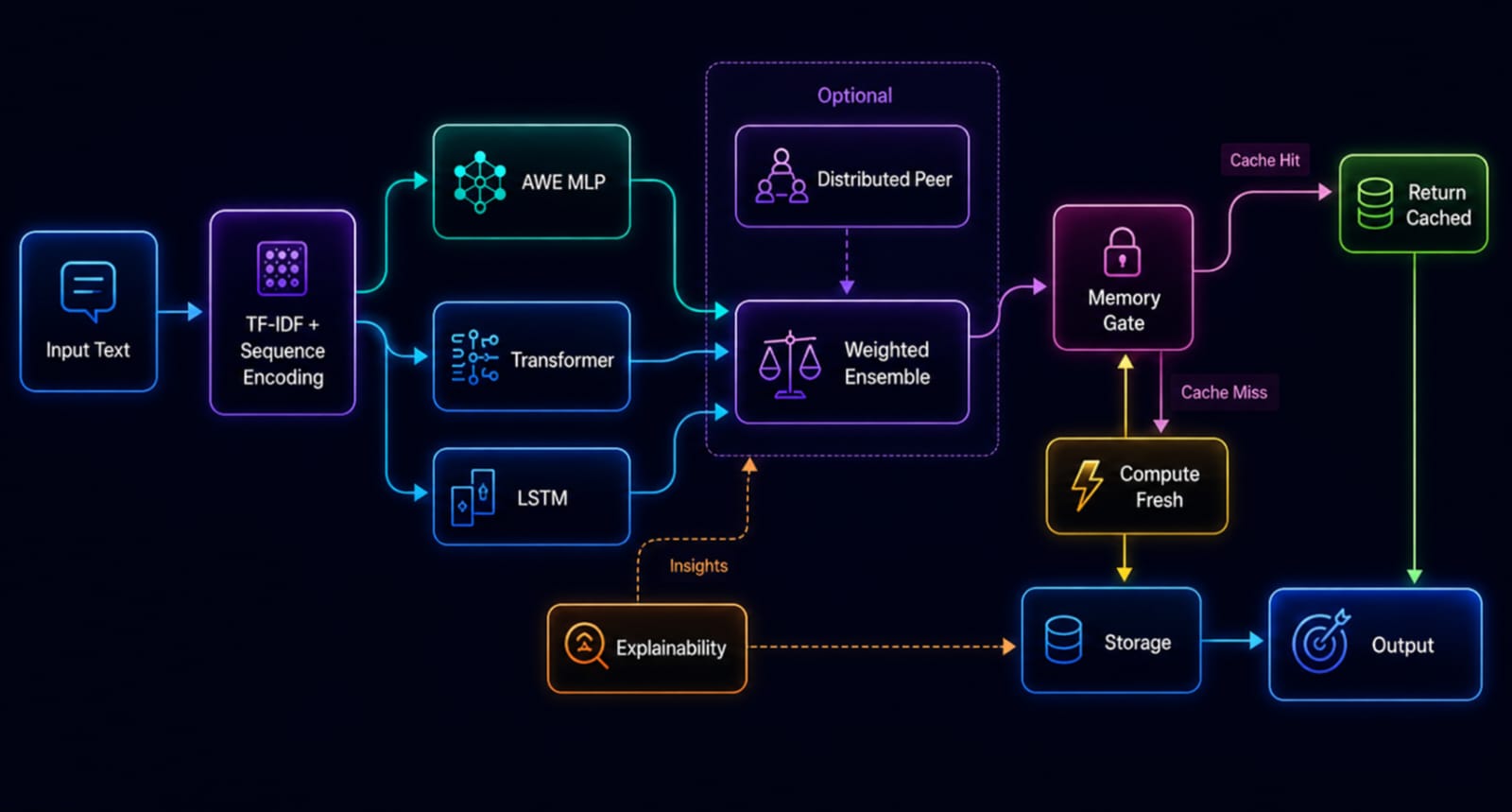
[=] Contextual meaning:
-
- Sequence encoding is a machine learning technique that transforms a sequential input (like text, time-series data, or audio) into a compact, fixed-length numerical vector, often called a context vector
-
- TF-IDF (Term Frequency-Inverse Document Frequency) is a numerical statistic used in machine learning and NLP to evaluate how important a word is to a document within a collection (corpus). It boosts rare words and penalizes common words (like "the", "and") by multiplying two metrics: how often a word appears in a document (TF) and the inverse frequency of the word across all documents (IDF).
-
- Explainability provides deeper transparency of why a model thought about a detail by showing its internal metrics like attention quality, from distributed peer memory or Ensemble prediction result's.
Introduction and demo

- Quick demo start: main.py
- purpose: let you demonstrate the advanced prediction method and asynchronous prediction directly.
- Quick test of P2P:
- multi_agent_client.py
- multi_agent_server.py
- P2PDirectTest.py
- Purpose: let you demonstrate simple P2P using AbstractIntegratedModule quickly, there may be bugs in this P2P setup so feel free to share it in issues.
[=] Requirements
[~] To run and execute IntegratedPipeline, Requirement's include Or see Requirements:
-
pip install for quick usage:
-
pip install AbstractIntegratedModule # or
python -m pip install AbstractIntegratedModule
-
Download binaries manually (Choose one minimal, specified for your needs):
- AbstractOptimizedModules for Optimizing Transformer using Cython (Optional)
- AbstractIntegratedModule (Main library binary)
-
Binaries can be downloaded from release or code section.
-
NOTE: Binaries in this repo is outdated, consider downloading the correct python wheel for your setup in here:
-
pip install abstractintegratedmodule --extra-index-url https://Micro-Novelty.github.io/abstract-modules/whl/ --break-system-packages
Note: using this installation method grants you a much safer, predictable behavior, and more secure AbstractIntegratedModule library than a pure binary file.
-
Windows Native OS -
- AbstractIntegratedModule.cp313-win_amd64 and its AbstractOptimizedModules.pyd Supports Python 3.13 for Windows Only (Robust, Stable version)
-
Linux x86_64
- AbstractIntegratedModule.cpython-312-x86_64-linux-gnu.so and its AbstractOptimizedModules.so supports Python 3.12 only.
-
Linux ARM64 - Raspberry Pi (Supports Raspberry pi 3 - 5)
- AbstractIntegratedModule.cpython-310-aarch64-linux-gnu.so and its AbstractOptimizedModules.so supports Python 3.10 only.
-
Libraries needed (For binary usage):
- Pandas
- aiohttp
- scikit-learn
- numpy
- psutil
-
Download AbstractIntegratedModule binaries from release section:
- This file contains:
- AbstractIntegratedModule.pyd, AbstractOptimizedModules.pyd (For windows machine).
- AbstractIntegratedModule.cpython-39-x86_64-linux-gnu.so, AbstractOptimizedModules.cpython-39-x86_64-linux-gnu.so (For linux x86_64).
- AbstractIntegratedModule.cpython-39-aarch64-linux-gnu.so, AbstractOptimizedModules.cpython-39-aarch64-linux-gnu.so (for Linux ARM64 - Raspberry Pi).
-
[=] for labels assignation:
- CSV file that contains training labels and titles used for training and prediction label map, example will be provided below, Go to Step's for in-depth Usage below.
[=] Requirements for Docker container
- Dockerfile (For Container assembler)
- Python scripts (Such as main.py for Dockerfile usage).
- entrypoint.sh (for smart entry point for Dockerfile container usage).
[=] System-Specific Notes
-
Windows:
- Requires Visual C++ Build Tools for compatibility
- Use PowerShell or CMD (not WSL bash for best results)
-
Linux:
- Ensure gcc and build-essential are installed
- Different distributions may require different package managers
-
ARM64 - Raspberry Pi
- Installation may take 30+ minutes due to ARM architecture
- Monitor system resources during installation
- Consider using faster storage (USB SSD) for better performance
[=] Docker Container Application
-
See Docker_installation_Section for an in-depth explanation, or Quick_Docker_start for a quick start.
- Note Consider checking:
- Dockerfile contains all the instructions need to assemble a Docker container.
- start.sh for Quick single agent start in Docker container.
- entrypoint.sh for a Smart entrypoint used in Dockerfile (Must be downloaded too along with Dockerfile and put in the same folder with Dockerfile after its downloaded)
- start-multi-agent-cluster.sh for Multi-agent cluster start in Docker container, What it does:
- Starts a multi-agent Docker cluster — runs docker-compose up -d in detached mode (background), scaling the agent-client service to 5 simultaneous instances, alongside whatever server is defined in the docker-compose.yml.
- Tails the logs — runs docker-compose logs -f which streams live logs from all containers (server + all 5 clients) to your terminal until you hit Ctrl+C.
- main.py for executing a python script in the Docker container that used main.py, like in this code:
-
docker run -it -v $(pwd):/app/data integrated-pipeline:latest python /app/data/main.py
-
- To use a .dockerignore file, place it in your build context directory (the same location as your Dockerfile) to specify which files and folders should be excluded when building your image.
- .env is used for environment setup in entrypoint.sh, this file must be in the same folder with Dockerfile and entrypoint.sh after its downloaded.
- Note Consider checking:
-
Build Image:
-
Clone repository:
-
git clone https://github.com/Micro-Novelty/IntegratedPipeline-Continous-Learning-AI-Agent-library-framework.git
cd IntegratedPipeline-Continous-Learning-AI-Agent-library-framework
-
Download:
-
In the code or release section.
- If the downloaded Dockerfile or .dockerignore or .env has .txt extension, remove the extension:
-
# remove .txt extension
mv Dockerfile.txt Dockerfile
mv env.txt .env
mv dockerignore.txt .dockerignore
-
Navigate to the folder: Use the cd command to enter the directory containing the Dockerfile and entrypoint.sh file.
-
cd /path/to/your/folder -
build image:
-
sudo docker build -t integrated-agent.
-
-
Download library dependencies for binaries usage: [=] Required libraries (when using binary):
- Numpy
- Scikit-learn
- pandas
- aiohttp
- psutil
-
Run IntegratedPipeline in a Container:
-
Install AbstractIntegratedModule via PIP or binaries (for binaries, can be downloaded in release section):
-
pip install AbstractIntegratedModule # or
python -m pip install AbstractIntegratedModule
-
docker run -it --name ai-agent integrated-agent:latest python
-
In python shell:
-
from AbstractIntegratedModule import IntegratedPipeline, PipelinePredictionManager
model = IntegratedPipeline('agent_memory')
print("✓ IntegratedPipeline initialized successfully!")
-
-
-
Run script:
# Mount your local directory and run a script
docker run -it -v $(pwd)/data:/app/data integrated-agent:latest python main.py # main.py could be replaced
-
Run with GPU Support (Optional):
-
# For NVIDIA GPU support
docker run -it --gpus all -v $(pwd)/data:/app/data integrated-agent:latest python main.py
-
-
For Single Agent and Multi-Agent P2P:
[=] Single agent:
# Build image
docker build -t integrated-agent:latest .

# Run single agent
docker run -it -v $(pwd)/data:/app/data integrated-agent:latest python
[=] Multi agent P2P (Consider docker-compose) :
- Note: Use the provided docker-compose.yml for Quick multi-agent.
- Navigate to the folder: Use the cd command to enter the directory containing the docker-compose.yml file.
-
cd /path/to/your/folder - run this command to run docker-compose.yml:
-
# Start multiple agents
docker-compose up -d

# View logs
docker-compose logs -f

# Stop all agents
docker-compose down
Performance in linux ARM64 Docker Environment/Container
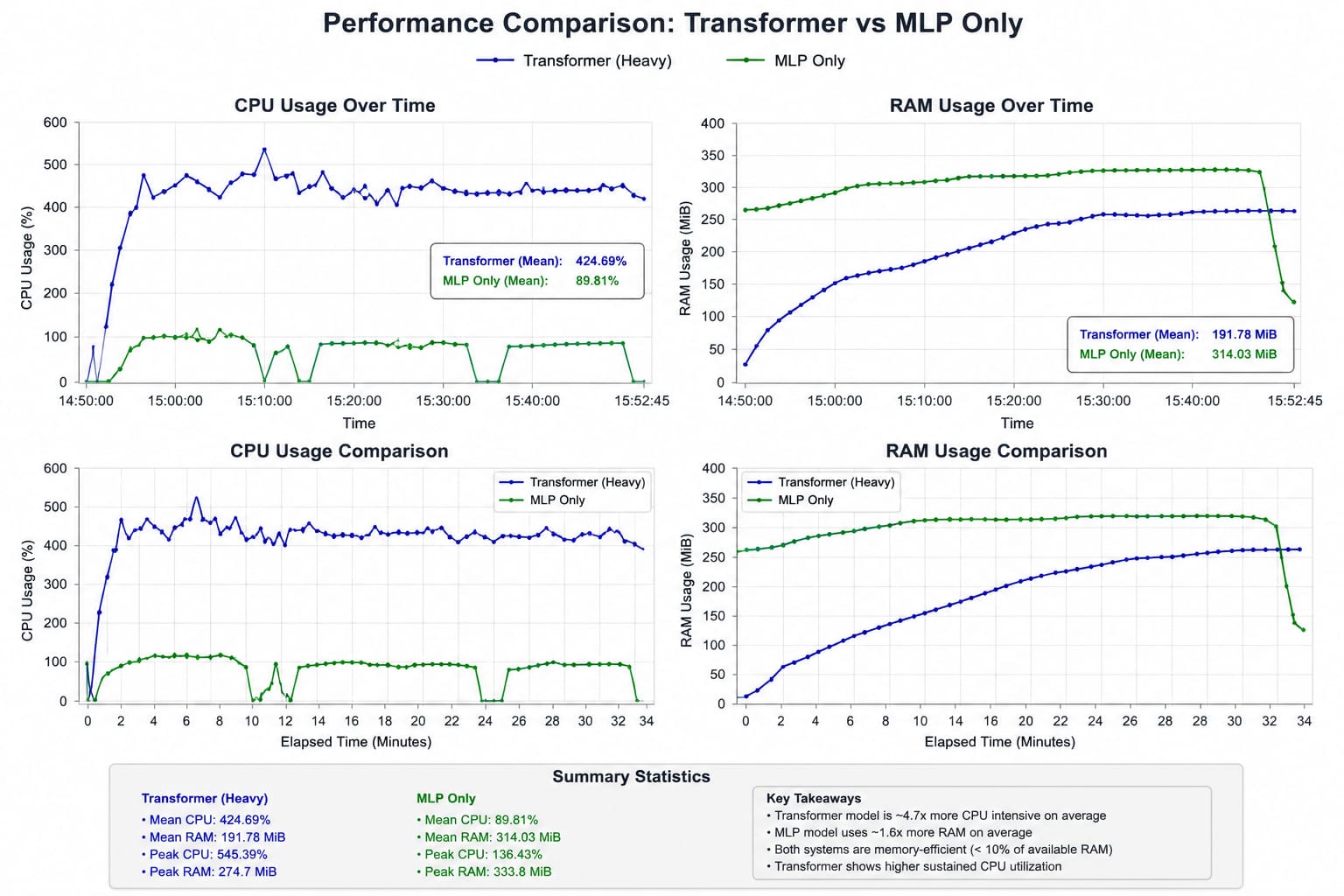
A. [=] Computational performance results with Transformer included during Advanced prediction method.
== TIME == | CPU % | RAM / RAM LIMIT ||

14:50:08.762  0.00%  25.52MiB / 3.71GiB
14:50:10.339  5.56%  25.52MiB / 3.71GiB
14:50:12.428  0.17%  25.52MiB / 3.71GiB
14:50:15.835 103.60% 38.8MiB / 3.71GiB
14:50:17.844 438.11% 60.15MiB / 3.71GiB
14:50:19.896 419.36% 68.32MiB / 3.71GiB
14:50:22.022 434.15% 73.2MiB  / 3.71GiB
14:50:23.969 436.47% 78.18MiB / 3.71GiB
14:50:25.966 435.85% 80.22MiB / 3.71GiB
14:50:28.018 430.47% 92.12MiB / 3.71GiB
14:50:30.029 450.55% 99.5MiB / 3.71GiB
14:50:32.065 438.06% 105.4MiB / 3.71GiB
14:50:34.100 469.52% 115.2MiB / 3.71GiB
14:50:36.109 449.89% 116.8MiB / 3.71GiB
14:50:38.123 423.56% 119MiB   / 3.71GiB
- [=] Note: To read the full logs (For included Transformer performance): performance_log_with_TF
- [=] Explanation:
- Average CPU Usage = 420% - 430% , Sustained roughlt 4.20 - 4.30 CPU Cores
- Meaning = - Compute-Intensive workload - reduced guaranteed of experiencing deadlocks, thread starvation, and major stalls - numerical backend is parallelizing efficiently
- Average RAM Usage = 180 - 195 Mib, Roughly 4.5 - 5% usage of available RAM
- Meaning = - Very efficient RAM Usage - Repeated 269 MiB suggests allocator settled, ndarray pools stabilized, workload reached steady state - gradual, safe and steady batch accumulation, reduced possibility of leak explosion.
- Average CPU Usage = 420% - 430% , Sustained roughlt 4.20 - 4.30 CPU Cores
B. [=] Advanced Prediction without Transformer, Only Specialized MLP + LSTM using AWE.
== TIME == | CPU %  | RAM \ RAM LIMIT |
10:01:37.456 100.44% 269.8MiB / 3.71GiB # initial round 1 training started
10:01:38.686 101.93% 279.8MiB / 3.71GiB
10:01:40.694 101.94% 293.2MiB / 3.71GiB
10:01:42.703 99.90%  302.9MiB / 3.71GiB
10:01:44.712 99.34%  319.8MiB / 3.71GiB
10:01:46.721 100.15% 319.7MiB / 3.71GiB
10:01:48.727 101.91% 319.7MiB / 3.71GiB
10:01:50.734 100.86% 319.7MiB / 3.71GiB
10:01:52.742 136.43% 322.9MiB / 3.71GiB
10:01:54.751 101.91% 324.9MiB / 3.71GiB
10:01:56.758 100.29% 324.9MiB / 3.71GiB
10:01:58.769 102.42% 327.1MiB / 3.71GiB
10:02:00.775 0.00%   329.6MiB / 3.71GiB # First Training and prediction round 1 finished
10:02:02.788 19.55%  330.1MiB / 3.71GiB # round 2 training
10:02:04.798 134.23% 332.2MiB / 3.71GiB
10:02:06.803 108.80% 332.2MiB / 3.71GiB
10:02:08.811 107.85% 332.2MiB / 3.71GiB
10:02:10.857 104.43% 332.2MiB / 3.71GiB
10:02:12.854 101.14% 332.2MiB / 3.71GiB
10:02:14.858 0.00%  332.3MiB / 3.71GiB
10:02:16.873 98.84% 333.8MiB / 3.71GiB
10:02:18.869 0.00%  132.7MiB / 3.71GiB # container stopped and round 2 finished
- [=] Note: See full performance log in here: performance_log_only_MLP
- [=] Explanation:
- Average CPU Usage = 85-90% Used, sustained roughly 1 CPU Core saturated on average
- Meaning: - Very efficient computation
- Much lighter CPU Usage than Transformer.
- Stable and less parallelizing behavior (Efficient computation)
- 4.7x lower CPU usage than transformer included - Average RAM usage = 314 MiB / 3.71 GiB, Roughly 8.5% usage of available RAM. - Meaning: - Slightly larger MiB used than Transformer. - Model allocation growth is stable, - training buffers stable - temporary ndarray growth.
- Meaning: - Very efficient computation
- Much lighter CPU Usage than Transformer.
- Stable and less parallelizing behavior (Efficient computation)
- Average CPU Usage = 85-90% Used, sustained roughly 1 CPU Core saturated on average
Both performance Overview
 _______________________________________
- Note:
- This performance metric was calculated in older versions, With newer Transformers that has more, newer modules, The resulting cpu consumed may Increase 1.5 - 2x much more in Docker ARM64 Environment + QEMU,
MLP And LSTM stays the same and still fully optimized.
_______________________________________
- Note:
- This performance metric was calculated in older versions, With newer Transformers that has more, newer modules, The resulting cpu consumed may Increase 1.5 - 2x much more in Docker ARM64 Environment + QEMU,
MLP And LSTM stays the same and still fully optimized.
Source code of AbstractIntegratedModule
- Note: The source code is provided in the repository.
- [=] Full Monolithic extensively-documented source code (12K+ Lines): AbstractIntegratedPipeline-SourceCode.zip
- [=] Separated Modules of AbstractIntegratedModule: separated-modules
- AbstractIntegratedModule.pyx and AbstractOptimizedModules.pyx files for independent compilation or direct compiling on real ARM64 device.
- lib.rs that contains Rust optimization for Models weight handling.
- [~] Note:
- The source code is open and Free to anyone who:
- Use it: Run the software for any personal, academic, or commercial purpose.
- Modify it: Change the source code to fit their needs.
- Distribute it: Share the original or modified code with others.
- Commercialize it: Package, brand, and sell the software for profit.
[=] Step's for in-depth Usage
-
Download via PIP:
-
Clone repository first:
 # Clone immediately for Windows and x86_64 only without prerequisites
 git clone https://github.com/Micro-Novelty/IntegratedPipeline-Continous-Learning-AI-Agent-library-framework.git
 cd IntegratedPipeline-Continous-Learning-AI-Agent-library-framework
-
Install the library via pip:
pip install AbstractIntegratedModule #or
python -m pip install AbstractIntegratedModule
-
-
Download for binaries:
- AbstractIntegratedModule.pyd, AbstractOptimizedModules.pyd (For windows machine) (Python 3.13)
- AbstractIntegratedModule.cpython-39-x86_64-linux-gnu.so, AbstractOptimizedModules.cpython-39-x86_64-linux-gnu.so (For linux x86_64) (Python 3.12)
- AbstractIntegratedModule.cpython-39-aarch64-linux-gnu.so, AbstractOptimizedModules.cpython-39-aarch64-linux-gnu.so (for Linux ARM64 - Raspberry Pi) (Python 3.10)
-
# Download from release
# AbstractIntegratedModule.pyd, AbstractOptimizedModules.pyd  (windows) /
# Abstractcpython-39-x86_64-linux-gnu.so, AbstractOptimizedModules.cpython-39-x86_64-linux-gnu.so (x86_64) /
# AbstractIntegratedModule.cpython-39-aarch64-linux-gnu.so  ,  AbstractOptimizedModules.cpython-39-aarch64-linux-gnu.so
[=] Steps for installation: Note: AbstractIntegratedModule has 5 library dependencies that must be installed on your computer if you use AbstractIntegratedModule binaries:
- [=] Required Libraries (For binaries usage):
- Numpy
- Scikit-learn
- pandas
- aiohttp
- psutil
-
Clone repository:
-
# prerequisites (for Raspberry pi OS Only)
# Update system
sudo apt-get update
sudo apt-get upgrade -y

# Install Python 3.13 and development tools
sudo apt-get install python3.13 python3.13-dev python3.13-venv -y

# Install additional build tools
sudo apt-get install build-essential libatlas-base-dev libjasper-dev -y

# Clone immediately for Windows and x86_64 only without prerequisites
git clone https://github.com/Micro-Novelty/IntegratedPipeline-Continous-Learning-AI-Agent-library-framework.git
cd IntegratedPipeline-Continous-Learning-AI-Agent-library-framework
-
-
Install System Dependencies (for x86_64 installation):
# Ubuntu/Debian sudo apt-get update sudo apt-get install python3.13 python3.13-dev python3.13-venv # CentOS/RHEL sudo yum install python313 python313-devel # Fedora sudo dnf install python3.13 python3.13-devel -
Create a virtual environment:
-
# Create virtual environment (windows)
python -m venv venv
# Activate virtual environment
venv\Scripts\activate

# Create virtual environment (x86_64) (ARM64 / raspberry pi)
python3.13 -m venv venv
# Activate virtual environment
source venv/bin/activate
-
-
Copy AbstractIntegratedModule binary:
-
# For windows:
# Copy the .pyd file to your project root
# AbstractIntegratedModule.pyd
copy C:\path\to\AbstractIntegratedModule.pyd .\AbstractIntegratedModule.pyd

# Copy the .so file to your project root (for x86_64)
cp /path/to/AbstractIntegratedModule.cpython-39-x86_64-linux-gnu.so ./AbstractIntegratedModule.cpython-39-x86_64-linux-gnu.so

# Copy ARM64 / Raspberry pi binary
cp /path/to/AbstractIntegratedModule.cpython-39-aarch64-linux-gnu.so ./AbstractIntegratedModule.cpython-39-aarch64-linux-gnu.so
-
-
Verify Installation:
-
python -c "from AbstractIntegratedModule import IntegratedPipeline; print('✓ Installation successful!')"
-
-
Run main.py for quick test of successful imports:
-
# run this for quick import test.
python main.py
-
-
Create CSV file that contains training labels and titles:
- Example format:
window_title,label
"Thesis.docx",focused_work,high,writing-thesis
"Microsoft Excel",work,medium,data-analysis
"YouTube -> Google Chrome",distracted,high,watching-videos
"Slack",communication,high,team-chat
"VSCode", focused_work,high,coding
"netflix.com -> Google Chrome",break,high,Netflix-break
"Outlook",work,medium,checking-email
"System Settings",system designing,low,configuring-computer
"GitHub",creating-and-editing-repo,research
"README.md -> VS Code",focused_work,medium,reading-docs
"Amazon.com -> Chrome",personal-work,high,shopping
Note = window_title is target_title and label is target_label, check step below to use it.
- Example format:
-
Use IntegratedPipeline as in this example:
from AbstractIntegratedModule import IntegratedPipeline
from AbstractIntegratedModule import PipelinePredictionManager
import numpy as np

memory_name = 'agent_memory'
cert_file = <your_cert_file_dir> # your .crt file
key_file = <your_key_file_dir> # your .key file

# SSL Setup for users who used Lets encrypt / Public CA cert:
# Server context
server_ctx = ssl.create_default_context(ssl.Purpose.CLIENT_AUTH)
server_ctx.load_cert_chain('your_server.crt', 'your_server.key') # No load_verify_locations needed — OS trust store handles public CA

# Client context
client_ctx = ssl.create_default_context(ssl.Purpose.SERVER_AUTH)
client_ctx.load_cert_chain('your_client.crt', 'your_client.key') # no load_verify_locations — OS trust store handles it

# for enterprise and internal CA:
'''
server_ctx = ssl.create_default_context(ssl.Purpose.CLIENT_AUTH)
server_ctx.load_cert_chain('their.crt', 'their.key')
server_ctx.load_verify_locations('company_ca.crt')  # internal CA not in OS store
server_ctx.verify_mode   = ssl.CERT_REQUIRED
server_ctx.check_hostname = False

client_ctx = ssl.create_default_context(ssl.Purpose.SERVER_AUTH)
client_ctx.load_cert_chain('their.crt', 'their.key')
client_ctx.load_verify_locations('company_ca.crt')
client_ctx.verify_mode   = ssl.CERT_REQUIRED
client_ctx.check_hostname = False
''' # uncomment to use

# Note: The Above setup is Important for Users who wants to do Secure P2P In deployment case, for local P2P the above setup is optional and automatic self-signed CERT will be used for local-device P2P.

main_model = IntegratedPipeline(
   memory_name=memory_name,  # memory name for the AI you already initialized
   use_async=True, # local asynchronous prediction is permitted, if not PipelineAsyncManager wont start asynchronous prediction.
   agent_port=5001, # this port is used to set AgentDistributedInference server (optional)
   ssl_cert_file=cert_file, ssl_key_file=key_file,# provide your cert_file path or key_file path (optional)
   ssl_context=server_ctx, # used by the Agent server. (optional)
   client_ssl_context=client_ctx # used by the client. (optional)
   )

main_prediction = PipelinePredictionManager(
   main_model, # your initialized pipeline
   label_csv='example_manual_training.txt',
   # your filename that contains the .txt file and contains the CSV format.
   # the Agent will automatically searched the nearby folder like: downloads, data, and desktop folder.
   target_title='window_title', label='label')

# example_manual_training is a .txt file that contain csv format like above example.

# rules will be used to create automatic dataset for IntegratedPipeline.
example_rules = [
                     # === WORK / PRODUCTIVITY ===
                     (r'code|programming|develop|debug|compile|script', 'focused_work'),
                     (r'vscode|visual_studio|ide|terminal|shell', 'focused_work'),
                     (r'notion|evernote|onenote|notes|todo|task', 'productive'),
                     (r'slack|teams|discord|zoom|meeting|call', 'communication'),
                     (r'email|gmail|outlook|inbox|mail', 'communication'),

                     # === ENTERTAINMENT ===
                     (r'youtube|netflix|twitch|stream|video', 'entertainment'),
                     (r'music|spotify|soundcloud|audio|player', 'entertainment'),
                     (r'game|gaming|steam|epic|play', 'gaming'),
                     (r'facebook|instagram|tiktok|social|post', 'social_media'),

                     # === BROWSING ===
                     (r'chrome|firefox|edge|safari|browser', 'browsing'),
                     (r'google|search|wiki|wiki|article', 'information'),
                     (r'stackoverflow|github|docs|documentation', 'research'),

                     # more rules
                 ]

# activate explainability capability to explain uncertainty:
main_model.show_explainability_details = True
main_model.distribution.predict_manager = main_prediction # set PipelinePredictionManager to AgentDistributedInference for asynchronous prediction later (Very important for asynchronous prediction)
# main_model.use_transformer = True if you want to use transformer, this will notify all modules that used advanced_prediction_method will initiate prediction with both transformer and MLP.


# test samples with more sophisticated rules and more complex titles for prediction
# (title, intent)
test_titles = [
 ("Opening Thesis.docx", "slight_work"),
 ("Watching YouTube and Google Chrome", "distracted"),
 ("Watching Slack", "communication"),
 ("Programming in Visual Studio Code", "focused_work"),
 ("Watching netflix.com - Chrome", "break"),
# more titles
 ]

titles, y, label_map = main_prediction.load_labels_from_csv(
   <your_filename.>,  # the name of your .txt file with CSV format.
   <target_title>, <target_label>)

# small training with simple titles first
main_model.train(titles, y)

# main_model.froze_learning = True
# prevent the model from training and make weights unchanged for static prediction.

results, chosen_label, confidence = main_prediction.advanced_prediction_method(
   test_titles, label_map, example_rules,
      X=None, y=None # you could create your own X and y samples and put it here (Optional)
            show_proba=False, top_k=3,
            use_transformer=True,
            return_attention=False,
            save_results=True,
            batch_size=2)
# batch size=2 is needed during transformer training for batching, if you have larger samples consider using batch_size > 8, for medium amount of samples (>10 -> <50 samples) consider using 2 or 4 batch_size.
# ... more features you can add
-
To use IntegratedPipeline prediction without Transformer, Only Specialized MLP: Note: IntegratedPipeline without Transformer is'nt recommended due to it being weak at certain contextual prediction's, excel's at classification task's.
- Example without transformer:
prediction_result = main_prediction.advanced_prediction_method(
         [t[0] for t in test_titles],  # titles is enough for MLP Classification.
         label_map,
         example_rules,
         show_proba=True
         )
-
Asynchronous prediction:
- Asynchronous prediction request is important and is critical because it keeps prediction interfaces responsive, maximizes local hardware efficiency, and enables apps to handle background tasks seamlessly without waiting on remote server responses,
- for asynchronous prediction handling, consider using this setup
# Step 2
from AbstractIntegratedModule import PipelineAsyncManager
from AbstractIntegratedModule import SecurityConfig
from AbstractIntegratedModule import SecurityLevel

print(" = TESTING ASYNCHRONOUS PREDICTION MANAGER = ")
# Set discovery secret (in production, use environment variable)
secret_key = 'my-ultra-safe-secret-key-for-authentication' # you can customize this key


security_config = SecurityConfig(
      max_text_length=10000, # can be extended
      max_queue_size=100, # can be extended
      rate_limit_requests=60,  # 60 per minute
      require_api_key=True, #
      max_pending_tasks=50,
      request_timeout=60.0,

      # Start with no IP restrictions, you can add allowed IPs for asynchronous prediction externally, boothstrap_auth for better security
      allowed_ips=[],
      blocklisted_ips=[],
      require_bootstrap_auth = False # true for better security (Not recommended, cause less flexibility)
  )

async_manager = PipelineAsyncManager(main_model,
        main_prediction, # your previous initialized PipelinePredictionManager
        config=security_config,
        state_file=None, # state file is used to load known security logs ex: ip used, ip blacklisted, etc.
        security_level=SecurityLevel.PRODUCTION, # production level security initiated
        api_key=secret_key  #set secret key you initialized
        max_workers=4, # workers to initiate asynchronous tasks, more workers, more capabilities to process asynchronous prediction requests.
        task_timeout=30,
        max_retries=3 ) # retries after failure during prediction

async_manager.start(method='Transformer_included', bootstrap_token=None) # boothstrap token is optional for better security

texts = {'test_titles': test_titles, 'label_map': label_map, 'rules': example_rules, 'X': None, 'y':None, 'use_transformer': True} # all samples needed for advanced prediction method. (X and y are optional samples)

regular_predict = async_manager.predict(
   texts=texts,
   timeout=60,
   retries=None,
   api_key=secret_key) # advanced prediction method for asynchronous prediction.

# with retries: async_manager.predict(texts, timeout=60, retries=5, api_key=secret_key) # 5 times retry if failed

print('[==] Initiating advanced batch prediction')
         predicted_output = async_manager.advanced_batch_prediction(test_titles, label_map, example_rules,
         X=None, y=None, # provide your initialized X and y samples (Also Optional, can be set to None)
         secret_key=secret_key, client_ip=None) # you can add client_ip to provide a robust authentication paired with secret_key
# for better and faster advanced prediction, consider using advanced batch prediction like in the above example
[=] Note:
- Asynchronous prediction used Event loop that handles incoming request, There are conditions where event loop will not start and can't accet requests:
- CPU Above > 95% - Disk space is < 100 MB
- RAM above > 95%
- When event loop is not triggered, Asynchronous prediction can't be initiated and must be restarted/retried.
- Peer-to-Peer Probability coordination:
- Each peer is both server and client simultaneously for robustness and resilience during during P2P.
- To Make the Agent cooperate with other peers, consider using this setup:
- [=] for ensemble prediction from multiple peers, exchanging predicted label with each other, consider using this setup:
# step 3
from AbstractIntegratedModule import CohesiveAgentDeployment
from AbstractIntegratedModule import PipelinePredictionManager
import asyncio
import traceback

prediction_manager = PipelinePredictionManager(main_model, label_csv=<your_training_labels.txt>, target_title=<target_title>, label=<target_label>)

secondary_model = IntegratedPipeline(memory_name=memory_name,
                use_async=True, agent_port=8080,
                ssl_cert_file=cert_file, ssl_key_file=key_file) # provide cert_file path or key_file path (optional)
# secondary model of integrated pipeline is critical for ARM64 environment to prevent socket conflict during P2P with the first Integrated pipeline instance.
# make sure that the agent_port in secondary_model must be different from agent_port in first IntegratedPipeline instance you initialized.

print("=== SECURE PEER-TO-PEER CLUSTER ===")

# CohesiveAgentDeployment is deeply tied and coupled with AgentDistributedInference,
# if you already set an SSL cert and key, CohesiveAgentDeployment will use the SSL directly from AgentDistributedInference
# allowing secure socket to be used directly by CohesiveAgentDeployment

main_model.distribution.enable_ssl = False # set to false if you dont have SSL key and CERT, this code would instruct AgentDistributedInference that you don't have SSL, and provide you a regular unsecured socket (Not necessary for production)
secondary_model.distribution.enable_ssl = False

# Agent 1 - Primary (Port 5555)
agent1 = CohesiveAgentDeployment(
     pipeline=main_model, # main_model is your initialized integrated pipeline
     memory_name="agent_primary", # any name you want for the agent.
     filename=<filename>, # name of your .txt file that contains the CSV format and training labels
     target_title=<title_name>,
     label_name=<label_name>,
     security_level="PRODUCTION", # production level security
     enable_peers=True, # allow peer discovery
     trusted_networks=['127.0.0.1/32', '192.168.1.0/24'], # for trusted networks, you need to provide the list of IPs of your peers.
     peer_discovery_port=5555, # peer port to start P2P
     secret_key=secret_key, # your secret key
     shared_auth_token=secret_key, # your previous initialized secret_key
     predict_manager=prediction_manager, # your prediction manager
     peer_config = <'your_peer_ip_lists.json'> # you need to create .json file that contains your peer IP and Port lists
     consecutive_peer_config = <'your_second_fallback_peer_ip_lists.json'> # same for this one too, but for fallback.
     )

# Agent 2 - Secondary (Port 5556)
agent2 = CohesiveAgentDeployment(
     pipeline=secondary_model,
     memory_name="agent_secondary",
     filename=<filename>,
     target_title=<title_name>,
     label_name=<label_name>,
     security_level="PRODUCTION",
     enable_peers=True, # agent is allowed to find peers
     trusted_networks=['127.0.0.1/32', '192.168.1.0/24'],
     peer_discovery_port=5556,
     secret_key=secret_key,
     shared_auth_token=secret_key,
     predict_manager=prediction_manager,
     peer_config = <'your_peer_ip_lists.json'> # you need to create .json file that contains your peer IP and Port lists
     consecutive_peer_config = <'your_second_fallback_peer_ip_lists.json'> # same for this one too, but for fallback.
     )

# Note: CohesiveAgentDeployment contains ConsecutivePeerAgent that can start a server once ensemble prediction from peer is started
# be advised to stop the server too before shutdown-ing CohesiveAgentDeployment cluster

# example peer_Ip_lists_config.json (de-comment to use)
# {
      # you must put "known_peers" in the config so python can identify the list of IPs and Ports
      #  "known_peers": [
        #    ["127.0.0.1", 5555], can be modified using real IP or local IP.
        #    ["127.0.0.1", 5556],
             # more ip and port lists...
     #   ]
    # }


try:
     # Start both agents
     print("\n🚀 Starting Agent 1...")
     await agent1.start()
     print("✅ Agent 1 started on port 5555")

     print("\n🚀 Starting Agent 2...")
     await agent2.start()
     print("✅ Agent 2 started on port 5556")

     # Give servers time to fully bind
     await asyncio.sleep(2)

     # Get API keys
     api_key = agent1.get_api_key()
     print(f"\n🔑 Using API Key: {api_key[:20]}...")

     texts = {"test_titles": test_titles, "label_map": label_map, "rules": rules, 'X': None, "y":None, "use_transformer": True, "agent_id": agent_id} # (X and y are optional samples here too)

     # texts dictionary must contain test_titles, label_map, and rules that you can assign,
     # agent ID can be strings, int, or floats, recommendded to make it long for better security.
     agent1.pipeline.use_transformer = False # set agent1 pipeline to not use transformer for efficient processing in ARM64 env.
     agent2.pipeline.use_transformer = False

      # Make prediction with peer ensemble
      # Connection will be guaranteed successfull during discovery.
     result = await agent1.multi_modal_peer_ensemble_prediction(
          texts=texts,
          api_key=api_key,
          method='advanced',
          disable_sync=True
      )  # await using asyncio, multi_modal_peer_ensemble is already async by design (Inside ConsecutivePeerAgent), no need to put asyncio.run()

     # must have agent2 peer ensemble function after agent1 peer ensemble prediction function,
     # so agent1 can receive agent2 peer ensemble prediction request.
     result2 = await agent2.multi_modal_peer_ensemble_prediction(
          texts=texts,
          api_key=api_key,
          method='advanced',
          disable_sync=True
      )

     print(f"\n📊 Ensemble Result for Agent 1:")
     print(f"   Prediction: {result.get('prediction', 'N/A')}")
     print(f"   Confidence: {result.get('confidence', 0):.2%}")

     print(f"\n📊 Ensemble Result for Agent 2:")
     print(f"   Prediction: {result2.get('prediction', 'N/A')}")
     print(f"   Confidence: {result2.get('confidence', 0):.2%}")

     # Keep running briefly
     print("\n⏳ Cluster stable. Waiting 5 seconds before shutdown...") # 5 seconds before shutdown.

     # stop ConsecutivePeerAgent servers inside CohesiveAgentDeployment.
     agent1._peer_agent.stop_server() # ._peer_agent is ConsecutivePeerAgent
     agent2._peer_agent.stop_server()

     await asyncio.sleep(5)

except Exception as e:
     print(f"\n❌ Error in cluster: {e}")
     traceback.print_exc()

finally:
     print("\n🛑 Shutting down cluster...")
     await agent1.shutdown()
     await agent2.shutdown()
     print("✅ Cluster shutdown complete")
[=] Important Note: - This setup outputs the given predicted label of an input directly, making P2P more flexible and fast. - This setup used Hybrid feature in prediction handling, Asynchronous prediction request, and Synchronous prediction handling. Synchronous prediction does block code execution for a few seconds, it was used for a few reason here, such as: - allowing a more slower traffic between agents, preventing other agent to get the same peer prediction over time, making each interaction equals and each peer can receive different peer prediction output.
[=] You can download this setup here for a direct test: P2PDirectTest.py
- [=] for probability coordination, locally, get peers data from database or via socket.
# step 4
dataset, _ = main_model.data_preparation(test_titles, label_map)
sequence_inputs = main_model.sequence_encoding(dataset)
X_raw_generation, y, n_classes, input_dim = main_model.mlp_training_features(example_rules, dataset)

main_model.initialize_fitting(dataset)
X_raw_features = main_model.tfidf.transform(X_raw_generation).toarray()
transformer_features = main_model.transformer_pooled_features(sequence_inputs)
X_features = np.concatenate([X_raw_features, transformer_features], axis=-1)

peer_probability_calibration = main_model.predict_proba(sequence_inputs, X_features, type='Hybrid', embedded=True) # peer-to-peer calibration is inside this function
[~] Note: the peer calibration coordination has a chance of triggering if both MLP and Transformer prediction doesn't agree on certain output. Consider using this setup below for using stand-alone peer-to-peer main function without being wrapped in other parent function, allowing flexible and auditable peer-to-peer sharing for probability coordination:
from AbstractIntegratedModule import WeightedEnsemblePredictor
from AbstractIntegratedModule import Transformer

num_classes = len(label_map)
# if you haven't fit the Tfidf:
# main_model.initialize_fitting(dataset)

ensemble_method = WeightedEnsemblePredictor(main_model, memory_name) # consider using the same memory name used in your previous pipeline
transformer = Transformer(main_model.vocab_size, d_model=32, n_heads=4, num_classes=num_classes) # you can audit how much parameter the transformer needs.
main_model.model2 = transformer # overwrite previous transformer initialization

# main_model.distribution is AgentDistributedInference() class
# consider using ssl for secure peer to peer coordination
main_model.distribution.ssl_cert_file = <path_to_your_ssl_cert_file>
main_model.distribution.ssl_key_file = <path_to_your_ssl_key_file>

dataset, _ = main_model.data_preparation(titles, label_map)
sequence_input = main_model.sequence_encoding(dataset)
_, attn_weights = transformer.forward(sequence_input)

probs = ensemble_method.predict_ensemble(sequence_input, X_features, y, method='dynamic', embedded=True)
# 3 options for ensemble weighting method:
# 1. dynamic: allow flexible, efficient weighting from both transformer and MLP,
# 2. meta: for a much more in-depth weighting from both model,
# 3. calibration: allow calibrating probability for both model outputs based on both best weights assembling.

agreement = main_model.agreement

# start server to initiate socket for P2P listener
main_model.distribution.start_server()

# set connection timeout (Optional)
main_model.distribution.connection_timeout = 30 # 30 seconds before timeout
calibrated_probability = main_model._handle_distributed_connections(probs, attn_weights, sequence_input, agreement)

# if an Agent experience a failure on tasks, consider using this function to reduce peer trust for safer flexible coordination:
# main_model.distribution.report_failure(id(main_model), '<task_name>', reason='<unknown>') # you can add the task_name and reason
# main_model.distribution.print_network_status() # to show other peers info.
[~] Note: this calibrated_probability is later used to calculate confidence and chosen output based on given label_map.
- Consider checking:
- multi_agent_client.py for a In-depth start for client testing.
- multi_agent_server.py for a In-depth start for server testing.
- If you get undefined NoneType Behavior when using .accept(), consider see Troubleshooting Issue 7 for a Quick fix.
-
Cross-Session availability:
- To use Cross-session avialability to transfer or import memory, consider using this setup:
-
main_model._cross_session_availability() # cross session capability function
-
- To use Cross-session avialability to transfer or import memory, consider using this setup:
-
As an option, You can add more feature's directly to what it should predict, behave using rules you have given, Create a visual dashboard, create a distributed mesh of this agent, and much more features you can try.
[+] Troubleshooting
-
Issue 1: "ModuleNotFoundError: No module named 'AbstractIntegratedModule'" When using the binary version of the library, Solution:
- [=] Verify the binary file is in the correct location:
ls -la AbstractIntegratedModule*.so # Linux dir AbstractIntegratedModule.pyd # Windows- [=] Check Python path:
python -c "import sys; print('\n'.join(sys.path))"- [~] Note: - Move binary to project root if not already there
- Ensure you're using Python 3.13 of the supported version.
-
Issue 2: "ImportError: DLL load failed" when using binary version of the library (For Windows) Solution:
-
- Ensure AbstractIntegratedModule.pyd is in your project root
-
- Install Visual C++ redistributables: Download from: https://support.microsoft.com/en-us/help/2977003
-
- Verify Python architecture (32-bit vs 64-bit) matches the .pyd file
-
-
Issue 3: "Permission denied" when using binary version of the library (for Linux/Raspberry Pi) [=] Solution:
-
# Make sure you have read permissions
chmod 644 AbstractIntegratedModule.cpython-39-*.so
# If in virtual environment, ensure it's activated
source venv/bin/activate
-
-
Issue 4: Missing Dependencies when using binary [=] Solution:
-
# Reinstall all dependencies
pip install --upgrade pip setuptools wheel
pip install numpy pandas scikit-learn matplotlib scipy requests

# Verify installation
pip list
-
-
Issue 5: Virtual Environment Issues [=] Solution:
-
# Deactivate current environment
deactivate

# Create a fresh virtual environment
python -m venv fresh_venv

# Activate it
source fresh_venv/bin/activate  # Linux/Raspberry Pi
# or
fresh_venv\Scripts\activate     # Windows

# Reinstall
pip install --upgrade pip
pip install numpy pandas scikit-learn matplotlib scipy
-
-
Issue 6: Raspberry Pi - "Bus error" or Performance Issues Solution:
- [=] Ensure adequate swap space:
free -h # Check current swap sudo nano /etc/dphys-swapfile # Increase if needed - Close unnecessary applications before running
- Consider using a faster SD card (UHS-I or better)
- [=] Ensure adequate swap space:
-
Issue 7: P2P Undefined Connection: If you get this warning:
-
[❌] Failed to connect to <host>:<port>: Nonetype object has no attribute .accept()- [=] Solution:
-
# initiate socket first
main_model.distribution.socket = socket.socket(socket.AF_INET, socket.SOCK_STREAM)
main_model.distribution.socket.setsockopt(socket.SOL_SOCKET, socket.SO_REUSEADDR, 1)
main_model.distribution.socket.bind(('0.0.0.0', self.port)) # self.port could be changed with other ports
main_model.distribution.socket.listen(5) # listens for 5 seconds
-
-
Issue 8: Cannot compare using '<' with str and float data:
- This happens when one of the labels extracted from your CSV file has NaN value, consider replace NaN with actual labels.
-
Issue 9: Failed authentication during asynchronous prediction:
- Solution: Ensure API_KEY is initialized inside PipelineAsyncManager like this:
-
 async_manager = PipelineAsyncManager(main_model,
 main_prediction, # your previous initialized PipelinePredictionManager
 config=security_config,
 state_file=None, # state file is used to load known security logs ex: ip used, ip blacklisted, etc.
 security_level=SecurityLevel.PRODUCTION, # production level security initiated
 api_key=secret_key # set secret key you initialized <- THIS IS IMPORTANT
 max_workers=4, # workers to initiate prediction, more workers, more capabilities to process prediction requests.
 task_timeout=30,
 max_retries=3 ) # retries after failure during prediction
- And make sure you also initialized api_key in the predict function that requires api_key:
async_manager.predict(...., ...., api_key=api_key, ...)
- And make sure you also initialized api_key in the predict function that requires api_key:
[=] Detailed process of Alpha-computing
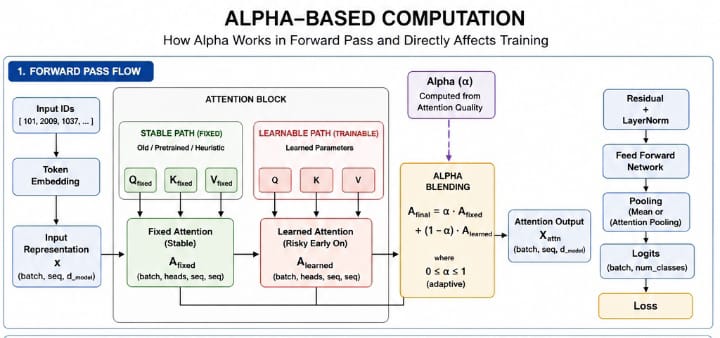
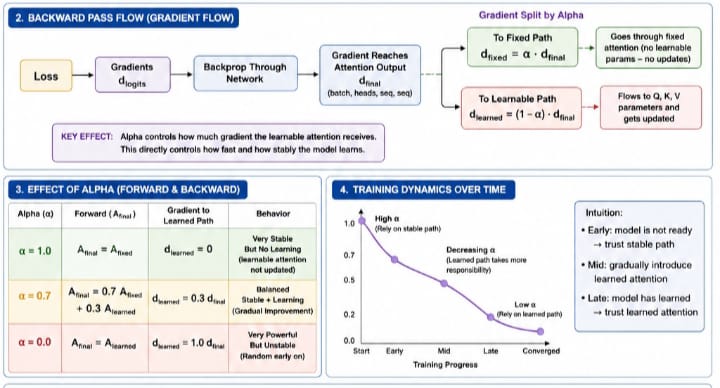 🧠 What Alpha-Based Computation Actually Does
At its core, alpha (α) is a control parameter that blends two different information paths inside a given transformer: A_final = α · A_fixed + (1 − α) · A_learned. [~] Where:
- A_fixed → stable, non-trainable (or minimally changing) attention
- A_learned → dynamic, trainable attention (Q, K, V)
- α ∈ [0, 1] → controls how much each path contributes
[~] Forward Pass -> Controlling Information Flow: During the forward pass, alpha determines what representation the model uses. If α is high (e.g., 0.8–1.0): Model relies mostly on stable attention → outputs are consistent → less noise → safer early training, If α is low (e.g., 0.0–0.3), Model relies mostly on learned attention, → more expressive → but unstable early on. So in forward propagation, alpha is essentially, “How much do I trust learned attention vs safe attention?”
[~] Backward Pass -> Controlling Gradient Flow: When gradients flow backward:
- dA_final → splits into two paths
    - Mathematically:
        - dA_fixed   = α · dA_final
        - dA_learned = (1 − α) · dA_final
[~] Simple Explanation:
- If α (alpha) is high: → most gradient goes to fixed path → learned attention gets very little update → training is stable but slow
- If α is low: → most gradient goes to learned attention → fast learning → but noisy / unstable
[=] Why This Matters for Training
- Without alpha: attention starts random → gradients noisy → model stuck (~10% accuracy)
- With alpha: early stage -> rely on stable structure → meaningful gradients
Main Components
[=] 1. - Consider checking and run: IntegratedPipeline_Flow.html regarding each function of the whole components and deep-dive mechanism. 2. - consider checking ARCHITECTURE.md for more explanation about the main components.
[=] With 23 total architectures working together as a standalone library that is efficient and robust, Main components include:
- GeometricWeightShaping Purpose: Analyzes the geometric structure of data (anisotropy, spectral properties, complexity) and generates optimal weight matrices based on that geometry. Essentially teaches the model how to "understand" the shape of data before processing it, Highly robust to noise, making it an excellent fit for messy environment.
- Activation Purpose: Provides standard neural network activation functions (ReLU, sigmoid, softmax) and their derivatives for backpropagation for MLP Class.
- Loss Purpose: Implements categorical crossentropy loss and its gradient for training classification models for both MLP and The Transformer
- Transformer Purpose: A complete transformer implementation with multi-head attention, positional embeddings, feed-forward networks, layer normalization, and custom backpropagation. Includes both fixed (stable) and dynamic (adaptive) training modes necessary for Scarce data environment using algorithm such as Alpha based computing directly during forward pass.
- Dense Purpose: A geometric-aware dense layer that adapts its weights based on input data geometry and handles variable input dimensions automatically.
- SoftmaxOutput
Purpose: A simple wrapper around softmax activation that stores the output and passes gradients through unchanged (since softmax + crossentropy gradient is handled elsewhere).
- MLP Purpose: A multi-layer perceptron that can switch between standard training and "focused" training (using feed-forward layers only) based on data complexity. Includes prediction, scoring, and geometric measurement methods.
- WeightedEnsemblePredictor Purpose: Combines Transformer and MLP predictions using dynamic weighting based on attention quality, model confidence, and agreement. Also manages memory storage, explainability, and peer agent communication.
- CrossSessionAutomation Purpose: Manages exporting, importing, and syncing model sessions across different devices or time periods. Allows saving entire model states to JSON and transferring them over network sockets.
- ExplainabilityModule Purpose: Generates human-readable explanations for predictions, learns from user feedback, maintains decision history, and batch-trains on corrections. The transparency layer for the AI agent.
- ModelStorage Purpose: SQLite-based persistence for models, attention weights, node memories, and agent data. Handles serialization/deserialization of numpy arrays and model dictionaries.
- AgentDistributedInference Purpose: The distributed agent system - can act as a server or client, handles SSL/TLS security, rate limiting, authentication, peer-to-peer prediction requests, memory synchronization, ensemble voting, and trust management between agents.
- QueryNode
Purpose: Manages trust relationships and identity verification between nodes. Evaluates node agreement, establishes connections, performs safety checks, and maintains the network of trusted peers.
- AutoBatcherAutomation
Purpose: Automatically batches incoming prediction requests to optimize throughput. Collects requests up to a maximum batch size or time window, then processes them together.
- IntegratedPipeline Purpose: The main orchestration class that ties everything together - handles text encoding, model initialization, training, prediction, memory management, hybrid predictions, and distributed inference coordination.
- PipelinePredictionManager Purpose: High-level prediction interface that loads labels from CSV, performs regular/advanced/hybrid predictions, displays results, and calculates entropy for uncertainty estimation.
- ThreadedMessageQueue purpose: Handles message queue in thread for asynchronous message handling. (Queue based)
- AsyncMessageQueue purpose: Handles incoming message from Asychronous peer request (Queue based)
- CohesiveAgentDeployment purpose: Handles both synchronous prediction, and P2P Asynchronous prediction request, acts as a server and a listener simultaneously.
- ConsecutivePeerAgent purpose: handles ensemble weighting from received output from peer, managed server and acts as a listener simultaneously.
- LSTMCell purpose: handles LSTM Core equations In Numpy.
- LSTMNetwork purpose: handling LSTM Feed-forward layer, Training and Samples handling.
- LSTMEngine purpose: handles Proper LSTM Confidence and calibration layer.
Full Documentation Features
- Go to IntegratedPipeline-Specialized-AI-Agent-library
- Go to MANN Intro
- Go to Abstract Weight Encoder (AWE) Intro
- Go to LSTM And Transformer Into
- Go to Why IntegratedPipeline?
- Go to Requirements
- Go to System-Specific-Notes
- Go to Quickstart with Docker
- Go to Performance in ARM64 Environment/Container
- Go to Step's for in-depth Usage
- Go to Troubleshooting
- Go to Detailed process of Alpha-computing
- Go to Main Components
- Go to Source code
- Consider checking:
- ROADMAP.md
- Contributing.md
- changelog.md
- requirements-For-Dev for contributors requirements.
- architecture_diagram.js.
License
[=] LICENSE: - MIT (2026) || See LICENSE for more information.
Release history Release notifications | RSS feed


Download files
Download the file for your platform. If you're not sure which to choose, learn more about installing packages.
Source Distribution
Built Distributions
Filter files by name, interpreter, ABI, and platform.
If you're not sure about the file name format, learn more about wheel file names.
Copy a direct link to the current filters
File details
Details for the file abstractintegratedmodule-0.8.3.tar.gz.
File metadata
- Download URL: abstractintegratedmodule-0.8.3.tar.gz
- Upload date:
- Size: 355.3 kB
- Tags: Source
- Uploaded using Trusted Publishing? No
- Uploaded via: twine/6.2.0 CPython/3.13.14
File hashes
| Algorithm | Hash digest | |
|---|---|---|
| SHA256 |
31b4634eb28faa32d21bc1e38f51cdc6a973e04a1810cc8d282eea1ae3190767
|
|
| MD5 |
b3419e07ceba0d9eb8d91217ba2a7eb3
|
|
| BLAKE2b-256 |
54b7ed5cba9377d924705044334f86e9247f574eb6ae384d31248a42148e2e8c
|
File details
Details for the file abstractintegratedmodule-0.8.3-cp313-cp313-win_amd64.whl.
File metadata
- Download URL: abstractintegratedmodule-0.8.3-cp313-cp313-win_amd64.whl
- Upload date:
- Size: 222.2 kB
- Tags: CPython 3.13, Windows x86-64
- Uploaded using Trusted Publishing? No
- Uploaded via: twine/6.2.0 CPython/3.13.14
File hashes
| Algorithm | Hash digest | |
|---|---|---|
| SHA256 |
928379133b601437f8bfb837719b8a279032fe72737ecd110ca7f548c384c3f8
|
|
| MD5 |
84eca42c303ad3e6e9cab6443a05e4c8
|
|
| BLAKE2b-256 |
e278210b4199d6553d8eebb3333e9f6ec034b28df9b2f303a164a95e29992cb0
|
File details
Details for the file abstractintegratedmodule-0.8.3-cp312-cp312-musllinux_1_2_aarch64.whl.
File metadata
- Download URL: abstractintegratedmodule-0.8.3-cp312-cp312-musllinux_1_2_aarch64.whl
- Upload date:
- Size: 15.8 MB
- Tags: CPython 3.12, musllinux: musl 1.2+ ARM64
- Uploaded using Trusted Publishing? No
- Uploaded via: twine/6.2.0 CPython/3.13.14
File hashes
| Algorithm | Hash digest | |
|---|---|---|
| SHA256 |
09066c845983700c310239657400ec15d6e61c4e75687fc61c3f8095ffba3f45
|
|
| MD5 |
12f6b8fbe86e0e4e3ff25cc3748494b6
|
|
| BLAKE2b-256 |
4df51959d85dde567cf165fad8b76b1165b986cbded664782beb20b963bd3c59
|
File details
Details for the file abstractintegratedmodule-0.8.3-cp312-cp312-manylinux_2_17_aarch64.manylinux2014_aarch64.whl.
File metadata
- Download URL: abstractintegratedmodule-0.8.3-cp312-cp312-manylinux_2_17_aarch64.manylinux2014_aarch64.whl
- Upload date:
- Size: 16.5 MB
- Tags: CPython 3.12, manylinux: glibc 2.17+ ARM64
- Uploaded using Trusted Publishing? No
- Uploaded via: twine/6.2.0 CPython/3.13.14
File hashes
| Algorithm | Hash digest | |
|---|---|---|
| SHA256 |
24157a1bc927f34dab23777462b6e692959fe6c02015a8f1b7f50581f27360d6
|
|
| MD5 |
5a5b79ce43eb201d00a44123c0598d6b
|
|
| BLAKE2b-256 |
e03aa4723b0bcb645fcf972dcda1bcfb2bb21e0d191c20075e26f2335c028fd6
|
File details
Details for the file abstractintegratedmodule-0.8.3-cp311-cp311-musllinux_1_2_aarch64.whl.
File metadata
- Download URL: abstractintegratedmodule-0.8.3-cp311-cp311-musllinux_1_2_aarch64.whl
- Upload date:
- Size: 13.7 MB
- Tags: CPython 3.11, musllinux: musl 1.2+ ARM64
- Uploaded using Trusted Publishing? No
- Uploaded via: twine/6.2.0 CPython/3.13.14
File hashes
| Algorithm | Hash digest | |
|---|---|---|
| SHA256 |
342b9cf26c113ed8415ebc1a5cbf03387a6f0d766ff87420acb64e8b2895895a
|
|
| MD5 |
462a5d6df27c47afb990c444682aacb9
|
|
| BLAKE2b-256 |
14d72da41e3cbed9f20861c8acd3d8b17fe1f6ec7511829c800f948bd156dca7
|
File details
Details for the file abstractintegratedmodule-0.8.3-cp311-cp311-manylinux_2_17_aarch64.manylinux2014_aarch64.whl.
File metadata
- Download URL: abstractintegratedmodule-0.8.3-cp311-cp311-manylinux_2_17_aarch64.manylinux2014_aarch64.whl
- Upload date:
- Size: 14.2 MB
- Tags: CPython 3.11, manylinux: glibc 2.17+ ARM64
- Uploaded using Trusted Publishing? No
- Uploaded via: twine/6.2.0 CPython/3.13.14
File hashes
| Algorithm | Hash digest | |
|---|---|---|
| SHA256 |
58aa935716064eafccb87a5d5bb1e14dc049bb88b9834a1765ce2658640d9e46
|
|
| MD5 |
fdf4bec4a573763284ed45463a6c26ca
|
|
| BLAKE2b-256 |
5b490d5d45032cbcb7b7926eddfbbfe2ef7ff275bcdb9c5bd27bf02c3c97f310
|






