
Used for printing to the CLI in different colors and styles

Project description
AdvancedPrinter
AdvancedPrinter is a custom Python library designed to mimic the behavior of the print function with added color and style options using ANSI escape codes. This allows you to print text with various colors and styles to the terminal.
Features
- Print text in different colors:
black,white,red,green,yellow,blue,magenta,cyan,orange,gray,olive- a list of all colors available by calling thehelpmethod. - Apply styles to text:
bold=b,italic=it,underline=u,inverted=inv,strike-through=str. - Combine styles:
b-it,b-u,it-u,b-it-uetc. - Use
framemethod to frame text with different designs.
Usage
-
Install the package from PyPi
pip install AdvancedPrinter
-
Import the
AdvancedPrinterclass into your Python script.from advancedprinter import AdvancedPrinter as ap
-
Use the
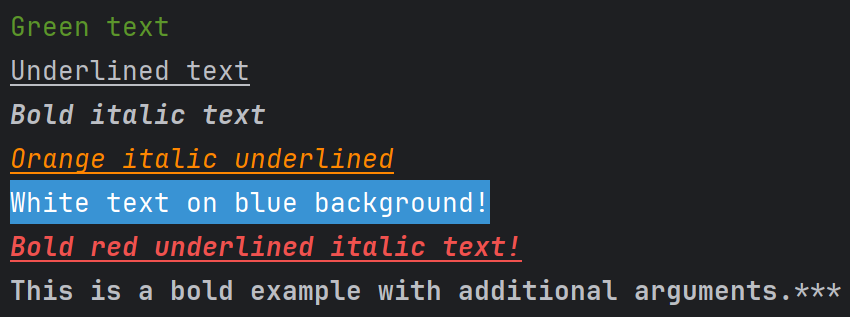
ap.print()method to print colored text.# Example usage ap.print("Green text", c="green") ap.print("Underlined text", s="u") ap.print("Bold italic text", s="b-it") ap.print("Orange italic underlined", s="it-u", c='orange') ap.print("White text on blue b!", c="white", b="blue") ap.print("Bold red underlined italic text!", c="red", s="b-it-u") # Additional arguments example ap.print("This is a bold example with additional arguments.", s="b", end="***")
-
Use
ap.line()method to print multiple colors in line using nestedf-stringsname = "Kaloian" print(f"""{ap.line("Hello, my name is", c='green', s='b')} {ap.line(f"{name}", c='blue')} {ap.line("and I'm", c='white')} {ap.line("28", c='red')} {ap.line('years old!', c='magenta')}""", end='***')

Import directly
-
Import
printandlinedirectly to override the inbuilt methodsfrom advancedprinter import print, line print("Green text", c="green") name = "Kaloian" print(f"""{line("Hello, my name is", c='green', s='b')} {line(f"{name}", c='blue')} {line("and I'm", c='white')} {line("28", c='red')} {line('years old!', c='magenta')}""", end='***')
-
Import the
framemethod to frame text with different designsfrom advancedprinter import frame

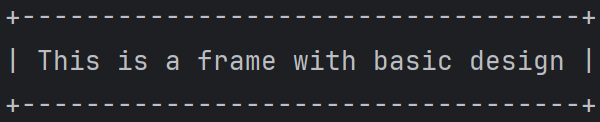
- basic
frame("This is a frame with basic design")
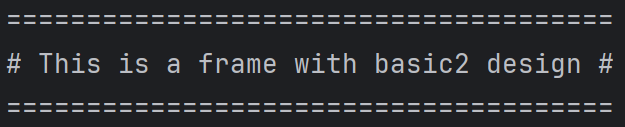
- basic2
frame("This is a frame with basic2 design", f_s='basic2')
- single
frame("This is a frame with single design", f_s='single')
- double
frame("This is a frame with double design", f_s='double')
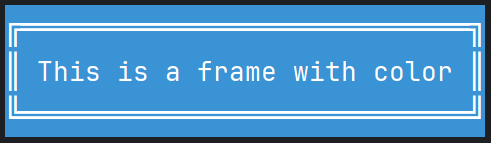
- color (if no parameters are provided for the frame color, it will take the color and background of the text)
frame("This is a frame with color", f_s='double', c='white', b='blue')
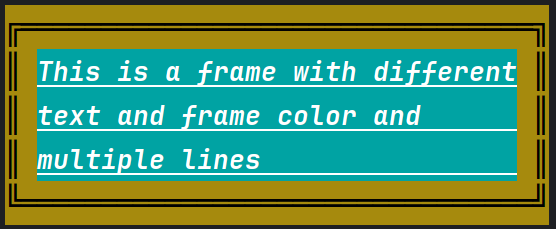
- multiline / multicolor
frame("""This is a frame with different
         text and frame color and
         multiple lines""",
         f_s='double', f_c='black', f_b='olive', c='white', b='cyan', s='b-u-it')


License
This project is licensed under the MIT License - see the LICENSE file for details.
Support Me


Download files
Download the file for your platform. If you're not sure which to choose, learn more about installing packages.
Source Distribution
Built Distribution
Filter files by name, interpreter, ABI, and platform.
If you're not sure about the file name format, learn more about wheel file names.
Copy a direct link to the current filters
File details
Details for the file AdvancedPrinter-1.1.0.tar.gz.
File metadata
- Download URL: AdvancedPrinter-1.1.0.tar.gz
- Upload date:
- Size: 6.0 kB
- Tags: Source
- Uploaded using Trusted Publishing? No
- Uploaded via: twine/5.0.0 CPython/3.12.0
File hashes
| Algorithm | Hash digest | |
|---|---|---|
| SHA256 |
421d08cfc315280ea22d6c3a61e1ae1cf8e06fa8a11c20f6dc4f9f280d0b0d4d
|
|
| MD5 |
69710324c776f3e660e70ee3acd48c94
|
|
| BLAKE2b-256 |
f6b5995972622ccb9393763e250db294cc7ac1cb0718db1e4f2e059ecf309fc4
|
File details
Details for the file AdvancedPrinter-1.1.0-py3-none-any.whl.
File metadata
- Download URL: AdvancedPrinter-1.1.0-py3-none-any.whl
- Upload date:
- Size: 6.5 kB
- Tags: Python 3
- Uploaded using Trusted Publishing? No
- Uploaded via: twine/5.0.0 CPython/3.12.0
File hashes
| Algorithm | Hash digest | |
|---|---|---|
| SHA256 |
d712fccacd38a2b490512dce9cd5fff241337eaca25f2c02866708c738fee8a8
|
|
| MD5 |
c66aea601f8da5cf87e91f7bf28b444e
|
|
| BLAKE2b-256 |
3633fff7929f2f19688c7db988cbc0af43065d75fd07157fb04c79ab21ced75e
|






