

AgentHive


AgentHive is a Python-based framework for managing distributed task execution with a focus on scalability and ease of use. It coordinates producers (tasks) and consumers (workers) in a high-availability setup, using Redis for messaging and PostgreSQL for persistent storage. With a powerful CLI, Docker Compose integration, and a web-based monitor, AgentHive is ideal for developers building extensible task-processing systems.
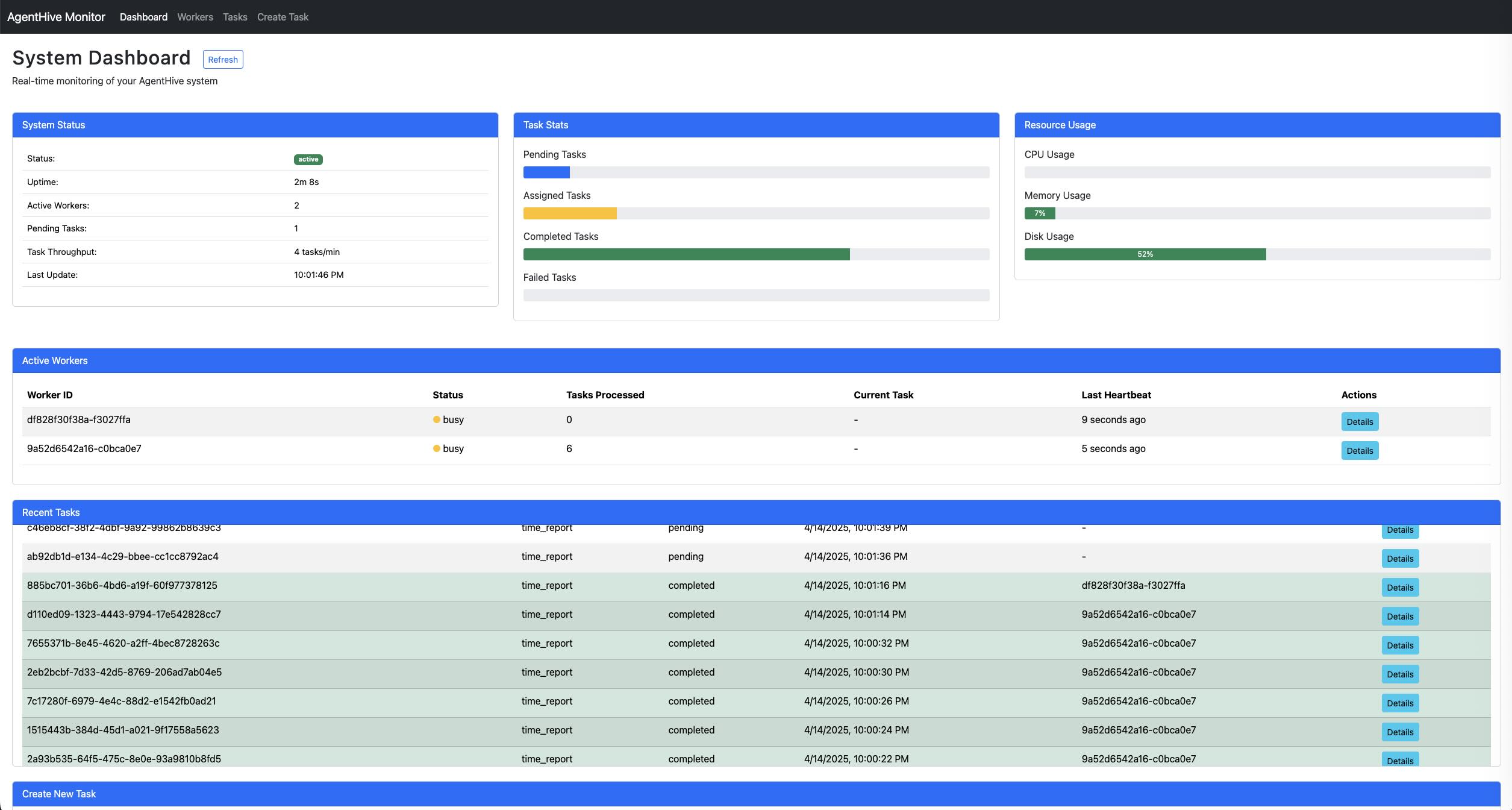
Key Features
- Task Coordination: Producers submit tasks; workers process them dynamically.
- High Availability: Coordinators manage workers and tasks with failover support.
- Dynamic Workers: Workers declare task-handling capabilities, loaded at runtime.
- Real-Time Monitoring: Web interface displays worker and task statuses via coordinator APIs.
- Dockerized: Pre-configured services for easy deployment with Docker Compose.
- CLI-Driven: Initialize projects and manage workers with simple
agenthivecommands.
Installation
Install AgentHive from PyPI to use the CLI:
pip install agenthive
Quick Start
-
Initialize a Project Create a new project with the
agenthive initcommand:agenthive init my-project cd my-project
-
Run the System Start all services (Redis, PostgreSQL, coordinators, workers, monitor) using Docker Compose:
docker-compose -f docker/docker-compose.yml up --build
-
Customize Workers Add custom workers to
src/workers/and rebuild the services:# Example: Add a new worker manually or extend CLI in the future echo "print('Custom worker loaded')" > src/workers/custom_worker.py docker-compose -f docker/docker-compose.yml up --build
Project Structure
After initialization, your project looks like this:
my-project/
├── docker/
│   ├── coordinator/
│   │   └── Dockerfile
│   ├── monitor/
│   │   └── Dockerfile
│   ├── workers/
│   │   └── Dockerfile
│   ├── docker-compose.yml
│   ├── postgres/
│   │   └── init.sql
│   └── redis/
│       └── redis.conf
└── src/
    └── workers/
        ├── example_worker.py
        └── requirements/
            └── example_worker.txt
docker/: Contains Dockerfiles and Compose configuration.src/workers/: Directory for custom worker implementations.
Architecture
- Coordinators: Assign tasks via Redis, track states in PostgreSQL.
- Workers: Fetch tasks from Redis, report heartbeats, execute custom logic.
- Redis: Message broker for tasks and status updates.
- PostgreSQL: Persistent storage for task and worker data.
- Monitor: Web UI querying coordinator APIs for system insights.
Usage
For End Users
- Initialize with
agenthive init <project-name>and run with Docker Compose. - Dockerfiles use
pip install agenthiveby default, requiring a PyPI-published version.
For Developers
- Use
--agenthive-project-pathto test local code:agenthive init my-project --agenthive-project-path /path/to/agenthive cd my-project docker-compose -f docker/docker-compose.yml up --build
- This copies
/path/to/agenthive/src/,setup.py, andrequirements/into the project, configuring Dockerfiles to use local code instead of PyPI.
Scaling Workers
-
To increase the number of worker instances without restarting existing services, use:
docker compose -f docker/docker-compose.yml up -d --no-recreate --scale worker=2
-
This command will:
- Start additional worker instances to reach the specified total (2 in this example)
- Run in detached mode (
-d) - Preserve existing containers (
--no-recreate) - Only affect the worker service, leaving other services untouched
-
Alternatively, to scale workers while only targeting the worker service:
docker compose -f docker/docker-compose.yml up -d --scale worker=2 worker
-
For permanent scaling, you can modify the
replicasvalue in the docker-compose.yml file:worker: # other configuration... deploy: mode: replicated replicas: 2 # Change from 1 to desired number
Development Setup
-
Clone and Install Locally
git clone https://github.com/changyy/py-AgentHive.git
cd py-AgentHive
python3 -m venv venv
source venv/bin/activate
pip install -e .
-
Test CLI
agenthive init test-project --agenthive-project-path .
cd test-project
docker-compose -f docker/docker-compose.yml up --build
-
Run Original Development Environment Use the local
docker/for core development:docker-compose -f docker/docker-compose.yml up --build
Worker Customization
Workers are Python modules in src/workers/. The worker service scans this directory dynamically at runtime. Example worker:
# src/workers/example_worker.py
from agenthive.core.worker import Worker
from typing import Dict, Any

class ExampleWorker(Worker):
    TASK_TYPES = ["example_task"]

    async def setup(self) -> None:
        print("ExampleWorker setting up...")

    async def process_task(self, task) -> Dict[str, Any]:
        print(f"Processing task: {task.data}")
        return {"result": "Task completed", "data": task.data}
Add dependencies in src/workers/requirements/<worker_name>.txt (e.g., requests==2.32.3).
Contributing
Fork the repo, create a feature branch, and submit a pull request to github.com/changyy/py-AgentHive.
License
MIT License. See the LICENSE file for details.
1 maintainer

Metadata
1 maintainer
Release files for AgentHive 1.0.202506050705
For a detailed explanation of source distributions (sdists) and built distributions (wheels), please see the package formats documentation.
Source distribution (sdist)
| File | Size | Uploaded | Provenance | Actions |
|---|---|---|---|---|
| agenthive-1.0.202506050705.tar.gz | 89.7 kB | With provenance | Details for agenthive-1.0.202506050705.tar.gz |
Built distribution (wheel)
| File | Interpreter | ABI | Platform | Actions Reset |
|---|---|---|---|---|
| agenthive-1.0.202506050705-py3-none-any.whl | Python 3 | none | any | Details for agenthive-1.0.202506050705-py3-none-any.whl |
Total release size: 197.8 kB
Release files / agenthive-1.0.202506050705.tar.gz
| Download URL | agenthive-1.0.202506050705.tar.gz |
|---|---|
| Size | 89.7 kB |
| Tags | Source |
|
SHA-256 checksum How to use checksums |
823bc72929bce4c71ed76b75b48c33a0700c17966cb994ef350f256b426bc28a
|
|
BLAKE2b-256 checksum How to use checksums |
339cae13b90fbd2c54fb9c92cc4bc2affdd0be30b30285c5677a8d4e26a91d71
|
| Upload date | |
|
Uploaded using Trusted Publishing? What is trusted publishing? |
Yes |
| Uploaded via |
twine/6.1.0 CPython/3.12.9
|
Provenance
Provenance describes where a file came from. On PyPI, provenance is shared via attestations, which provide a verifiable record of the build or publishing details. View details, limitations and caveats.


PyPI Publish Attestation
PyPI verified that this artifact, at this checksum, originated from the publisher listed below.
Signed by GitHub Actions, verified by PyPI on Jun 4, 2025.
Transparency logRelease files / agenthive-1.0.202506050705-py3-none-any.whl
| Download URL | agenthive-1.0.202506050705-py3-none-any.whl |
|---|---|
| Size | 108.1 kB |
| Tags | Python 3 |
|
SHA-256 checksum How to use checksums |
6fade0cd2024b2cc2f7a143c43516183672b3c6fd947c7365256c99b3f1d1600
|
|
BLAKE2b-256 checksum How to use checksums |
478a74aa45f6a4b2e9d809b263fb3fccd2d3978a23c36243b18c854ace00ffed
|
| Upload date | |
|
Uploaded using Trusted Publishing? What is trusted publishing? |
Yes |
| Uploaded via |
twine/6.1.0 CPython/3.12.9
|
Provenance
Provenance describes where a file came from. On PyPI, provenance is shared via attestations, which provide a verifiable record of the build or publishing details. View details, limitations and caveats.
PyPI Publish Attestation
PyPI verified that this artifact, at this checksum, originated from the publisher listed below.
Signed by GitHub Actions, verified by PyPI on Jun 4, 2025.
Transparency logSecurity for AgentHive 1.0.202506050705
Provenance
Provenance describes where a file came from. On PyPI, provenance is shared via attestations, which provide a verifiable record of the build or publishing details. View details, limitations and caveats.
Full provenance
All 2 files in this release have been uploaded with provenance metadata.
Attestation for agenthive-1.0.202506050705.tar.gz
PyPI Publish Attestation
PyPI verified that this artifact, at this checksum, originated from the publisher listed below.
Signed by GitHub Actions, verified by PyPI on Jun 4, 2025.
Transparency logA note on package security
PyPI is a repository for distributing packages, not a service for auditing them. While third-party security researchers and our staff do their best to detect and remove malicious packages, PyPI cannot guarantee the quality, security or suitability of any given package.
To learn more about protecting yourself from malicious actors, visit our package security documentation.














