
AntiCAP

Project description

AntiCAP
Version:3.3.0
识别率随缘,全靠内置模型和算法
| 类型 | 状态 | 描述 |
|---|---|---|
OCR识别 |
✅ | 返回图片字符串 |
数学计算 |
✅ | 返回计算结果 |
缺口滑块 |
✅ | 返回坐标 |
阴影滑块 |
✅ | 返回坐标 |
图标点选 |
✅ | 侦测图标位置 或 按序返回坐标 |
文字点选 |
✅ | 侦测文字位置 或 按序返回坐标 |
相似对比 |
✅ | 图片中文字的相似度对比 |
双图旋转验证码 |
✅ | 返回角度 |
单图旋转验证码 |
✅ | 返回角度 |
WebApi服务 |
✅ | https://github.com/81NewArk/AntiCAP-WebApi |
📑 目录
🧑⚖️ 免责声明
本项目基于 MIT 开源协议 发布,欢迎自由使用、修改和分发,但必须遵守中华人民共和国法律法规。
使用本项目即表示您已阅读并同意以下条款:
-
合法使用: 不得将本项目用于任何违法、违规或侵犯他人权益的行为,包括但不限于网络攻击、诈骗、绕过身份验证、未经授权的数据抓取等。
-
风险自负: 任何因使用本项目而产生的法律责任、技术风险或经济损失,由使用者自行承担,项目作者不承担任何形式的责任。
-
禁止滥用: 不得将本项目用于违法牟利、黑产活动或其他不当商业用途。
使用视为同意上述条款,即"谁使用,谁负责"。如不同意,请立即停止使用并删除本项目。
📄 AntiCAP 文档
🌍环境说明
python >=3.8 64bit
📁 安装
Pypi下载
pip install AntiCAP -i https://pypi.tuna.tsinghua.edu.cn/simple
🤖 调用说明
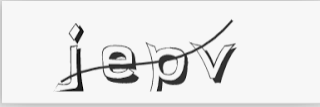
1. 通用OCR识别
参考例图 (数字、大小写字母、汉字)
# example.py

import base64
import AntiCAP


with open("captcha.jpg", "rb") as img_file:
    img_base64 = base64.b64encode(img_file.read()).decode('utf-8')


Atc = AntiCAP.Handler(show_banner=True)
result = Atc.OCR(img_base64=img_base64) #传入图片Base64编码字符串

print(result) # 返回字符串 jepy
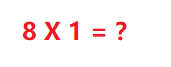
2. 算术验证码识别
参考例图 (加减乘除)
# example.py

import base64
import AntiCAP


with open("captcha.jpg", "rb") as img_file:
    img_base64 = base64.b64encode(img_file.read()).decode('utf-8')


Atc = AntiCAP.Handler(show_banner=True)
result = Atc.Math(img_base64=img_base64) #传入图片Base64编码字符串

print(result) #返回计算结果 8
3. 图标侦测
参考例图

# example.py

import base64
import AntiCAP


with open("captcha.jpg", "rb") as img_file:
    img_base64 = base64.b64encode(img_file.read()).decode('utf-8')


Atc = AntiCAP.Handler(show_banner=True)
result = Atc.Detection_Icon(img_base64=img_base64) #传入图片Base64编码字符串

print(result)

# [{'class': 'icon', 'box': [9.12, 105.4, 111.73, 223.02]}...]
# box分别为 [x1, y1, x2, y2] 左上角和右下角坐标
4. 文字侦测
参考例图

# example.py

import base64
import AntiCAP


with open("captcha.jpg", "rb") as img_file:
    img_base64 = base64.b64encode(img_file.read()).decode('utf-8')


Atc = AntiCAP.Handler(show_banner=True)
result = Atc.Detection_Text(img_base64=img_base64) #传入图片Base64编码字符串

print(result)
# [{'class': 'Text', 'box': [145.71, 19.21, 223.99, 95.7]}...]
# box分别为 [x1, y1, x2, y2] 左上角和右下角坐标
5. 图标点选类
提示图

目标图片
# example.py

import base64
import AntiCAP

with open("order_image.jpg", "rb") as f:
    order_img_base64 = base64.b64encode(f.read()).decode('utf-8')

# 读取目标图(所有图标)并转为 base64
with open("target_image.jpg", "rb") as f:
    target_img_base64 = base64.b64encode(f.read()).decode('utf-8')

Atc = AntiCAP.Handler(show_banner=True)
result = Atc.ClickIcon_Order(
    order_img_base64=order_img_base64,
    target_img_base64=target_img_base64
)

print(result)
6. 文字点选类
提示图

目标图片
# example.py

import base64
import AntiCAP

with open("order_image.jpg", "rb") as f:
    order_img_base64 = base64.b64encode(f.read()).decode('utf-8')

# 读取目标图(所有图标)并转为 base64
with open("target_image.jpg", "rb") as f:
    target_img_base64 = base64.b64encode(f.read()).decode('utf-8')

Atc = AntiCAP.Handler(show_banner=True)
result = Atc.ClickText_Order(
    order_img_base64=order_img_base64,
    target_img_base64=target_img_base64
)

print(result)
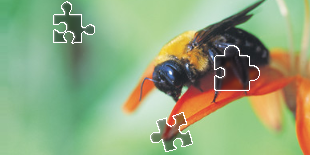
7. 缺口滑块类
缺口图

背景图
# example.py

import base64
import AntiCAP

# 读取滑块图片(小块)
with open("slider.png", "rb") as f:
    target_base64 = base64.b64encode(f.read()).decode('utf-8')

# 读取背景图片(带缺口的大图)
with open("background.jpg", "rb") as f:
    background_base64 = base64.b64encode(f.read()).decode('utf-8')


Atc = AntiCAP.Handler(show_banner=True)

result = Atc.Slider_Match(target_base64=target_base64,
                          background_base64=background_base64
)

print(result)
8. 阴影滑块类
目标图片

背景图片

# example.py

import base64
import AntiCAP

# 读取滑块图片(小块)
with open("target.jpg", "rb") as f:
    target_base64 = base64.b64encode(f.read()).decode('utf-8')

# 读取背景图片(带缺口的大图)
with open("background.jpg", "rb") as f:
    background_base64 = base64.b64encode(f.read()).decode('utf-8')


Atc = AntiCAP.Handler(show_banner=True)

result = Atc.Slider_Match(target_base64=target_base64,
                          background_base64=background_base64
)

print(result)
9. 相似度对比
图片1

图片2

# example.py
import base64
import AntiCAP

with open("image1.jpg", "rb") as f:
    image1_base64 = base64.b64encode(f.read()).decode('utf-8')

with open("image2.jpg", "rb") as f:
    image2_base64 = base64.b64encode(f.read()).decode('utf-8')


Atc = AntiCAP.Handler(show_banner=True)

result = Atc.Compare_Image_Similarity(image1_base64=image1_base64, image2_base64=image2_base64)

print("相似度结果:", result)
10. 双图旋转类验证码
内圈

外圈

# example.py

import base64
import AntiCAP

with open("inside.jpg", "rb") as f:
    inside_base64 = base64.b64encode(f.read()).decode('utf-8')

with open("outside.jpg", "rb") as f:
    outside_base64 = base64.b64encode(f.read()).decode('utf-8')


Atc = AntiCAP.Handler(show_banner=True)

result= Atc.Double_Rotate(inside_base64=inside_base64, outside_base64=outside_base64)

print(result)

# {'similarity': 0.6651270985603333, 'inner_angle': 75.5, 'raw_angle': 151}
11. 单图旋转类验证码
图片

# example.py

import base64
import AntiCAP

with open("rotate_image.jpg", "rb") as f:
    rotate_base64 = base64.b64encode(f.read()).decode('utf-8')


Atc = AntiCAP.Handler(show_banner=True)

result= Atc.Single_Rotate(image_base64=rotate_base64)

print(result)

# 229  返回旋转角度
🧬 自定义模型
使用模型的函数均支持自定义模型
import AntiCAP

Atc = AntiCAP.Handler(show_banner=True)


result = Atc.Math(img_base64="",
                  # math_model_path 参数为 .pt格式的yolo侦测模型
                  math_model_path=r"C:\AntiCAP\model\yuor_math_model.pt")


result = Atc.Detection_Icon(img_base64="",
                            # text_model_path 参数为 .pt格式的yolo侦测模型
                            detectionIcon_model_path=r"C:\AntiCAP\model\yuor_detectionIcon_model.pt")

result = Atc.Detection_Text(img_base64="",
                            # detectionText_model_path 参数为 .pt格式的yolo侦测模型
                            detectionText_model_path=r"C:\AntiCAP\model\yuor_detectionText_model.pt")


result = Atc.ClickText_Order(order_img_base64="",
                             target_img_base64="",
                             # text_model_path 参数为 .pt格式的yolo侦测模型
                             detectionText_model_path=r"C:\AntiCAP\model\yuor_detectionTcon_model.pt",
                             # sim_onnx_model_path为 .onnx格式的孪生神经网络模型
                             sim_onnx_model_path=r"C:\AntiCAP\model\your_sim_onnx_model.onnx")


result = Atc.ClickIcon_Order(order_img_base64="",
                             target_img_base64="",
                             # text_model_path 参数为 .pt格式的yolo侦测模型
                             detectionIcon_model_path=r"C:\AntiCAP\model\yuor_detectionIcon_model.pt",
                             # sim_onnx_model_path为 .onnx格式的孪生神经网络模型
                             sim_onnx_model_path=r"C:\AntiCAP\model\your_sim_onnx_model.onnx")


result = Atc.Compare_Image_Similarity(image1_base64="",
                                      image2_base64="",
                                      # sim_onnx_model_path为 .onnx格式的孪生神经网络模型
                                      sim_onnx_model_path=r"C:\AntiCAP\model\your_sim_onnx_model.onnx")


result = Atc.Single_Rotate(image_base64="",
                            # rotate_onnx_modex_path为 .onnx格式的旋转模型
                            rotate_onnx_modex_path=r"C:\AntiCAP\model\your_rotate_onnx_model.onnx")
🐧 QQ交流群

💪🏼 模型训练
🚬 请作者抽一包香香软软的利群


😚 致谢名单
这份荣光我不会独享
[1] Ddddocr作者 网名:sml2h3
[2] 微信公众号 OneByOne 网名:十一姐
[3] 苏州大学,苏州大学文正学院 计算机科学与技术学院 张文哲教授
[4] 苏州大学,苏州大学文正学院 计算机科学与技术学院 王辉教授
[5] 苏州市职业大学,苏州大学文正学院 计算机科学与技术学院 陆公正副教授
[6] 武汉科锐软件安全教育机构 钱林松讲师 网名:Backer
📚 参考文献
[1] Github. 2025.03.28 https://github.com/sml2h3
[2] Github. 2025.03.28 https://github.com/2833844911/
[3] Bilibili. 2025.03.28 https://space.bilibili.com/308704191
[4] Bilibili. 2025.03.28 https://space.bilibili.com/472467171
[5] Ultralytics. 2025.03.28 https://docs.ultralytics.com/modes/train/
[6] YRL's Blog. 2025.03.28 https://blog.2zxz.com/archives/icondetection
Release history Release notifications | RSS feed


Download files
Download the file for your platform. If you're not sure which to choose, learn more about installing packages.
Source Distribution
Built Distribution
Filter files by name, interpreter, ABI, and platform.
If you're not sure about the file name format, learn more about wheel file names.
Copy a direct link to the current filters
File details
Details for the file anticap-3.3.0.tar.gz.
File metadata
- Download URL: anticap-3.3.0.tar.gz
- Upload date:
- Size: 16.0 kB
- Tags: Source
- Uploaded using Trusted Publishing? No
- Uploaded via: twine/6.2.0 CPython/3.10.6
File hashes
| Algorithm | Hash digest | |
|---|---|---|
| SHA256 |
a4c524173aa597e211fcfb90089bb3315ab0523ce9ee5b4d0096c07add4071a1
|
|
| MD5 |
d09a9ff991a3cf3c6b7c81c425e684e5
|
|
| BLAKE2b-256 |
468a69d26431515fbc5a1c84cf552e0b269ec961d8a66613760298e46abe8d4e
|
File details
Details for the file anticap-3.3.0-py3-none-any.whl.
File metadata
- Download URL: anticap-3.3.0-py3-none-any.whl
- Upload date:
- Size: 19.6 kB
- Tags: Python 3
- Uploaded using Trusted Publishing? No
- Uploaded via: twine/6.2.0 CPython/3.10.6
File hashes
| Algorithm | Hash digest | |
|---|---|---|
| SHA256 |
821a500db8398d0444949b3e516c4c6d5875486c6c26624343c81207f9d613ee
|
|
| MD5 |
d52bd32fc7622504e100c348c4d622f1
|
|
| BLAKE2b-256 |
4cb2e5bb51eb32397e80c77f0bbe3c864b0d2f232e05e8ca179eb1ae69bed7e1
|






