
OpenAPI is a specification for designing and documenting RESTful APIs, enabling clear structure, easy integration, and automated tool support.

Project description
Getting Started with OpenAI API
Introduction
Welcome to the OpenAI Postman Collection! This collection provides a comprehensive set of examples to help you get started with the OpenAI API. Easily walkthrough multiple usecases, API Capabilities, and OpenAI's assistant APIs.
The OpenAI API provides a simple interface for developers to create an intelligence layer in their applications powered by OpenAI's state-of-the-art models. The Chat Completions endpoint powers ChatGPT and provides a straightforward way to generate text responses.
Note: This collection is part of a workspace curated by the Postman team to help you explore and work with useful APIs. Learn how to contribute to this collaborative space and its collections here.
Getting Started
Step 1: Fork the Collection
Fork the Collection manually or by clicking the Run in Postman button

Step 2: Setup your account
Create an OpenAI account or sign in to an existing one.
Step 3: Fetch your API key
Next, navigate to the API keys page and click on the "Create new secret key" button.
Give your key a name, select a project, and configure all relevant permissions for this API key.
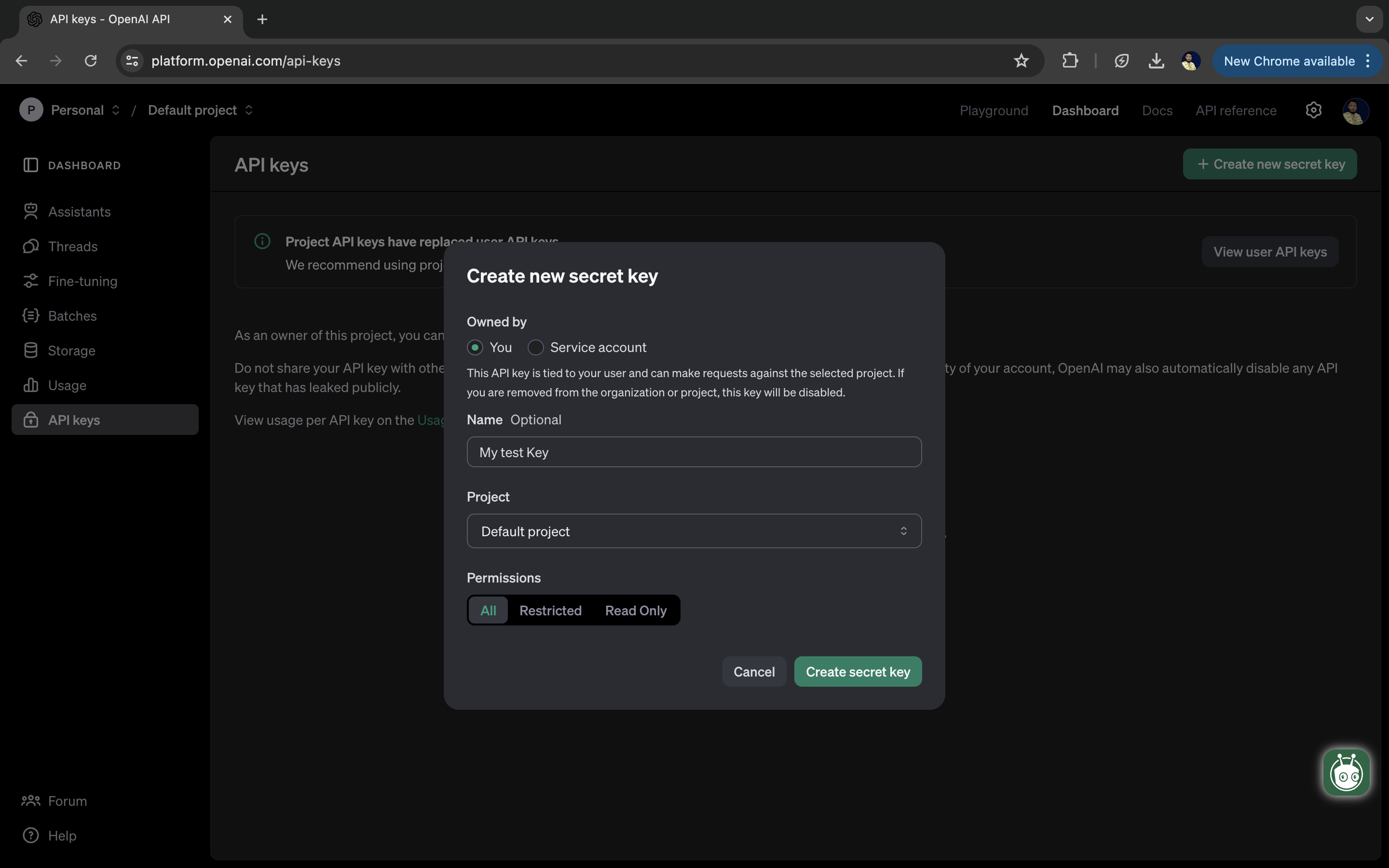
Create the secret key.
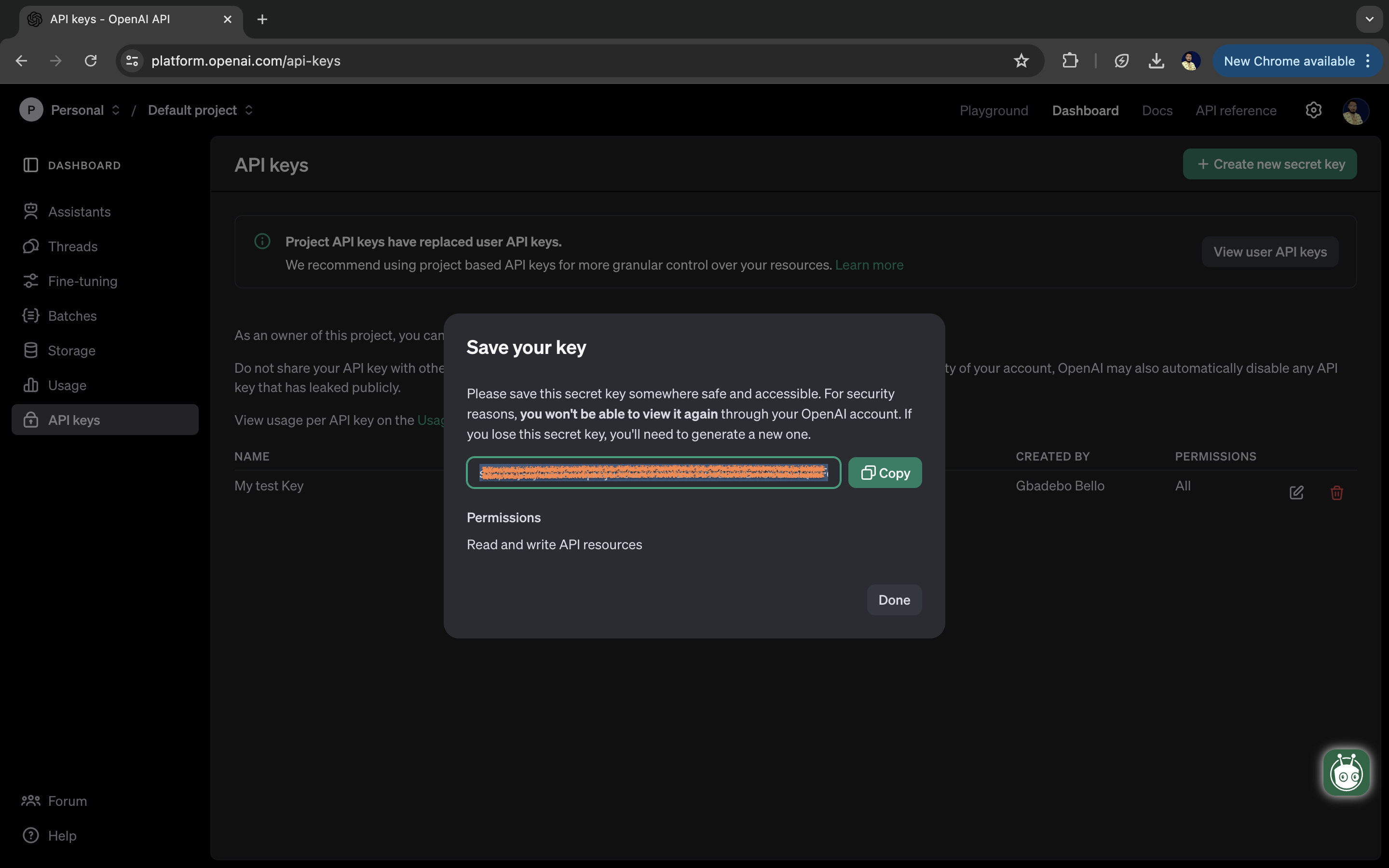
Once the Secret Key is created, copy it to your clipboard by clicking the copy button and select "Done" to close the open prompt.
Step 4: Configure the API Key in Postman
Postman provides you with a Vault that let's you store sensitive data locally. Data stored in this vault is not synced with Postman Cloud and can only be accessed in your local Postman Instance.
Using the table below as a guide, add your keys to your vault. A reference to a secret {{vault:openai-secret-key}}} has been added to the collection authorization tab as a Bearer token to be automatically used with all requests in this workspace. If you do not use the same variable name in your vault, please update the authorization tab accordingly.
| Key | Value | Allowed Domains |
|---|---|---|
openai-secret-key |
your_key_value | https://api.openai.com |
There are three folders in this collection.
-
OpenAI API - Use Cases: Documents several interesting use cases of the OpenAI API.
-
OpenAI API capabilities: Documents the OpenAI API and includes most of the requests and interfaces that the API exposes. It makes use of the scripts tab to build basic workflows where necessary and test for assertions against the API response.
-
OpenAI Assistants API: Documents the new Assistants API (in Beta) which is designed to help developers build powerful AI assistants capable of performing a variety of tasks
OpenAI API Use Cases
-
Build a simple FAQ system
OpenAI API Capabilities
-
Fine Tuning
-
Batch API Requests
-
Files
-
Image Generation
-
Models
OpenAI Assistants API
-
Threads
-
Messages
-
Runs
-
Vector Store
-
Vectore Store Files
Getting Help
We want you to get the best support you can when working with this workspace. If you're stuck and you need help regarding OpenAI specific issues, we recommend that you explore the following channels.
For Postman specific questions or feedback about this workspace:
- Postman's Community Forum - Provide feedback and ask questions about this workspace, ask general Postman questions, understand how to use a feature, how to build a workflow, etc.
For Postman specific issues:
- Postman Github Issues - Submit feature requests, bug reports, etc here
Install the Package
The package is compatible with Python versions 3.7+.
Install the package from PyPi using the following pip command:
pip install Apimatic-open-api-sdk==1.0.0
You can also view the package at: https://pypi.python.org/pypi/Apimatic-open-api-sdk/1.0.0
Test the SDK
You can test the generated SDK and the server with test cases. unittest is used as the testing framework and pytest is used as the test runner. You can run the tests as follows:
Navigate to the root directory of the SDK and run the following commands
pip install -r test-requirements.txt pytest
Initialize the API Client
Note: Documentation for the client can be found here.
The following parameters are configurable for the API Client:
| Parameter | Type | Description |
|---|---|---|
| environment | Environment |
The API environment. Default: Environment.PRODUCTION |
| http_client_instance | HttpClient |
The Http Client passed from the sdk user for making requests |
| override_http_client_configuration | bool |
The value which determines to override properties of the passed Http Client from the sdk user |
| http_call_back | HttpCallBack |
The callback value that is invoked before and after an HTTP call is made to an endpoint |
| timeout | float |
The value to use for connection timeout. Default: 60 |
| max_retries | int |
The number of times to retry an endpoint call if it fails. Default: 0 |
| backoff_factor | float |
A backoff factor to apply between attempts after the second try. Default: 2 |
| retry_statuses | Array of int |
The http statuses on which retry is to be done. Default: [408, 413, 429, 500, 502, 503, 504, 521, 522, 524] |
| retry_methods | Array of string |
The http methods on which retry is to be done. Default: ['GET', 'PUT'] |
| bearer_auth_credentials | BearerAuthCredentials |
The credential object for OAuth 2 Bearer token |
The API client can be initialized as follows:
from openaiapi.configuration import Environment
from openaiapi.http.auth.o_auth_2 import BearerAuthCredentials
from openaiapi.openaiapi_client import OpenaiapiClient

client = OpenaiapiClient(
    bearer_auth_credentials=BearerAuthCredentials(
        access_token='AccessToken'
    ),
    environment=Environment.PRODUCTION
)
Authorization
This API uses the following authentication schemes.
List of APIs
- Text Generation-Chat Completions API
- Function Calling-Chat Completions API
- Builda Simple FAQ System-Embeddings API
- Chat Completions
- Structured Outputs
- Predicted Outputs
- Fine Tuning
- Batch API Requests
- Image Generation
- Vector Store Files
- Vector Store
- Open AI Assistants API-Beta
- Reasoning
- Embeddings
- Files
- Models
- Moderations
- Messages
- Runs
- Threads
- Batches
SDK Infrastructure
HTTP
Utilities
Release history Release notifications | RSS feed

Download files
Download the file for your platform. If you're not sure which to choose, learn more about installing packages.
Source Distribution
Built Distribution
Filter files by name, interpreter, ABI, and platform.
If you're not sure about the file name format, learn more about wheel file names.
Copy a direct link to the current filters
File details
Details for the file apimatic_open_api_sdk-1.0.0.tar.gz.
File metadata
- Download URL: apimatic_open_api_sdk-1.0.0.tar.gz
- Upload date:
- Size: 75.6 kB
- Tags: Source
- Uploaded using Trusted Publishing? No
- Uploaded via: twine/6.1.0 CPython/3.9.13
File hashes
| Algorithm | Hash digest | |
|---|---|---|
| SHA256 |
2755a5b27b5bba9fe42d28c354206d56e276b0b494c62a72084aa1252120bc0d
|
|
| MD5 |
fe94c7f43d708438c8e396df48694508
|
|
| BLAKE2b-256 |
bebdc25a74a1bb47614720dfed0021b74e13421d99254a5109e4714674732278
|
File details
Details for the file apimatic_open_api_sdk-1.0.0-py3-none-any.whl.
File metadata
- Download URL: apimatic_open_api_sdk-1.0.0-py3-none-any.whl
- Upload date:
- Size: 240.4 kB
- Tags: Python 3
- Uploaded using Trusted Publishing? No
- Uploaded via: twine/6.1.0 CPython/3.9.13
File hashes
| Algorithm | Hash digest | |
|---|---|---|
| SHA256 |
ed0eeaa49ce69743b962e780ba29b822342bdb3719429899f078eeaa431d655f
|
|
| MD5 |
3e49c936691481e5307af0d3c86eee5b
|
|
| BLAKE2b-256 |
d720ce50056341ed404fbc3432e061b5efb9cc5d73aca2fea7bf1da9e9c1aa93
|






