
Designed for visualizing package dependencies and highlighting differences between branches in GitHub pull requests. It offers customization options to tailor package views.


Project description
ArchLens
ArchLens is a Python software tool that generates customizable visual package views, showcasing the packages in your system and their dependencies. It offers the flexibility to include or exclude specific packages to suit your requirements for comprehensible views.
Moreover, ArchLens can highlight the differences between your working branch and a specified remote branch, including added or removed dependencies and created or deleted packages, by using green and red highlighting.
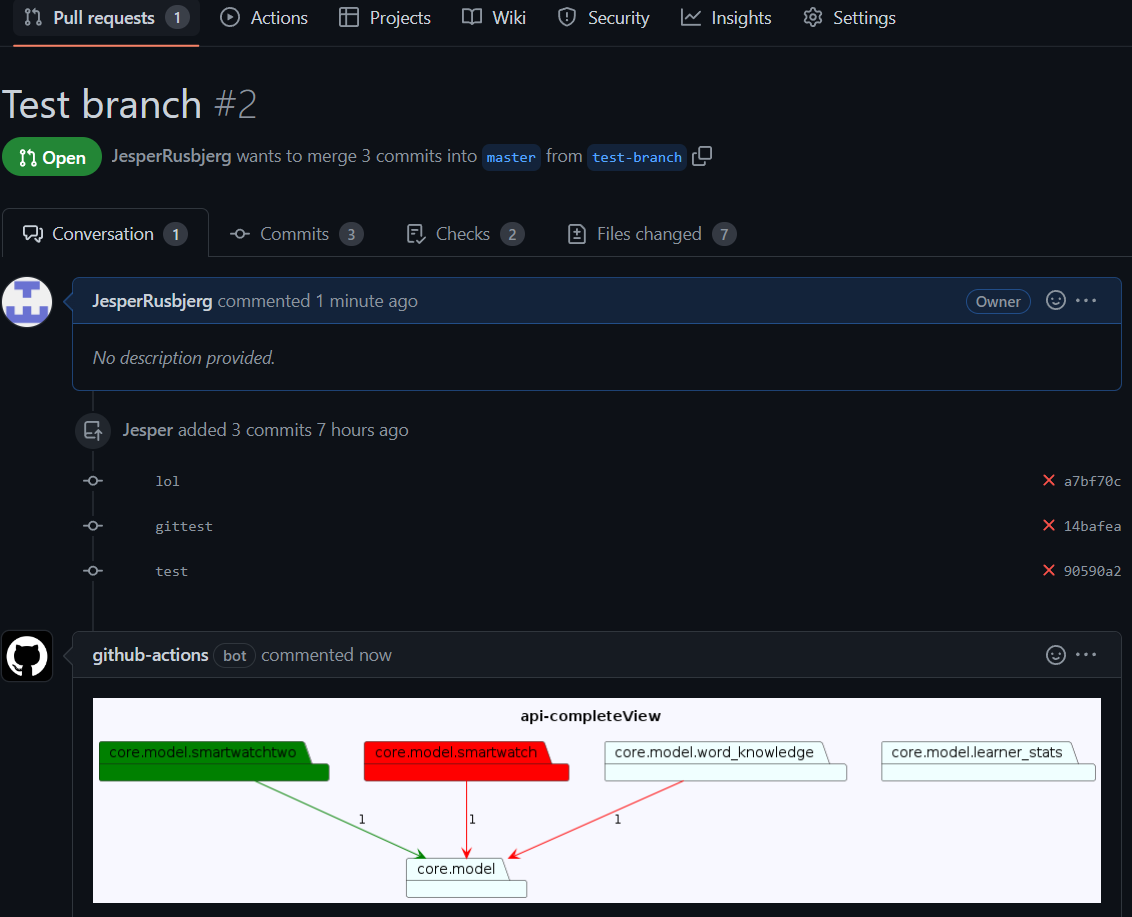
Lastly, ArchLens can display the highlighted differences in the system views when a pull request is created on GitHub. It automatically generates the views specified in your config, highlights the differences, and displays them in your pull request, simplifying the review process.
To help you get started, this readme includes various options in combination with the setup of a config file.
Compatibility
ArchLens is compatible with projects written in Python versions greater than 3.9
Installation
To install ArchLens, simply use the pip package manager by running the following command:
pip install archlens-preview (You need administrative right to perform the operation)
This will download and install the necessary files and dependencies needed for ArchLens to run properly.
Commands
All commands must be run from the project's root folder
The system has 4 commands:
-archlens init- Creates the config template
-archlens render - Renders the views specified in the config
-archlens render-diff - Renders the differences in the views between your working branch and a specified branch
-archlens create-action Creates the github action which will automatically add the difference views to pull requests.
Using the system
In this section, we will guide you through using the ArchLens system by explaining the commands and output with the example of an API project called 'zeeguu-api' that can be found at https://github.com/zeeguu/api.
Although the project is not large, understanding the system even for this project size of roughly 40 packages can be challenging. To begin generating views, you need to be in the root of your project and run the following command:
archlens init
This will create an "archlens.json" file in your root folder, where you can edit your desired views. This is the initial config:
 {
    "$schema": "https://raw.githubusercontent.com/archlens/ArchLens/master/src/config.schema.json",
    "name": "",
    "rootFolder": "",
    "github": {
        "url": "",
        "branch": "main"
    },
    "saveLocation": "./diagrams/",
    "views": {
        "completeView": {
            "packages": [],
            "ignorePackages": []
        }
    }
}
You can render the views specified in your "archlens.json" file by running the command:
archlens render
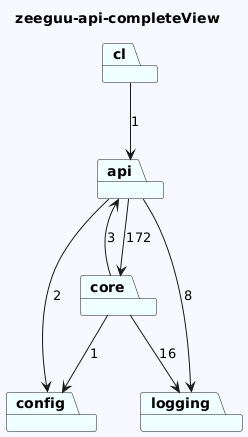
This will generate the diagrams for all the views defined in your configuration file and save them in the location specified in the "saveLocation" field of your configuration. Since currently you only have one view you will only see the following:
Expanding Packages
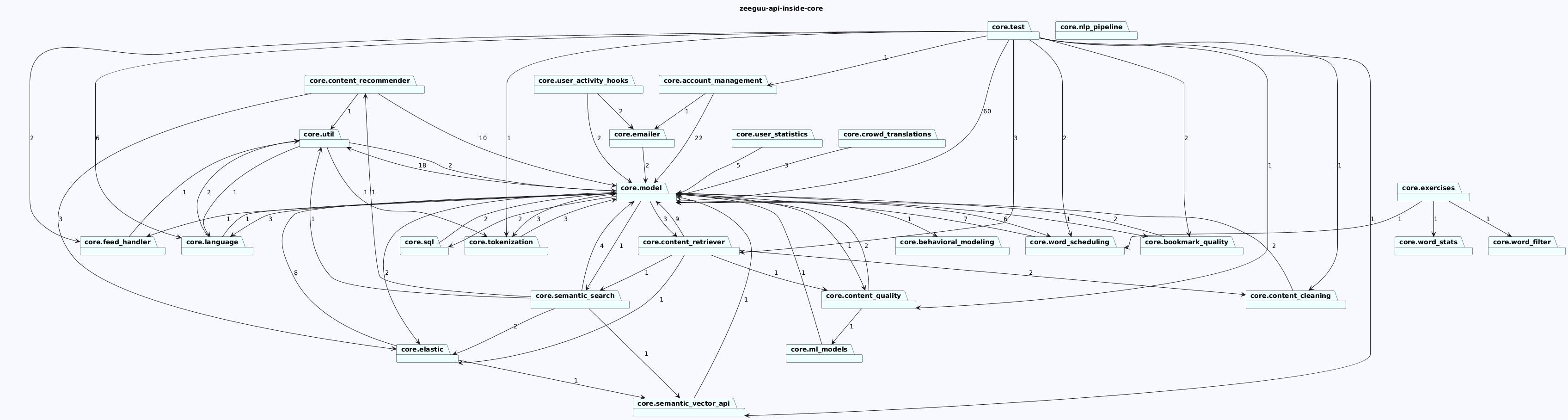
If you want to generate another view, in which you want to show the contents of the core package for example, you can do it by adding a new view to your definition. E.g.
 {
    "$schema": "https://raw.githubusercontent.com/archlens/ArchLens/master/src/config.schema.json",
    "name": "",
    "rootFolder": "",
    "github": {
        "url": "",
        "branch": "main"
    },
    "saveLocation": "./diagrams/",
    "views": {
        "completeView": {
            "packages": [],
            "ignorePackages": []
        },

 "inside-core": {
      "packages": [
        {
          "path": "core",
          "depth": 1
        }
      ]
    }
}
This will generate another view that shows all the dependencies inside the core package
Filtering of packages
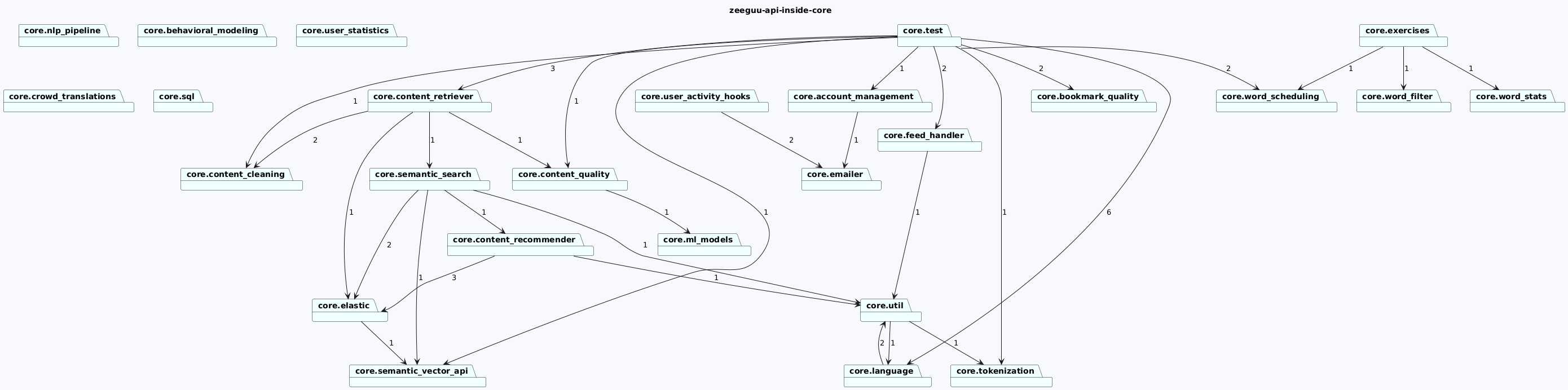
The last view we generated above is quite dense. One way to solve this problem is to observe that almost all the packages depend on the core.model package. When every node depends on it, drawing all the dependencies has little value. We can filter nodes that are shown in the diagram if we use the ignorePackages key in a view definition.
We redefine the view to filter out the core.mode package from the view:
    "inside-core": {
      "packages": [
        {
          "path": "core",
          "depth": 1
        }
      ],
      "ignorePackages": [
        "core.model",
      ]
    },
The resulting view is much more relevant for understanding the architecture of this sytem.
Arrows
Each arrow in the system diagram represents a dependency between two packages, and the number on the arrow indicates the number of dependencies going in that direction. If you prefer not to see these arrows, you can use the optional "showDependencyCount" setting, which is a boolean. When set to "false", the dependency count will be hidden in all views. Here is an example of how to set this option in your archlens.json file:
{
    "$schema": "https://raw.githubusercontent.com/archlens/ArchLens/master/src/config.schema.json",
    "name": "zeeguu", # Name of project
    "rootFolder": "zeeguu", # Name of source folder
    "github": {
        "url": "https://github.com/zeeguu/api", # Link to project's Github
        "branch": "master" # Name of main/master branch of project
    },
    "showDependencyCount": false, <------ here we remove the arrows.
    "saveLocation": "./diagrams/", # Location to store generated diagrams
}
In this ArchLens config file, the dependency count would be gone. This setting is applied to all of the views.
Ignore packages
In addition to selecting which packages you want in your diagram, you can also select which packages you want removed from your diagram.
This can be done in two different ways:
"ignorePackages": [
"*test*" #Removes any package which contains the word test
"api/test" #Removes the package api/test and all of its sub packages
]
To clarify, the first method using an asterisk (*) will remove any package containing the specified keyword, while the second method will remove only the specified package and all of its sub-packages. This can be useful for cleaning up clutter in the diagram or for excluding certain packages that are not relevant to the analysis.
The difference views
To generate a difference view using ArchLens, you need to be on a branch other than the one specified in the configuration file. Usually, you would compare your current branch with the main/master branch, but you have the flexibility to choose any branch you desire. For the following example, I have narrowed down the view by filtering out only the "core/model" package.
{
    "$schema": "https://raw.githubusercontent.com/archlens/ArchLens/master/src/config.schema.json",
    "name": "zeeguu",
    "rootFolder": "zeeguu",
    "github": {
        "url": "https://github.com/zeeguu/api",
        "branch": "master"
    },
    "saveLocation": "./diagrams/",
    "views": {
         "coreView":{
            "packages": [
                "core/model" #Looking at core/model, using the path instead of object, because i want to see the entire sub system
            ],
            "ignorePackages": []
        }
    }
}
For the next example, the core view is further filtered to show only "core/model". Three changes were made in comparison to the main branch: the package "smart_watch" was deleted, a new package called "smart_watch_two" was added, and a dependency from "word_knowledge" to "model" was removed.
To render this new view displaying the changes, a new command must be run:
archlens render-diff
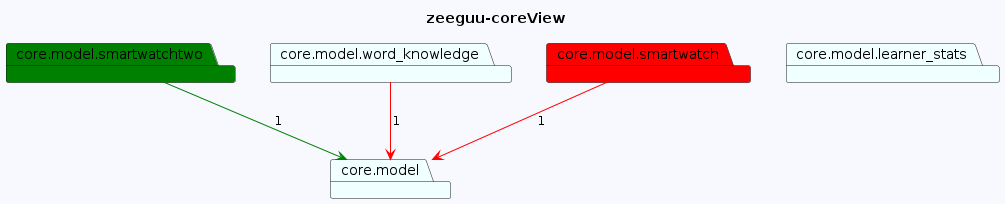
If there are no diffrences, a diagram without diffrences will still be generated.
Github action - Pull request
To display the difference views in your pull requests, run the command:
archlens create-action
This command generates the necessary files in the .github folder, creating it if it doesn't already exist. Once this is done, you can create a pull request, and the difference view will be visible to the reviewer, as shown in the image below. If there are no diffrences, a diagram without diffrences will still be generated.
Contributing
Further development on ArchLens is welcomed. To contribute to developing further on ArchLens, we welcome you to fork the repository and propose your additions.
Before you start developing, ensure you have a compatible Python version for running ArchLens. ArchLens have been tested for versions after, including, 3.9, up until, and excluding, version 3.12. There are known issues related to running ArchLens with a version after and including version 3.11.
After ensuring that the current Python version is compatible with ArchLens, we recommend installing the required packages from the files requirements.txt and dev-requirements.txt. This will ensure that the necessary packages to run and test your contributions to ArchLens are in your development environment and that they uphold the minimum version requirements. The installing process has been tested using pip, and can be done using the following commands:
python -m pip install -r requirements.txt
python -m pip install -r dev-requirements.txt
(What you use to install pip packages might differ)
Next, to continue setting up your development environment, run the following command:
python setup.py develop
After following these steps, one can use the commando below to run the commands locally:
python ./src/cli_interface.py [cli_command]
For an overview of CLI-commands, look here.
Changelog
All notable changes to this project will be documented in this file.
The format is based on Keep a Changelog, and this project adheres to Semantic Versioning.
[0.2.9] - 2025-06-23
Bugfix
- Default view shows top level packages not all the packages in the system
[0.2.8] - 2025-06-23
Bugfix
- Fixed package depth functionality that was not working properly: when depth is 2 the view should not show nodes at depth 1 or 3! (with Sebastian Cloos Hylander)
Release history Release notifications | RSS feed


Download files
Download the file for your platform. If you're not sure which to choose, learn more about installing packages.
Source Distribution
Built Distribution
Filter files by name, interpreter, ABI, and platform.
If you're not sure about the file name format, learn more about wheel file names.
Copy a direct link to the current filters
File details
Details for the file archlens-0.2.9.tar.gz.
File metadata
- Download URL: archlens-0.2.9.tar.gz
- Upload date:
- Size: 16.9 kB
- Tags: Source
- Uploaded using Trusted Publishing? No
- Uploaded via: twine/6.1.0 CPython/3.9.23
File hashes
| Algorithm | Hash digest | |
|---|---|---|
| SHA256 |
bb4317c993b0db5424bbc0a697accf9a397f8d5ed254d6704a9ea13fe1478f1f
|
|
| MD5 |
c4a932193a9c990ea28794630e086bc6
|
|
| BLAKE2b-256 |
1c332c1bfc0f59f3245b8d8c361a2a3826c06a8bd20b123581137ec34a0c6892
|
File details
Details for the file archlens-0.2.9-py3-none-any.whl.
File metadata
- Download URL: archlens-0.2.9-py3-none-any.whl
- Upload date:
- Size: 22.5 kB
- Tags: Python 3
- Uploaded using Trusted Publishing? No
- Uploaded via: twine/6.1.0 CPython/3.9.23
File hashes
| Algorithm | Hash digest | |
|---|---|---|
| SHA256 |
7888d9bb461dfa98f2016df4ad13d4d1ab26792bfe6154cb15c16907128d35f0
|
|
| MD5 |
3bae1595054344de6e7d239f660ba9a0
|
|
| BLAKE2b-256 |
baaba25e2efa9ef28cfda3baa35f343af70696addffe16d697c3b2f6235c3d3f
|






