
ArgUI

An automatic, terminal based interactive interface for any Python 3 argparse command line with keyboard and mouse support.
See It in Action
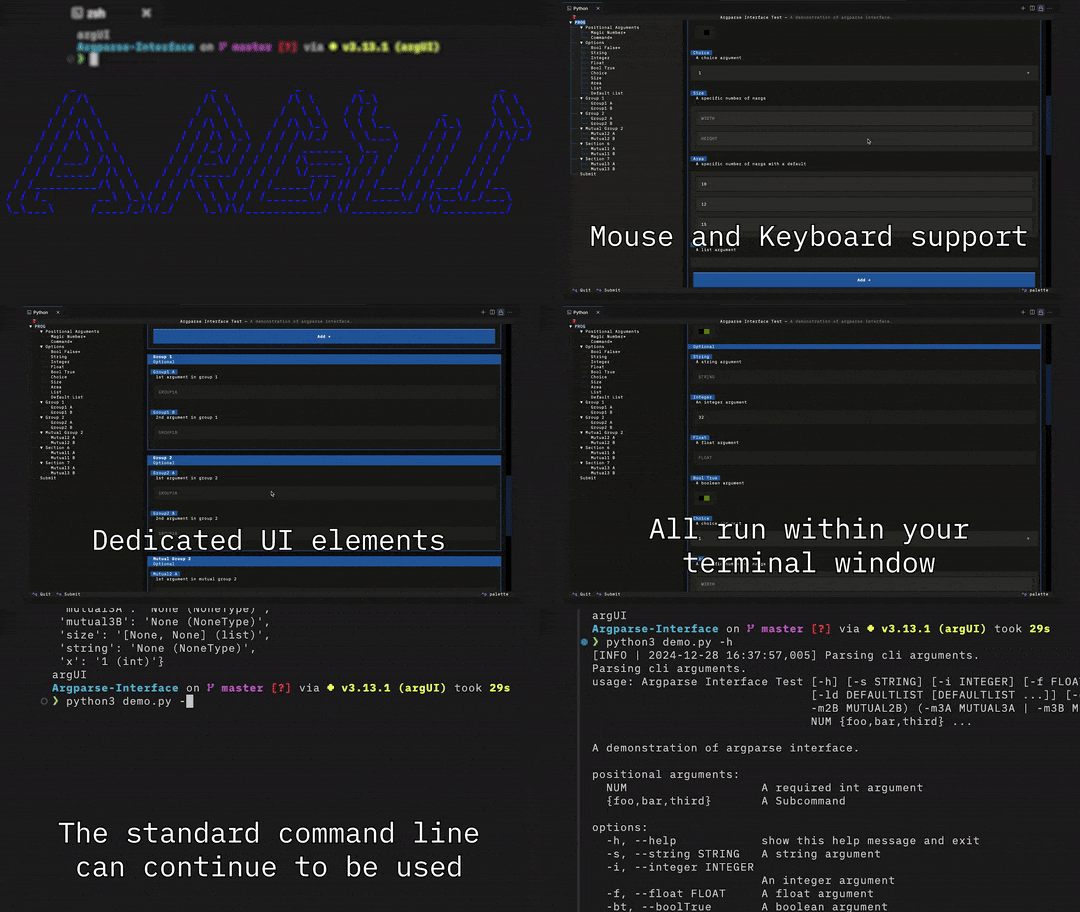
Get a feel for the features of ArgUI using the Demo.py code included in this project.
Usage
Install as a Dependency
The ArgUI package is available on PyPi.
It can be installed by calling: pip install argparse-interface
Setup Your Argparse
ArgUI supports wrapping any implementation of the Python 3 argparse native library.
This will all you to use both standard terminal and interface modes to interact with your program.
# Import
import argparse
import argui

# Setup your ArgumentParser normally
parser = argparse.ArgumentParser(prog="Demo")

# `add_argument`, `add_argument_group`, etc...

# Wrap your parser
interface = argui.Wrapper(parser)

# Get arguments
args: argparse.Namespace = interface.parseArgs()

# `args` is the same as if you had called `parser.parse_args()`
See Demo.py for more information.
Run Your Program
Your program can now be run in both CLI and GUI modes.
To run in CLI mode, simply use your script as normal like python foo.py -h.
To run in GUI mode, provide only the --gui (by default) argument like python foo.py --gui.
Navigation
Mouse navigation of the GUI is possible in most terminals.
There are known issues with the VSCode terminal on Windows 10 and some others. However, Mouse navigation does work in Powershell when opened on its own.
Keyboard navigation is always available using Tab, Arrow Keys, and Enter.
But make note that if you are using a terminal within another program (like VSCode), that some more advanced keyboard commands (like CTRL+S) may be captured by the container program and not sent to the GUI.
Advanced Argument Types
ArgUI also provides a number of meta types to be used with the .add_argument(type=...) function to add additional functionality to the interface mode.
These can be accessed with import argui.types.
Example Usage
Meta Types can be used for the type keyword argument anywhere you call the add_argument(...) function.
# Import
import argparse
import argui
from argui.types import FileSelectFile

# Setup your ArgumentParser normally
parser = argparse.ArgumentParser(prog="Demo")

# Define your arguments
parser.add_argument(
    "-p",
    "--path",
    type=FileSelectFile(exts=[".png", ".jpg"]), # Instantiate the Meta Type
    help="A file or directory path argument"
)

# Wrap the parser with ArgUI and use as normal (see above)
File Select
All options will show the File Select input in the GUI mode and operate as advanced types in the CLI mode.
| Type | Effect | Notes |
|---|---|---|
pathlib.Path(native) |
Allows for any file or directory to be selected. | Provided as an uninstantiated type like: type=Path |
FileSelectFile |
Allows only files to be selected. Optionally restricts selection to specified file types. | Accepts a list of extensions to whitelist. |
FileSelectDir |
Allows only directories to be selected. |
Development Setup
These instructions assume you will be using the uv Python package manager.
Setup the Environment
- Install uv.
- Clone this repo and enter the directory with a terminal.
- Run
uv run demo.pyto run the demo or any other scripts you create.
Build the Project
- Setup the environment and successfully run the demo.
- If necessary, bump the package version with
uv version. - Run
uv buildto build to thedist/directory. - Ensure that only the package version you want to publish is in the
dist/directory. - Run
python check.pywith your primary, clean, Python distribution to initiate the demo within an isolated test environment.- If the demo does not function, the package is broken and needs to be fixed.
- Run
uv publishto publish the package to PyPi. - Run
uv run --with argui --no-project -- python -c "import argui"to test the package as pulled from PyPi.
1 maintainer

Metadata
1 maintainer
Release files for argparse-interface 0.3.1
For a detailed explanation of source distributions (sdists) and built distributions (wheels), please see the package formats documentation.
Source distribution (sdist)
| File | Size | Uploaded | Provenance | Actions |
|---|---|---|---|---|
| argparse_interface-0.3.1.tar.gz | 26.8 kB | Without provenance | Details for argparse_interface-0.3.1.tar.gz |
Built distribution (wheel)
| File | Interpreter | ABI | Platform | Actions Reset |
|---|---|---|---|---|
| argparse_interface-0.3.1-py3-none-any.whl | Python 3 | none | any | Details for argparse_interface-0.3.1-py3-none-any.whl |
Total release size: 63.4 kB
Release files / argparse_interface-0.3.1.tar.gz
| Download URL | argparse_interface-0.3.1.tar.gz |
|---|---|
| Size | 26.8 kB |
| Tags | Source |
|
SHA-256 checksum How to use checksums |
067ae017d3dc39782854735bb1f7115ad8a5674ab8278c56b967a8ed508e7696
|
|
BLAKE2b-256 checksum How to use checksums |
502287a0823a94e1949cce277c1510965c5339a2c8071e609e15d530fe414453
|
| Upload date | |
|
Uploaded using Trusted Publishing? What is trusted publishing? |
No |
| Uploaded via |
uv/0.7.12
|
Release files / argparse_interface-0.3.1-py3-none-any.whl
| Download URL | argparse_interface-0.3.1-py3-none-any.whl |
|---|---|
| Size | 36.7 kB |
| Tags | Python 3 |
|
SHA-256 checksum How to use checksums |
78d258a8b2f57d26207c5a1c4e6868d54c7b48e51399f5e7314913b0c071ec6a
|
|
BLAKE2b-256 checksum How to use checksums |
e63bbd3aba738f220c86381cecf2fa36f92f3cd2de685cd8a18623a4f2989d0d
|
| Upload date | |
|
Uploaded using Trusted Publishing? What is trusted publishing? |
No |
| Uploaded via |
uv/0.7.12
|
Security for argparse-interface 0.3.1
Provenance
Provenance describes where a file came from. On PyPI, provenance is shared via attestations, which provide a verifiable record of the build or publishing details. View details, limitations and caveats.
No provenance found
None of the files in this release were uploaded with provenance metadata.
A note on package security
PyPI is a repository for distributing packages, not a service for auditing them. While third-party security researchers and our staff do their best to detect and remove malicious packages, PyPI cannot guarantee the quality, security or suitability of any given package.
To learn more about protecting yourself from malicious actors, visit our package security documentation.














