
Flexible multi-segmented and curved arrows for Python visualizations.

Project description
ArrowETC




ArrowETC is a Python library for building flexible, multi-segmented arrows with explicit vertex control -- perfect for precise, publication-quality diagrams. It was designed as a drop-in replacement for matplotlib’s FancyArrow and FancyArrowPatch, providing far greater control over arrow geometry, corners, and paths.
Documentation: Read the Docs
Motivation
While FancyArrow and FancyArrowPatch in matplotlib offer basic arrow-drawing capabilities, they suffer from limited control: they don’t expose explicit vertex data, they lack support for multi-segment paths, and they provide no access to corner calculations for sharp mitered joints or smooth curves.
ArrowETC was created to overcome these limitations by giving full access to the arrow’s properties, allowing:
- Multi-segmented arrows with arbitrary bends.
- Accurate miter or curved joints.
- Optional smooth Bezier curves through control points.
- Easy addition of custom arrowheads with precise placement.
- Metadata about segment lengths and angles for advanced use.
This was essential for building LogicTreeETC, a Python framework for generating logic and decision trees with annotated boxes connected by precise arrows representing information flow (e.g., suggested study paths or process flows).
Features
- Straight or curved arrows: Draw arrows as straight lines or smooth Bezier curves through path points.
- Multi-bend support: Create arrows with multiple corners and arbitrary joint angles.
- Precise arrowheads: Add flared arrowheads with geometry matched to the arrow shaft.
- Explicit geometry access: Retrieve each polygon vertex for alignment, collision detection, or annotation.
- Matplotlib-ready: Output vertices directly usable in your matplotlib plots.
Installation
ArrowETC requires Python 3.8+ and the packages numpy, matplotlib, and scipy. Install via pip:
pip install ArrowETC
Examples
Below are practical examples showcasing what ArrowETC can do. These scripts generate images demonstrating straight, multi-segmented, and curved arrows with various configurations:
Matplotlib integration
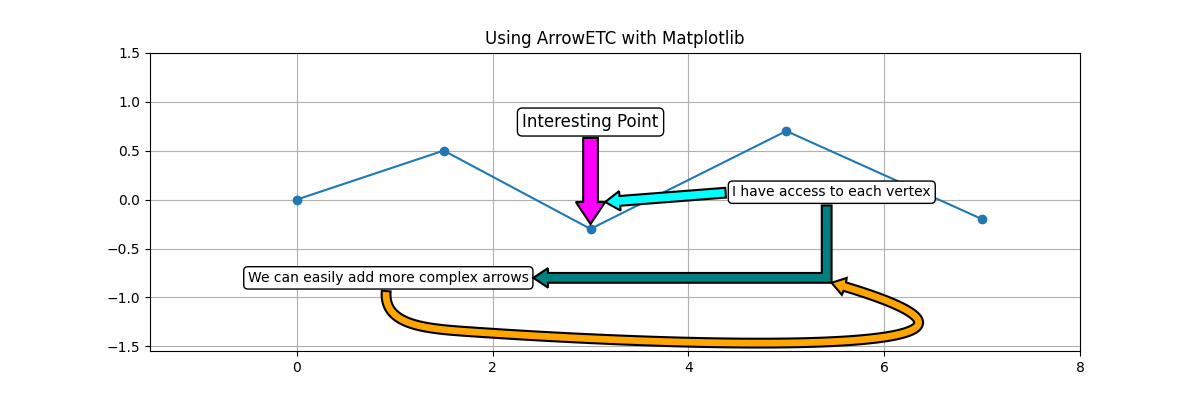
See https://github.com/carret1268/ArrowETC/blob/main/examples/example_with_matplotlib.py for a complete example demonstrating how to use ArrowETC as a drop-in replacement for matplotlib arrows. The example shows how to add ArrowETC arrows pointing from annotation boxes to points on a scatter plot, or other annotation boxes, or even specific vertices on another arrow; including straight, segmented, and curved Bezier arrows -- perfect for creating polished, publication-quality figures with precise control over arrow geometry.
Basic arrow with head
Draws a straight vertical arrow with an arrowhead at the tip. This demonstrates the simplest use of ArrowETC as a direct replacement for matplotlib’s FancyArrow.
path = [(0, 0), (0, 4)]
arrow = ArrowETC(path, arrow_width=0.5, arrow_head=True)
arrow.save_arrow("resources/basic_arrow_with_head.png")

Multi-segment arrow with head
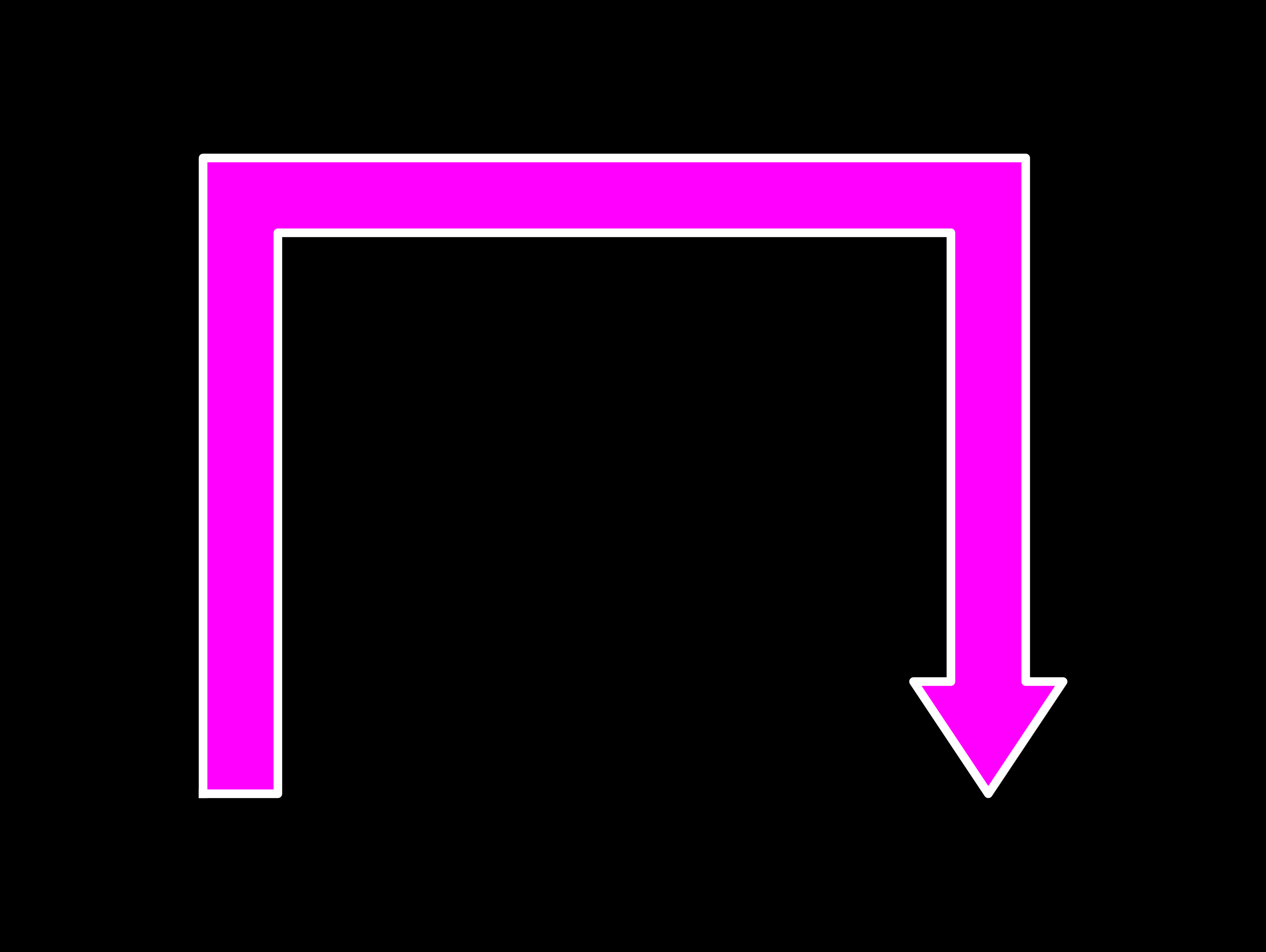
Draws an arrow that bends twice -- showcasing ArrowETC’s support for arbitrarily segmented arrows with mitered joints.
path = [(0, 0), (0, 4), (5, 4), (5, -2)]
arrow = ArrowETC(path, arrow_width=0.5, arrow_head=True)
arrow.save_arrow(base_path / "multi_segment_arrow_with_head.png", fc="magenta", lw=1)
Obtuse angle arrow
Illustrates how ArrowETC handles obtuse bends smoothly with obtuse corners.
path = [(0, 0), (4, 0), (8, 2)]
arrow = ArrowETC(path, arrow_width=0.5, arrow_head=True)
arrow.save_arrow(base_path / "obtuse_arrow_with_head.png", fc="orange", ec="cyan", lw=1.2)

Acute angle arrow
Shows an arrow with an acute angle, where the shaft sharply turns -- highlighting ArrowETC’s ability to produce clean miters even for tight angles.
path = [(0, 0), (4, 0), (1, 4)]
arrow = ArrowETC(path, arrow_width=0.5, arrow_head=True)
arrow.save_arrow(base_path / "acute_arrow_with_head.png")

More complex multi-segmented arrow
Shows how the ArrowETC object can handle more complicated paths.
path = [(0, 0), (1, 2), (2, -1), (4, -2), (5, 0), (7, 0)]
arrow = ArrowETC(path, arrow_head=True, arrow_width=0.2)
arrow.save_arrow(base_path / "many_segments_with_head.png", lw=1.2)

Multi-segmented arrow without arrowhead
Creates a segmented rectangular “pipe” without an arrowhead, useful for process diagrams or connectors where a directional tip is unnecessary.
path = [(0, 0), (0, -10), (10, -10), (10, 0)]
arrow = ArrowETC(path, arrow_width=1, arrow_head=False)
arrow.save_arrow(base_path / "multi_segment_no_head.png")

Basic Bezier arrow with head
Uses a smooth Bezier curve instead of straight segments.
path = [(0, 0), (4, 0), (8, 2)]
arrow = ArrowETC(path, arrow_width=0.5, arrow_head=True, bezier=True)
arrow.save_arrow(base_path / "basic_bezier_with_head.png", fc="orange", ec="cyan", lw=1.2)

Complex Bezier arrows
- Low bezier_n:
bezier_n=400-- demonstrates how too few sample points can distort the arrowhead or tip on sharp, complex curves.
path = [(0, 0), (4, -5), (8, 2), (16, -8)]
arrow = ArrowETC(path, arrow_width=1, arrow_head=True, bezier=True)
arrow.save_arrow(base_path / "crazier_bezier_with_head-low_n.png", lw=1.2)

- High bezier_n:
bezier_n=800-- shows a smooth, high-resolution arrow even along aggressive curves, fixing tip skew.
path = [(0, 0), (4, -5), (8, 2), (14, -8)]
arrow = ArrowETC(path, arrow_width=1, arrow_head=True, bezier=True, bezier_n=800)
arrow.save_arrow(base_path / "crazier_bezier_with_head-high_n.png", lw=1.2)

These examples illustrate how ArrowETC can handle everything from straight connectors to advanced, smooth curved paths -- making it an ideal replacement for matplotlib’s limited arrow types, and a powerful tool for your custom diagrams.
For reference, all example scripts are included in the examples/ directory. The generated images are saved in the resources/ directory.
Why these examples matter
They demonstrate ArrowETC’s key advantages:
- Precise control of arrow geometry, including segment corners.
- Support for multi-segment and curved paths beyond what FancyArrow/FancyArrowPatch allow.
- Integration-ready arrow metadata for downstream tasks, e.g., logic trees using LogicTreeETC.
License
This project is licensed under a CC0 License. See LICENSE file for details.
Release history Release notifications | RSS feed


Download files
Download the file for your platform. If you're not sure which to choose, learn more about installing packages.
Source Distribution
Built Distribution
Filter files by name, interpreter, ABI, and platform.
If you're not sure about the file name format, learn more about wheel file names.
Copy a direct link to the current filters
File details
Details for the file arrowetc-0.1.4.tar.gz.
File metadata
- Download URL: arrowetc-0.1.4.tar.gz
- Upload date:
- Size: 11.7 kB
- Tags: Source
- Uploaded using Trusted Publishing? No
- Uploaded via: twine/6.1.0 CPython/3.11.13
File hashes
| Algorithm | Hash digest | |
|---|---|---|
| SHA256 |
08672028fbb038d10b7a64c9d7a35e66ef5c2e138175ffca3c79b7b623efb2c3
|
|
| MD5 |
7c4103b5f6c32ad8021f4ff69c3632fa
|
|
| BLAKE2b-256 |
9ee2aa6534c3872f56bcbd18b581dff6923426da81acd22d289e3cac0d9a7bf7
|
File details
Details for the file arrowetc-0.1.4-py3-none-any.whl.
File metadata
- Download URL: arrowetc-0.1.4-py3-none-any.whl
- Upload date:
- Size: 10.9 kB
- Tags: Python 3
- Uploaded using Trusted Publishing? No
- Uploaded via: twine/6.1.0 CPython/3.11.13
File hashes
| Algorithm | Hash digest | |
|---|---|---|
| SHA256 |
02d70d16c42a212eca4a102772d1fc911d605e6c06db3e61d37af4780249859c
|
|
| MD5 |
7b7cc60bf3d817b4fe5895658a587fb4
|
|
| BLAKE2b-256 |
bc7604817001c482706eca2cb9a75e392751cb57ac798d0613c6abea2d6f44d8
|






