

Achieving Seamless Performance In Real-time Environments -> Text User Interface
Note:
This is the official rewrite of TUI/SWARM by the original inventor/author Simon Arjuna Erat.
Please be aware that this is an unstable work in progress, and some references in this text may refer to habits/behaviour based on the original BASH source code.
- This software/framework is running under MIT License
- For recent updates, please see the ChangeLog
- You can install this as a PyPi Package -->
pip install AspireTUI - Documentation and Source Code can be found on the GitHub repo
- This framework has currently
with a total of
so far. (stats from pypi)
Please report bugs and/or inconsistencies!
--> GitHub Issues <--
Brief
ASPIRE is a Python 3.11+ module that offers an easy to use line-based text user interface framework.
It aims to make the console output more appealing to end users and provide developers an easy to use framework for 'everyday tasks' and to put their output left, center and right oriented with some 'dividers' (header, title) using a theme for presentation.
Note:
The original BASH version was only using internal BASH functionality and GNU Core Utils, I intend to only rely on Python standard library for this framework as well.
No depency hell! But I might need to "re-invent the wheel" for certain functions. -> However, during WIP phases, I might rely on additional libs until my mind is ready to do so.
Target Audience
For developers aiming to enhance the user experience with the console.

Detail
ASPIRE is designed with simplified usability in mind for both end users and developers.
These functions aim to streamline interactions and improve the overall experience, coding and usage wise.
It aims to be cross platform compatible, but this will also require you to handle certain cases in your own code.
It supports:
- Any console that can run Python code.
Like:- MS Windows (regular + PowerShell)
- Any GNU + *nix system/distro
As a side effect this (partialy) includes:- Apple iOS
Usage & Preview
Please see help and examples for detailed information.
The code for the previous preview would look as simple as this, which is how you can use it as library in your projects:
from AspireTUI import tui
from AspireTUI import Strings as _stew

tui.header("Aspire by (sea/sri-arjuna)", "{_stew.now()}")
tui.title("Hello World")
tui.print("Left string", "Center string", "Right string")
tui.wait(3)
tui.press()
This is how "Hello World" (using header, title and print) can look like:
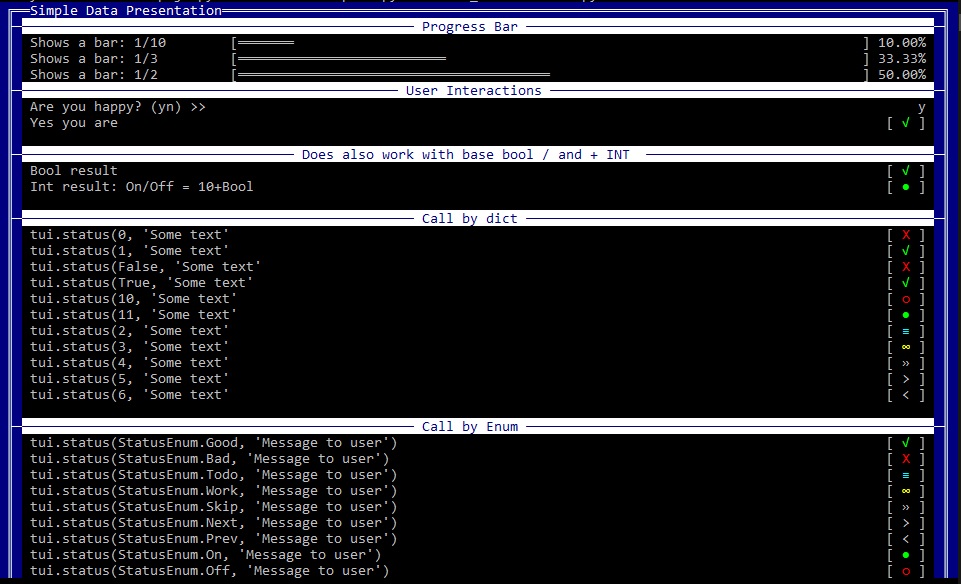
Here's just a screenshot of how "data" or "progress" could be shown to your users, or how they could interact with your programm.
Installation
Super simple:
pip install AspireTUI
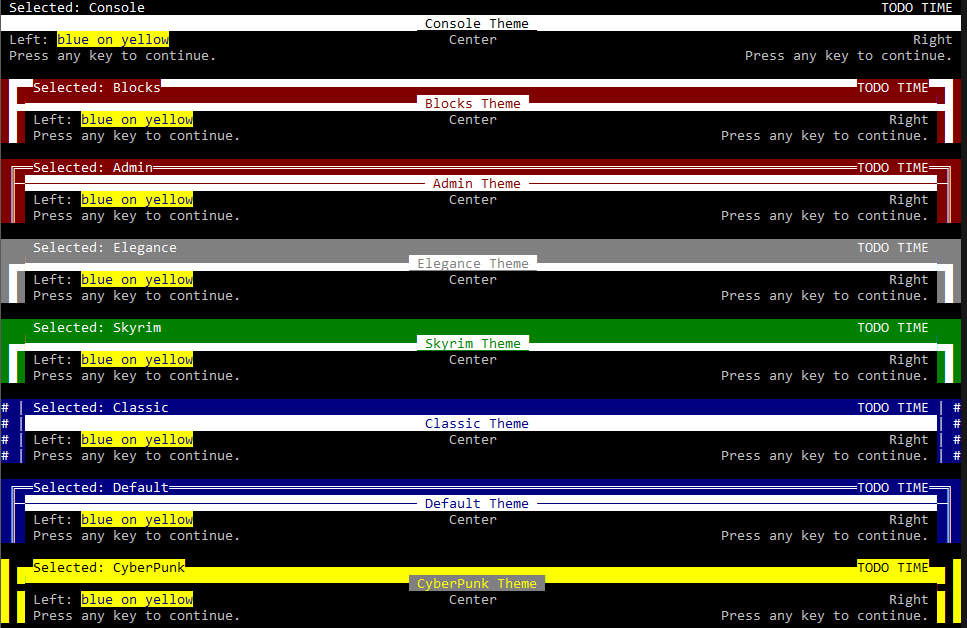
Various themes:
This is just a preview of the "official" themes.
You can further customize the appearance by using the Custom theme.
Please see help and examples for detailed information.
1 maintainer

Metadata
1 maintainer
Release files for AspireTUI 0.5.1
For a detailed explanation of source distributions (sdists) and built distributions (wheels), please see the package formats documentation.
Source distribution (sdist)
| File | Size | Uploaded | Provenance | |
|---|---|---|---|---|
| aspiretui-0.5.1.tar.gz | 52.2 kB | Without provenance | Details |
Built distribution (wheel)
| File | Interpreter | ABI | Platform | Reset |
|---|---|---|---|---|
| AspireTUI-0.5.1-py3-none-any.whl | Python 3 | none | any | Details |
Total release size: 116.8 kB
Release files / aspiretui-0.5.1.tar.gz
| Download URL | aspiretui-0.5.1.tar.gz |
|---|---|
| Size | 52.2 kB |
| Tags | Source |
|
SHA-256 checksum How to use checksums |
4a70cee490637c2fb69264b1886b55c31505c2296bc7c440f0d6de20359f1dca
|
|
BLAKE2b-256 checksum How to use checksums |
6a442f25f7e61de76744aa53dfedf10cc8d346a0af53157fe19ae5e5c81f19b2
|
| Upload date | |
|
Uploaded using Trusted Publishing? What is trusted publishing? |
No |
| Uploaded via |
twine/5.1.1 CPython/3.12.5
|
Release files / AspireTUI-0.5.1-py3-none-any.whl
| Download URL | AspireTUI-0.5.1-py3-none-any.whl |
|---|---|
| Size | 64.6 kB |
| Tags | Python 3 |
|
SHA-256 checksum How to use checksums |
36668251d0d6c9b98be8b78bd8840feb6a8cb2eefaf0d5c23a1751f59eff08e7
|
|
BLAKE2b-256 checksum How to use checksums |
b1ba74904803f154b454d7271c0a9bd432762804ecd82386b4728dde254e3c7f
|
| Upload date | |
|
Uploaded using Trusted Publishing? What is trusted publishing? |
No |
| Uploaded via |
twine/5.1.1 CPython/3.12.5
|
Security for AspireTUI 0.5.1
Provenance
Provenance describes where a file came from. On PyPI, provenance is shared via attestations, which provide a verifiable record of the build or publishing details. View details, limitations and caveats.
No provenance found
None of the files in this release were uploaded with provenance metadata.
A note on package security
PyPI is a repository for distributing packages, not a service for auditing them. While third-party security researchers and our staff do their best to detect and remove malicious packages, PyPI cannot guarantee the quality, security or suitability of any given package.














