
Asset Forge

Asset Forge: CMake for video game assets. With this utility, you will be able to preprocess your asset files, which are human and tool readable or usable, into binary files that can be directly streamed into C/C++ structs and classes. This process will streamline loading complex assets in small video game projects written in C/C++ or other systems languages.
Instead of linking several libraries dedicated to loading different types of files: meshes, animations, sprite sheets, etc., now you can just write a simple Python script that loads any complicated mesh/assimp file, optimizes the mesh, does some pre-calculations for vertex normals and tangent vectors, then packages it into a binary file that can be easily loaded in C/C++ by streaming the data into a struct or class that has a mirror structure to the binary file.
Preprocessing assets into binary files also has the benefit of compression. In the example a human editable plaintext json is 3689 bytes, preprocessing it into a .bin file compresses it to 1273 bytes, then compressing that with zlib results in a .bin.z that is 468 bytes; An 88% compression!
Author: Mason Hawver
Version: v0.2.3
Example Usage and Result:
pip install AssetForge

cd exp
pip install -r requirements.txt # these are packages needed for the custom tools used in the example (PIL and cariosvg)

ls -R assets

assets/:
atlases  test.txt

assets/atlases:
atari_8bit_font.atlas  atari_8bit_font.png

python Amake.py

[0%  ] building ...
[11% ] LinkingTool "assets/output.log"
[22% ] CopyingTool "assets/test.txt"
[33% ] LinkingTool "assets/atlases/atari_8bit_font.png"
[44% ] LinkingTool "assets/atlases/atari_8bit_font.atlas"
[55% ] LinkingTool "assets/output.svg"
[66% ] AtlasTool "assets/atlases/atari_8bit_font.atlas"
[77% ] SVGtoPNGTool "assets/output.svg"
[88% ] LinkingTool "assets/output.png"
[100%] CompressionTool "build/atlases/atari_8bit_font.atlas.bin"

ls -R build

build/:
atlases  output.log (link)  output.png (link)  output.svg (link)  test.txt # Note debug=True writes a output.log output.svg and output.png to assets and they are linked to the build dir

build/atlases:
atari_8bit_font.atlas (link)  atari_8bit_font.atlas.bin  atari_8bit_font.atlas.bin.z (88% compression) atari_8bit_font.png (link)


feh build/output.png
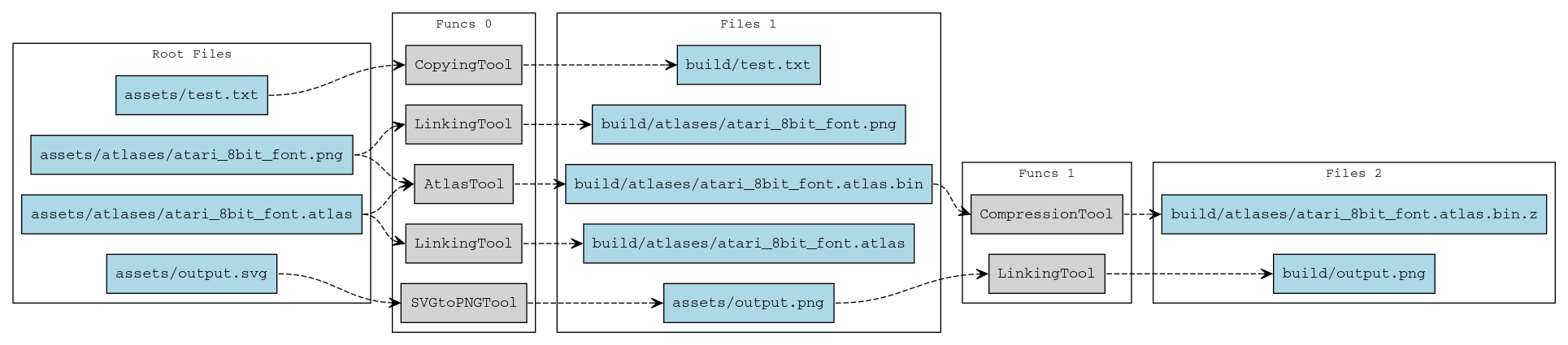
Note: the debug graph of the flow of files as inputs and output to tools also includes itself - meta!
Getting Started
- Create an
Amake.pyfile:
import AssetForge

from pathlib import Path

from amake import atlas, svg

AssetForge.RegisterTool(AssetForge.common.CopyingTool(pattern=r"^.*\.txt$"),  priority=1)
AssetForge.RegisterTool(AssetForge.common.CompressionTool(),                  priority=5)
AssetForge.RegisterTool(AssetForge.common.LinkingTool(),                      priority=0)
AssetForge.RegisterTool(atlas.AtlasTool(),                                    priority=3)
AssetForge.RegisterTool(svg.SVGtoPNGTool(),                                   priority=3)


AssetForge.Build(Path("assets"), Path("build"), recursive=True, parallel=True, debug=True)
- Add/write scripts in
amake:
Read the documentation for more information on this. But all you need to do to create a tool is implement AssetTool.
- Run the build:
python Amake.py
Tools Overview
Example/Custom:
-
AtlasTool:
Processes a.atlasfile (a JSON describing sprite bounds in a human-readable format) into a.atlas.binbinary file. This binary file can then be loaded directly into C++ containers (e.g., astd::vectorof AABBs and astd::unordered_map<std::string, unsigned int>). -
SVGtoPNGTool:
Converts.svgfiles into.pngfiles, using CairoSVG for the conversion.
General:
-
CompressionTool:
Compresses.binfiles (such as.atlas.bin) into.bin.zfiles. -
CopyingTool:
Copies files (that match the given pattern) from the input to the output directory, often used when simple duplication is sufficient. -
LinkingTool:
Creates symbolic links for files from the input directory to the output directory, avoiding data duplication.
1 maintainer

Metadata
1 maintainer
Release files for AssetForge 0.3.16
For a detailed explanation of source distributions (sdists) and built distributions (wheels), please see the package formats documentation.
Source distribution (sdist)
| File | Size | Uploaded | |
|---|---|---|---|
| assetforge-0.3.16.tar.gz | 16.2 kB | Details |
Built distribution (wheel)
| File | Interpreter | ABI | Platform | Reset |
|---|---|---|---|---|
| assetforge-0.3.16-py3-none-any.whl | Python 3 | none | any | Details |
Total release size: 31.7 kB
Release files / assetforge-0.3.16.tar.gz
| Download URL | assetforge-0.3.16.tar.gz |
|---|---|
| Size | 16.2 kB |
| Tags | Source |
|
SHA-256 checksum How to use checksums |
06b096d4f6dcef48c48d15bcc59921af84e1e32c92ada1728626daca2c08d73d
|
|
BLAKE2b-256 checksum How to use checksums |
131f7453d8b186667799e4ef04bf8463ea39263c43637b428e155036566c7223
|
| Upload date | |
|
Uploaded using Trusted Publishing? What is trusted publishing? |
No |
| Uploaded via |
twine/6.1.0 CPython/3.9.21
|
Release files / assetforge-0.3.16-py3-none-any.whl
| Download URL | assetforge-0.3.16-py3-none-any.whl |
|---|---|
| Size | 15.5 kB |
| Tags | Python 3 |
|
SHA-256 checksum How to use checksums |
5a8be193c7c2c5d6e6dc0fc813bc9803db4220756d3d3deed78e94f73ae9a42c
|
|
BLAKE2b-256 checksum How to use checksums |
570bfb5955e99af8a75a662f4c3371fbe456b2731ea186ce145c95a2e5dc9fc9
|
| Upload date | |
|
Uploaded using Trusted Publishing? What is trusted publishing? |
No |
| Uploaded via |
twine/6.1.0 CPython/3.9.21
|














