

AstraLint
A linter for space-physics data files. AstraLint checks the metadata of CDF and FITS files against the community standards, explains every problem with a link to the rule it breaks, and repairs what can be repaired without guessing.
- Standards: ISTP (the metadata guidelines for NASA space-physics CDF data), what CDAWeb (NASA's space-physics data browser) needs to ingest a dataset, the CDF profile of PDS4 (NASA's Planetary Data System archive), and SOLARNET for solar FITS files.
- For: anyone producing or archiving CDF/FITS files, either by hand or as a CI step.
- Try it: online, in your browser, no install needed. Every rule is listed in the rule catalog.
$ astralint lint mms1_asp2_srvy_l1b_stat_00000000_v01.cdf
mms1_asp2_srvy_l1b_stat_00000000_v01.cdf
  ERROR   ISTP-VA-002  mms1_asp_epoch › mms1_asp_epoch missing required attribute(s): DEPEND_0
  ERROR   ISTP-VA-019  mms1_asp_stat/FILLVAL › Attribute FILLVAL of mms1_asp_stat must be outside [VALIDMIN, VALIDMAX]
  WARNING ISTP-GA-010  Instrument_type › Instrument_type should use a standard ISTP value
  WARNING ISTP-GA-002  missing recommended global attribute(s): DOI, spase_DatasetResourceID
  …
  What each rule checks: https://github.com/SciQLop/AstraLint/blob/main/docs/rules.md
✗ Found 38 problems (34 errors, 4 warnings), plus 26 info findings

→ 1 auto-fixable, 2 need your input — run: astralint fix mms1_asp2_srvy_l1b_stat_00000000_v01.cdf
Each line gives a severity, a rule reference, where the problem is (variable/attribute)
and what is wrong. Look up any reference in the rule catalog: it says what
the rule checks, links to the section of the standard, and says whether
astralint fix can repair it.
Contents
- Install · Quick start · Commands · Use in CI
- Auto-fixing · Fixing by hand · Configuration · Suites · How it works · Terms
- Docs: rule catalog · configuration reference · writing rules · assertions reference · development · installation
Install
pip install astralint
Python 3.11 or later. See installation for uv and installing from source.
Quick start
astralint lint myfile.cdf         # 1. what is wrong, and where
astralint fix myfile.cdf          # 2. repair what can be repaired → myfile.fixed.cdf
astralint lint myfile.fixed.cdf   # 3. what is left needs a human: see "Fixing by hand"
Commands
| Command | Does |
|---|---|
astralint lint PATH… |
Check files, or every CDF/FITS file under a directory |
astralint fix FILE |
Write a corrected copy of a CDF (Auto-fixing) |
astralint list-suites |
List the suites (--details for more) |
astralint config init / validate / show |
Write, check, or print the configuration |
astralint dump-file-model FILE |
Show how AstraLint reads a file (the model rules run on) |
Common lint options:
| Option | Effect |
|---|---|
--suite NAME |
Suite to check against (default ISTP) |
--select PATTERN / --ignore PATTERN |
Run only, or skip, rules by reference or name; regex allowed, repeatable; not both at once |
--strict |
Also fail on warnings |
--show-passed |
Print every check, passed ones included, as a tree; add --failed-only to prune it |
--output console|html|json |
Report format; --dest FILE writes it to a file |
--config-file FILE |
Use this configuration instead of the one found in the project |
--verbose |
Say which configuration and suite are used |
astralint COMMAND --help lists every option.
Use in CI
| Exit code | lint |
fix |
|---|---|---|
0 |
no errors (and no warnings, with --strict) |
ran: listed the fixes, or wrote the corrected copy |
1 |
errors found (or warnings, with --strict) |
— |
2 |
usage error: missing or unsupported file, unknown suite, invalid configuration, conflicting options | same |
A usage error prints one line on stderr, so a pipeline can tell "the command was wrong"
from "the data has problems". --strict is a command-line option only. A GitHub Actions
step:
- uses: actions/setup-python@v5
  with:
    python-version: "3.12"
- run: pip install astralint
- run: astralint lint data/ --strict --output json --dest astralint.json
The JSON report starts with a summary and a flat list of every failing check (errors,
warnings and info), then the full result tree. Without --dest it goes to standard
output:
{
  "summary": {"errors": 34, "warnings": 4, "info": 26},
  "findings": [
    {
      "file": "mms1_asp2_srvy_l1b_stat_00000000_v01.cdf",
      "reference": "ISTP-GA-010",
      "severity": "WARNING",
      "target": "Instrument_type",
      "message": "Instrument_type should use a standard ISTP value",
      "url": "https://istp-metadata.readthedocs.io/…/03_metadata-global-attributes.html#instrument-type"
    }
  ],
  "results": ["…the full result tree…"]
}
Auto-fixing
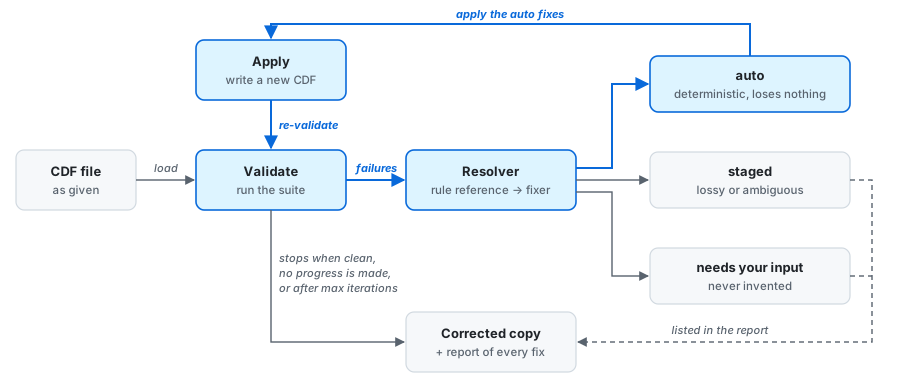
astralint fix repairs what can be repaired without guessing. It runs a loop, validating,
fixing and validating again, until the file is clean or nothing more can be fixed. Then it
writes a corrected copy and never touches the original:
astralint fix myfile.cdf                        # apply the auto fixes → myfile.fixed.cdf
astralint fix myfile.cdf --apply none           # dry run: list every proposed fix
astralint fix myfile.cdf --dest corrected.cdf   # choose where to write
astralint fix myfile.cdf --max-iter 3           # cap the loop (default 10)
Every fix records where it came from, how confident it is, and why. It falls into one of three groups:
- auto: deterministic and lossless, applied for you. For example:
- a missing or wrong
FILLVALset to the ISTP value for the variable's type, including the special time fills (-9223372036854775808for TT2000,-1.0E31for CDF_EPOCH); VAR_TYPEandDEPEND_0inferred from how variables point at each other, orVAR_TYPEcorrected to match the data type (strings aremetadata, numberssupport_data);Logical_file_id,Logical_sourceandData_versionread from an ISTP-style file name;Generation_datereformatted toyyyymmdd;- a mis-cased ISTP attribute renamed to its ISTP spelling (
Frame→FRAME), keeping its value; - for the PDS4 suite, one lossless re-save that removes compression and fragmentation.
- a missing or wrong
- suggested: computed but lossy or ambiguous, so only proposed for review. For example,
a shortened over-long
CATDESC, or the closest existing name for a danglingDEPEND_1. - needs your input: never invented. Physical values (
UNITS,VALIDMIN/VALIDMAX) and identity or provenance (PI_name,DOI) are only ever reported.
fix reads the same configuration as lint. A rule you ignore, deselect, or demote below
ERROR with severity_overrides is not fixed. The rule catalog says,
for each rule, what fix can do about it.
Fixing by hand
What fix leaves is for you: a value only you know (UNITS, PI_name, …), or a change
too risky to automate, such as an attribute stored with the wrong data type
(ISTP-VA-029). pycdfpp,
which AstraLint uses to read CDF files, can make such edits in a few lines:
import numpy as np
import pycdfpp

cdf = pycdfpp.load("myfile.cdf")
var = cdf["B_GSE"]
var.attributes["UNITS"].set_value("nT")                     # change a text attribute
var.add_attribute("VAR_NOTES", "Spin-averaged")             # add one
var.attributes["FILLVAL"].set_value(                        # store a value with the variable's type
    np.array([-1e31], dtype=np.float32), pycdfpp.DataType.CDF_FLOAT
)
cdf.add_attribute("DOI", ["https://doi.org/10.0000/example"])  # add a global attribute
pycdfpp.save(cdf, "myfile.edited.cdf")
Then run astralint lint myfile.edited.cdf again. If your files are produced by a
pipeline, fix the pipeline, or its skeleton table, rather than each file.
Configuration
Settings come from, highest priority first: command-line options, .astralint.yaml,
pyproject.toml [tool.astralint], then built-in defaults.
astralint config init      # write a commented starter .astralint.yaml
astralint config validate  # check it
astralint config show      # print the merged result
# .astralint.yaml
suite: ISTP
ignore:
  - "RecommendedVariableAttributes"   # by name…
  - "ISTP-VA-00[678]"                 # …or reference (here: the "preferably N characters" warnings)
severity_overrides:
  ISTP-VAR-005: INFO                  # "the epoch should be the first variable"
output:
  format: html
  dest: report.html
# pyproject.toml
[tool.astralint]
suite = "ISTP"
ignore = ["RecommendedVariableAttributes"]
Every option is in the configuration reference.
Suites
| Suite | Checks | Rules |
|---|---|---|
| ISTP | The ISTP Metadata Guidelines, sections 3–5, rule by rule: global and variable attributes, variable types, pointers between variables (DEPEND_i, LABL_PTR_i, …), time variables |
73 |
| CDAWeb | ISTP, plus what CDAWeb needs to ingest a dataset: Instrument_type and Mission_group become errors, entry-count limits |
ISTP + 1 |
| PDS4 | ISTP, plus the CDF-A archiving profile from the Guide to Archiving CDF Files in PDS4: no compression, CDF ≥ 3.4, contiguous zVariables, a spase_DatasetResourceID |
ISTP + 8 |
| SOLARNET | A first rule from the SOLARNET recommendations for FITS headers | 1 |
Which suite? Delivering data to CDAWeb: CDAWeb. Archiving in PDS: PDS4. Solar
FITS files: SOLARNET. Anything else: ISTP, the default.
Severity follows the standard's own wording: "must" and "required" are errors,
"should" and "recommended" are warnings, hints are info. Every rule has a stable
reference (ISTP-GA-… for global attributes, ISTP-VA-… for variable attributes,
ISTP-VAR-… for variables) that you can use in --select, --ignore and
severity_overrides.
You can add your own rules to any suite: see writing rules.
How it works
A codec reads the file into a format-independent file model. A suite runs its rules on that model, and a report renders the results.
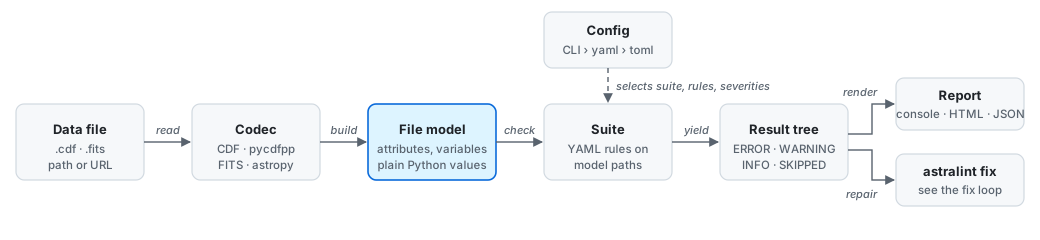
Rules are short YAML files, so a standard's requirements read almost like the standard itself. They only ever see the file model, never a file format, which is why one suite can apply to any format with a codec:
| Format | Extensions | Read with |
|---|---|---|
| CDF | .cdf |
pycdfpp |
| FITS | .fits, .fit, .fts |
astropy |
Files can be local paths or URLs. To add a format, a suite, an assertion or an auto-fix, see development.
Terms
- CDF: NASA's Common Data Format, the usual container for space-physics time series.
- Suite: a set of rules for one standard (ISTP, PDS4, …). A rule is one requirement,
with a reference such as
ISTP-VA-029. - Finding: one problem a rule found, at one place in the file.
- CDF-A: the profile of CDF that PDS4 accepts for archiving: no compression, contiguous data, zVariables only.
- zVariable / rVariable: the two kinds of CDF variable. zVariables carry their own dimensions; rVariables are an older kind that share the file's dimensions.
- Fragmented / contiguous: whether a variable's records are stored in one block or scattered across the file.
VAR_TYPE: the ISTP attribute that says what a variable is:data(the measurements),support_data(time, energy, … that data depends on),metadata(labels, units and format strings), orignore_data.
This project was built from simple-modern-uv.
1 maintainer

Metadata
1 maintainer
Release files for AstraLint 0.10.0
For a detailed explanation of source distributions (sdists) and built distributions (wheels), please see the package formats documentation.
Source distribution (sdist)
| File | Size | Uploaded | Provenance | |
|---|---|---|---|---|
| astralint-0.10.0.tar.gz | 949.7 kB | Without provenance | Details |
Built distribution (wheel)
| File | Interpreter | ABI | Platform | Reset |
|---|---|---|---|---|
| astralint-0.10.0-py3-none-any.whl | Python 3 | none | any | Details |
Total release size: 1.1 MB
Release files / astralint-0.10.0.tar.gz
| Download URL | astralint-0.10.0.tar.gz |
|---|---|
| Size | 949.7 kB |
| Tags | Source |
|
SHA-256 checksum How to use checksums |
6cbdc1718b53489d21123a90e6648bfae68bfbf092d39dc660f9f7a00e28b48e
|
|
BLAKE2b-256 checksum How to use checksums |
cb884c8fd79fbf6c86caf45ada974e530450d2c39aba70a0e8e98e23a0ca8ddf
|
| Upload date | |
|
Uploaded using Trusted Publishing? What is trusted publishing? |
Yes |
| Uploaded via |
uv/0.9.25 {"installer":{"name":"uv","version":"0.9.25","subcommand":["publish"]},"python":null,"implementation":{"name":null,"version":null},"distro":{"name":"Ubuntu","version":"24.04","id":"noble","libc":null},"system":{"name":null,"release":null},"cpu":null,"openssl_version":null,"setuptools_version":null,"rustc_version":null,"ci":true}
|
Release files / astralint-0.10.0-py3-none-any.whl
| Download URL | astralint-0.10.0-py3-none-any.whl |
|---|---|
| Size | 149.1 kB |
| Tags | Python 3 |
|
SHA-256 checksum How to use checksums |
806ed0394969c5793fe3e2d87f84bcc7362f876bc13b64d73587bb0f5a8b5f0a
|
|
BLAKE2b-256 checksum How to use checksums |
680ab332d5daeb5787a0fb1a8179a3626318623704962f0be2d09878dfca0b8a
|
| Upload date | |
|
Uploaded using Trusted Publishing? What is trusted publishing? |
Yes |
| Uploaded via |
uv/0.9.25 {"installer":{"name":"uv","version":"0.9.25","subcommand":["publish"]},"python":null,"implementation":{"name":null,"version":null},"distro":{"name":"Ubuntu","version":"24.04","id":"noble","libc":null},"system":{"name":null,"release":null},"cpu":null,"openssl_version":null,"setuptools_version":null,"rustc_version":null,"ci":true}
|
Security for AstraLint 0.10.0
Provenance
Provenance describes where a file came from. On PyPI, provenance is shared via attestations, which provide a verifiable record of the build or publishing details. View details, limitations and caveats.
No provenance found
None of the files in this release were uploaded with provenance metadata.
A note on package security
PyPI is a repository for distributing packages, not a service for auditing them. While third-party security researchers and our staff do their best to detect and remove malicious packages, PyPI cannot guarantee the quality, security or suitability of any given package.
To learn more about protecting yourself from malicious actors, visit our package security documentation.














