
AugmentedDataLoader


Medical image augmentation tool that can be integrated with Pytorch & MONAI, by Ciro B. Raggio and P. Zaffino.
Installation
AugmentedDataLoader is compatible with Python >= 3.9 and binaries are available on PyPi.
python -m pip install AugmentedDataLoader
Description
A medical image augmentation algorithm developed to improve flexibility and customization in the data augmentation process for medical image processing applications. It can be integrated and used within the MONAI framework.
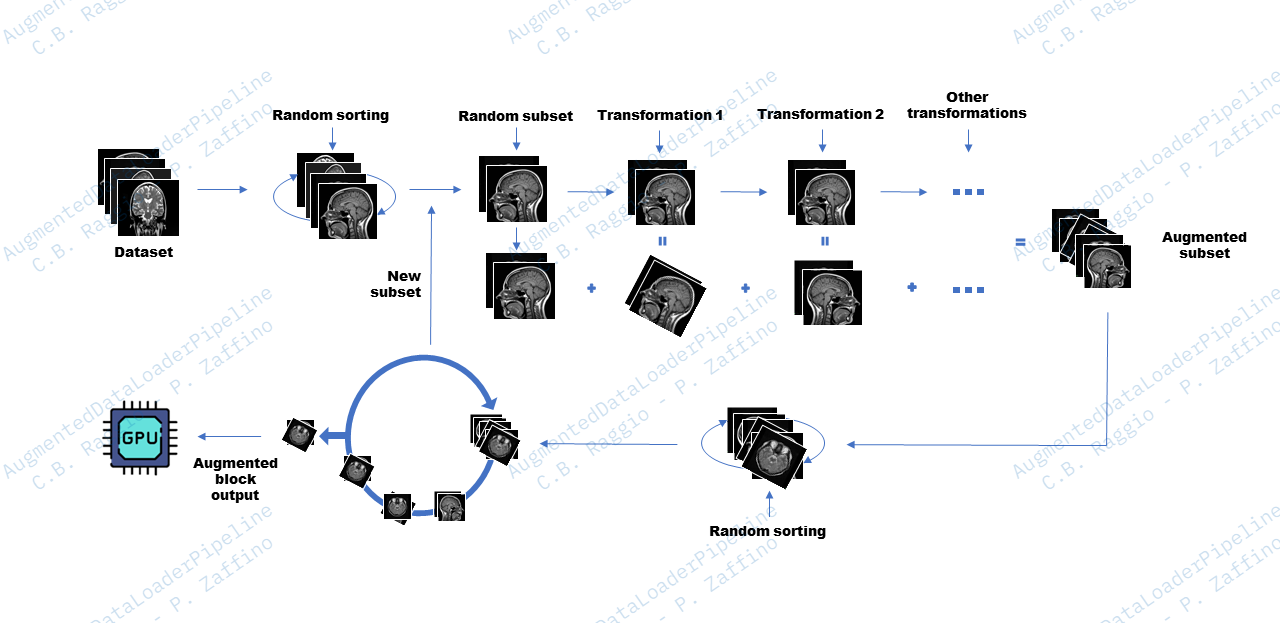
It's designed to operate on a dataset of medical images and apply a series of specific transformations to each image (even more than one image associated with a mask, segmentation, or label). This process augments the original dataset on-the-fly, providing a greater variety of samples for training deep learning models.
We recommend the use of ImageDataset available in MONAI with the AugmentedDataLoader class, which automatically handles the loading of images and associated segmentations/labels.
How it works and how to use it
Configuration Parameters:
- Define a list of Torch or MONAI transformations to be applied to each image (augmentation_transforms). These transformations can include rotation, scaling, cropping, and other operations.
- Specify the size of the subset of images to be transformed for each iteration (for more information, see "shuffle mode" parameter).
- Set the batch size to determine how many images will be returned for each batch.
Optional Parameters:
- Shuffle mode, different modes are provided:
- full: each transformation is applied to each image in the subset (i.e. if the subset is 10 and the transformations are 10, 100 samples will be generated) by keep it in memory. The possible combinations generated are then mixed, including the original images, and the batches are returned. It requires more memory, but is faster and more generalizable.
- pseudo: subset_len parameter will have no effect in this case. The logic is based only on the batch size and the which is shuffled and returned immediately after each transformation. It takes up less memory but is slower and less generalizable.
- You can specify the device on which to perform the transformations (transformation_device) and on which device to address the returned batches (return_on_device).
- If necessary, define a debug path to save a slice of the image of each augmented sample for debugging purposes.
Snippets
Here are some simple snippets ready to use.
AugmentedDataLoader
You just declare:
- an ImageDataset
- how many images to process and how many to receive for each iteration
- MONAI transformations to apply to the images for the augmentation process.
Declare an AugmentedDataLoader and receive the augmented images on the fly!
from monai.transforms import Rotate, RandRotate,Flip, Compose, Resize
from monai.data import ImageDataset
from AugmentedDataLoader.loaders import AugmentedDataLoader

# ImageDataset params
image_path = ".../data/img_dir/"
seg_path = ".../data/mask_dir/"

# ImageDataset params
images_to_transform = [f"{image_path}/{img}" for img in os.listdir(image_path)]
seg_to_transform = [f"{seg_path}/{mask}" for mask in os.listdir(seg_path)]

each_image_trans = Compose([
    # ...transformations to apply to all images here...
    # Example
    EnsureChannelFirst(channel_dim="no_channel")
    Resize(spatial_size=(256, 256, 256), mode='trilinear')
    # ...
])

# AugmentedDataLoader params
augmentation_transforms = [
    Rotate(angle=[0.4, 0.4,0.4]), # 0.4 rad
    Flip(spatial_axis=1),
    RandRotate(range_x=[-0.5, 0.5], range_z=[-0.5, 0.5], range_y=[-0.5, 0.5], prob=1, keep_size=True)
]
subset_size = 2 # Has no effect when used with shuffle_mode="pseudo"
batch_size = 2
debug_path='./debug_path_example'
transformation_device=0
return_on_device=1

dataset = ImageDataset(image_files=images_to_transform, seg_files=seg_to_transform, transform=each_image_trans, seg_transform=each_image_trans)

augmented_data_loader = AugmentedDataLoader(dataset=dataset, # Plain ImageDataset
                                            augmentation_transforms=augmentation_transforms,
                                            batch_size=batch_size,
                                            subset_len=subset_size,
                                            transformation_device=transformation_device,
                                            return_on_device=return_on_device,
                                            debug_path, # use debug
                                            shuffle_mode="full") # full or pseudo, for other infos read the docs

for img_batch, seg_batch in augmented_data_loader:
    # img_batch -> [B,C,H,W]
    # seg_batch -> [B,C,H,W] if seg_files are specified, otherwise [Label1,Label2...,LabelN]

    # network train...
AugmentedImageToImageDataLoader
Ideal for multiple image types associated with a single mask/segment or label. In this case, declare:
- an ImageToImageDataset, imported from datasets, which accepts three type of images (image, image, mask or label) and transformations to apply to the three types
- how many images to process and how many to receive at each iteration
- MONAI transformations to apply to the images for the augmentation process.
Declare an AugmentedImageToImageDataLoader and receive the augmented images on the fly!
import os
from monai.transforms import RandRotate, Flip, Compose, Resize
from AugmentedDataLoader.loaders import AugmentedImageToImageDataLoader
from AugmentedDataLoader.datasets import ImageToImageDataset

first_type_image_path = ".../data/first_type_img_dir/"
second_type_image_path = ".../data/second_type_img_dir/"
seg_path = ".../data/mask_dir/"

# ImageDataset params
first_type_images_to_transform = [f"{first_type_image_path}/{img}" for img in os.listdir(first_type_image_path)]
second_type_images_to_transform = [f"{second_type_image_path}/{img}" for img in os.listdir(second_type_image_path)]
seg_to_transform = [f"{seg_path}/{mask}" for mask in os.listdir(seg_path)]

each_image_trans = Compose([
    # ...transformations to apply to all images here...
    # Example
    EnsureChannelFirst(channel_dim="no_channel")
    Resize(spatial_size=(256, 256, 256), mode='trilinear')
    # ...
])

# AugmentedDataLoader params
augmentation_transforms = [
    Flip(spatial_axis=1),
    Rotate(angle=[0.4, 0.4,0.4]), # 0.4 rad
    RandRotate(range_x=[-0.5, 0.5], range_z=[-0.5, 0.5], range_y=[-0.5, 0.5], prob=1, keep_size=True)
]

subset_size = 2 # Has no effect when used with shuffle_mode="pseudo"
batch_size = 2
transformation_device="cuda:2"
return_on_device="cuda:2"

dataset = ImageToImageDataset(first_type_image_files=first_type_images_to_transform,
                              second_type_image_files=second_type_images_to_transform,
                              seg_files=seg_to_transform,
                              first_type_image_transforms=each_image_trans,
                              second_type_image_transforms=each_image_trans, # can be different
                              seg_transform=each_image_trans, # can be different
                              reader="pilreader"  # can be different
                              )

augmented_data_loader = AugmentedImageToImageDataLoader(
                                            dataset=dataset, # Custom ImageToImageDataset
                                            augmentation_transforms=augmentation_transforms,
                                            batch_size=batch_size,
                                            subset_len=subset_size,
                                            transformation_device=transformation_device,
                                            return_on_device=return_on_device,
                                            shuffle_mode="full")
for img_batch_f, img_batch_s, seg_batch in augmented_data_loader:
    # img_batch_f -> [B,C,H,W]
    # img_batch_s -> [B,C,H,W]
    # seg_batch -> [B,C,H,W] if seg_files are specified, otherwise [Label1,Label2...,LabelN]

    # network train...
Workflow
The example workflow shown in the figure refers to shuffle_mode="full".
1 maintainer

Metadata
1 maintainer
Release files for AugmentedDataLoader 3.0.5
For a detailed explanation of source distributions (sdists) and built distributions (wheels), please see the package formats documentation.
Source distribution (sdist)
| File | Size | Uploaded | |
|---|---|---|---|
| augmenteddataloader-3.0.5.tar.gz | 10.8 kB | Details |
Built distribution (wheel)
| File | Interpreter | ABI | Platform | Reset |
|---|---|---|---|---|
| augmenteddataloader-3.0.5-py3-none-any.whl | Python 3 | none | any | Details |
Total release size: 24.8 kB
Release files / augmenteddataloader-3.0.5.tar.gz
| Download URL | augmenteddataloader-3.0.5.tar.gz |
|---|---|
| Size | 10.8 kB |
| Tags | Source |
|
SHA-256 checksum How to use checksums |
13a6c84f725af90a8eebae5a5eb54654809def1879ac83ca14a4c8a99a405924
|
|
BLAKE2b-256 checksum How to use checksums |
b9f7a6f7ac35aec2523e1898920e5a3dbba56bedc544a223a7fc5b2bc5b3464a
|
| Upload date | |
|
Uploaded using Trusted Publishing? What is trusted publishing? |
Yes |
| Uploaded via |
twine/6.1.0 CPython/3.12.9
|
Provenance
Provenance describes where a file came from. On PyPI, provenance is shared via attestations, which provide a verifiable record of the build or publishing details. View details, limitations and caveats.


PyPI Publish Attestation
PyPI verified that this artifact, at this checksum, originated from the publisher listed below.
Signed by GitHub Actions, verified by PyPI on Jun 4, 2025.
Transparency logRelease files / augmenteddataloader-3.0.5-py3-none-any.whl
| Download URL | augmenteddataloader-3.0.5-py3-none-any.whl |
|---|---|
| Size | 14.0 kB |
| Tags | Python 3 |
|
SHA-256 checksum How to use checksums |
e5e518a921eb79d97830dff3bba57a6ae1ac181dbc63e8b4931f51754671b6e6
|
|
BLAKE2b-256 checksum How to use checksums |
889f1e358712a466ea0bd90a90df78c500dfd07dfa2746db63a40c9c496cfe02
|
| Upload date | |
|
Uploaded using Trusted Publishing? What is trusted publishing? |
Yes |
| Uploaded via |
twine/6.1.0 CPython/3.12.9
|
Provenance
Provenance describes where a file came from. On PyPI, provenance is shared via attestations, which provide a verifiable record of the build or publishing details. View details, limitations and caveats.
PyPI Publish Attestation
PyPI verified that this artifact, at this checksum, originated from the publisher listed below.
Signed by GitHub Actions, verified by PyPI on Jun 4, 2025.
Transparency log













