
Auto3D




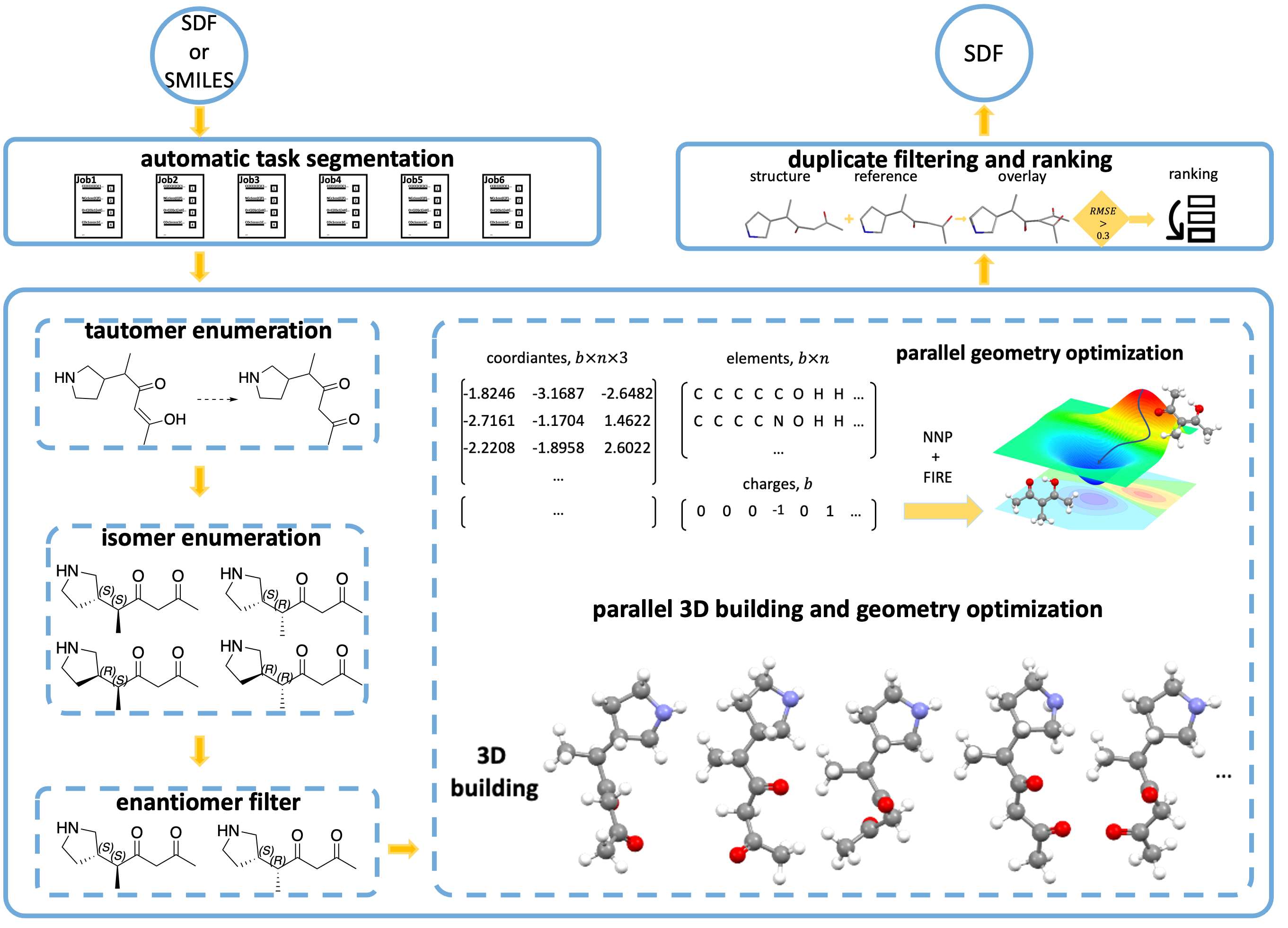
Auto3D automatically generates low-energy 3D molecular conformers from SMILES or SDF input using neural network potentials (AIMNet2, ANI2x, ANI2xt). It handles tautomer enumeration, stereoisomer generation, geometry optimization, and conformer ranking in a single workflow.
What's New in v3.0
- Modern CLI with Typer and Rich - beautiful terminal output, progress bars, and helpful error messages
- Subcommand structure -
run,config,models,validatecommands - Improved architecture - cleaner codebase with strategy patterns and proper separation of concerns
- Better logging - structured logging throughout the workflow
- Type safety - full type hints and Pydantic validation
Installation
# Using uv (fastest)
uv pip install Auto3D

# Using pip
pip install Auto3D

# Using conda (recommended for GPU support)
conda install -c conda-forge auto3d
For GPU acceleration, ensure you have CUDA-compatible PyTorch installed. See the installation guide for detailed instructions.
Quick Start
Command Line
# Generate top-5 conformers per molecule
auto3d run molecules.smi --k=5

# Use a configuration file
auto3d run molecules.smi -c config.yaml

# Generate a config template
auto3d config init

# List available neural network models
auto3d models list

# Validate input file before running
auto3d validate molecules.smi
Python API
from Auto3D import Auto3DOptions, main

# Generate conformers for a SMILES file
config = Auto3DOptions(path="molecules.smi", k=1)
output_path = main(config)
For small batches (< 150 molecules), use the convenience function:
from Auto3D import Auto3DOptions, smiles2mols

smiles = ["CCO", "CCCO", "c1ccccc1"]
config = Auto3DOptions(k=1, use_gpu=False)
mols = smiles2mols(smiles, config)

# Access energies from RDKit mol objects
for mol in mols:
    print(f"{mol.GetProp('_Name')}: {mol.GetProp('E_tot')} Hartree")
CLI Commands
| Command | Description |
|---|---|
auto3d run <input> [options] |
Generate conformers from SMILES/SDF |
auto3d energy <input.sdf> |
Single-point energy for an SDF |
auto3d optimize <input.sdf> |
Geometry-optimize the structures in an SDF |
auto3d thermo <input.sdf> |
Thermochemistry (enthalpy/entropy/Gibbs); needs the ase extra |
auto3d tautomers <input.smi> |
Enumerate and rank stable tautomers |
auto3d config init |
Create a configuration template |
auto3d config show <file> |
Display config with syntax highlighting |
auto3d config validate <file> |
Validate a configuration file |
auto3d models list |
List available NNP models |
auto3d models info <engine> |
Show model details |
auto3d models test <engine> |
Load an engine and run a forward pass to verify it works |
auto3d validate <input> |
Validate input file |
Common Options
auto3d run input.smi --k=5              # Top-k conformers
auto3d run input.smi --window=3.0       # Energy window (kcal/mol)
auto3d run input.smi --engine=ANI2x        # AIMNET, ANI2x, ANI2xt, a registry name, or a model path
auto3d run input.smi --no-gpu           # CPU-only mode
auto3d run input.smi -c config.yaml     # Use config file
Shell Completion
# Enable tab completion
auto3d --install-completion bash  # or zsh, fish
Neural Network Potentials
| Engine | Description | Elements |
|---|---|---|
| AIMNET (default) | AIMNet2 with D3 dispersion (alias for aimnet2) |
H, B, C, N, O, F, Si, P, S, Cl, As, Se, Br, I |
| aimnet2-2025, aimnet2-nse, aimnet2-pd, ... | Any aimnet registry model |
H, B, C, N, O, F, Si, P, S, Cl, As, Se, Br, I (aimnet2-pd replaces As with Pd) |
| ANI2x | ANI-2x ensemble | H, C, N, O, F, S, Cl |
| ANI2xt | Extended ANI-2x | H, C, N, O, F, S, Cl |
AIMNet2 models are provided by the aimnet
package and auto-downloaded (and sha256-validated) into ~/.cache/aimnet on first
use; set AIMNET_CACHE_DIR to change the cache location. Network access is required
once per model. Run auto3d models list to see available registry families.
optimizing_engine also accepts a path to a custom NNP model file.
Note: As of v3.5, AIMNet2 is served by the
aimnetpackage rather than bundled.jptfiles, and the default AIMNet2 energies differ from 3.x (the registry.ptexternalizes D3 dispersion), so conformer rankings may shift slightly. Requires Python >= 3.11 and PyTorch >= 2.8.
Key Parameters
| Parameter | Default | Description |
|---|---|---|
k |
- | Output top-k conformers per molecule |
window |
- | Energy window in kcal/mol (alternative to k) |
optimizing_engine |
AIMNET | NNP: AIMNET, an aimnet registry name, ANI2x, ANI2xt, or a model path |
use_gpu |
True | Enable GPU acceleration |
enumerate_tautomer |
False | Enumerate tautomers |
enumerate_isomer |
True | Enumerate stereoisomers |
threshold |
0.3 | RMSD threshold for duplicate removal (Å) |
Documentation
Full documentation: auto3d.readthedocs.io
Citation
If you use Auto3D in your research, please cite:
@article{liu2022auto3d,
    title={Auto3D: Automatic generation of the low-energy 3D structures with ANI neural network potentials},
    author={Liu, Zhen and Zubatiuk, Tetiana and Roitberg, Adrian and Isayev, Olexandr},
    journal={Journal of Chemical Information and Modeling},
    volume={62},
    number={22},
    pages={5373--5382},
    year={2022},
    publisher={ACS Publications},
    doi={10.1021/acs.jcim.2c00817}
}
Contributing
- Bug reports: GitHub Issues
- Feature requests: GitHub Discussions
- Pull requests: Welcome! Please read our contributing guidelines.
License
MIT License - see LICENSE for details.


Download files
Download the file for your platform. If you're not sure which to choose, learn more about installing packages.
Source Distribution
Built Distribution
Filter files by name, interpreter, ABI, and platform.
If you're not sure about the file name format, learn more about wheel file names.
Copy a direct link to the current filters
File details
Details for the file auto3d-3.0.0.tar.gz.
File metadata
- Download URL: auto3d-3.0.0.tar.gz
- Upload date:
- Size: 7.1 MB
- Tags: Source
- Uploaded using Trusted Publishing? Yes
- Uploaded via:
twine/7.0.0 CPython/3.13.14
File hashes
| Algorithm | Hash digest | |
|---|---|---|
| SHA256 |
a290499b54a8038734a2b8db8cde923d521f1faa4288723479b665c2a2565032
|
|
| MD5 |
9d7c5f20c4d4ef5f31783251b161c240
|
|
| BLAKE2b-256 |
a151e5084a6c0396a75a68b042647227d1812aac4f61e0ad56d25ae4da498ce7
|
Provenance
The following attestation bundles were made for auto3d-3.0.0.tar.gz:
Publisher:
publish.yml on isayevlab/Auto3D_pkg
-
Statement:
-
Statement type:
https://in-toto.io/Statement/v1 -
Predicate type:
https://docs.pypi.org/attestations/publish/v1 -
Subject name:
auto3d-3.0.0.tar.gz -
Subject digest:
a290499b54a8038734a2b8db8cde923d521f1faa4288723479b665c2a2565032 - Sigstore transparency entry: 2341234075
- Sigstore integration time:
-
Permalink:
isayevlab/Auto3D_pkg@24d8390f9f675e440b0aba97992a5039f967240b -
Branch / Tag:
refs/tags/v3.0.0 - Owner: https://github.com/isayevlab
-
Access:
public
-
Token Issuer:
https://token.actions.githubusercontent.com -
Runner Environment:
github-hosted -
Publication workflow:
publish.yml@24d8390f9f675e440b0aba97992a5039f967240b -
Trigger Event:
release
-
Statement type:
File details
Details for the file auto3d-3.0.0-py3-none-any.whl.
File metadata
- Download URL: auto3d-3.0.0-py3-none-any.whl
- Upload date:
- Size: 6.8 MB
- Tags: Python 3
- Uploaded using Trusted Publishing? Yes
- Uploaded via:
twine/7.0.0 CPython/3.13.14
File hashes
| Algorithm | Hash digest | |
|---|---|---|
| SHA256 |
015bd0196add4a6239c0afffd64e5ae6e0a5ce3fef651f3c54b29d6b32b763b3
|
|
| MD5 |
a049b1e0121ea2f8771dab6c3427544c
|
|
| BLAKE2b-256 |
59a50fff6be873318a9268693348eef969ba68337beca0eb640383c879ec0d87
|
Provenance
The following attestation bundles were made for auto3d-3.0.0-py3-none-any.whl:
Publisher:
publish.yml on isayevlab/Auto3D_pkg
-
Statement:
-
Statement type:
https://in-toto.io/Statement/v1 -
Predicate type:
https://docs.pypi.org/attestations/publish/v1 -
Subject name:
auto3d-3.0.0-py3-none-any.whl -
Subject digest:
015bd0196add4a6239c0afffd64e5ae6e0a5ce3fef651f3c54b29d6b32b763b3 - Sigstore transparency entry: 2341234081
- Sigstore integration time:
-
Permalink:
isayevlab/Auto3D_pkg@24d8390f9f675e440b0aba97992a5039f967240b -
Branch / Tag:
refs/tags/v3.0.0 - Owner: https://github.com/isayevlab
-
Access:
public
-
Token Issuer:
https://token.actions.githubusercontent.com -
Runner Environment:
github-hosted -
Publication workflow:
publish.yml@24d8390f9f675e440b0aba97992a5039f967240b -
Trigger Event:
release
-
Statement type:







