








AutoCarver turns raw numeric, categorical, and ordinal columns into supervised, drift-robust, human-readable bins in a few lines of code. Stop losing model performance to suboptimal manual binning — and stop discovering overfit bins in production monitoring.
- Searched, not eyeballed — a dynamic-programming search ranks the candidate groupings by Tschuprow's T (default) or Cramér's V, for your
min_freqandmax_n_mod. - Robust by construction — every candidate grouping is vetoed unless it holds on a held-out dev set (and optional CV folds), at
fittime rather than in monitoring. - Define → carve → model — declare your
Features,fita carver,transform: the whole feature set is carved in one supervised pass, not one notebook per feature. One carver per target type —BinaryCarver,MulticlassCarver,OrdinalCarver,ContinuousCarver(regression) — all with the identical API. - AI-assisted — a local MCP server lets your LLM assistant qualify and carve columns through tool calls, fully on your machine.
On the Titanic quick start, Fare collapses from 72 pre-carving modalities to 2 bins while its association with survival rises: Tschuprow's T 0.18 raw → 0.29 carved.
Built for credit scoring, fraud detection, and risk modeling.
🆕 What's New
📊 Cross-validated robustness. fit now accepts a cv argument for extra
held-out robustness views on top of (or instead of) a dev set:
carver.fit(X, y, cv=5). Accepts an int, any scikit-learn splitter, or
explicit index pairs, resolved via sklearn.model_selection.check_cv — folds
veto over-fit combinations but never reorder them (ranks stay anchored to the
full train set). See Cross-validation folds.
🤖 LLM & MCP integration. AutoCarver now ships a local Model Context Protocol server: point an MCP-aware assistant (VS Code Copilot, Claude Desktop, Cursor, …) at a data file and let it qualify the columns and carve them against your target through tool calls. The server runs fully on your machine — your dataset is never sent to AutoCarver or any external service (only your own LLM provider sees what the assistant shares). Carving quality depends on the LLM, so have a human confirm the feature definitions before production use. See the LLM & MCP guide.
pip install "autocarver[mcp]"
Once configured, just ask your assistant:
Qualify the columns in
titanic.csvand carve them againstSurvived.
The assistant infers feature types, proposes a carving, and returns the summary table — no code written by hand.
Client config
Add to .vscode/mcp.json (VS Code / GitHub Copilot) or claude_desktop_config.json (Claude Desktop, under mcpServers instead of servers):
{
  "servers": {
    "autocarver": {
      "command": "python",
      "args": ["-m", "AutoCarver.mcp"]
    }
  }
}
If you use uv, point command at uv instead so it resolves the environment for you:
{
  "servers": {
    "autocarver": {
      "command": "uv",
      "args": ["run", "python", "-m", "AutoCarver.mcp"]
    }
  }
}
Install
pip install autocarver
Quick Start

You already have a DataFrame and a target — that's the first box ticked before you start:
- Load data
- Split train / dev
- Declare features by type
- Fit the carver, validated on the dev set
- Inspect the carved bins
- Persist
The rest is the snippet below — binary classification on the Titanic dataset:
from pathlib import Path

import pandas as pd
from sklearn.model_selection import train_test_split

from AutoCarver import BinaryCarver, Features

# 1. Load data
url = "https://web.stanford.edu/class/archive/cs/cs109/cs109.1166/stuff/titanic.csv"
data = pd.read_csv(url)
target = "Survived"

# 2. Train / dev split, stratified on the target
train, dev = train_test_split(data, test_size=0.33, random_state=42, stratify=data[target])

# 3. Declare features by type
features = Features(
    categoricals=["Sex"],
    numericals=["Age", "Fare", "Siblings/Spouses Aboard", "Parents/Children Aboard"],
    ordinals={"Pclass": ["1", "2", "3"]},
)

# 4. Fit the carver (dev set drives the robustness checks)
carver = BinaryCarver(features=features)
train_processed = carver.fit_transform(train, train[target], X_dev=dev, y_dev=dev[target])
dev_processed = carver.transform(dev)

# 5. Inspect the carved buckets, target rate, and association
carver.summary

# 6. Persist for later use
carver.save(Path("titanic_carver.json"))

# 7. Load the carver back in
carver = BinaryCarver.load(Path("titanic_carver.json"))
dev_processed = carver.transform(dev)
min_freq and max_n_mod are the only two knobs that matter to start with — the defaults (0.02 / 5) reflect common scoring practice, and every behavioral toggle lives in one ProcessingConfig object. Scan, adjust, move on.
For multiclass classification use MulticlassCarver (one binning per feature, against the full K-class target) — or OneVsRestCarver for a separate binning per class; for ordinal targets use OrdinalCarver; for regression use ContinuousCarver — the API is identical. To pre-select features by target association and inter-feature redundancy, pipe the carved output through ClassificationSelector or RegressionSelector with features=carver.features (the carver carves its own copy, so your original features stay raw).
What you get
Two questions worth answering before your next model review: can you defend every bin boundary of your current model to a stakeholder — and can you show each one holds on data it has never seen? AutoCarver makes both a one-liner:
-
The best grouping, not the first acceptable one — candidate groupings are ranked by Tschuprow's T (default) or Cramér's V, and the highest-ranked one that holds on the dev set is kept, so you don't stop at the first grouping that looks fine.
-
Stop silent overfitting before production — bins that only exist in your training sample degrade quietly under drift. Every candidate combination is validated on a dev set (and optional CV folds): any whose target rates flip or whose buckets fall below
min_freqis rejected at fit time, not discovered in monitoring. -
First-class ordinal features —
OrdinalDiscretizerenforces your declared modality order, so under-represented levels are merged with their nearest neighbour instead of being collapsed by frequency. -
You are the final auditor —
carver.features.summaryandcarver.features.historyexpose the bin definitions, per-bin target rate / frequency, and the full carving trace; disagree with a boundary and you can override it, andtransformapplies your fix like any carved bin:feature = carver.features("Siblings/Spouses Aboard") # any carved feature; labels are [0, 1, 2] feature.group([1], 2) # merge two bins you consider equivalent
-
Interpretable buckets — human-readable boundaries you can audit, document, and ship to a scorecard.
-
Dimensionality reduction — groups under-represented modalities and caps bins per feature (
max_n_mod), which is especially useful before one-hot encoding. -
Feature pre-selection —
ClassificationSelector/RegressionSelectorrank features by target association and filter on inter-feature correlation.
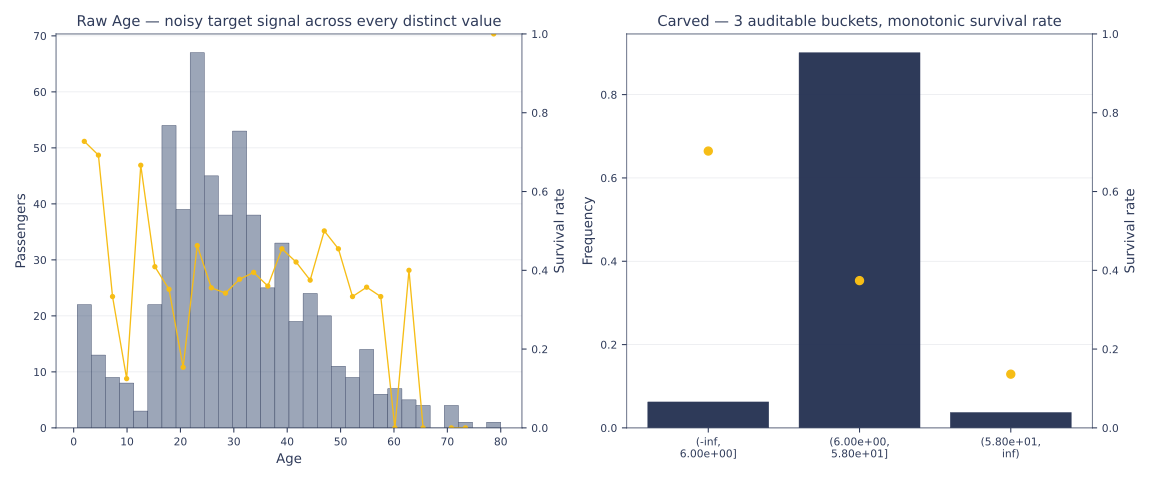
Titanic Age, one BinaryCarver.fit call: 84 raw values collapse to 3 buckets with a monotonic survival rate.
How does it compare?
| Manual binning | AutoCarver | optbinning | sklearn KBinsDiscretizer | |
|---|---|---|---|---|
| Algorithm | eyeballing distributions, notebook by notebook | dynamic-programming search over ordered groupings | CART pre-binning, then CP solver (CP-SAT default; MIP optional) | quantile / uniform / k-means — unsupervised |
Grouping kept for given min_freq / max_n_mod / metric |
none — first acceptable grouping wins | best viable grouping among the top-ranked candidates | best merge of its CART pre-bins found within a solver time limit | n/a — no target objective |
| Target types | any, at ~1 feature/hour | binary, multiclass, ordinal, continuous | binary, multiclass, continuous | n/a |
All feature types in one fit (numeric, categorical, ordinal, NaN) |
each feature is its own project | yes — declared ordinal order enforced, NaN as its own modality |
yes via BinningProcess; no first-class ordinal type (user_splits workaround) |
numeric only; NaN raises |
| Held-out dev-set robustness check | rarely — too tedious to script per feature | yes — dev set + optional k-fold CV, built into fit |
no (script CV yourself) | no |
Per-bin stats + carving history after fit |
scattered notebook cells | carver.summary, carver.history |
binning_table |
no |
All three libraries are sklearn-Pipeline compatible; AutoCarver adds JSON round-trip persistence (carver.save("...json")). AutoCarver (ClassificationSelector, RegressionSelector) and optbinning (BinningProcess(selection_criteria=...)) both offer feature pre-selection. The full feature matrix, side-by-side runnable snippets, and a "when to pick which" guide live on the comparison page.
Documentation
Full reference, tutorials, and end-to-end notebook examples on ReadTheDocs.
1 maintainer

Metadata
1 maintainer
Release files for AutoCarver 7.8.2
For a detailed explanation of source distributions (sdists) and built distributions (wheels), please see the package formats documentation.
Source distribution (sdist)
| File | Size | Uploaded | Provenance | Actions |
|---|---|---|---|---|
| autocarver-7.8.2.tar.gz | 183.9 kB | With provenance | Details for autocarver-7.8.2.tar.gz |
Built distribution (wheel)
| File | Interpreter | ABI | Platform | Actions Reset |
|---|---|---|---|---|
| autocarver-7.8.2-py3-none-any.whl | Python 3 | none | any | Details for autocarver-7.8.2-py3-none-any.whl |
Total release size: 414.9 kB
Release files / autocarver-7.8.2.tar.gz
| Download URL | autocarver-7.8.2.tar.gz |
|---|---|
| Size | 183.9 kB |
| Tags | Source |
|
SHA-256 checksum How to use checksums |
890377b933a36b739c6ad1a20388d85aaeddfc30b0596a676c28ead2401f855a
|
|
BLAKE2b-256 checksum How to use checksums |
ef93a8d173af8922b595d766dd2ee05a628faf8670cc8e2f43b0becdfad50b51
|
| Upload date | |
|
Uploaded using Trusted Publishing? What is trusted publishing? |
Yes |
| Uploaded via |
twine/7.0.0 CPython/3.13.16
|
Provenance
Provenance describes where a file came from. On PyPI, provenance is shared via attestations, which provide a verifiable record of the build or publishing details. View details, limitations and caveats.


PyPI Publish Attestation
PyPI verified that this artifact, at this checksum, originated from the publisher listed below.
Signed by GitHub Actions, verified by PyPI on Oct 25, 2026.
Transparency logRelease files / autocarver-7.8.2-py3-none-any.whl
| Download URL | autocarver-7.8.2-py3-none-any.whl |
|---|---|
| Size | 231.1 kB |
| Tags | Python 3 |
|
SHA-256 checksum How to use checksums |
8ac6c1b0a72168c9ece73552cea6558b655b166b86d431152ccdf6eb67e5e2c2
|
|
BLAKE2b-256 checksum How to use checksums |
69e2668a64f2165414167a200f33d720e3bc1c7b6aa655d7faf1ecd48180ef18
|
| Upload date | |
|
Uploaded using Trusted Publishing? What is trusted publishing? |
Yes |
| Uploaded via |
twine/7.0.0 CPython/3.13.16
|
Provenance
Provenance describes where a file came from. On PyPI, provenance is shared via attestations, which provide a verifiable record of the build or publishing details. View details, limitations and caveats.
PyPI Publish Attestation
PyPI verified that this artifact, at this checksum, originated from the publisher listed below.
Signed by GitHub Actions, verified by PyPI on Oct 25, 2026.
Transparency logSecurity for AutoCarver 7.8.2
Provenance
Provenance describes where a file came from. On PyPI, provenance is shared via attestations, which provide a verifiable record of the build or publishing details. View details, limitations and caveats.
Full provenance
Both files in this release have been uploaded with provenance metadata.
Attestation for autocarver-7.8.2.tar.gz
PyPI Publish Attestation
PyPI verified that this artifact, at this checksum, originated from the publisher listed below.
Signed by GitHub Actions, verified by PyPI on Oct 25, 2026.
Transparency logA note on package security
PyPI is a repository for distributing packages, not a service for auditing them. While third-party security researchers and our staff do their best to detect and remove malicious packages, PyPI cannot guarantee the quality, security or suitability of any given package.
To learn more about protecting yourself from malicious actors, visit our package security documentation.














