
AutoEnsembler
This is an AutoEnsembler package, it helps you to find the best ensemble model for Classification and Regression problem. As we know that every model gives best at certain type/part of data , by assuming this, AutoEnClassifer and AutoEnRegressor has been built on top of LogisticRegression/Lasso, SVC/SVR, RandomForestClassifier/RandomForestRegressor, AdaBoostClassifer/AdaBoostRegressor, LGBMClassifier/LGBMRegressor, XGBClassifier/XGBRegressor and KNeighborsClassifier/KNeighborsRegressor.
What's new ?
- Changed GridSearch attribute to search and now it can take values 'random', 'grid', False.
Uniqueness
- In AutoEnClassifer, you can pass a parameter that you want to optimize, i.e. 'FN' / 'FP'
- While training, by default it will split the data into training data and validation data by 0.2 (you can also specify) and it will show you the accuracy_score/r2_score (with respect to each model you selected and of AutoEnClassifer/AutoEnRegressor) on validation data
- While initiating the model you can also specify which models should be used for ensembling and what type of search you want to use.
Motivation
I participated in various competitions of Data Science & Machine Learning and I learned many things from it. As my contribution towards this community, I'm sharing this AutoEnsembler package with you all.
When to use ?
- If you want to build Robust Model with mean less time.
- When you have small or medium size data.
- If you have large size data then set search to False.
Installation
pip install AutoEnsembler
How to use ?
AutoEnClassifier
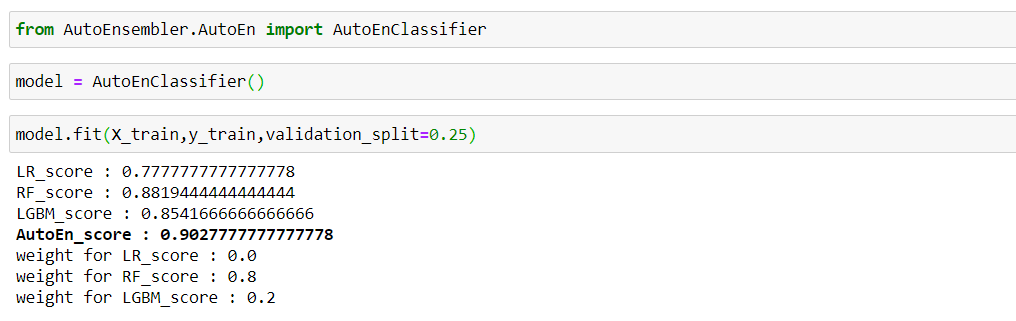
After installing, you can import this, as shown below. By default LogisticRegression/Lasso, RandomForestClassifier/RandomForestRegressor and LGBMClassifier/LGBMRegressor is selected. While fitting the model, validation_split is set to 0.25 (by default is 0.2). You can also see the accuracy_score/r2_score of individual model and of AutoEn model on validation_split data and you can also see the weight used for individual models for prediction.
Note :- (Recommended) Create your own validation data and this validation data should have same distribution as test data for best results on test data.
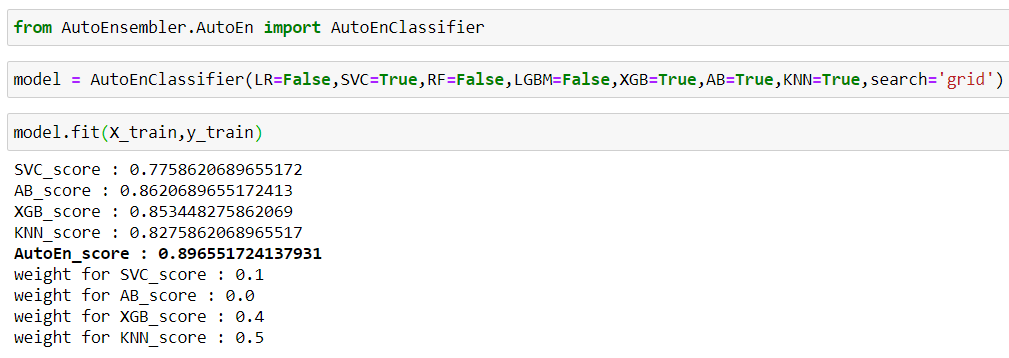
As you can see below, rest all the models are now set to True with respect to each model name and search is set to 'grid' (by default is 'random').
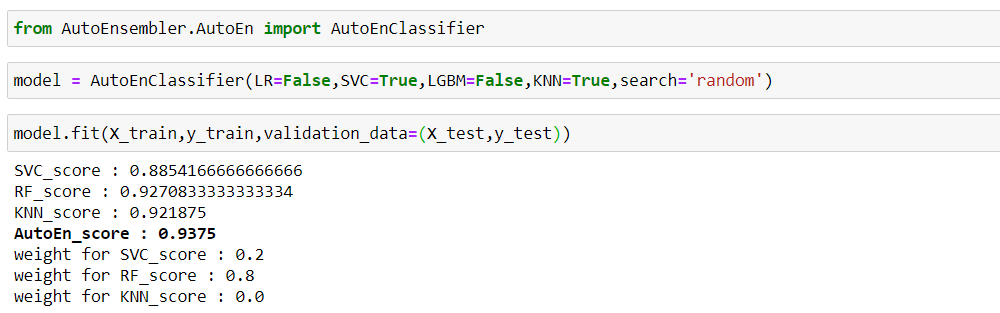
Now, search is set to 'random' and passed validation data to it and now the score will compute on validation_data.
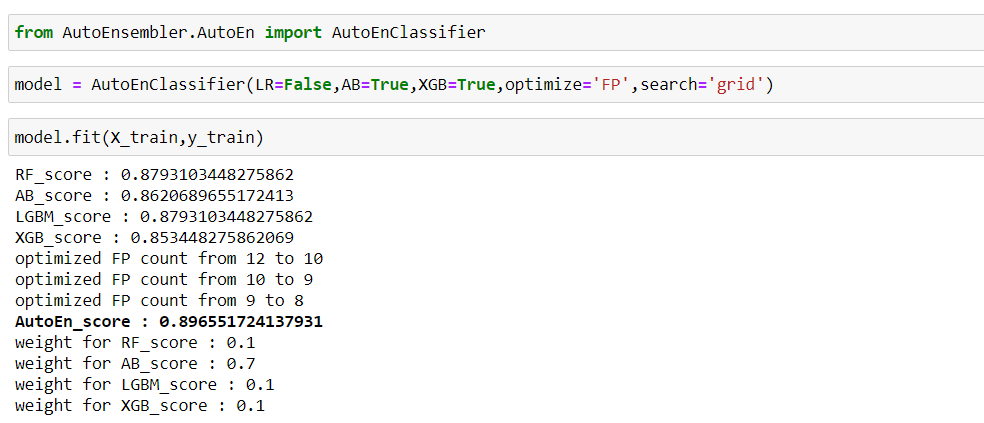
Below, optimize is set to 'FP', to optimizing the 'FP' i.e. False Positive Note:- Here 'FP' count is optimized with respect to validation data and on your test data it will be more or less equal, depending upon the size. You may think how it is optimized, while ensembling, one may get multiple models with same accuracy, from that it will select least 'FN'/'FP' as you specify.
AutoEnRegressor
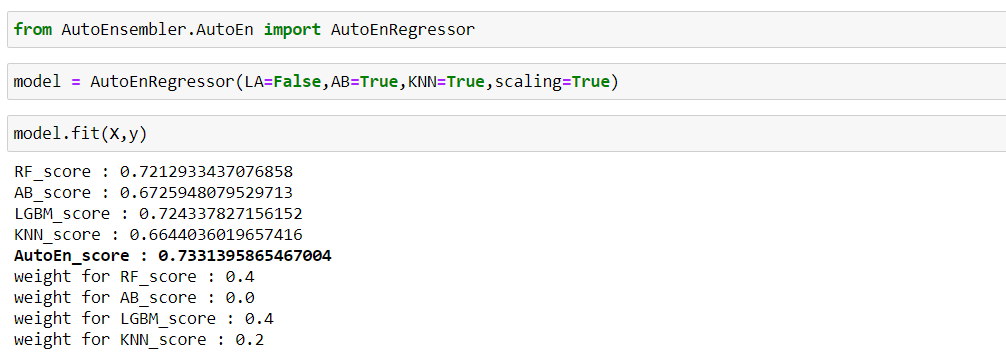
As you can see with four models, AutoEnRegressor reached near to 0.73 r2_score. By default scaling is set to True in both AutoEnClassifier and AutoEnRegressor Almost all features are similar with respect to AutoEnClassifier. Reminder :- (Recommended) Create your own validation data and this validation data should follow same distribution as test data for best results on test_data.
To Do
- To include class_weight attribute.
Bug / Feature Request
If you find a bug, kindly open an issue here by including your search query and the expected result. If you would like to request a new function, feel free to do so by opening an issue here. Please include sample queries and their corresponding results.
Want to Contribute
If you are strong in OOPS concept/Machine Learning, please feel free to contact me. Email :- nileshchilka1@gmail.com
Happy Learning!!
1 maintainer

Release files for AutoEnsembler 1.5
For a detailed explanation of source distributions (sdists) and built distributions (wheels), please see the package formats documentation.
Source distribution (sdist)
| File | Size | Uploaded | |
|---|---|---|---|
| AutoEnsembler-1.5.tar.gz | 7.6 kB | Details |
Built distribution (wheel)
| File | Interpreter | ABI | Platform | Reset |
|---|---|---|---|---|
| AutoEnsembler-1.5-py3-none-any.whl | Python 3 | none | any | Details |
Total release size: 16.1 kB
Release files / AutoEnsembler-1.5.tar.gz
| Download URL | AutoEnsembler-1.5.tar.gz |
|---|---|
| Size | 7.6 kB |
| Tags | Source |
|
SHA-256 checksum How to use checksums |
5d727ad57fbfd1371582ee899d8440b2c70446b4ba81141e6c607d0a865eb25a
|
|
BLAKE2b-256 checksum How to use checksums |
9b5d4ba7a681e59c2615c78c9f452b474b50e4dc0789b347260f729c4d258506
|
| Upload date | |
|
Uploaded using Trusted Publishing? What is trusted publishing? |
No |
| Uploaded via |
twine/3.2.0 pkginfo/1.5.0.1 requests/2.23.0 setuptools/45.2.0.post20200210 requests-toolbelt/0.9.1 tqdm/4.46.1 CPython/3.7.6
|
Release files / AutoEnsembler-1.5-py3-none-any.whl
| Download URL | AutoEnsembler-1.5-py3-none-any.whl |
|---|---|
| Size | 8.6 kB |
| Tags | Python 3 |
|
SHA-256 checksum How to use checksums |
5760b99c8b76b6907205d9342696c415278743486c75258d45a72d22dde103b9
|
|
BLAKE2b-256 checksum How to use checksums |
b18e261baf973cb063b093ef9f4a2af65cd572163eb72e5cdfe58395fc8c017c
|
| Upload date | |
|
Uploaded using Trusted Publishing? What is trusted publishing? |
No |
| Uploaded via |
twine/3.2.0 pkginfo/1.5.0.1 requests/2.23.0 setuptools/45.2.0.post20200210 requests-toolbelt/0.9.1 tqdm/4.46.1 CPython/3.7.6
|














