
Automated DAQ + flux-lock control for STAR Cryoelectronics PFL-102 SQUID systems
Verified details
These details have been verified by PyPIProject links
GitHub Statistics
Maintainers

Project description
AutoSQUID — SQUID measurement-cycle + auto-S-tune
This package is developed specifically for performing/automating superconductor quantum interference device (SQUID) measurements. It's developed using Star Cryoelectronics PFL-102, PCI-1000, and DAC-2568 and a national instrument (NI) data acuisition (DAQ) card PCIe-6320. All settings live in the notebook as one Config object; all logic lives in the modules here. The package imports nidaqmx + pyserial (it assumes a STAR Cryo + NI rig); the MXC thermometer is not imported — you plug your lab's reader into cfg.temp_reader in the notebook.
Full reference:
docs/AutoSQUID_protocol.pdf— the configuration table, the PCIe-6320 DAQ and PFL-102/SCC details, the reset protocol, the run loop, the operating procedure, and the auto-S-tune procedure. This README is the orientation + quick-start; the protocol is the bench reference.
What it does
For one fixed temperature, and for each scan interval, collect a target number of clean, gap-free time-series runs at the chosen sample rate. It can watch for a flux-lock jump while acquiring, resets the feedback locked loop (FLL) and re-acquires on a failure, optionally logs the MXC temperature throughout, and saves each trace in the standard PCS102 text format with an append-only run ledger. A companion notebook centers the locked output near 0 mV before the run (auto-S-tune).
Wiring
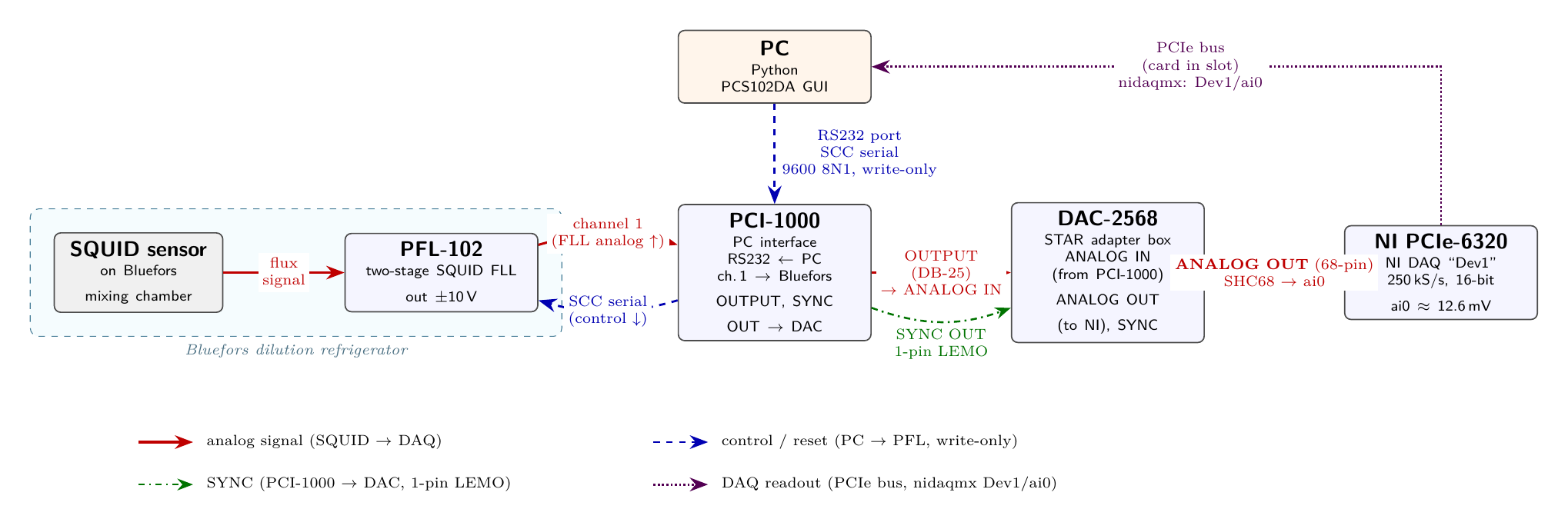
Analog: SQUID/PFL-102 (Bluefors) → PCI-1000 ch.1 → PCI-1000 OUTPUT → DAC-2568 ANALOG IN → ANALOG OUT (68-pin)
→ PCIe-6320 ai0 (read over the PCIe bus via nidaqmx). Control: PC → PCI-1000 RS232 → PFL (SCC serial,
write-only). Sync: PCI-1000 SYNC OUT → DAC-2568 (1-pin LEMO).
Project layout
AutoSQUID/
├─ pyproject.toml          # pip install -e .   (src layout)
├─ README.md  CHANGELOG.md  LICENSE (GPLv3)
├─ src/AutoSQUID/          # the importable package (modules below)
├─ examples/               # example_*.ipynb showcases (local working copies are gitignored)
└─ docs/                   # AutoSQUID_protocol.pdf, squid_wiring_diagram.png
Modules
| module | role | deps |
|---|---|---|
util.py |
generic helpers (clamp) |
— |
config.py |
Config dataclass — every knob + derived paths / filename stem / PFL register |
— |
scc.py |
SCC framing:assemble_command, pfl_register, dac_data (OpenSQUID-derived) |
— |
analysis.py |
detection + I/O:is_surge_spec, chunk_jump, format_temp_label, PCS102 read/write, ledger, scan_indices |
numpy, pandas |
serial_io.py |
SCC writes:reset, fire_reset, s_lock/s_tune, set_squid_flux, set_squid_bias, set_array_bias, set_array_flux |
pyserial |
daq.py |
NI reads:daq_read, daq_mean, live_mean, classify, detect_ai_channel, acquire_finite_chunked |
nidaqmx |
temperature.py |
MXC read_temp (via injected cfg.temp_reader) + optional background TempLogger and logging helpers |
— (injected) |
measurement.py |
state machine:run_cycle (one interval), reset_and_verify, resolve_temp_label; the interval loop lives in the notebook |
— |
tuning.py |
auto_s_tune — live-center the locked output near 0 by stepping S-flux (secant search) |
— |
plotting.py |
plot_run — raw trace + temperature, read back from disk |
matplotlib, pandas |
util/config/scc use only stdlib; analysis/plotting add numpy/pandas/matplotlib; serial_io/daq
import their instrument backends (pyserial/nidaqmx) at module top — the package assumes the STAR Cryo + NI
rig — while temperature imports no thermometer backend and reads through the injected cfg.temp_reader. So
import AutoSQUID needs nidaqmx, pyserial, numpy, pandas, and matplotlib (but no lab thermometer
library). Dependency order: util → scc/config → analysis → serial_io/daq/temperature →
measurement/tuning/plotting.
Notebooks (examples/)
example_measurement_cycle.ipynb— the minimal showcase: buildConfig(setdata_root/user/dateand yourcfg.temp_reader) →detect_ai_channel→resolve_temp_label→ the interval loop (sq.run_cycle(cfg, tau)). Copy it and fill in your lab's values.example_auto_s_tune.ipynb— buildConfig→sq.s_lock(cfg)thensq.auto_s_tune(cfg).
After pip install -e . (from the repo root), each example just import AutoSQUID; you set
cfg.temp_reader to your thermometer reader (fn(channel) -> T in K) in the first cell.
Quick start (bench PC)
import AutoSQUID as sq
cfg = sq.Config(scan_interval_s=[100e-6], n_trials=2, port="COM3",
                data_root=r"", user="", date="")     # set your data_root / user / date
# plug in your lab's thermometer reader: fn(channel) -> T in K
cfg.temp_reader = lambda ch: ...                     # define for your thermometer (returns T in K)
dev, cfg.daq_ai = sq.detect_ai_channel(cfg)          # §1 pick the live ai0
print(sq.read_temp(cfg))                             # confirm the MXC backend
for tau in cfg.scan_intervals:                       # §2 acquire (lock the FLL first!)
    if sq.run_cycle(cfg, tau) == "reset_fail":
        break
sq.plot_run(cfg)                                     # §3 plot from disk
First run on the hardware: do the one-time bring-up in the protocol (§ Operating procedure) as a supervised dry run — do not "Run All" blind.
Required fields (validated at the use site)
run_cycle() raises before any reset or write unless data_root, user, and daq_ai are set; with
temp_label="auto" it also requires temp_reader. auto_s_tune() requires daq_ai, port, data_root,
and user so its S-flux result always has an action_log.txt destination.
Config() itself is passive — it doesn't validate.
Temperature logging is gated by cfg.temp_logger (default True): run_cycle() then runs a background
TempLogger that reads cfg.temp_reader every temp_every_s into each trace's TEMP_*.csv, so set
cfg.temp_reader for any logged run (without it the CSV is all nan). Set cfg.temp_logger=False to skip
temperature entirely — no thread, no TEMP_*.csv, and no temp_reader required (for a literal temp_label).
A literal temp_label (e.g. "14mK") only sets the filename label; it does not by itself disable logging —
use temp_logger=False for that.
Behavior (per scan interval)
Collect n_trials CLEAN traces within max_attempts real acquisitions. Each acquisition is order-indexed
i: clean → DAQ_{MonDD}_{tau}us_{label}_{npts}_{i}.txt (+ its TEMP_..._{i}.csv), failed →
…_{i}_{JUMP|SURGE|RAIL|BADBASE}.txt. i continues past existing files, so re-running resumes / tops up
and never overwrites. A reset fires only after a failed acquisition, never between clean traces; a
non-clearing reset — or a bad baseline at the start (the reset didn't hold) — is systemic and stops the
whole sweep. Every acquisition outcome is appended to experiment_log.txt; resets, temperature reads, and
MEASURE/BAD_BASELINE events go to action_log.txt (a reset failure also gets a ledger row). Each RESET
action records the number of reset/verify tries needed to clear the baseline; RESET_FAIL records not cleared.
A trace is labeled CLEAN only after a post-hoc is_surge_spec check passes: no rail, no >6σ baseline
jump, and no frozen/stuck flat segment (flagged when a chunk's std collapses below the live noise level).
Anything failing is saved with a _JUMP/_SURGE/_RAIL/_BADBASE suffix. (Still re-run the standalone
integrity gate before downstream analysis.)
vrange = ±1 V (matches previous measurements): finer ADC resolution, but the ADC clips ~1 V, so jump_v
(default 0.5 V) catches an in-range slip and rail_v (9.5 V) is dormant until the card returns to ±10 V.
terminal_config (default "DIFF") sets the NI analog-input reference: DIFF reads ai0 against its paired
negative input (ai0/ai8) and rejects common-mode / ground-loop pickup — the right choice for this floating SQUID
output; "RSE" (single-ended vs board ground) and "NRSE" (vs AI SENSE) are the alternatives. live_jump_check
(default True) runs the mid-run jump/rail abort during acquisition; set it False to drain each run without it
(the post-hoc is_surge_spec gate on the saved trace still applies).
Data layout
Everything is written under cfg.outdir = data_root / user / date:
<data_root>/                                       # cfg.data_root  (set per install)
└─ <user>/                                         # cfg.user
   └─ <date>/                                      # cfg.date   ("" → the bare <user>/ folder)
      ├─ DAQ_{MonDD}_{tau}us_{label}_{npts}_{i}.txt        # clean trace, e.g. DAQ_Jun01_100us_14mK_10Mpts_1.txt
      ├─ DAQ_..._{i}_{JUMP|SURGE|RAIL|BADBASE}.txt         # failed trace (+ its TEMP_..._{i}.csv)
      ├─ TEMP_{MonDD}_{tau}us_{label}_{npts}_{i}.csv       # MXC log when temp_logger=True (time_s, T_K)
      ├─ experiment_log.txt                                # per-acquisition numeric ledger
      └─ action_log.txt                                    # results-free event log (resets, temp, attempts)
{i} is the order index and continues across days; matching ignores the {MonDD} date, so traces from any day in <date>/ count toward the same {tau}us_{label}_{npts} core.
Analysis (PSD)
sq.plot_psd(path, filename, conversion, P=…, clean_only=True) reads a trace back from disk and plots its
PSD. Traces are stored in raw volts with no
calibration baked in; plot_psd multiplies by the per-cooldown conversion factor (f₀/V) to give a flux PSD
(f₀²/Hz), so you must pass the correct cooldown calibration yourself — it isn't recorded with the trace.
clean_only=True runs the is_surge_spec integrity gate on each trace and skips any that fail.
Auto-S-tune
auto_s_tune automates the manual "nudge S-flux until the trace is centered at 0 mV": with the SQUID
locked, it steps the SQUID-flux DAC and reads a short finite live-mean each step, using a secant update
(dx = (target − mean)/slope) so the sign and gain are measured, not assumed — no reset between steps.
Its first response probe is 10% below start_sflux; if that side is flat, it retries once 10% above the
same starting point before returning no_response.
Stops when the live mean is within tol_V (default 20 mV) of target, or at one DAC LSB. Returns
dict(status ∈ {converged, dac_limited, no_response, max_iter}, flux_sflux, mean_V, std_V, n_iter) (dac_limited = as centered as one DAC LSB allows, still outside tol_V). no_response means the
live mean doesn't move with the S-flux steps — typically not locked, wrong daq_ai, or S-flux not reaching the SQUID.
See the protocol's auto-S-tune section for the full procedure.
Contact
For questions, bug reports, or setup issues, please feel free to contact:
- Zhengyue Chen — czhengyue@wustl.edu
- Sheng Ran — rans@wustl.edu
Project details
Verified details
These details have been verified by PyPIProject links
GitHub Statistics
Maintainers


Download files
Download the file for your platform. If you're not sure which to choose, learn more about installing packages.
Source Distribution
Built Distribution
Filter files by name, interpreter, ABI, and platform.
If you're not sure about the file name format, learn more about wheel file names.
Copy a direct link to the current filters
File details
Details for the file autosquid-0.1.4.tar.gz.
File metadata
- Download URL: autosquid-0.1.4.tar.gz
- Upload date:
- Size: 65.5 kB
- Tags: Source
- Uploaded using Trusted Publishing? Yes
- Uploaded via: twine/6.1.0 CPython/3.13.12
File hashes
| Algorithm | Hash digest | |
|---|---|---|
| SHA256 |
6a2e71dbc7aeb21485aa388eb9aee9fa49464002e2816b5aa6b70e0d225d4551
|
|
| MD5 |
5e5995c3f1437bc2773397efb446d3fb
|
|
| BLAKE2b-256 |
e4bb83b1b2386e679adf5de362bef50933bb32c24d16409d6a5f801ab0e41647
|
Provenance
The following attestation bundles were made for autosquid-0.1.4.tar.gz:
Publisher:
publish.yml on zhengyuechen/AutoSQUID
-
Statement:
-
Statement type:
https://in-toto.io/Statement/v1 -
Predicate type:
https://docs.pypi.org/attestations/publish/v1 -
Subject name:
autosquid-0.1.4.tar.gz -
Subject digest:
6a2e71dbc7aeb21485aa388eb9aee9fa49464002e2816b5aa6b70e0d225d4551 - Sigstore transparency entry: 1743895818
- Sigstore integration time:
-
Permalink:
zhengyuechen/AutoSQUID@27ced129b8b3ae9b1bee7da384ba01fd72987407 -
Branch / Tag:
refs/tags/v0.1.4 - Owner: https://github.com/zhengyuechen
-
Access:
public
-
Token Issuer:
https://token.actions.githubusercontent.com -
Runner Environment:
github-hosted -
Publication workflow:
publish.yml@27ced129b8b3ae9b1bee7da384ba01fd72987407 -
Trigger Event:
release
-
Statement type:
File details
Details for the file autosquid-0.1.4-py3-none-any.whl.
File metadata
- Download URL: autosquid-0.1.4-py3-none-any.whl
- Upload date:
- Size: 52.9 kB
- Tags: Python 3
- Uploaded using Trusted Publishing? Yes
- Uploaded via: twine/6.1.0 CPython/3.13.12
File hashes
| Algorithm | Hash digest | |
|---|---|---|
| SHA256 |
545333bf416ae57035b82721c2f5cec60ea2d528b386a97182ee18e4cc6082e8
|
|
| MD5 |
5de718c5b5593cb25bec79728d894f96
|
|
| BLAKE2b-256 |
31a9f64263b6d685481d6a075bbff0d6e2ae23a1a0e04ab0ccf56246e38727b4
|
Provenance
The following attestation bundles were made for autosquid-0.1.4-py3-none-any.whl:
Publisher:
publish.yml on zhengyuechen/AutoSQUID
-
Statement:
-
Statement type:
https://in-toto.io/Statement/v1 -
Predicate type:
https://docs.pypi.org/attestations/publish/v1 -
Subject name:
autosquid-0.1.4-py3-none-any.whl -
Subject digest:
545333bf416ae57035b82721c2f5cec60ea2d528b386a97182ee18e4cc6082e8 - Sigstore transparency entry: 1743895930
- Sigstore integration time:
-
Permalink:
zhengyuechen/AutoSQUID@27ced129b8b3ae9b1bee7da384ba01fd72987407 -
Branch / Tag:
refs/tags/v0.1.4 - Owner: https://github.com/zhengyuechen
-
Access:
public
-
Token Issuer:
https://token.actions.githubusercontent.com -
Runner Environment:
github-hosted -
Publication workflow:
publish.yml@27ced129b8b3ae9b1bee7da384ba01fd72987407 -
Trigger Event:
release
-
Statement type:






