
BeamMe: A general purpose 3D beam finite element input generator


Project description
MeshPy











MeshPy is a general purpose 3D beam finite element input generator written in Python. It contains advanced geometry creation and manipulation functions to create complex beam geometries, including a consistent handling of finite rotations. It can be used to create input files for the following finite element solvers (adaption to other solvers is easily possibly):
- 4C (academic finite element solver)
- Abaqus (commercial software package)
- AceFEM (Finite element package for automation of the finite element method in Mathematica)
MeshPy is developed at the Institute for Mathematics and Computer-Based Simulation (IMCS) at the Universität der Bundeswehr München.
Overview
- Examples
- How to use MeshPy?
- How to cite MeshPy?
- Work that uses MeshPy
- Installation
- Optional dependencies
- Developing MeshPy
- Contributing
- Authors
Examples
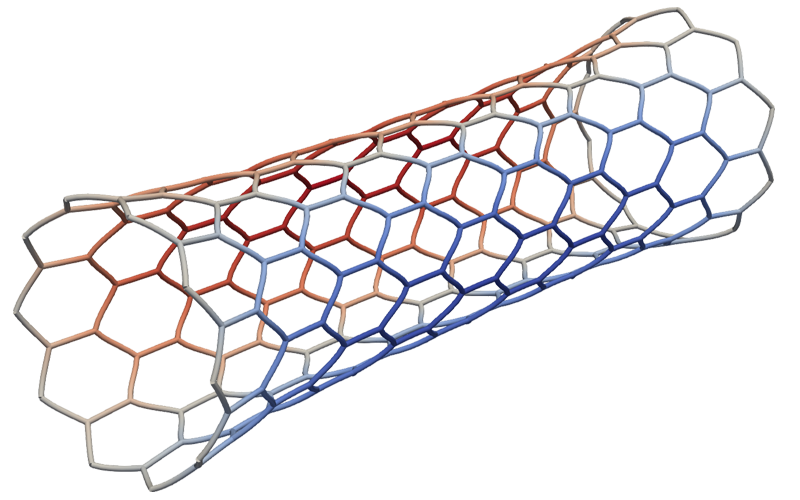
Honeycomb structure under tension (simulated with 4C)
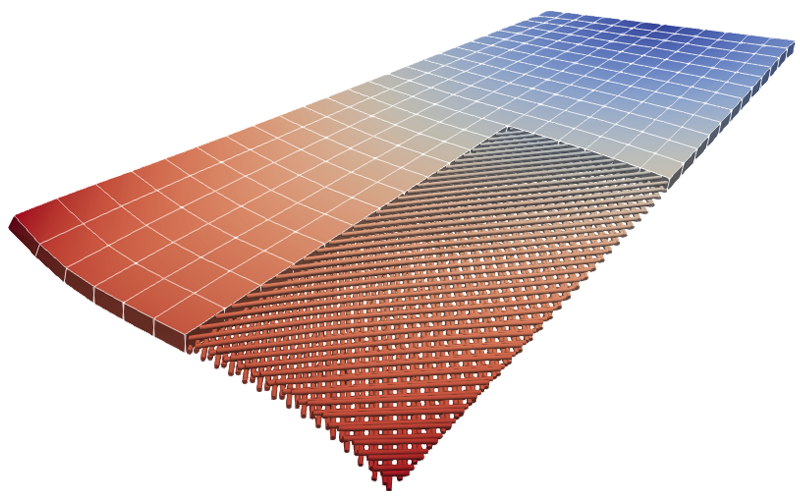
Fiber reinforced composite plate (simulated with 4C)
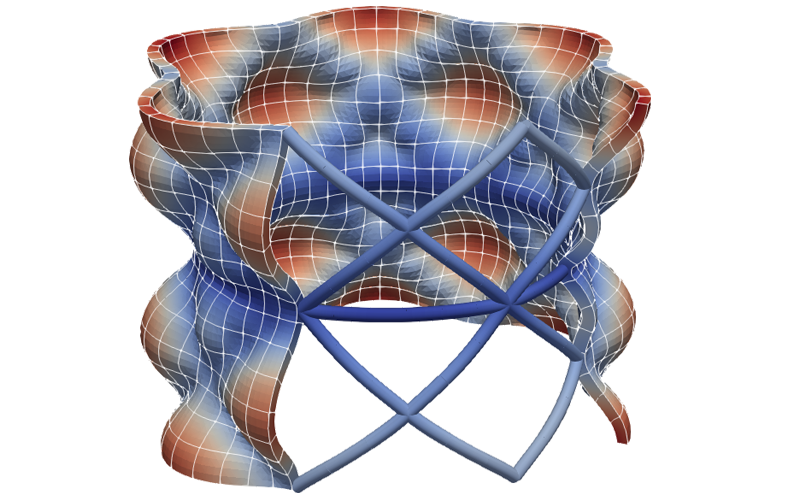
Fiber reinforced pipe under pressure (simulated with 4C)

Fiber reinforcements of a twisted plate (simulated with 4C)
How to use MeshPy?
MeshPy provides example notebooks to showcase its core features and functionality.
The examples can be found in the examples/ directory.
They can be run locally or directly tested from your browser via the following links:
- Example 1: Finite rotation framework
- Example 2: Core mesh generation functions

You can also interactively test the entire MeshPy framework directly from your browser here
How to cite MeshPy?
Whenever you use or mention MeshPy in some sort of scientific document/publication/presentation, please cite MeshPy as
Steinbrecher, I., Popp, A.: MeshPy - A general purpose 3D beam finite element input generator, https://imcs-compsim.github.io/meshpy
This can be done with the following BiBTeX entry:
@Misc{MeshPyWebsite,
  author       = {Steinbrecher, I. and Popp, A.},
  howpublished = {\url{https://imcs-compsim.github.io/meshpy}},
  title        = {{M}esh{P}y -- {A} general purpose {3D} beam finite element input generator},
  year         = {2021},
  key          = {MeshPyWebsite},
  url          = {https://imcs-compsim.github.io/meshpy},
}
Feel free to leave a ⭐️ on GitHub.
Work that uses MeshPy
Peer-reviewed articles
- Datz, J.C., Steinbrecher, I., Meier, C., Engel, L.C., Popp, A., Pfaller, M.R., Schunkert, H., Wall, W.A.: Patient-specific coronary angioplasty simulations — A mixed-dimensional finite element modeling approach. Computers in Biology and Medicine. 189, 109914 (2025). https://doi.org/10.1016/j.compbiomed.2025.109914
- Firmbach, M., Steinbrecher, I., Popp, A., Mayr, M.: An approximate block factorization preconditioner for mixed-dimensional beam-solid interaction. Computer Methods in Applied Mechanics and Engineering. 431, 117256 (2024). https://doi.org/10.1016/j.cma.2024.117256
- Hagmeyer, N., Mayr, M., Popp, A.: A fully coupled regularized mortar-type finite element approach for embedding one-dimensional fibers into three-dimensional fluid flow. International Journal for Numerical Methods in Engineering. 125, e7435 (2024). https://doi.org/10.1002/nme.7435
- Steinbrecher, I., Popp, A., Meier, C.: Consistent coupling of positions and rotations for embedding 1D Cosserat beams into 3D solid volumes. Computational Mechanics. 69, 701–732 (2022). https://doi.org/10.1007/s00466-021-02111-4
- Hagmeyer, N., Mayr, M., Steinbrecher, I., Popp, A.: One-way coupled fluid-beam interaction: Capturing the effect of embedded slender bodies on global fluid flow and vice versa. Advanced Modeling and Simulation in Engineering Sciences. 9, 9 (2022). https://doi.org/10.1186/s40323-022-00222-y
- Steinbrecher, I., Mayr, M., Grill, M.J., Kremheller, J., Meier, C., Popp, A.: A mortar-type finite element approach for embedding 1D beams into 3D solid volumes. Computational Mechanics. 66, 1377–1398 (2020). https://doi.org/10.1007/s00466-020-01907-0
PhD thesis
- Hagmeyer, N.: A computational framework for balloon angioplasty and stented arteries based on mixed-dimensional modeling, https://athene-forschung.rz.unibw-muenchen.de/146359, (2023)
- Steinbrecher, I.: Mixed-dimensional finite element formulations for beam-to-solid interaction, https://athene-forschung.unibw.de/143755, (2022)
Installation
Python environment
MeshPy is tested with, and supports Python versions 3.9-3.12. It is recommended to use a virtual Python environment such as Conda/Miniforge or venv.
- A Conda/Miniforge environment can be created and loaded with
# Create the environment (this only has to be done once)
conda create -n meshpy python=3.12
# Activate the environment
conda activate meshpy
- A venv virtual environment can be created and loaded with (on Debian systems the following packages might have to be installed:
sudo apt-get install python3-venv python3-dev)# Create the environment (this only has to be done once) python -m venv <path-to-env-folder>/meshpy-env # Activate the environment source <path-to-env-folder>/meshpy-env/bin/activate
Install MeshPy from source
You can either install MeshPy directly from the source in a non-editable and editable fashion like:
- Non-editable:
This allows you to use MeshPy, but changing the source code will not have any effect on the installed package
git clone git@github.com:imcs-compsim/meshpy.git
cd meshpy
pip install .
- Editable:
This allows you to change the source code without reinstalling the module
git clone git@github.com:imcs-compsim/meshpy.git
cd meshpy
pip install -e .
Now you are able to use MeshPy. A good way to get started is by going through the examples
jupyter notebook examples/
If you also want to execute the associated test suite check out our development section.
Optional dependencies
4C
MeshPy can run 4C simulations directly from within a Python script, allowing for full control over arbitrarily complex simulation workflows. Fore more information, please have a look at the meshpy.four_c.run_four_c module.
CubitPy
CubitPy is a Python library that contains utility functions extending the Cubit/Coreform Python interface. Furthermore, it allows for the easy creation of 4C-compatible input files directly from within Python. MeshPy can import meshes created with CubitPy and allows for further modification and manipulation of them.
CubitPy can be installed as an optional dependency with:
pip install -e .[cubitpy]
ArborX geometric search
MeshPy can optionally execute its geometric search functions using the C++ library ArborX. First make sure the pybind11 submodule is loaded
cd <path_to_meshpy>
git submodule update --init
To setup MeshPy with ArborX, CMake and Kokkos have to be available on your system (the preferred variant is via Spack). Create a build directory
mkdir -p <path_to_meshpy>/src/build/geometric_search
Configure cmake and build the extension
cd <path_to_meshpy>/build/geometric_search
cmake ../../meshpy/geometric_search/src/
make -j4
Note: Currently ArborX only works if MeshPy is installed in editable mode.
Developing MeshPy
If you want to actively develop MeshPy or run the test suite, you must install MeshPy in editable (-e) mode and with our optional developer dependencies ([dev]) like
pip install -e ".[dev]" # Quotation marks are required for some shells
You can now run the MeshPy test suite to check that everything worked as expected
pytest
Coding guidelines
-
When working on MeshPy, use a leading underscore (
_) to indicate functions, classes, and variables that are intended for internal use only. This is a coding convention rather than an enforced rule, so apply it where it improves code clarity, especially for functions that check consistency or modify internal states. -
To avoid ambiguous or incorrect imports when using MeshPy as a library, internal imports must follow a strict aliasing convention as illustrated below:
Import guidelines
# Not OK
import numpy  # No alias
import numpy as np  # Missing leading underscore

from numpy import *  # Wildcard imports
from numpy import _core  # We don't allow the import of private functionality
from numpy.linalg import norm  # No alias
from numpy import sin as sin2  # Missing leading underscore
from meshpy.core.mesh import Mesh as _BeamMesh  # MeshPy imports have to be aliased with the same name, i.e., should be `_Mesh` (imports from third party libraries can be renamed)

# OK
import numpy as _np
import sys as _sys

from pathlib import Path as _Path

from math import sin as _math_sin
from numpy import sin as _np_sin

import meshpy.core.conf as _conf
from meshpy.core.mesh import Mesh as _Mesh
from meshpy.core.node import Node as _Node
from meshpy.core.node import NodeCosserat as _NodeCosserat
Testing
MeshPy provides a flexible testing system where additional tests can be enabled using specific flags. The following flags can be used with pytest to enable specific test sets:
--exclude-standard-tests: Disables the default test suite--4C: Runs tests related to 4C integration--ArborX: Enables tests for ArborX-related functionality--CubitPy: Runs tests for CubitPy integration--performance-tests: Includes performance tests
These flags can be combined arbitrarily; for example, to run the 4C, CubitPy, and ArborX tests but exclude the default test suite, use:
# 4C Tests require a path to a 4C executable
export MESHPY_FOUR_C_EXE=<path_to_4C>
# CubitPy Tests require a path to a Cubit/Coreform installation
export CUBIT_ROOT=<path_to_Cubit_or_Coreform>

pytest --4C --ArborX --CubitPy --exclude-standard-tests
Cython geometric search
Some performance critical geometric search algorithms in MeshPy are written in Cython. If Cython code is changed, it has to be recompiled. This can be done by running
python setup.py build_ext --inplace
Contributing
If you are interested in contributing to MeshPy, we welcome your collaboration. For general questions, feature request and bug reports please open an issue.
If you contribute actual code, fork the repository and make the changes in a feature branch.
Depending on the topic and amount of changes you also might want to open an issue.
To merge your changes into the MeshPy repository, create a pull request to the main branch.
A few things to keep in mind:
- Read our coding guidelines.
- It is highly encouraged to add tests covering the functionality of your changes, see the test suite in
tests/. - To maintain high code quality, MeshPy uses a number of different pre-commit hooks to check committed code. Make sure to set up the pre-commit hooks before committing your changes
pre-commit install - Check that you did not break anything by running the MeshPy tests.
For most changes it should be sufficient to run the standard test suite:
pytest
- Feel free to add yourself to the authors section in the README.md file.
Authors
Maintainers
- Ivo Steinbrecher (@isteinbrecher)
- David Rudlstorfer (@davidrudlstorfer)
Contributors (in alphabetical order)
- Dao Viet Anh
- Max Firmbach (@maxfirmbach)
- Martin Frank (@knarfnitram)
- Nora Hagmeyer (@NoraHagmeyer)
- Matthias Mayr (@mayrmt)
- Gabriela Loera (@eulovi)


Download files
Download the file for your platform. If you're not sure which to choose, learn more about installing packages.
Source Distribution
Built Distribution
Filter files by name, interpreter, ABI, and platform.
If you're not sure about the file name format, learn more about wheel file names.
Copy a direct link to the current filters
File details
Details for the file beamme-0.0.0.tar.gz.
File metadata
- Download URL: beamme-0.0.0.tar.gz
- Upload date:
- Size: 253.0 kB
- Tags: Source
- Uploaded using Trusted Publishing? No
- Uploaded via: twine/6.1.0 CPython/3.12.8
File hashes
| Algorithm | Hash digest | |
|---|---|---|
| SHA256 |
c2aa516da9cddcc0a604680ec8ad8a5e221d340e2bd6991c3a129ce53c66d27f
|
|
| MD5 |
f5062e9f0a31417e573582ae45095be6
|
|
| BLAKE2b-256 |
82881426163f57b4adfae33c37433e34d1fdab10f1c3942983d1cb53d52e6f52
|
File details
Details for the file beamme-0.0.0-cp312-cp312-macosx_11_0_arm64.whl.
File metadata
- Download URL: beamme-0.0.0-cp312-cp312-macosx_11_0_arm64.whl
- Upload date:
- Size: 281.5 kB
- Tags: CPython 3.12, macOS 11.0+ ARM64
- Uploaded using Trusted Publishing? No
- Uploaded via: twine/6.1.0 CPython/3.12.8
File hashes
| Algorithm | Hash digest | |
|---|---|---|
| SHA256 |
b48885cb44857cfb18454b66e1379b3c18ae06fed0f1c39d8e9ddcce35685024
|
|
| MD5 |
39e14eb1c7b0d257b83325df4b1cb0f9
|
|
| BLAKE2b-256 |
83c622aacda3a62c9934e194b44bfd40d53efeef234bd976254a19cd6b7eb0c0
|






