
unittest自动化测试的可视化报告模板

Project description
BeautifulReport
一个基于unittest.TestResult模块实现的测试用例模板, 可把测试中的结果通过BeautifulReport整合成一个可视化的报表.
如何使用它?
>>> pip install BeautifulReport
import unittest
from BeautifulReport import BeautifulReport

if __name__ == '__main__':
    test_suite = unittest.defaultTestLoader.discover('./tests', pattern='test*.py')
    result = BeautifulReport(test_suite)
    result.report(filename='测试报告', description='测试deafult报告', report_dir='report', theme='theme_default')
Report API简介
-
BeautifulReport.report
- report (
filename -> 测试报告名称, 如果不指定默认文件名为report.html
description -> 测试报告用例名称展示
report_dir='.' -> 报告文件写入路径
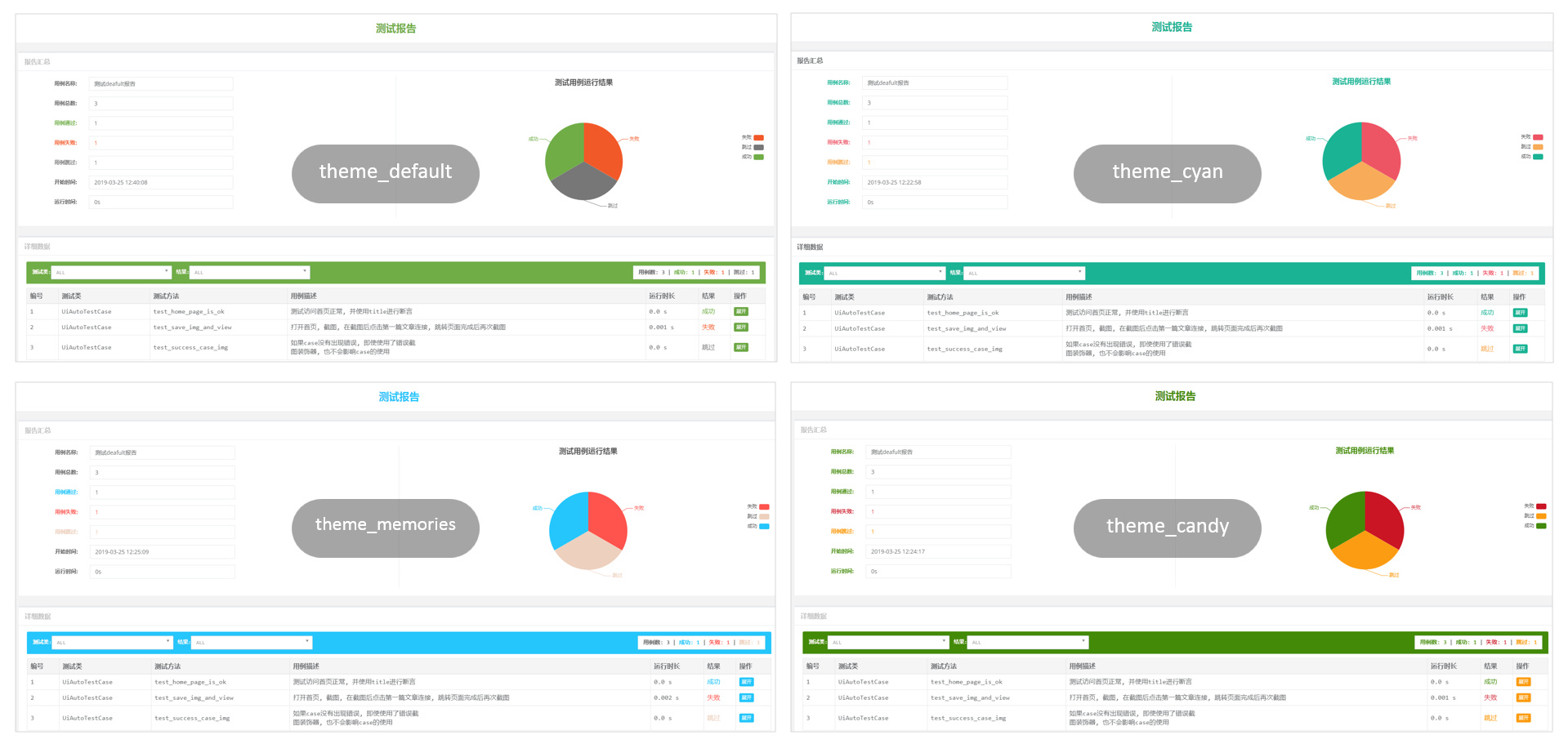
theme='theme_default' -> 报告主题样式 theme_default theme_cyan theme_candy theme_memories
)
- report (
-
BeautifulReport.add_test_img
如果使用报告过程中需要把测试报告的截图放在报告中, 可以使用add_test_img方法
- add_test_img ( *pargs )
可以在测试用例上挂载一个装饰器, 实例内容如下
- 默认存放的图片路径是img, 需要在当前测试项目的启动路径下, 创建一个img文件夹
- 传递给装饰器的图片,在运行测试前可以不存在, 运行测试之后生成即可.
- 当文件在报告中展示后, 想要看到原图, 可以点击报告中的缩略图查看完整的截图
import unittest
from BeautifulReport import BeautifulReport


class UnittestCaseSecond(unittest.TestCase):
    """ 测试代码生成与loader 测试数据"""

    def test_equal(self):
        """
        test 1==1
        :return:
        """
        import time
        time.sleep(1)
        self.assertTrue(1 == 1)

    @BeautifulReport.add_test_img('测试报告.png')
    def test_is_none(self):
        """
        test None object
        :return:
        """
        save_some_img('测试报告.png')
        self.assertIsNone(None)
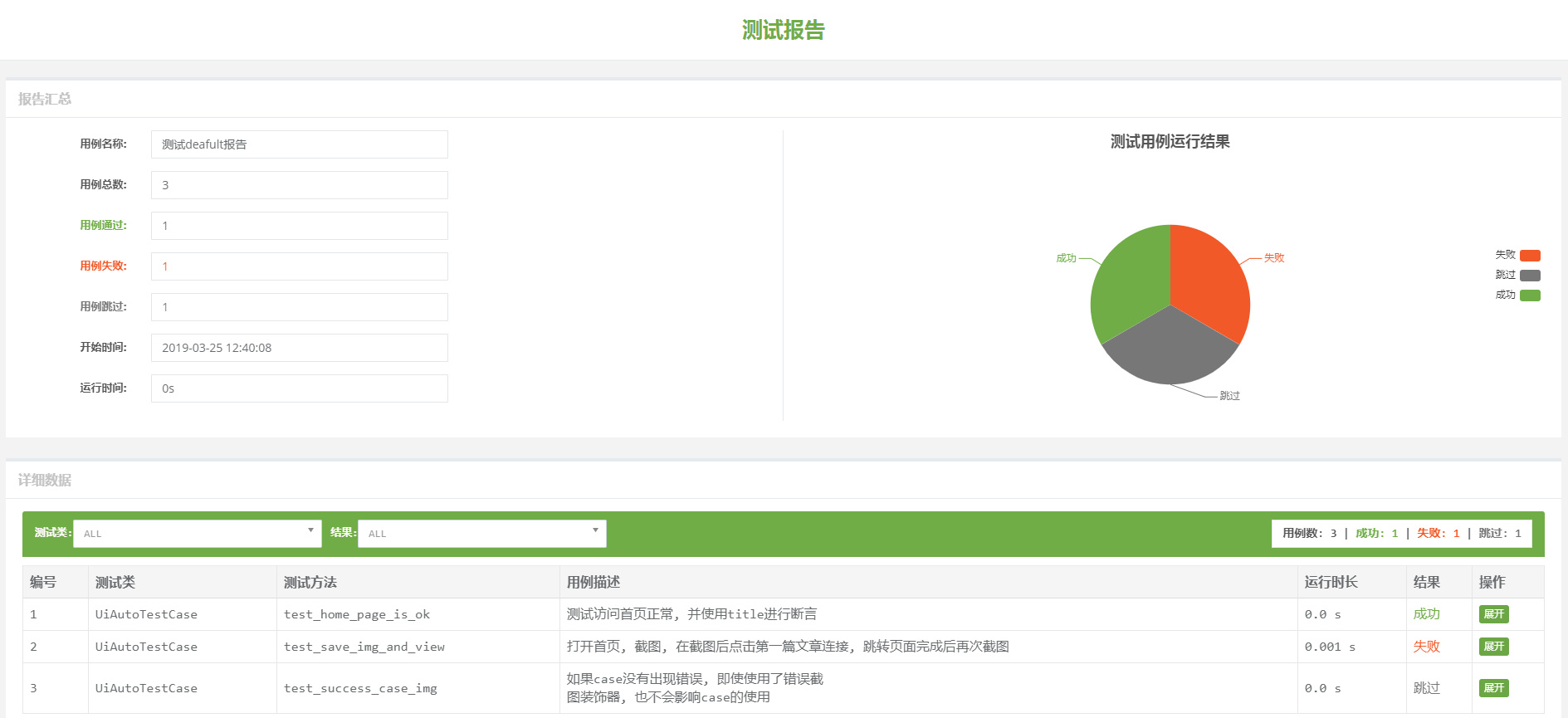
- 运行sample之后生成如下报告
- 主题样式
感谢原作者 TesterlifeRaymond 的代码贡献,本人在原基础上修复了部分bug并增加了主题样式的自定义
Release history Release notifications | RSS feed


Download files
Download the file for your platform. If you're not sure which to choose, learn more about installing packages.
Source Distribution
BeautifulReport-fix-0.1.2.tar.gz
(31.7 kB
view details)
Built Distribution
Filter files by name, interpreter, ABI, and platform.
If you're not sure about the file name format, learn more about wheel file names.
Copy a direct link to the current filters
File details
Details for the file BeautifulReport-fix-0.1.2.tar.gz.
File metadata
- Download URL: BeautifulReport-fix-0.1.2.tar.gz
- Upload date:
- Size: 31.7 kB
- Tags: Source
- Uploaded using Trusted Publishing? No
- Uploaded via: twine/6.1.0 CPython/3.11.7
File hashes
| Algorithm | Hash digest | |
|---|---|---|
| SHA256 |
3337aee3c62cbfa483163752320abc27c2715fab50b99da8ff37d584c5d863c5
|
|
| MD5 |
72239c4a13f694bfbe80d5f8b97ad208
|
|
| BLAKE2b-256 |
fa155848daeeb0a7efa21b660c235026fb0bce7fee5bb53447e2eea0e270618c
|
File details
Details for the file BeautifulReport_fix-0.1.2-py3-none-any.whl.
File metadata
- Download URL: BeautifulReport_fix-0.1.2-py3-none-any.whl
- Upload date:
- Size: 33.7 kB
- Tags: Python 3
- Uploaded using Trusted Publishing? No
- Uploaded via: twine/6.1.0 CPython/3.11.7
File hashes
| Algorithm | Hash digest | |
|---|---|---|
| SHA256 |
36f5fd4310f259cff6ab6f63721f1debe958a9d528e9adc5882a8fcabf1f54c4
|
|
| MD5 |
a75443c19b850c02ce073fe304c8a181
|
|
| BLAKE2b-256 |
f1be1880a7180a5cfe2168f32527cfa7c13ee2fb7f7b75d8378fecca291b7f79
|






