
Command Line Achievements — Make command line fun again!






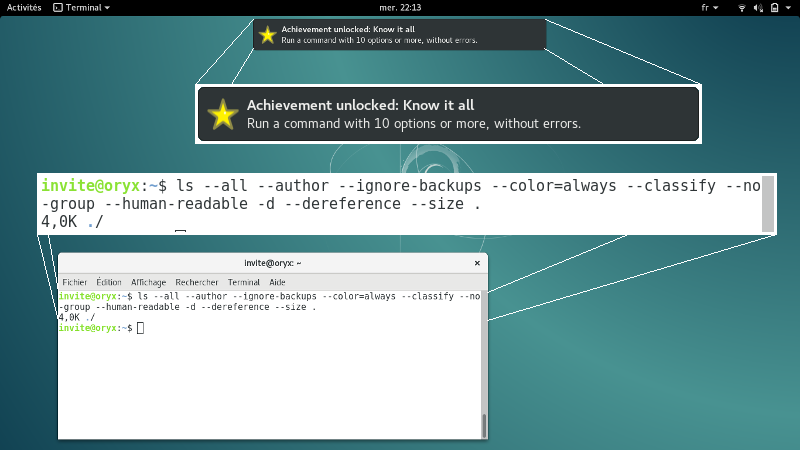
Command line was all fun when it was invented fifty years ago, but it can no longer compete with modern interfaces, glowing windows, shiny buttons, and so on… Command Line Achievements (later abbreviated CLAchievements or CLA) aims to solve this, by making command line fun again! Inspired by video game achievements, it unlocks achievements when users meets the fulfillement conditions.
What’s new?
See changelog.
Download, install, enable
This is a quick guide to install and enable CLAchievements. For more information, see the installation page of the documentation.
Install:
pip install clachievements[pgi]
Enable: In each shell where you want to use CLAchievements, or in your .bahsrc:
$(clachievements alias)
Progress
Progress is displayed using clachievements report:
✘ Always give credit: Run `ls` with names of `ls` authors as options.
✔ Coin flipping: Use `head` and `tail` at least 100 times (combined). (unlocked on 2016-10-17 22:03:34.815846)
✘ H4x0r: Mess with CLA data files.
✘ Know it all: Run a command with 10 options or more, without errors.
✘ Liar: Use `true` and `false`.
✘ List all the things!: Run `ls -R /` and wait for it to finish.
✔ Lost: Use `pwd` more than 50 times. (unlocked on 2016-10-17 22:03:33.670310)
✘ Maker: Use all commands starting with `mk`.
✘ Philosopher: Use `whoami` more than 10 times.
✘ Self reference: Run a binary on itself.
✔ So it begins: Get Command Line Achievements up and running. (unlocked on 2016-10-15 00:18:36.097743)
✘ Something to hide: Use `shred` more than 10 times.
✔ Sound Of Silence: Run a command with both "--verbose" and "--quiet" options. (unlocked on 2016-10-17 22:02:57.448414)
✘ The End: Unlock every achievement.
✔ There is more than one way to do it: Run `ls .`. (unlocked on 2016-10-17 22:02:37.680371)
✘ When credit is due: Run `ls` with names of `CLAchievements` author as options.
-------------
31% completed
More information about the clachievements binary is available in the documentation.
Documentation
The compiled documentation is available on readthedocs
To compile it from source, download and run:
cd doc && make html
1 maintainer

Release files for CLAchievements 0.1.0
For a detailed explanation of source distributions (sdists) and built distributions (wheels), please see the package formats documentation.
Source distribution (sdist)
| File | Size | Uploaded | |
|---|---|---|---|
| CLAchievements-0.1.0.tar.gz | 153.7 kB | Details |
Built distribution (wheel)
| File | Interpreter | ABI | Platform | Reset |
|---|---|---|---|---|
| CLAchievements-0.1.0-py3-none-any.whl | Python 3 | none | any | Details |
Total release size: 185.9 kB
Release files / CLAchievements-0.1.0.tar.gz
| Download URL | CLAchievements-0.1.0.tar.gz |
|---|---|
| Size | 153.7 kB |
| Tags | Source |
|
SHA-256 checksum How to use checksums |
bf0207c2069546c1d53dad4e8056107d389e7b3ba12ecb008a5e1cc070e11bd5
|
|
BLAKE2b-256 checksum How to use checksums |
5ce89107646f6b40d77310e2be1a4fb89569b03649c81f585b4f72c772b882d2
|
| Upload date | |
|
Uploaded using Trusted Publishing? What is trusted publishing? |
No |
Release files / CLAchievements-0.1.0-py3-none-any.whl
| Download URL | CLAchievements-0.1.0-py3-none-any.whl |
|---|---|
| Size | 32.1 kB |
| Tags | Python 3 |
|
SHA-256 checksum How to use checksums |
9141f185e8905086927e21fd5f0d59e551aaedd42a974afdf291738d6d1580b3
|
|
BLAKE2b-256 checksum How to use checksums |
b201886cd84618c56d7f5efdf55b899d3cde524b1eb95f04d676bc7acd311fdd
|
| Upload date | |
|
Uploaded using Trusted Publishing? What is trusted publishing? |
No |













