
CTkFileDialog
A modern and fully customizable File Dialog for CustomTkinter — a must-have extension pack!
[!WARNING] Unfortunately parameters like
video_preview,preview_img, andtooltipare not compatible with the mini dialog and will not be applied. View modes and sorting are exclusive to the Default dialog.
🚀 Features
- 🔍 Autocomplete in the path entry field (with
Tab,Up, andDown) - 🧩 Flexible filetype filters: accepts simple extensions or tkinter-style
(label, pattern)tuples (patterns may contain multiple space‑separated globs). Wildcards like*/*.*are treated as match‑all. - � Search/filter files in real-time
- 🖼️ Live image preview
- 🎥 Video thumbnail preview
- 📁 Directory selection (single or multiple)
- 📄📁 Combined file-or-folder selection (single or multiple)
- ➕ Create new folders from within the dialog (
foldercreation) - 💾 Save file dialog (return path or open file), with automatic extension (
defaultext) - ❔ Tooltip support
- 🖥️ Shell Path Syntax Support
- ⌨️ Backspace using Alt + Left Arrow shortcut
- 👀 Multiple view modes (Grid and List view in Default dialog)
- 📊 Sort files by name, date, size, type, or last modified
- 💡 Data type validation at runtime and for static type analyzers
📦 Installation
# Using bash
git clone https://github.com/hmidani-abdelilah/CTkFileDialog-plus
cd CTkFileDialog-plus
python3 -m venv .venv
source .venv/bin/activate
pip3 install -r requirements.txt

# On Windows
git clone https://github.com/hmidani-abdelilah/CTkFileDialog-plus
cd CTkFileDialog-plus
python3 -m venv .venv
.\.venv\Scripts\activate.ps1  # In PowerShell
pip3 install -r requirements.txt

# Or using pip
python3 -m venv .venv
source .venv/bin/activate  # On PowerShell use .\.venv\Scripts\activate.ps1
pip3 install CTkFileDialog-plus
[!WARNING] You should install the Hack Nerd Fonts if u wanna see the icons without problems :)
📁 Project structure
CTkFileDialog-plus/
├── LICENSE                         # project license terms
├── README.md                       # user and developer documentation
├── requirements.txt                # Python dependencies
├── test.py                         # general package usage example
├── test_save_as.py                 # save-as dialog regression/test example
├── CTkFileDialog/                  # package source code
│   ├── __init__.py                 # public package API
│   ├── _functions.py               # dialog helper functions exposed to users
│   ├── _system.py                  # cross-platform path handling support
│   ├── Dialog.py                   # dialog imports and public component exports
│   ├── Constants/                  # reusable package constants
│   │   ├── __init__.py
│   │   └── constants.py
│   ├── core/                       # core filesystem/search/sorting logic
│   │   ├── __init__.py
│   │   ├── filesystem.py
│   │   ├── search.py
│   │   └── sorting.py
│   ├── icons/                      # icon assets for the dialogs
│   │   ├── _IconsMini/
│   │   └── *.png
│   ├── preview/                    # image/video preview helpers
│   │   ├── __init__.py
│   │   └── media.py
│   ├── resources/                  # shared resource loading utilities
│   │   ├── __init__.py
│   │   └── icons.py
│   ├── system/                     # platform-specific system utilities
│   │   ├── __init__.py
│   │   └── platform.py
│   ├── ui/                         # dialog UI implementations and widgets
│   │   ├── __init__.py
│   │   ├── default_dialog.py
│   │   ├── mini_dialog.py
│   │   └── tooltip.py
│   └── utils/                      # small helper utilities
│       ├── __init__.py
│       └── helpers.py
├── Images/                         # README screenshots showing light and dark themes
│   ├── MiniDialogDark.png
│   ├── MiniDialogLight.png
│   ├── NormalDialogDark.png
│   └── NormalDialogLight.png
🧪 Demo — All Methods
🗂️ Open File
import customtkinter as ctk
from CTkFileDialog import askopenfilename

ctk.set_appearance_mode("Dark")
ctk.set_default_color_theme("blue")

def open_file():
    # you can pass simple extensions...
    # path = askopenfilename(preview_img=True, autocomplete=True)
    # or tkinter‑style tuples with labels and multiple globs:
    path = askopenfilename(
        filetypes=[
            ("Text files","*.txt"),
            ("Python","*.py *.pyw"),
            ("All","*.*"),
        ],
        preview_img=True,
        autocomplete=True,
    )
    if path:
        result_label.configure(text=f"Selected file:\n{path}")

app = ctk.CTk()
app.title("askopenfilename Demo")
app.geometry("500x200")

ctk.CTkButton(app, text="Open File", command=open_file).pack(pady=20)
result_label = ctk.CTkLabel(app, text="Waiting for file selection...")
result_label.pack()

app.mainloop()
🗂️ Open Multiple Files
import customtkinter as ctk
from CTkFileDialog import askopenfilenames

ctk.set_appearance_mode("Dark")
ctk.set_default_color_theme("blue")

def open_files():
    paths = askopenfilenames(
        filetypes=[("Images","*.jpg *.png"), ("All","*.*")],
        preview_img=True,
        autocomplete=True,
    )
    if paths:
        result_label.configure(text="Selected files:\n" + "\n".join(paths))

app = ctk.CTk()
app.title("askopenfilenames Demo")
app.geometry("500x300")

ctk.CTkButton(app, text="Open Multiple Files", command=open_files).pack(pady=20)
result_label = ctk.CTkLabel(app, text="Waiting for file selection...", wraplength=450)
result_label.pack()

app.mainloop()
📁 Select Directory
import customtkinter as ctk
from CTkFileDialog import askdirectory

ctk.set_appearance_mode("Dark")
ctk.set_default_color_theme("blue")

def select_directory():
    folder = askdirectory(autocomplete=True)
    if folder:
        result_label.configure(text=f"Selected directory:\n{folder}")

app = ctk.CTk()
app.title("askdirectory Demo")
app.geometry("500x200")

ctk.CTkButton(app, text="Select Directory", command=select_directory).pack(pady=20)
result_label = ctk.CTkLabel(app, text="Waiting for directory selection...")
result_label.pack()

app.mainloop()
📁 Select Single Directory (askopendirname)
import customtkinter as ctk
from CTkFileDialog import askopendirname

ctk.set_appearance_mode("Dark")
ctk.set_default_color_theme("blue")

def select_directory():
    folder = askopendirname(autocomplete=True)
    if folder:
        result_label.configure(text=f"Selected directory:\n{folder}")

app = ctk.CTk()
app.title("askopendirname Demo")
app.geometry("500x200")

ctk.CTkButton(app, text="Select Directory", command=select_directory).pack(pady=20)
result_label = ctk.CTkLabel(app, text="Waiting for directory selection...")
result_label.pack()

app.mainloop()
📁 Select Multiple Directories (askopendirnames)
import customtkinter as ctk
from CTkFileDialog import askopendirnames

ctk.set_appearance_mode("Dark")
ctk.set_default_color_theme("blue")

def select_directories():
    # Hold Ctrl or Shift while clicking to select several folders
    folders = askopendirnames(autocomplete=True)
    if folders:
        result_label.configure(text="Selected directories:\n" + "\n".join(folders))

app = ctk.CTk()
app.title("askopendirnames Demo")
app.geometry("500x300")

ctk.CTkButton(app, text="Select Directories", command=select_directories).pack(pady=20)
result_label = ctk.CTkLabel(app, text="Waiting for directory selection...", wraplength=450)
result_label.pack()

app.mainloop()
📄📁 Select a File or a Folder (askopenpathname)
import customtkinter as ctk
from CTkFileDialog import askopenpathname

ctk.set_appearance_mode("Dark")
ctk.set_default_color_theme("blue")

def select_path():
    path = askopenpathname(autocomplete=True)
    if path:
        result_label.configure(text=f"Selected:\n{path}")

app = ctk.CTk()
app.title("askopenpathname Demo")
app.geometry("500x200")

ctk.CTkButton(app, text="Select File or Folder", command=select_path).pack(pady=20)
result_label = ctk.CTkLabel(app, text="Waiting for selection...")
result_label.pack()

app.mainloop()
📄📁 Select Multiple Files and/or Folders (askopenpathnames)
import customtkinter as ctk
from CTkFileDialog import askopenpathnames

ctk.set_appearance_mode("Dark")
ctk.set_default_color_theme("blue")

def select_paths():
    # Hold Ctrl or Shift while clicking to mix files and folders in one selection
    items = askopenpathnames(autocomplete=True)
    if items:
        result_label.configure(text="Selected:\n" + "\n".join(items))

app = ctk.CTk()
app.title("askopenpathnames Demo")
app.geometry("500x300")

ctk.CTkButton(app, text="Select Files/Folders", command=select_paths).pack(pady=20)
result_label = ctk.CTkLabel(app, text="Waiting for selection...", wraplength=450)
result_label.pack()

app.mainloop()
import customtkinter as ctk
from CTkFileDialog import asksaveasfilename

ctk.set_appearance_mode("Dark")
ctk.set_default_color_theme("blue")

def save_as_filename():
    path = asksaveasfilename(autocomplete=True)
    if path:
        result_label.configure(text=f"Save file as:\n{path}")

# You can also auto-append an extension if the user doesn't type one:
# path = asksaveasfilename(autocomplete=True, defaultext=".txt")

app = ctk.CTk()
app.title("asksaveasfilename Demo")
app.geometry("500x200")

ctk.CTkButton(app, text="Save As (Filename Only)", command=save_as_filename).pack(pady=20)
result_label = ctk.CTkLabel(app, text="Waiting for filename...")
result_label.pack()

app.mainloop()
💾 Save As (write to file)
import customtkinter as ctk
from CTkFileDialog import asksaveasfile

ctk.set_appearance_mode("Dark")
ctk.set_default_color_theme("blue")

def save_as_file():
    file = asksaveasfile(autocomplete=True)
    if file:
        file.write("This file was created using the demo.")
        file.close()
        result_label.configure(text=f"File saved:\n{file.name}")

# Alternatively, asksaveasfile supports the context manager protocol:
# with asksaveasfile(autocomplete=True) as file:
#     if file:
#         file.write("This file was created using the demo.")

app = ctk.CTk()
app.title("asksaveasfile Demo")
app.geometry("500x200")

ctk.CTkButton(app, text="Save As (Real File)", command=save_as_file).pack(pady=20)
result_label = ctk.CTkLabel(app, text="Waiting for save location...")
result_label.pack()

app.mainloop()
📂 Open File as Object
import customtkinter as ctk
from CTkFileDialog import askopenfile

ctk.set_appearance_mode("Dark")
ctk.set_default_color_theme("blue")

def open_file_obj():
    f = askopenfile(mode='rb',
                    filetypes=[("Binary","*.bin"), ("All","*.*")])
    if f:
        data = f.read()
        f.close()
        result_label.configure(text=f"Read {len(data)} bytes from {f.name}")

app = ctk.CTk()
app.title("askopenfile Demo")
app.geometry("500x200")

ctk.CTkButton(app, text="Open File Object", command=open_file_obj).pack(pady=20)
result_label = ctk.CTkLabel(app, text="Waiting for file selection...")
result_label.pack()

app.mainloop()
📂 Open Multiple Files as Objects
import customtkinter as ctk
from CTkFileDialog import askopenfiles

ctk.set_appearance_mode("Dark")
ctk.set_default_color_theme("blue")

def open_files_obj():
    files = askopenfiles(mode='r', filetypes=[("Text","*.txt")])
    if files:
        for f in files:
            content = f.read()
            f.close()
            print(f"{f.name}: {len(content)} chars")
        result_label.configure(text=f"Opened {len(files)} files, see console output.")

app = ctk.CTk()
app.title("askopenfiles Demo")
app.geometry("500x200")

ctk.CTkButton(app, text="Open Files Objects", command=open_files_obj).pack(pady=20)
result_label = ctk.CTkLabel(app, text="Waiting for file selection...")
result_label.pack()

app.mainloop()
🧩 Parameters
| Parameter | Description |
|---|---|
filetypes |
Optional filter list: either ['.txt', '.md'] or [('Text','*.txt'),('Py','*.py *.pyw'),('All','*.*')]. Wildcards are normalized internally. |
hidden |
Show hidden files or directories (False by default). |
preview_img |
Enable image preview in the file dialog. |
video_preview |
Show first frame of video files as thumbnail (experimental). |
autocomplete |
Enable path autocompletion with Tab, Up, and Down. |
initial_dir |
Set the initial directory when opening the dialog. |
tool_tip |
Enable the tool tip. |
foldercreation |
Enable a "New Folder" button so the user can create folders from within the dialog (True by default). |
defaultext |
(asksaveasfilename/asksaveasfile only) Extension appended to the filename if the user didn't type one (default is none). |
style |
Defines the dialog style, by default it will be 'Default' but you can choose a small one ('Mini'). |
geometry |
Defines the dialog size. For functions that support both styles, pass a tuple (default_geometry, mini_geometry). |
title |
Define the title for the dialog window. Defaults to CTkFileDialog. |
🎯 Using New Features
🔎 Search/Filter Files
Both Default and Mini dialogs include a search bar. Simply type in the search field to filter files and directories in real-time:
file = askopenfilename(style='Default')
# Use the search bar in the dialog to filter results
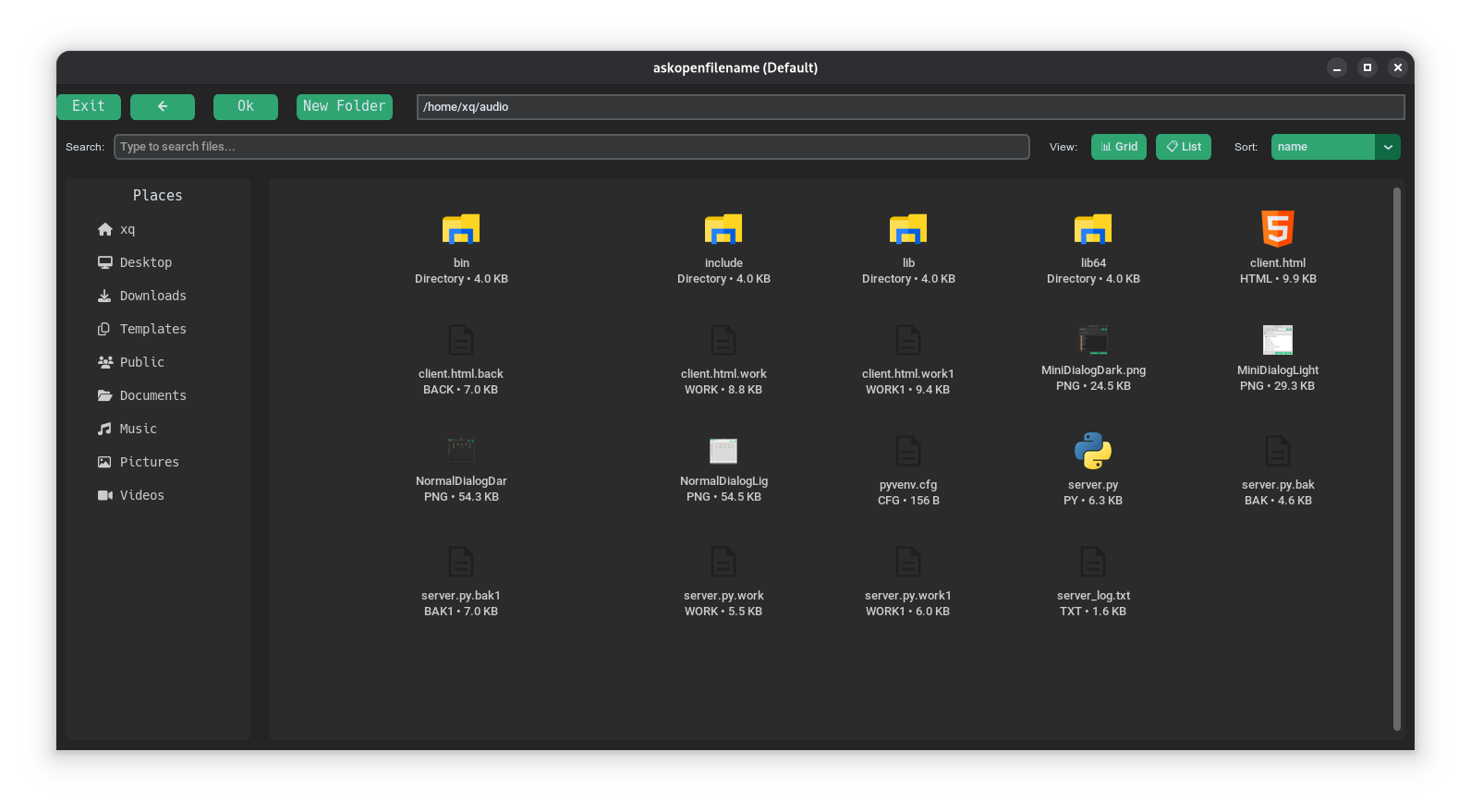
👀 View Modes (Default Dialog Only)
The Default dialog supports two view modes:
- Grid View: Icon-based grid layout (default)
- List View: Detailed list with file info (size, date modified, type)
Toggle between modes using the view buttons in the toolbar.
📊 Sorting Options (Default Dialog Only)
Sort files by:
- Name (alphabetical)
- Date (creation/modification time)
- Type (file extension)
- Size (file size)
- Last Modified (most recent first)
Select a sort option from the sort menu in the toolbar.
This module has constants that can be used outside or inside the dialog, they are used to obtain paths like /home/user or /home/user/.config/ Here is a basic example
#!/usr/bin/env python3
import customtkinter as ctk
from CTkFileDialog import askopenfilename
from CTkFileDialog.Constants import HOME

root = ctk.CTk()

def open_file():
    f = askopenfilename(initial_dir=HOME, autocomplete=True)
    if f:
        print(f"file selected: {f}")

ctk.CTkButton(master=root, command=open_file, text="Open File").pack(padx=10, pady=10, anchor=ctk.CENTER)

root.mainloop()
And here are the constants available from the package
| Parameter | Description |
|---|---|
PWD |
Current working directory (e.g., where the program was launched) |
HOME |
User's home directory (e.g., /home/user or C:\Users\user) |
TEMP |
Temporary directory (fallback to /tmp if no env vars are set) |
CONFIG_DIR |
XDG-compliant user configuration directory (default: ~/.config) |
CACHE_DIR |
XDG-compliant user cache directory (default: ~/.cache) |
PATH |
System PATH split into a list of directories |
DATA_DIR |
XDG-compliant user data directory (default: ~/.local/share) |
VENV |
Active Python virtual environment (venv or conda), fallback to PWD |
DOWNLOAD_DIR |
Default download directory (e.g., ~/Downloads or C:\Users\user\Download). |
DOWNLOAD_DIR_VIDEO |
Default video download directory (e.g., ~/Downloads/Video or C:\Users\user\Download\Video). |
🌙 Dark Mode Preview
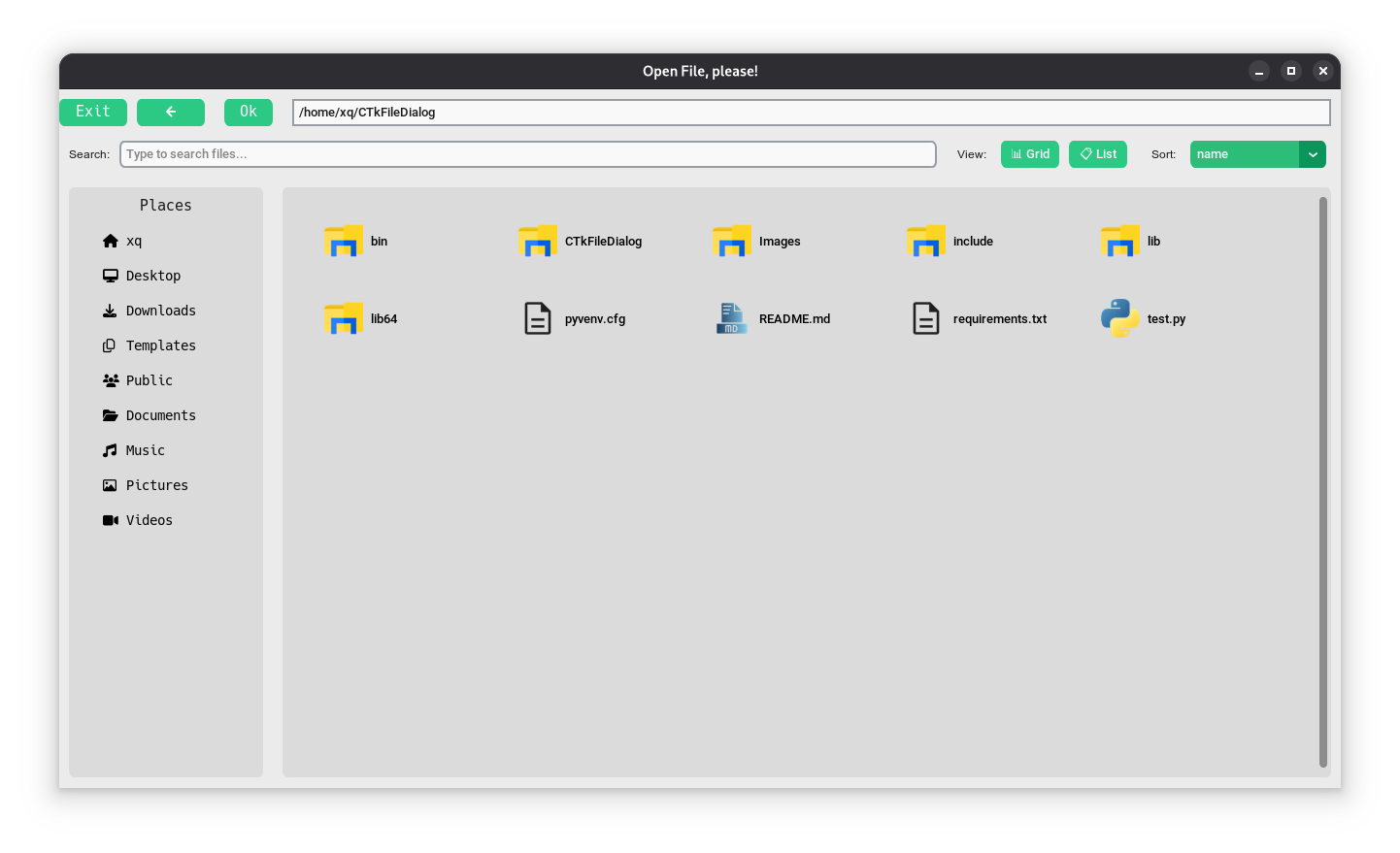
☀️ Light Mode Preview
1 maintainer

Download files
Download the file for your platform. If you're not sure which to choose, learn more about installing packages.
Source Distribution
Built Distribution
Filter files by name, interpreter, ABI, and platform.
If you're not sure about the file name format, learn more about wheel file names.
Copy a direct link to the current filters
File details
Details for the file ctkfiledialog_plus-2.0.1.tar.gz.
File metadata
- Download URL: ctkfiledialog_plus-2.0.1.tar.gz
- Upload date:
- Size: 224.2 kB
- Tags: Source
- Uploaded using Trusted Publishing? No
- Uploaded via:
twine/7.0.0 CPython/3.10.12
File hashes
| Algorithm | Hash digest | |
|---|---|---|
| SHA256 |
51eb3b3a38becdbbc65c429d8080d7ccadea5db08d3a6b8667eb4655dfc7dc4b
|
|
| MD5 |
67a50777f825b2ed17b3a73a0526cead
|
|
| BLAKE2b-256 |
895b61971fc722876f3607bb30a16f0d91285917b28b43fd6d1f5850ccc86f60
|
File details
Details for the file ctkfiledialog_plus-2.0.1-py3-none-any.whl.
File metadata
- Download URL: ctkfiledialog_plus-2.0.1-py3-none-any.whl
- Upload date:
- Size: 236.5 kB
- Tags: Python 3
- Uploaded using Trusted Publishing? No
- Uploaded via:
twine/7.0.0 CPython/3.10.12
File hashes
| Algorithm | Hash digest | |
|---|---|---|
| SHA256 |
3a1ba34993346ba25f89fa59a1272ed49aae9dfeb5c17ba139663b633be4fbad
|
|
| MD5 |
db7a27412d8618c54763b99ee04f987f
|
|
| BLAKE2b-256 |
27814d05b842e88ceb124773ab120ddd109de82ec3de31ab219ba3e6f27fd890
|














