
CTkColorPicker
A modern color picker made for customtkinter!
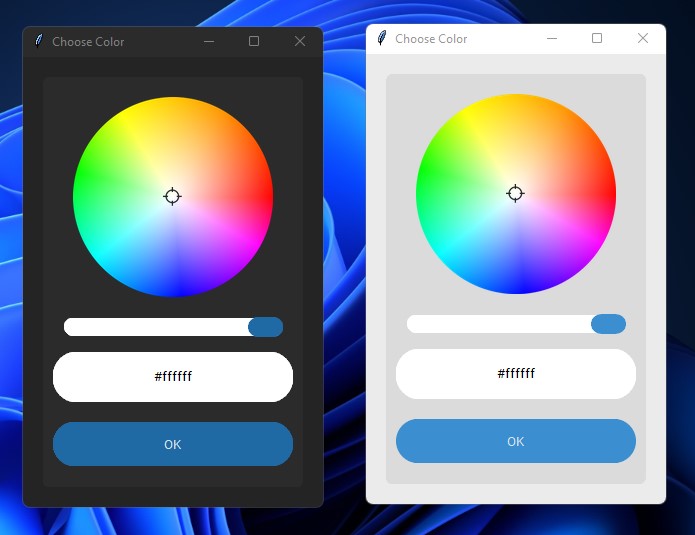
Download
pip install CTkColorPicker

Requirements
How to use?
import customtkinter as ctk
from CTkColorPicker import *

def ask_color():
    pick_color = AskColor() # open the color picker
    color = pick_color.get() # get the color string
    button.configure(fg_color=color)

root = ctk.CTk()

button = ctk.CTkButton(master=root, text="CHOOSE COLOR", text_color="black", command=ask_color)
button.pack(padx=30, pady=20)
root.mainloop()
Options
| Arguments | Description |
|---|---|
| width | set the overall size of the color picker window |
| title | change the title of color picker window |
| fg_color | change forground color of the color picker frame |
| bg_color | change background color of the color picker frame |
| button_color | change the color of the button and slider |
| button_hover_color | change the hover color of the buttons |
| text | change the default text of the 'OK' button |
| initial_color | set the default color of color picker (currently in beta stage) |
| slider_border | change the border width of slider |
| corner_radius | change the corner radius of all the widgets inside color picker |
| **other button parameters | pass other button arguments if required |
ColorPickerWidget
This is a new color picker widget that can be placed inside a customtkinter frame.
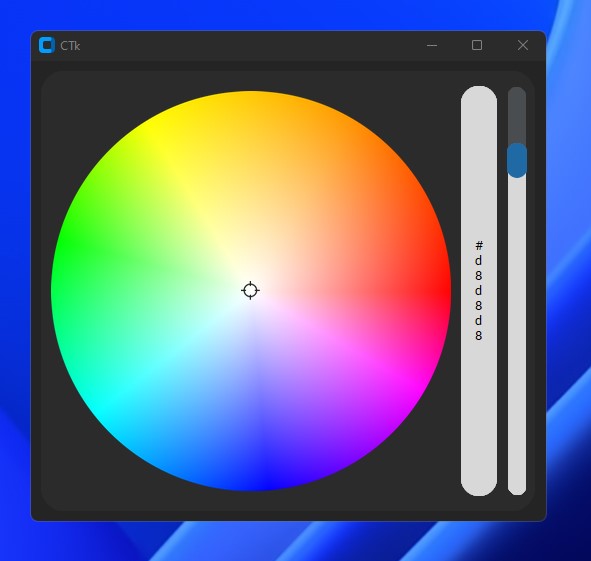
Usage
from CTkColorPicker import *
import customtkinter

root = customtkinter.CTk()
colorpicker = CTkColorPicker(root, width=500, command=lambda e: print(e))
colorpicker.pack(padx=10, pady=10)
root.mainloop()
Options
| Arguments | Description |
|---|---|
| master | parent widget |
| width | set the overall size of the color picker frame |
| fg_color | change forground color of the color picker frame |
| initial_color | set the default color of color picker (currently in beta stage) |
| slider_border | change the border width of slider |
| corner_radius | change the corner radius of all the widgets inside color picker |
| command | add a command when the color is changed |
| orientation | change orientation of slider and label |
| **other slider parameters | pass other slider arguments if required |
That's all, hope it will help!
1 maintainer

Metadata
1 maintainer
Release files for CTkColorPicker 0.9.0
For a detailed explanation of source distributions (sdists) and built distributions (wheels), please see the package formats documentation.
Source distribution (sdist)
| File | Size | Uploaded | |
|---|---|---|---|
| CTkColorPicker-0.9.0.tar.gz | 121.6 kB | Details |
Built distribution (wheel)
| File | Interpreter | ABI | Platform | Reset |
|---|---|---|---|---|
| CTkColorPicker-0.9.0-py3-none-any.whl | Python 3 | none | any | Details |
Total release size: 244.6 kB
Release files / CTkColorPicker-0.9.0.tar.gz
| Download URL | CTkColorPicker-0.9.0.tar.gz |
|---|---|
| Size | 121.6 kB |
| Tags | Source |
|
SHA-256 checksum How to use checksums |
5f65e35d0cf9d0c9fee7e24f3f460e256641f0e335ab00c17425bb0d16060b0c
|
|
BLAKE2b-256 checksum How to use checksums |
08d4e10f2f5e827325eb51983e4b19793c7de8e1865d5db5c1da4857b6690732
|
| Upload date | |
|
Uploaded using Trusted Publishing? What is trusted publishing? |
No |
| Uploaded via |
twine/4.0.1 CPython/3.10.0
|
Release files / CTkColorPicker-0.9.0-py3-none-any.whl
| Download URL | CTkColorPicker-0.9.0-py3-none-any.whl |
|---|---|
| Size | 123.0 kB |
| Tags | Python 3 |
|
SHA-256 checksum How to use checksums |
8406f0c321c1fc3b513e1aa74200bc4a30bc03e2448247519907689031af190b
|
|
BLAKE2b-256 checksum How to use checksums |
5b8dc3f374fd7627deb35c37795e8799fc40f72a510fde0f465e6c792c58624e
|
| Upload date | |
|
Uploaded using Trusted Publishing? What is trusted publishing? |
No |
| Uploaded via |
twine/4.0.1 CPython/3.10.0
|














